Igniteui-angular: Form field status after blur
Question
Currently form field status (valid/invalid) is reflected by red/green color instantly as user is making changes to a form field. For example, having <input igxInput minlenght="5" /> makes input red with first character typed.
Is there any way to to make form components reflect validation status when they are touched and dirty?
Is there any way to force form fields reflect their status from code (i.e. on form submit when form is invalid)?
- igniteui-angular version: latest
- browser: any
 ramunas-k
All 8 comments
@ramunas-k This is related to general angular form validation, as we don't perform custom validation within the input group, select and other form components. This article explains why validation happens on touched and dirty and how to implement custom validators:
 kdinev
on 15 May 2019
kdinev
on 15 May 2019
@kdinev Thanks for your response.
Yes, I know that validation as technical process is triggered by Angular framework itself. But representation of invalid state is something UI components do. Hence I'm not questioning the validation itself but my question is related to timing and conditions related UI components are marked as invalid.
Let's extend a bit my example: <input igxInput formControlName="firstName" minlength="5" />.
When such a view renders I have no problem that the underlying FormControl will be invalid right after view initialization. My problem is that user, as soon as he/she starts typing, will see that input turns into error state. Technically this is straight forward, but from user experience perspective user hasn't done anything wrong yet, he/she just started typing and should not be presented with error state. A dynamic hint at this point might be very helpful for the user, but this is out of scope of this question.
My question is: how could I control when IgniteUI form components show the error state (red border and text color for input by default)?
A very related situation is if user tries to submit a form (say by button click) without touching any of the controls on a form. It would be nice to represent each relevant UI component with error state (and probably a message) even though none of the inputs on the form was neither focused nor edited.
Are there any APIs for this provided in the library?
ramunas-k
on 15 May 2019
@ramunas-k Ignite UI doesn't have any FormControls itself. The definition of the form control comes from Angular, and the form lifecycle and validation also come from Angular. As you can see we don't apply our own validation classes to the elements:

Thus, if you want to change anything in the form control validation lifecycle, you would have to implement a custom validator, as prescribed in the article linked above. The first code example in the article also shows how you can show custom validation messages when a form control instance is invalid. We supply additional elements, which you can use for this, like the igx-hint.
<igx-input-group>
  <label for="userEmail" igxLabel>Email address</label>
  <input #userEmail igxInput id="userEmail" type="email" pattern="^[a-z0-9._%+-]+@[a-z0-9.-]+\.[a-z]{2,4}$" name="userEmail" [(ngModel)]="preferences.email" />
  <igx-suffix *ngIf="userEmail.value.length > 0" (click)="userEmail.value = null">
    <igx-icon>clear</igx-icon>
  </igx-suffix>
  <igx-hint *ngIf="userEmail.invalid">You need to provide a valid email.</igx-hint>
</igx-input-group>
@kdinev sadly we are still not on the same page. I know that FormControl, formControlName, ngModel, all ng-* classes come from Angular.
I also know that you are wrong in stating that you do not apply your own validation classes:
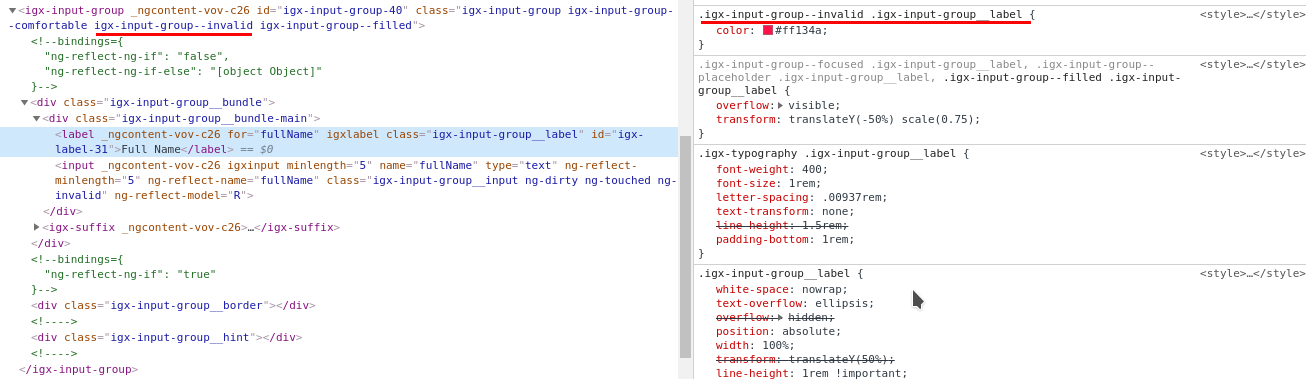
What I did here was I opened a very first StackBlitz example provided in InputGroup component showcase page and made a little modification. In particular I removed a required attribute (and therefore built-in Angular validator) from fullName form control (input to be more precise) and added a minlenght="5" attribute (and therefore built-in Angular validator). When I start typing in a fullName field it turns red right away:
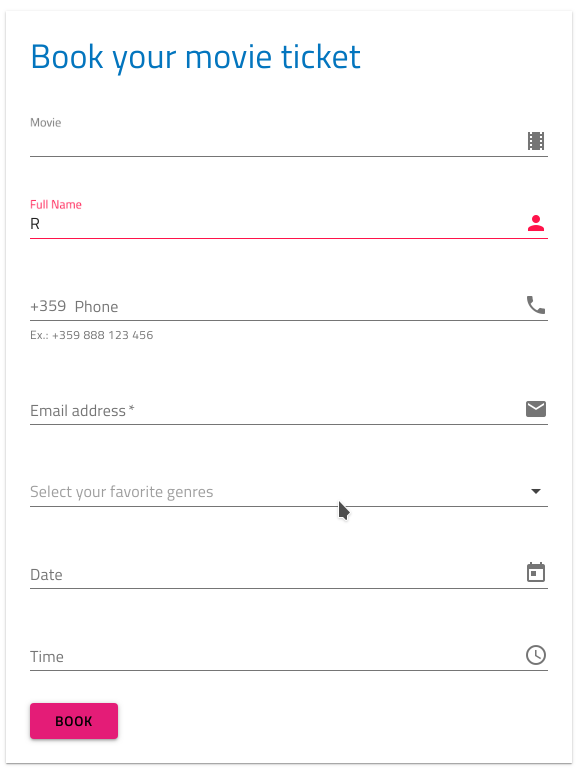
(Forked example with changes here)
I did not see any special code for the form field to reflect error state therefore this makes me think that this is driven by components.
So I'll just repeat myself:
From user experience perspective user hasn't done anything wrong yet, he/she just started typing and should not be presented with error state. Clearly IgniteUI components try to reflect error state but they do that not in the best manner. By best I mean fitting requirements I try to implement.
My question is: how could I control when IgniteUI form components show the error state? In this particular case what developer should do to make fullName form field turn red only when user changed something and proceeded to next form field while the modified field does not pass validation?
ramunas-k
on 15 May 2019
@ramunas-k I double checked with the team and I was half right. The lifecycle is Angular's but we don't implement it quite right at the moment. @rkaraivanov and @gedinakova will take over this.
kdinev
on 15 May 2019
@ramunas-k After internal discussions it was determined that this is an issue in our code. We will investigate it further.
 gedinakova
on 21 May 2019
gedinakova
on 21 May 2019
@DiyanDimitrov @rkaraivanov I'd like to chime in since we have another related issue and I started looking at this one.
Don't see the updateOn option in the discussion and it seems to be exactly what the issue is about.
As @kdinev noted, the igxInput directive is not a ControlValueAccessor so the handling is entirely controlled by Angular's ngModel or FormControl and this option should work just fine.
The base updateOn is set to 'change' by default, but it can also be on 'blur' or 'submit', available though options on form controls and even on the form itself. Here's a modified sample: https://stackblitz.com/edit/igxinput-validation-updateon-q33au6
For the second [and third] question - the Input directive already checks touched & dirty to show errors so all you have to do is update the form control. And since NgForm doesn't have a method to force validation, the common practice seems to be to do just that - mark controls as touched:
for (const key of Object.keys(this.form.controls)) {
  this.form.controls[key].markAsTouched({ onlySelf: true });
  // recalculate validity(status), by default emits `statusChanges`:
  this.form.controls[key].updateValueAndValidity({ onlySelf: true });
}
The initial set of the bound ngModel value also validates and form controls with required end up invalid on init, so adding a manual update to ensure status change will notify the Input directive.
@ramunas-k Can you check the sample out and let us know if this behaves as you initially requested? Perhaps there's no point in extra option after all.
 damyanpetev
on 7 Jan 2020
damyanpetev
on 7 Jan 2020
@damyanpetev thanks a lot. Looks like it works as expected.
Feel free to close this issue.
ramunas-k
on 8 Jan 2020
Related issues
 tkiryu
·
3Comments
tkiryu
·
3Comments
 jdk339
·
3Comments
jdk339
·
3Comments
 ChronosSF
·
3Comments
ChronosSF
·
3Comments
 Hypenate
·
3Comments
ChronosSF
·
3Comments
Hypenate
·
3Comments
ChronosSF
·
3Comments
Most helpful comment
@damyanpetev thanks a lot. Looks like it works as expected.
Feel free to close this issue.