Igniteui-angular: Load the grid with cells in edit mode
Is your feature request related to a problem? Please describe.
I find it bit inconvenient for the users when they are required to double click OR press Enter to enable Edit mode in the cell.
Describe the solution you'd like
Is there a way to automatically load the grid with all the cells in edit mode, meaning when the page loads single click on any cell with open the cell editor.
 ammritt
All 6 comments
Hey @ammritt, you can use igxCell template in order to achieve this.
StackBlitz samples.
  <igx-column field="UnitPrice" header="Unit Price" [dataType]="'number'">
    <ng-template igxCell let-cell="cell" let-val let-row>
      <input name="units" [(ngModel)]="cell.value"/>
    </ng-template>
  </igx-column>
 zdrawku
on 21 Mar 2019
zdrawku
on 21 Mar 2019
Hi @zdrawku thanks for the reply.
I think you misunderstood my question. I want to load my grid in edit mode so user doesn't have to double-click any cell to start the edit mode but just single click a cell and start editing.
ammritt
on 26 Mar 2019
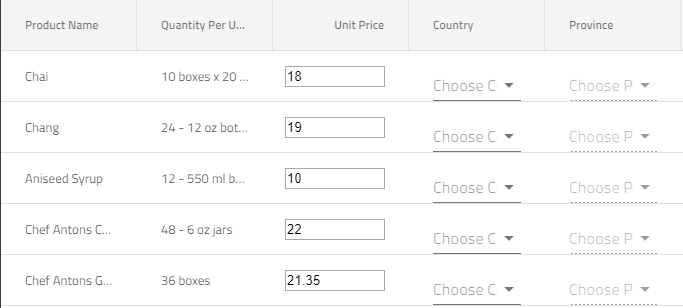
Hi @ammritt, did you have the chance to check the provided sample? Unit Price cells are in edit mode when the grid is loaded, you can use the same
approach for all orher cells that you want to put in edit mode by default, by using the igxCell template.
zdrawku
on 27 Mar 2019
@zdrawku Thanks I tried your way, this works as we are basically using an edit input as bodyTemplate for the cell.
Unfortunately this is not what I need, this solution will need me to write the cell editor markup for all the column definitions each time I define a grid. HTML5 input markup also look bit off when used.
All I want for my users is to be able to start editing without double-clicking on any cell. I think a simple method to set the edit mode of the grid can be useful. What you think?
ammritt
on 1 Apr 2019
hey @ammritt, you can use cellClick emmiter, and from there you can put the cell in edit mode with inEditMode setter.
After that on any cell click (single) or keyboard navigation change, the newly focused cell will be put in edit mode.
zdrawku
on 4 Apr 2019
Thanks for the update @zdrawku
I will close this issue.
ammritt
on 4 Apr 2019
Related issues
 ChronosSF
·
3Comments
ChronosSF
·
3Comments
 nikunjgajera
·
3Comments
nikunjgajera
·
3Comments
nikunjgajera
·
3Comments
nikunjgajera
·
3Comments
 tkiryu
·
3Comments
tkiryu
·
3Comments
 jdk339
·
3Comments
jdk339
·
3Comments