Igniteui-angular: igx-grid: `pinned` property doesn't work when `width` property is set together.
Description
When pinned and width properties are set to igx-column, the column is not pinned.
- igniteui-angular version: from 7.1.2 to 7.1.8, 7.2.0-beta.x
- browser: N/A
Steps to reproduce
Result
"ID" column is not pinned. If removing width property, "ID" column is pinned.
Expected result
"ID" column should be pinned.
Attachments
 tkiryu
All 6 comments
@tkiryu This is by design. Check the console message.
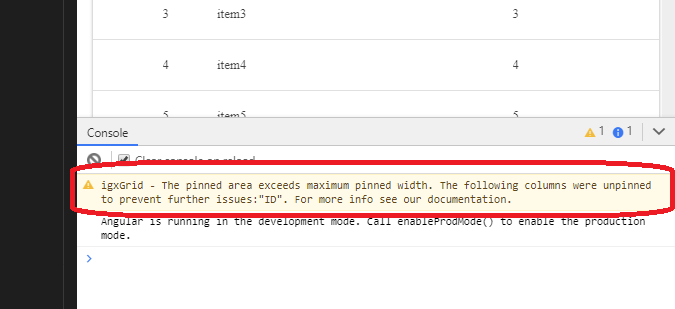
 kdinev
on 1 Mar 2019
kdinev
on 1 Mar 2019
@kdinev , I don't get it.
The width of "ID" column is only 100px. Whereas, the width of igx-grid is 100%.
I don't think the width of "ID" column can exceed the width of igx-grid. What's more, these configuration had worked until 7.1.1.
Could you reopen this issue and look into it again, please?
tkiryu
on 1 Mar 2019
@tkiryu I thought this is reproducible only in the small stackblitz window. Now I see that you get this even if you open the app in full screen mode. Reopening and marking as regression!
kdinev
on 1 Mar 2019
@kdinev , thank you so much!
tkiryu
on 4 Mar 2019
This is duplicate of #3774
 mpavlinov
on 6 Mar 2019
mpavlinov
on 6 Mar 2019
Closing this issue in favor of #3774
kdinev
on 7 Mar 2019
Related issues
 lorenzo-iovino
·
3Comments
lorenzo-iovino
·
3Comments
 ChronosSF
·
3Comments
ChronosSF
·
3Comments
 nikunjgajera
·
3Comments
nikunjgajera
·
3Comments
 ymita
·
3Comments
nikunjgajera
·
3Comments
ymita
·
3Comments
nikunjgajera
·
3Comments