Igniteui-angular: Question - Initial example shows grid filtering with Input box, can it be done with a ComboBox ?
In this igx-grid example, you can see an input box that read Filter by Country which filters the grid using data binding, so this is filtering "as you type" using IgxStringFilteringOperand
Now, is it possible to do the same type of filtering using a ComboBox .
Basically the ComboBox with output an array list since this is multiple selection, therefore how can I get the grid to accept an array ? so if I select 2 countries in the ComboBox , then it will filter and show those 2 values in the grid
I'm guessing I can use .conditionList() but not sure.
 corganfuzz
All 16 comments
Yes, it is. As you want to build a complex filter with multiple conditions you need to build a FilteringExpressionsTree object. Here is how you can do it for the "CountryName" column:
filterCountry(args) {
    let countries = args.newSelection;
    const et = new FilteringExpressionsTree(FilteringLogic.Or, "CountryName");
    countries.forEach((country) => {
        et.filteringOperands.push({
            condition: IgxNumberFilteringOperand.instance().condition('equals'),
            fieldName: 'CountryName',
            searchVal: country
        });
    });
    this.grid1.filteringExpressionsTree = et;
  }
and you need to link it to the IgxCombo with code like this:
<igx-combo #combo [data]="data" [type]='"box"' placeholder="Choose Country"
searchPlaceholder="Search..." (onSelectionChange)="filterCountry($event)"></igx-combo>
Here is a link to the StackBlitz sample.
 mpavlinov
on 7 Feb 2019
mpavlinov
on 7 Feb 2019
@mpavlinov works , thanks
Suggestion. you guys should put this on filtering documentation main page. Very requested and common feature already implemented on drag and drop software such as Power-Bi and Tableau.
corganfuzz
on 7 Feb 2019
@corganfuzz The Grid Filtering topic does have two samples with FilteringExpressionsTree in the Usage section, where we show initial filtering and multi column filtering. Were you able to find them, or they are not visible enough?
mpavlinov
on 8 Feb 2019
You're right. However, I meant more as a selling point. First time I saw filtering on the grid I thought it was great ( nothing really new was my initial thought) , but if I've would saw the combobox filtering I would've probably been like "wow i'm sold" see the difference ? , just a suggestion though.
corganfuzz
on 8 Feb 2019
Yes. I see you point. But we're working on a new feature for 7.2.0. Excel-Style Filtering. Checkout the spec here. At the end of this month this will be part of the control's functionality.
mpavlinov
on 8 Feb 2019
Exactly what I was looking for, I personally dislike excel with a passion. but regular users love it, and the more a UI looks like it the better.
corganfuzz
on 8 Feb 2019
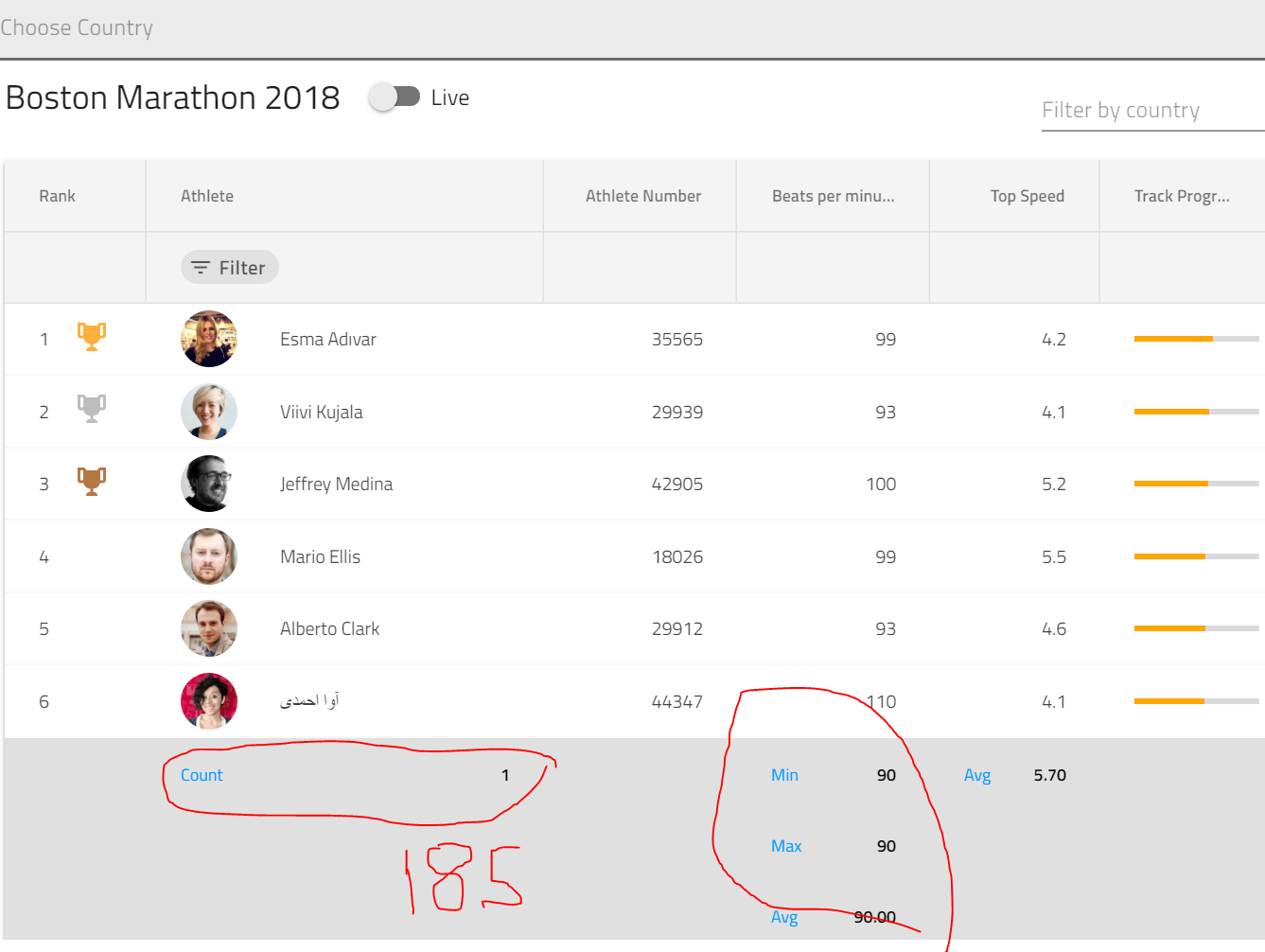
@mpavlinov Sorry to come back to this again but when I filtered with the dropdown the summary count doesnt get updated so, I cant really do much with only [hasSummary]="true" should I do it manually ? or how does it update the count ? here's an example , so when I deselect the number should be 185, also average reminded unchanged
corganfuzz
on 19 Feb 2019
@corganfuzz I need to investigate it. Will write back with my findings.
mpavlinov
on 19 Feb 2019
@mpavlinov so I come up with something let me know if it makes sense. I guess the functionality of filtering the grid doesnt work like the method inside (onSelection) meaning all unchecked boxes === [],
because in the grid , if no filters are applied, then it does show ALL the data.
so in this case, a way to do it is:
if (event.newSelection === []) {
   this.combo.selecAllItems();  // which visually it doe not check any boxes
}
and if a selection is made the empty array becomes said selection [Albania, UK...]
corganfuzz
on 19 Feb 2019
@corganfuzz I was thinking of clearing the grid filtering like this:
if (countries.length === 0) {
    this.grid1.clearFilter();
    return;
}
Here is the modified function:
filterCountry(arg) {
    let countries = arg.newSelection;
    if (countries.length === 0) {
        this.grid1.clearFilter();
        return;
    }
    const et = new FilteringExpressionsTree(FilteringLogic.Or, "City");
    countries.forEach((country) => {
        et.filteringOperands.push({
            condition: IgxNumberFilteringOperand.instance().condition('equals'),
            fieldName: 'City',
            searchVal: country
        });
    });
    this.grid1.filteringExpressionsTree = et;
}
cool so you've replaced combo for grid1 . question is there any reason for return //empty ? or can you just I delete the word return inside the if statement ?
corganfuzz
on 19 Feb 2019
@corganfuzz Yes. The return should stay in the code. In order to work as expected the function should stop execution after clearFilter is called, because otherwise the rest of the code in the function will execute.
mpavlinov
on 19 Feb 2019
so my ideal solution includes the both solutions above. because in my real scenario I use
this.grid1.filteredData; to get the the values of the filtered data an put it inside a variable
while this.grid1.clearFilter(); clear the counts , it really doesnt give me the initial data that goes inside the grid, which equals to no checkbox selection at all,
Now it willbe cool if a can find a method kinda like this.grid1.filteredData; ....maybe something like this.grid1.unfilteredData ? or something. does igx-grid has a method like that ?
corganfuzz
on 19 Feb 2019
Actually , scratch that. this solved it.
let dataAfterTopFiltering = this.grid1.filteredData;
    if (countries.length === 0) {
      this.grid1.clearFilter();
      dataAfterTopFiltering = this.initlalgridData;
      // return;
    }
Needless to say if I leave the return statement it will not work
corganfuzz
on 19 Feb 2019
@corganfuzz Let me know if you have more questions. If not, you can close the issue.
mpavlinov
on 20 Feb 2019
Please go ahead and close it
corganfuzz
on 20 Feb 2019
Related issues
 QuinntyneBrown
·
3Comments
QuinntyneBrown
·
3Comments
 nikunjgajera
·
3Comments
nikunjgajera
·
3Comments
 ChronosSF
·
3Comments
ChronosSF
·
3Comments
 mkamiishi
·
3Comments
mkamiishi
·
3Comments
 ymita
·
3Comments
ymita
·
3Comments
Most helpful comment
Exactly what I was looking for, I personally dislike excel with a passion. but regular users love it, and the more a UI looks like it the better.