Igniteui-angular: Getting Started Update
The Getting Started Page needs to be updated with more information.
- [x] Mention importing HammerJS and @Types/HammerJS
- [x] Explain modifying the angular-cli.json file to include the styling for Ignite UI for Angular
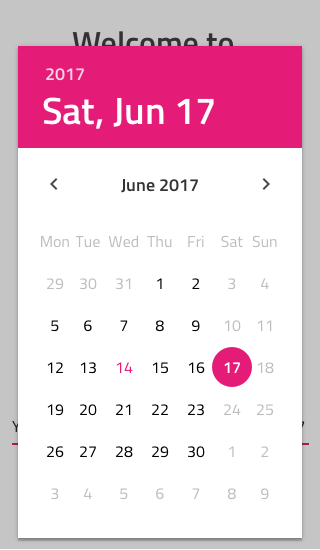
- [x] Change the navbar with another component ( for example: datepicker with some additional design)
- [x] Clear unnecessary imports
 SDinev
All 16 comments
Changes are available on staging.
 hanastasov
on 24 Nov 2017
hanastasov
on 24 Nov 2017
Adding the staging link here:
https://staging.infragistics.local/products/ignite-ui-angular/getting-started
Any time frame of when this will go live?
As an aside, while this documenting the need to npm install @types\hammerjs does resolve the issue. I have to ask, if we are configured correctly, shouldn't npm be handling that automatically for us?
 MikeTechSpeak
on 28 Nov 2017
MikeTechSpeak
on 28 Nov 2017
<h1/> causes an issue. It should be </h1>.
Note also that the template for app.component.html appears twice.
 jVanZwieten
on 29 Nov 2017
jVanZwieten
on 29 Nov 2017
In Usage section Ignite ui needs to be capitalized.
hanastasov
on 29 Nov 2017
The fixes are applied:
https://staging.infragistics.local/products/ignite-ui-angular/getting-started
 dianj
on 29 Nov 2017
dianj
on 29 Nov 2017
Two things:
- [x] Add a screenshot for the expected final result, so people know if they've done the steps right - Spasimir
- [x] figure out a way to avoid this:
<img width="300" src="data:image/svg+xml;base64,PHN2ZyB4bWxucz0iaHR0cDovL3d3dy53My5vcmcvMjAwMC9zdmciIHZpZXdCb3g9IjAgMCAyNTAgMjUwIj4KICAgIDxwYXRoIGZpbGw9IiNERDAwMzEiIGQ9Ik0xMjUgMzBMMzEuOSA2My4ybDE0LjIgMTIzLjFMMTI1IDIzMGw3OC45LTQzLjcgMTQuMi0xMjMuMXoiIC8+CiAgICA8cGF0aCBmaWxsPSIjQzMwMDJGIiBkPSJNMTI1IDMwdjIyLjItLjFWMjMwbDc4LjktNDMuNyAxNC4yLTEyMy4xTDEyNSAzMHoiIC8+CiAgICA8cGF0aCAgZmlsbD0iI0ZGRkZGRiIgZD0iTTEyNSA1Mi4xTDY2LjggMTgyLjZoMjEuN2wxMS43LTI5LjJoNDkuNGwxMS43IDI5LjJIMTgzTDEyNSA1Mi4xem0xNyA4My4zaC0zNGwxNy00MC45IDE3IDQwLjl6IiAvPgogIDwvc3ZnPg==">
Replace it with a link to an image, for brevity and improved legibility
SDinev
on 30 Nov 2017
I totally skipped this point "please make sure that HammerJS and @Types/hammerJS are also installed in your app" and after coming back to it I installed them in my projects folder but apparently it should be done in the folder of the particular project. I think the initial paragraphs have to be restructured because there is critical information in them.
- [ ] Add color coding to the code snippets to make them more readable
 StefanIvanov
on 30 Nov 2017
StefanIvanov
on 30 Nov 2017
Restructure the paragraphs in what ways ?
hanastasov
on 30 Nov 2017
Bullet list the two "dependencies" as they are the initial steps for example with a font treatment to make them stand out more e.g. bold or larger font size
StefanIvanov
on 30 Nov 2017
Can we get either the embedded plunkr, link to plunkr or JSFiddle back in. Being able to modify a live sample is a very easy way to learn, as well as to demo to customers. It was in the pre-release, and it was yanked out. Was there a reason for it being yanked?
MikeTechSpeak
on 1 Dec 2017
@MikeTechSpeak Marketing requested that we remove plunkr.
 kdinev
on 1 Dec 2017
kdinev
on 1 Dec 2017
Fair enough, but who and why? Because the embedded code is extremely useful. I believe plukr looked a little off because I think they had embedded ads. Which if that is why that is a valid reason. But can't we still use jsFiddle instead then?
MikeTechSpeak
on 1 Dec 2017
We can still have both. Our samples will live both on plunkr and on our server. We will just provide a sample link to plunkr where people can play around with it.
 simeonoff
on 4 Dec 2017
simeonoff
on 4 Dec 2017
Please close this issue and create a new one, so we can put it in planning. Also link the two for information tracking.
kdinev
on 4 Dec 2017
@MikeTechSpeak @dianj Please abstain from posting links in the public issues that are not publicly accessible.
kdinev
on 4 Dec 2017
Alright.
Arguably, we'll have an updated Getting Started with our CLI. Until then, let's have some final quick fixes to the current version and update the website.
- [x] create a separate code box afte the
npm install igniteui-js-blocksfor the hammerjs and @types/hammerjs dependencies. Include a//commentin the box explaining that these are dependencies. - [x] Bold or otherwise single out names of files from the rest of the text - like "angular-cli.json". This will increase visibility as well as overall legibility
- [x] in the codebox for angular-cli.json, add
"scripts": ["../node_modules/hammerjs/hammer.min.js"],
without this line, the code from the getting started does not execute properly - [x] in all codeboxes, include comments to annotate where we're adding on top of the Angular CLI. Include color coding if possible, to be consistent with the documentation code boxes.
- [x] include a screenshot for the expected end result at the end of the article (preview in image):

- [x] include a screenshot for the expected end result at the end of the article (preview in image):
- [x] change Angular logo with Infragistics logo
- [x] change app title from "app" to "Ignite UI for Angular"
including ig logo and images:

SDinev
on 14 Dec 2017
Related issues
 cornel-stoica-str
·
3Comments
cornel-stoica-str
·
3Comments
 nikunjgajera
·
3Comments
nikunjgajera
·
3Comments
 Hypenate
·
3Comments
Hypenate
·
3Comments
 ChronosSF
·
3Comments
ChronosSF
·
3Comments
 QuinntyneBrown
·
3Comments
QuinntyneBrown
·
3Comments
Most helpful comment
Fair enough, but who and why? Because the embedded code is extremely useful. I believe plukr looked a little off because I think they had embedded ads. Which if that is why that is a valid reason. But can't we still use jsFiddle instead then?