Hello !
I would like to start the simulator with the command react-native run-ios :
** BUILD FAILED **
The following build commands failed
Installing build/Build/Products/Debug-iphonesimulator/pizza.app
An error was encountered processing the command (domain=NSPOSIXErrorDomain, code=22):
Failed to install the requested application
The bundle identifier of the application could not be determined.
Ensure that the application's Info.plist contains a value for CFBundleIdentifier.
Print: Entry, ":CFBundleIdentifier", Does Not Exist

Command failed: /usr/libexec/PlistBuddy -c Print:CFBundleIdentifier build/Build/Products/Debug-iphonesimulator/pizza.app/Info.plist
Print: Entry, ":CFBundleIdentifier", Does Not Exist
ignite doctor results:
  node               8.12.0       /usr/local/bin/node
  npm                6.4.1        /usr/local/bin/npm
  yarn               1.10.1       /usr/local/bin/yarn
React Native
  react-native-cli   2.0.1
  app rn version     0.55.4
Ignite
  ignite             2.1.2        /usr/local/bin/ignite
Thans 👍 :)
 koff75
All 12 comments
The CFBundleIdentifier error is kind of a generic catch all. The real error is most likely listed a few lines above that. I suspect it's the same issue I encountered after upgrading to Mojave and Xcode 10. You'll need to run the following commands, then open Xcode and do a clean
Commands
./node_modules/react-native/scripts/ios-install-third-party.sh
./node_modules/react-native/scripts/ios-configure-glog.sh
Clean build folder
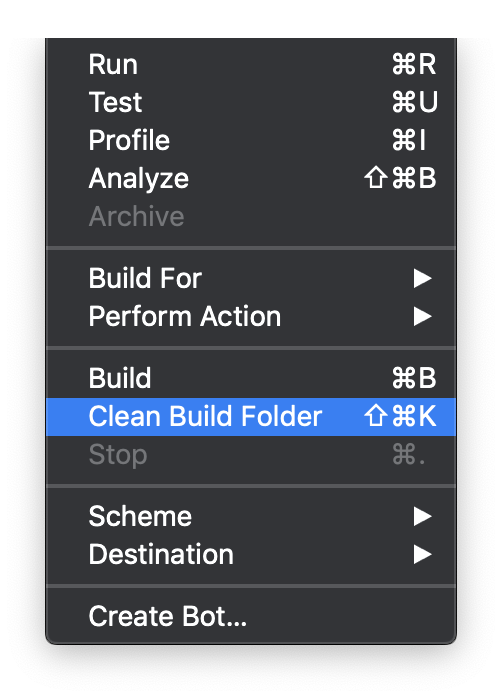
Then just run react-native run-ios again and it should work.
P.S. another issue I've recently encountered with Xcode 10 is that the simulator won't auto launch when running react-native run-ios, so I have to use Spotlight to open it manually.
 AnonymousSB
on 22 Oct 2018
AnonymousSB
on 22 Oct 2018
Thanks for your answer, but I still have the problem with Xcode 10 and Mojave...
koff75
on 23 Oct 2018
Can you provide more output? I’m interested in the errors right before it says “Build Failed”.
AnonymousSB
on 23 Oct 2018
I just dealt with the same issue elsewhere. In order to get any react-native app working on Mojave with Xcode 10, react-native needs to be at v0.57.3. The latest Andross is using 0.55.1. My guess is the issue stems here. I've tried to run through the same steps I've used in another RN project, but still can't shake the issue with third parties in react-native. My guess is that ignite has something internally that relies on older versions.
 gretzky
on 23 Oct 2018
gretzky
on 23 Oct 2018
Yeah, unfortunately there are issues with Xcode 10 and React Native. There are a couple of issues here that have some suggested bandaids, but I think a more permanent fix is still coming.
 kevinvangelder
on 24 Oct 2018
kevinvangelder
on 24 Oct 2018
@gretzky this did the trick for me. Had to upgrade to react-native 0.57.4 then clean the build folder from Xcode. Once i did so, I also had to do the following to get 0.57.4 to transpile:
Remove "babel-preset-react-native" and install "metro-react-native-babel-preset".
Change the presets entry in my .babelrc to "presets": ["module:metro-react-native-babel-preset"].
Change the following line in App/Config/index.js from Text.defaultProps.allowFontScaling = AppConfig.allowTextFontScaling to Text.allowFontScaling = AppConfig.allowTextFontScaling
 jwanga
on 5 Nov 2018
jwanga
on 5 Nov 2018
@jwanga, I've already done those steps as well and still experiencing issues, but thanks!
gretzky
on 5 Nov 2018
Today's update of 0.57.5 is supposed to resolve the remaining XCode 10 errors. I'd suggest trying to upgrade if you're experiencing issues.
kevinvangelder
on 13 Nov 2018
Just try Ignite this morning and have the same issue.
The one that i created using react-native init doesn't have this issue.
I'm not on Mojave.
Ignite doctor:
  node               10.6.0       /usr/local/bin/node
  npm                6.4.1        /usr/local/bin/npm
  yarn               1.10.1       /usr/local/bin/yarn

React Native
  react-native-cli   2.0.1
  app rn version     0.57.5

Ignite
  ignite             2.1.2        /usr/local/bin/ignite

Android
  java               1.8.0_92     /usr/bin/java
  android home       -            /usr/local/opt/android-sdk

iOS
  xcode              10.0
Any idea?
 esafirm
on 21 Nov 2018
esafirm
on 21 Nov 2018
@esafirm Did you try the steps posted above by @AnonymousSB? https://github.com/infinitered/ignite/issues/1329#issuecomment-431959264
kevinvangelder
on 25 Nov 2018
still having this
 nikitph
on 10 Jan 2019
nikitph
on 10 Jan 2019
@nikitph This is not a real error (the real error is located prior to the CFBundleIdentifier error). Please file a new issue with as much information as you can and a minimal reproducible app we can run to see the error ourselves.
 jamonholmgren
on 21 Jan 2019
jamonholmgren
on 21 Jan 2019
Related issues
 skellock
·
34Comments
skellock
·
34Comments
 FernandoMorais
·
23Comments
FernandoMorais
·
23Comments
 phuongpt
·
55Comments
phuongpt
·
55Comments
 johndanek
·
19Comments
johndanek
·
19Comments
 AlirezaAkbarix
·
23Comments
AlirezaAkbarix
·
23Comments
Most helpful comment
I just dealt with the same issue elsewhere. In order to get any react-native app working on Mojave with Xcode 10, react-native needs to be at v0.57.3. The latest Andross is using 0.55.1. My guess is the issue stems here. I've tried to run through the same steps I've used in another RN project, but still can't shake the issue with third parties in react-native. My guess is that ignite has something internally that relies on older versions.