Ignite: GPU copying slow from loss functions
Hey all,
I did some profiling of the ignite code:

Looks like in my training runs, around 20% of the time gets used by the loss functions. Specifically this happens for the .item() calls in pytorch. The metrics are copied from cuda to gpu every iteration, which is very slow. This happens in both TopKCategoricalAccuracy and Loss
Perhaps we should replace the .item() call, and put it in compute, so we gather the statistics on the gpu and keep them there until they are used.
 TiRune
All 14 comments
@TiRune thanks for the feedback, do you mind to share the code to reproduce the profiling please ?
if I understand correctly you run the training + online metrics computation.
Perhaps we should replace the .item() call, and put it in compute, so we gather the statistics on the gpu and keep them there until they are used.
Yes, we need to take a closer look at this...
 vfdev-5
on 17 Aug 2018
vfdev-5
on 17 Aug 2018
Can't share the code unfortunately, company rules.
Yes I'm doing training, and try to gather statistics of the training loss every few iterations.
I found out that this was causing slowdowns when reading: https://www.sagivtech.com/2017/09/19/optimizing-pytorch-training-code/
Who suggested the methods for profiling, and also noted that (Cuda copies are expensive.
It turned out that a lot of our cuda copies were for batch statistics: the loss, accuracy, and other data.
Instead of displaying the loss and other metrics for every batch, aggregate them on the GPU and copy them to the CPU for display at the end of every epoch.)
update gets called every training iteration, potentially causing this slowdown.
Some extra info: training with DataParallel on 2 gpus. But I just checked, the problem persists for 1 gpu as well; and is actually bigger: 30% of the total time is taken by the loss gathering, specifically the line that copies to the cpu with the .item() statement.
TiRune
on 17 Aug 2018
Interesting. Thank you for this @TiRune! This seems very reasonable to me. The only real concern I can see is that GPU memory is generally a much more limited resource. Seems to me like this outweighs that concern though.
 jasonkriss
on 17 Aug 2018
jasonkriss
on 17 Aug 2018
@TiRune
I'm trying to reproduce your profiling results and here is my setup. Machine has GPU, so device is 'cuda'.
- Python 3.5
- PyTorch 0.4.1
- Ignite: master
The results are the following:
- total run took 598 seconds
- _fire_event took 0.443 seconds


PS: Looking better to your profiling image, I can deduce that you ran it with ignite version different of master. Maybe such huge time passed in metrics can be also explained by the fact that you compute metrics during the training time and all those internal variables were conserved the graph. Option no_grad was missing (this is our bug). We fixed this issue in #236 .
@TiRune Could you please rerun your profiling with master version of ignite and report your result. Thank you
PPS: Ran the same code with reinstalled from pip Ignite 0.1.0, the results are similar to the above.
vfdev-5
on 18 Aug 2018
@TiRune thanks for the bug report, this looks interesting. It would be great if you could confirm if this happens on master. If so, we should fix this asap
 alykhantejani
on 19 Aug 2018
alykhantejani
on 19 Aug 2018
Looking into it on my side as well. Won't be done today because of some hectic deadlines, but I'll keep you posted :)
Happily using ignite btw, so great work :)
TiRune
on 20 Aug 2018
Thanks @TiRune - looking forward to your response
alykhantejani
on 20 Aug 2018
The new master branch of ignite definitely reduced the overhead time significantly; so that is great.
I also figured out that if I remove the loss function calculation all together; the same overhead is now taken by prepare_batch... So I can only conclude that the cprofile code is wrong somehow; and it's confusing timings completely.
It's very likely the overhead is caused by prepare_batch instead; thus I think it's safe to close this ticket.
TiRune
on 23 Aug 2018
@TiRune thanks for the feedback! Are you obtaining something similar as in my previous message ?
Anyway glad that we have a similar conclusion on metric computation.
vfdev-5
on 23 Aug 2018
@TiRune that's good to know. We will be releasing a new update soon to conda and pip so you wont have to build from master (probably in 2 weeks)
alykhantejani
on 23 Aug 2018
@vfdev-5 Interestingly for me; although I had multiple losses logged, it only logs a bunch of time on 1 loss. My cProfile is not nearly as fine-grained as yours. No idea why this is though :/.
See:
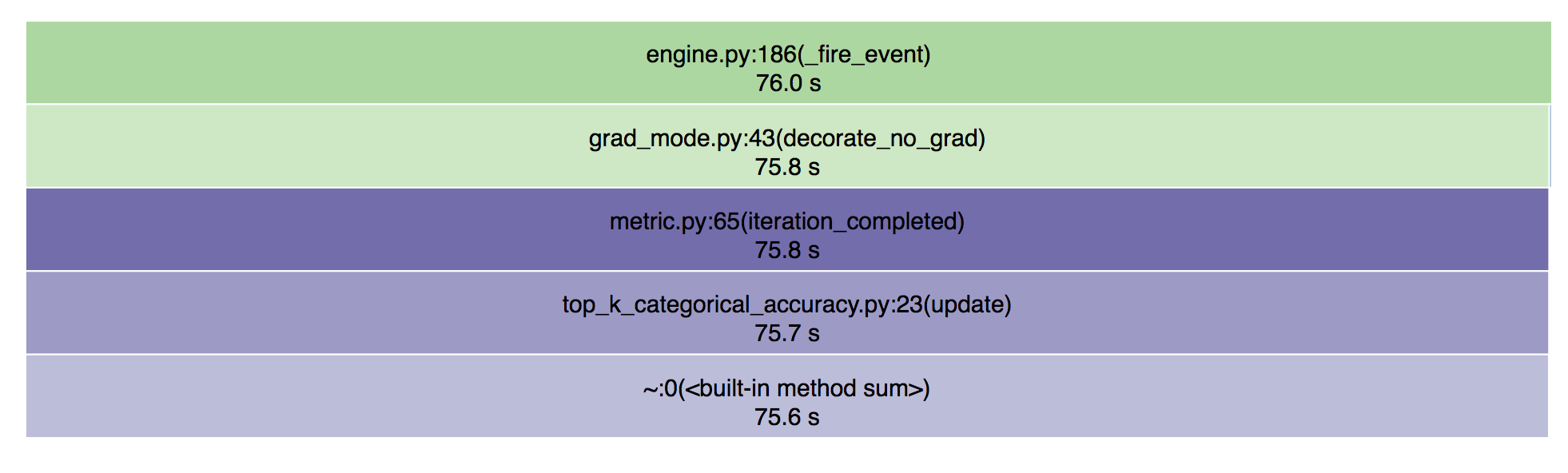
Think Cprofile is a bit broken for multi-gpu models or because of the multi-threaded data-loaders
TiRune
on 23 Aug 2018
@TiRune Okay, I see. In my case I tested on a single GPU, python 3.5, snakeviz version 1.0.0
vfdev-5
on 23 Aug 2018
Alright, here's what I think now happens:
GPU calls are async; function waits in .item() when it's called (in this case top_k_categorical.update is called first of all the loss functions), thus it's stuck there until the cuda is synced again. Thus it looks like .item() is causing slowdowns; but in actuality the code is still running the forward pass.
Case closed it seems; cProfile can't really be trusted with multiple workers and multi-gpu :)
TiRune
on 23 Aug 2018
@TiRune maybe you've already seen torch.utils.bottleneck, in any case it seems they say something similar.
vfdev-5
on 23 Aug 2018
Related issues
 czotti
·
3Comments
alykhantejani
·
3Comments
czotti
·
3Comments
alykhantejani
·
3Comments
 UjwalKandi
·
3Comments
UjwalKandi
·
3Comments
 kilsenp
·
3Comments
kilsenp
·
3Comments
 CreateRandom
·
3Comments
CreateRandom
·
3Comments
Most helpful comment
Looking into it on my side as well. Won't be done today because of some hectic deadlines, but I'll keep you posted :)
Happily using ignite btw, so great work :)