New issue checklist
- [x] I have reviewed the
READMEand documentation - [x] I have searched existing issues and this is not a duplicate
I want to show skeleton view while data loading using this library. Is there a way to use that? The library works by providing a data source to the collection view. I am unable to do so. Can I provide a dataSource to adatper's collectionView?
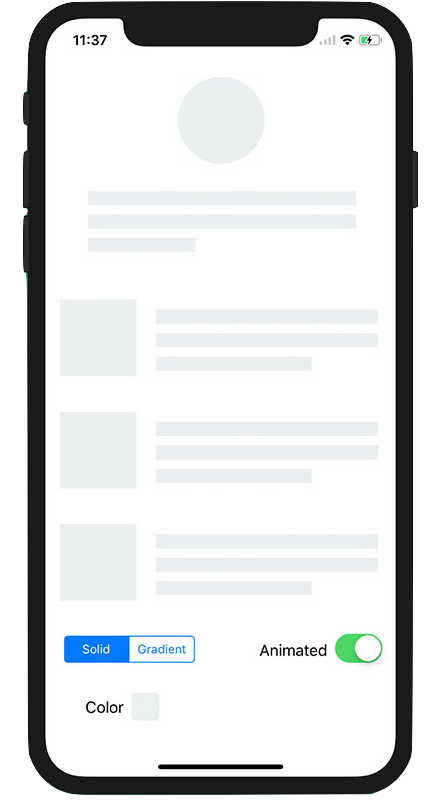
Or is there any other way to achieve a loading view which looks like this:
 sasquatchgit
All 4 comments
@sasquatchgit this is a very cool library! Because IGListAdapter internally must be the UICollectionViewDataSource, there likely isn't a clean way to make this integration happen. I'd actually encourage you to request adding IGListKit support to SkeletonView itself. Maybe as an extension or new repository?
We can't provide first-class third-party library support, sadly.
 rnystrom
on 19 Apr 2018
rnystrom
on 19 Apr 2018
@sasquatchgit try this Skeleton animation ( Skeleton ), it can integrate with IGListKit just simple changes.
on-refreshing/loading (in refresh handler)
// Set data to place holder models - (or on your existing models, have a `isLoading` bool flag)
// something like this in handler
@objc refreshHandler () {
    self.data = [model(id: 0, isRefreshing: true),
                    model(id: 1, isLoading: true),
                    model(id: 2, isLoading: true),
                    model(id: 3, isLoading: true)] // Depend on your need, add more here.
    // Let IGListKit adapter reload these placeholder models.
    self.adapter.reloadData { (success) in
            debugPrint("Now showing loading skeletons...")
    }
    // do some API calls here to fetch data.
    // use a dummy timer here.
    DispatchQueue.main.asyncAfter(deadline: .now() + 3) {
            // By this point in this closure, you should have your data ready.
            // lets say
            //   someDara = [ model(id:0, name: "User1", desc: "I am user first"),
            //       model(id:2, name: "@rnystrom", desc: "I am maker of IGListKit"),
            //       model(id:3, name: "Donald", desc: "You are fired")     ]
            //  you simply override existing data and reload it to effect in collectionView.
           self.data = someData
           self.adapter.reloadData { (success) in
                debugPrint("Now real data is reloaed in collectionView")
             }
       }
}
You model could be sth like this
class Model {
    var displayName: String
    var desc: String
    var isLoading: Bool
     //...
}
Then in your cellForItem function in *sectionController, update view based on isLoading's value
    override func cellForItem(at index: Int) -> UICollectionViewCell {
        let cellClasses = [NameCell.self, DescCell.self]
        let cellClass: AnyClass = cellClasses[index]
        let cell = collectionContext!.dequeueReusableCell(of: cellClass, for: self, at: index)
        if let cell = cell as? NameCell {
            if (user?.isLoading)! {
                cell.startLoadingAnimation()
            }else {
                cell.stopLoadingAnimation()
                cell.userDisplayNameLabel.text = model?.displayName
            }
        }
        else if let cell = cell as? DescCell {
            if (user?.isLoading)! {
                cell.startLoadingAnimation()
            } else {
                cell.stopLoadingAnimation()
                cell.textLabel.text = model?.DescCell

            }
        }
        return cell
    }
And on top of your existing collectionViewCell, you need to implement stopLoadingAnimation() and startLoadingAnimation(), which is pretty easy, checkout Skeleton
It will look like following:

Wdyt? @sasquatchgit @rnystrom
 10000TB
on 8 Sep 2018
10000TB
on 8 Sep 2018
@10000TB can u publish demo ?!
 adelbios
on 23 Aug 2019
adelbios
on 23 Aug 2019
@adelbios the demo code is already in my comment, and so is final look within app
10000TB
on 16 Sep 2019
Related issues
rnystrom
·
3Comments
 FazeelAkhtar
·
3Comments
FazeelAkhtar
·
3Comments
 kleiberjp
·
3Comments
kleiberjp
·
3Comments
 joseph-francis
·
3Comments
joseph-francis
·
3Comments
 jessesquires
·
3Comments
jessesquires
·
3Comments
Most helpful comment
@sasquatchgit try this Skeleton animation ( Skeleton ), it can integrate with IGListKit just simple changes.
on-refreshing/loading (in refresh handler)
You model could be sth like this
Then in your
cellForItemfunction in*sectionController, update view based onisLoading's valueAnd on top of your existing collectionViewCell, you need to implement
stopLoadingAnimation()andstartLoadingAnimation(), which is pretty easy, checkout SkeletonIt will look like following:

Wdyt? @sasquatchgit @rnystrom