Iglistkit: Multiple horizontal sections
Hi so here's an example of what I'm trying to do
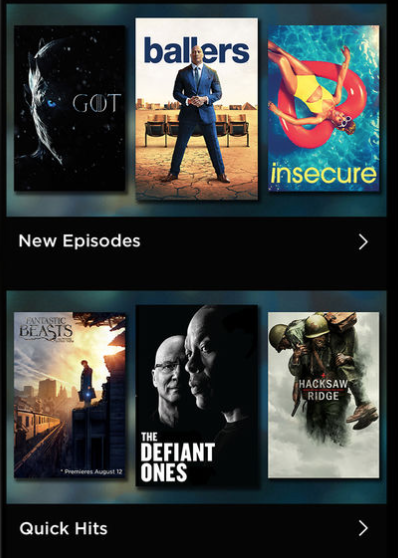
I want 4 sections with horizontal scroll.
I've been trying to do it with no success, my data always go in the same section.
Can I get some help? Thanks!
 Jkurbs
All 6 comments
@Jkurbs are you using UICollectionViewFlowLayout? If so, mind trying our IGListCollectionViewLayout instead? If that doesn't solve your problem, could you post more details about your setup?
 rnystrom
on 6 Sep 2017
rnystrom
on 6 Sep 2017
Could you post an example project @Jkurbs where you have tried? Preferably a github repo? I have multiple sideways scrolling sections in my most recent app.
 heumn
on 6 Sep 2017
heumn
on 6 Sep 2017
Hi guys, Thank you for the quick response! Let me start by showing you what my data structure looks like:
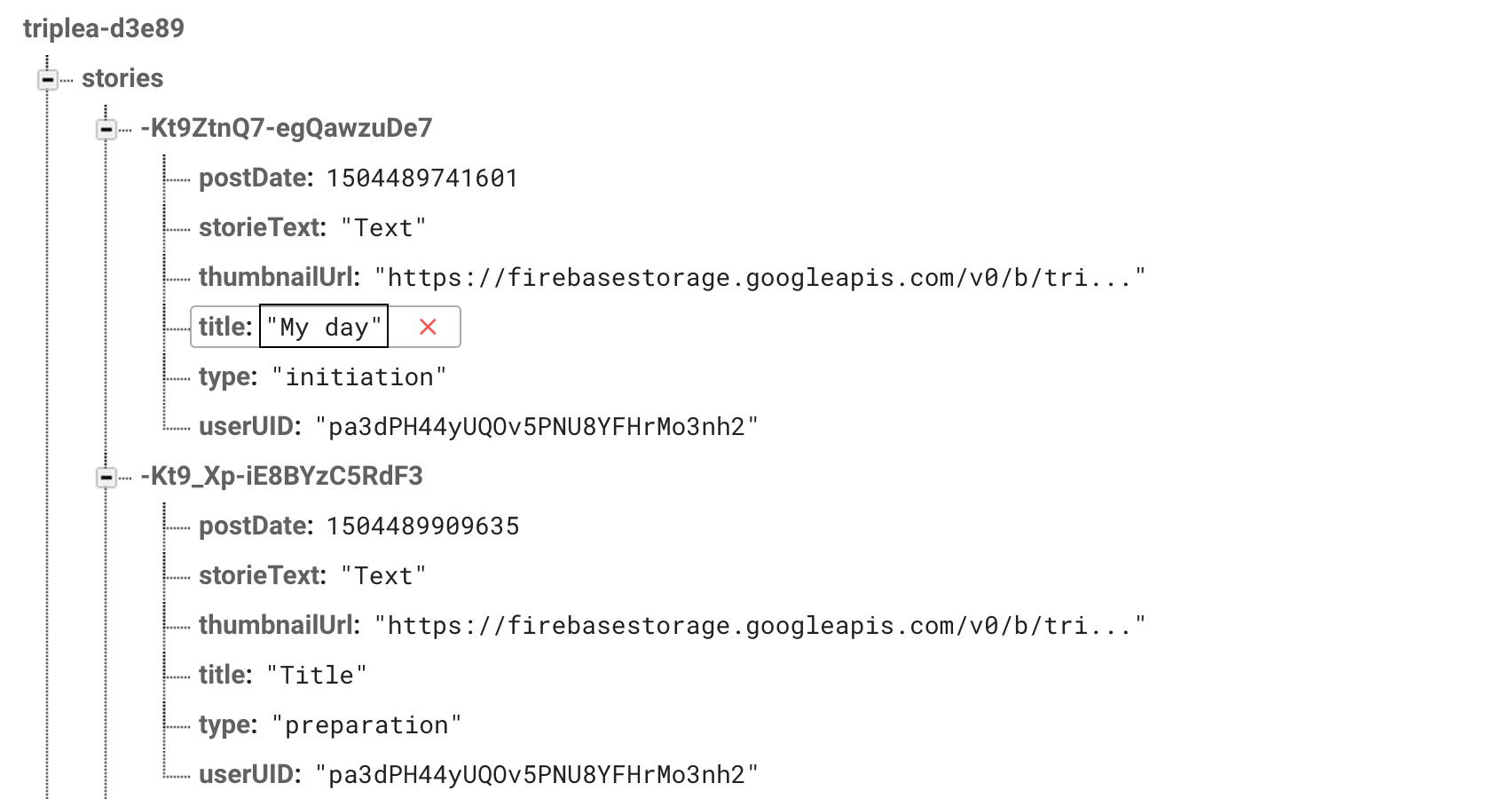 .
.
As you can see in the picture each story have a different type, there's 4 types in total.
Here's my model for the stories:
class Stories {

    var headerText: String?
    var storieId: String?
    var type: String?
    var thumbnailUrl: String?
    var title: String?
    var storieText: String?
    var username: String?
    var userId: String?
    var postDate: NSNumber?
    var text: String?


    init(headerText: String, storieId: String, type: String, thumbnailUrl: String, title: String, storieText: String, username: String, userId: String, postDate: NSNumber, text: String) {
       self.headerText = headerText
       self.storieId = storieId
       self.type = type
       self.thumbnailUrl = thumbnailUrl
       self.title = title
       self.storieText = storieText
       self.username = username
       self.userId = userId
       self.postDate = postDate
       self.text = text
    }


    init(key: String, artData: Dictionary<String, AnyObject>) {

        self.storieId = key

        if let title = artData["title"] as? String {
            self.title = title
        }

        if let storieText = artData["storieText"] as? String {
            self.storieText = storieText
        }

        if let username = artData["username"] as? String {
            self.username = username
        }

        if let thumbnailUrl = artData["thumbnailUrl"] as? String {
            self.thumbnailUrl = thumbnailUrl
        }

        if let userId = artData["userId"] as? String {
            self.userId = userId
        }

        if let type = artData["type"] as? String {
            self.type = type
        }

        if let postDate = artData["postDate"] as? NSNumber {
            self.postDate = postDate
        }

        if let text = artData["text"] as? String {
            self.text = text
        }
    }
}

extension Stories: Equatable {

    static public func ==(rhs: Stories, lhs: Stories) -> Bool {
        return rhs.storieId == lhs.storieId && rhs.type == lhs.type
    }
}

extension Stories: ListDiffable {

    public func diffIdentifier() -> NSObjectProtocol {
        return storieId! as NSObjectProtocol
    }


    public func isEqual(toDiffableObject object: ListDiffable?) -> Bool {
        if self === object { return true }
        guard let object = object as? Stories else { return false }

        return self.storieId == object.storieId && self.type == object.type
    }
}
All I want is 4 horizontal sections for 4 different type.
@rnystrom @heumn, tell me if you need more information. Thanks again for the support!
Jkurbs
on 8 Sep 2017
@Jkurbs check out some of our examples that have embedded, horizontal lists. That's probably your best option.
Our modeling guide can probably help with your design too!
https://github.com/Instagram/IGListKit/blob/master/Guides/Modeling%20and%20Binding.md
rnystrom
on 8 Sep 2017
You could make a section controller for horizontal scrolling which takes a parameter type, which roughly based on the Example's HorizontalSectionController but just allowing to filter out by type.
As you can see in the HorizontalSectionController it's using an embedded UICollectionView with a new a ListAdapter which requires the ListAdapterDataSource-protocol to implemented on your section controller. Now in the objects(for listAdapter: ListAdapter)-method you could do some funky stuff.
Of course, this new section controller needs a wrapper ListDiffable-class so you have an array in section controller to drive the data source with.
E.g.
class GroupedStories {
   var title: String = 'Title'?
   var items: []
}
 weyert
on 10 Sep 2017
weyert
on 10 Sep 2017
Closing due to inactivity
rnystrom
on 26 Oct 2017
Related issues
 kleiberjp
·
3Comments
rnystrom
·
3Comments
kleiberjp
·
3Comments
rnystrom
·
3Comments
 HarshilShah
·
3Comments
HarshilShah
·
3Comments
 alexwillrock
·
3Comments
alexwillrock
·
3Comments
 jessesquires
·
3Comments
jessesquires
·
3Comments
Most helpful comment
@Jkurbs check out some of our examples that have embedded, horizontal lists. That's probably your best option.
https://github.com/Instagram/IGListKit/blob/master/Examples/Examples-iOS/IGListKitExamples/SectionControllers/ExpandableSectionController.swift
Our modeling guide can probably help with your design too!
https://github.com/Instagram/IGListKit/blob/master/Guides/Modeling%20and%20Binding.md