New issue checklist
- [V ] I have reviewed the
READMEand documentation - [V ] I have searched existing issues and this is not a duplicate
General information
IGListKitversion: 3.0.0- iOS version(s): 10.3.2
- CocoaPods/Carthage version: CocoaPods 1.1.1
- Xcode version: 8.3.3
- Devices/Simulators affected: iPhone 7 Plus, iOS Simulator
- Reproducible in the demo project? (Yes/No):
- Related issues:
Hi,
I have a cell (CityCell) showing an image and a label.
The first cell must have a length equal to the view, while the other cells must have half the length of the view.
So in the first row I have one item, in the other rows I have two items per row.
So I have this:
override func sizeForItem(at index: Int) -> CGSize {
    let width = collectionContext!.containerSize.width
    if index == 0 {
        return CGSize(width: width, height: width/2)
    } else {
        return CGSize(width: width/2, height: width/2)
    }
}
The problem is that the items have wrong size, and each time I scroll the view they assume different sizes.
I created a demo project with this problem: link
and you can also see a video: link
I am currently solving this problem by creating another ViewCell that I use only for the first element. In cellForItem, if index == 0 I cast the first item to the new ViewCell otherwise to CityCell
Thanks... and a big thank you for this awesome framework
 gbtt
gbtt
All 7 comments
Your code in your repo is empty. Could you submit the code?
 weyert
on 6 Aug 2017
weyert
on 6 Aug 2017
oops :)
I have submitted the code.
gbtt
on 7 Aug 2017
Hey, thanks for providing a demo project, that makes it easier to help :)
The problem seems to be that you are hard coding the frames of the labels
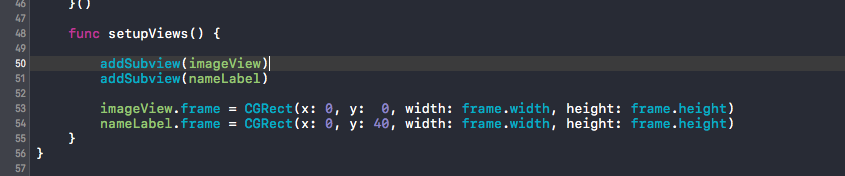
It won't help what frame you set as the superview, when the image and the label has hard coded sizes.
I would propose you watch some of the great WWDC videos about AutoLayout. It will help you a lot with understanding how the layout engine of UIKit works.
To fix your problem I added an extension to UIView that will fill the view with the subview.
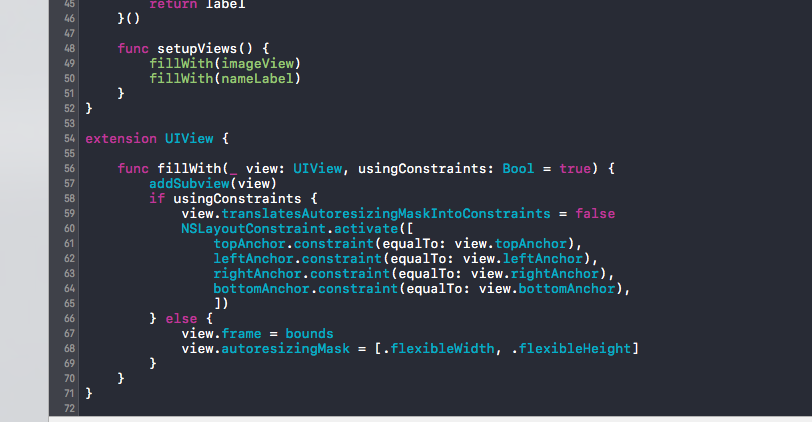

You can grab it here if you want to re-use it:
extension UIView {

    func fillWith(_ view: UIView, usingConstraints: Bool = true) {
        addSubview(view)
        if usingConstraints {
            view.translatesAutoresizingMaskIntoConstraints = false
            NSLayoutConstraint.activate([
                topAnchor.constraint(equalTo: view.topAnchor),
                leftAnchor.constraint(equalTo: view.leftAnchor),
                rightAnchor.constraint(equalTo: view.rightAnchor),
                bottomAnchor.constraint(equalTo: view.bottomAnchor),
            ])
        } else {
            view.frame = bounds
            view.autoresizingMask = [.flexibleWidth, .flexibleHeight]
        }
    }
}
I think we can consider this issue soved :)
 heumn
on 25 Aug 2017
heumn
on 25 Aug 2017
@heumn slay!
 rnystrom
on 25 Aug 2017
rnystrom
on 25 Aug 2017
Totally forgot to look into this. My apologies 😞
weyert
on 25 Aug 2017
Hi @heumn
thanks for the information and for the fix! :)
gbtt
on 25 Aug 2017
My pleasure :) Best of luck!
heumn
on 25 Aug 2017
Related issues
 alexwillrock
·
3Comments
alexwillrock
·
3Comments
 iwasrobbed
·
3Comments
iwasrobbed
·
3Comments
 lucabartoletti
·
3Comments
lucabartoletti
·
3Comments
 FazeelAkhtar
·
3Comments
FazeelAkhtar
·
3Comments
 PhilCai1993
·
3Comments
PhilCai1993
·
3Comments
Most helpful comment
Hey, thanks for providing a demo project, that makes it easier to help :)
The problem seems to be that you are hard coding the frames of the labels
It won't help what frame you set as the superview, when the image and the label has hard coded sizes.
I would propose you watch some of the great WWDC videos about AutoLayout. It will help you a lot with understanding how the layout engine of UIKit works.
To fix your problem I added an extension to UIView that will fill the view with the subview.
You can grab it here if you want to re-use it:
I think we can consider this issue soved :)