Iglistkit: CollectionView Cells are lining up vertically not horizontally
Problem
At the moment I have created a ListController with the code snippet below. Unfortunately, my collectionView cells are not lining horizontally but vertically. Any idea what's going on? Or what I may be missing? This information was taken directly from a project included in the examples folder.
final class GridSectionController: ListSectionController {

  private var object: GridItem?

  override init() {
      super.init()
      self.minimumInteritemSpacing = 1
      self.minimumLineSpacing = 1
  }

  override func numberOfItems() -> Int {
      return object?.itemCount ?? 0
  }

  override func sizeForItem(at index: Int) -> CGSize {
      let width = collectionContext?.containerSize.width ?? 0
      let itemSize = floor(width / 3)
      return CGSize(width: itemSize, height: itemSize)
  }

  override func cellForItem(at index: Int) -> UICollectionViewCell {
      guard let cell = collectionContext?.dequeueReusableCell(of: CenterLabelCell.self, for: self, at: index) as? CenterLabelCell else {
          fatalError()
      }
      cell.backgroundColor = .red
      return cell
  }

  override func didUpdate(to object: Any) {
      self.object = object as? GridItem
  }

}
I have included a screenshot below:
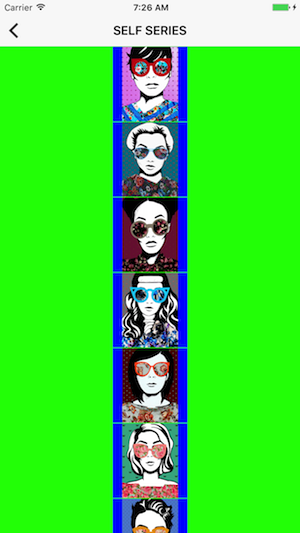
Thanks for the help!
General information
IGListKitversion: 3.0.0- iOS version(s): 10.3
- CocoaPods/Carthage version: 1.2.1
- Xcode version: 8.3.3
- Devices/Simulators affected: iPhone 7 Simulator
- Reproducible in the demo project? (Yes/No):
- Related issues:
 AdamBCo
All 5 comments
You need to ensure the layout your UICollectionView is utilizing, has the scroll direction set to horizontal. Example:
let layout = UICollectionViewFlowLayout()
layout.scrollDirection = .horizontal
let view = UICollectionView(frame: .zero, collectionViewLayout: layout)
 mattlisiv
on 22 Jul 2017
mattlisiv
on 22 Jul 2017
@mattlisiv Please allow me to clarify:
Since the width of the cell is the width of the collectionView divided by 3, I am looking for the layout to be vertical, but for 3 cells to be arranged on each row; therefore depicting a grid of photos.
AdamBCo
on 22 Jul 2017
@AdamBCo,
I see what you mean now. I think this is still an unavailable feature. I wanted to implement something similar but was not able. See similar issue #750 .
mattlisiv
on 22 Jul 2017
@AdamBCo are you using UICollectionViewFlowLayout? If so, that layout puts each _section_ on a "newline" (new row) instead of finding a best-fit. IGListKit puts each ListSectionController in a UICollectionView section, so that's where this gets tricky.
Can you try using our ListCollectionViewLayout added in 3.0? That should do exactly what you want (and is what we use in Instagram).
Lmk if that helps!
 rnystrom
on 24 Jul 2017
rnystrom
on 24 Jul 2017
@rnystrom That worked, so thank you for the help.
AdamBCo
on 25 Jul 2017
Related issues
 shuhrat10
·
3Comments
shuhrat10
·
3Comments
 FazeelAkhtar
·
3Comments
FazeelAkhtar
·
3Comments
 kleiberjp
·
3Comments
kleiberjp
·
3Comments
 alexwillrock
·
3Comments
alexwillrock
·
3Comments
 lucabartoletti
·
3Comments
lucabartoletti
·
3Comments
Most helpful comment
@rnystrom That worked, so thank you for the help.