Iglistkit: Horizontal center paging
New issue checklist
- [x] I have reviewed the
READMEand documentation - [x] I have searched existing issues and this is not a duplicate
General information
IGListKitversion: 3.0- iOS version(s): 11
- CocoaPods/Carthage version:
- Xcode version: Xcode 8.3 and Xcode 9
- Devices/Simulators affected: iPhone 7
- Reproducible in the demo project? (Yes/No):
- Related issues: No
Debug information
# Please include debug logs using the following lldb command:
po [IGListDebugger dump]
Hello!
This is a question, I think!
First, thanks for a great product ! 🎉
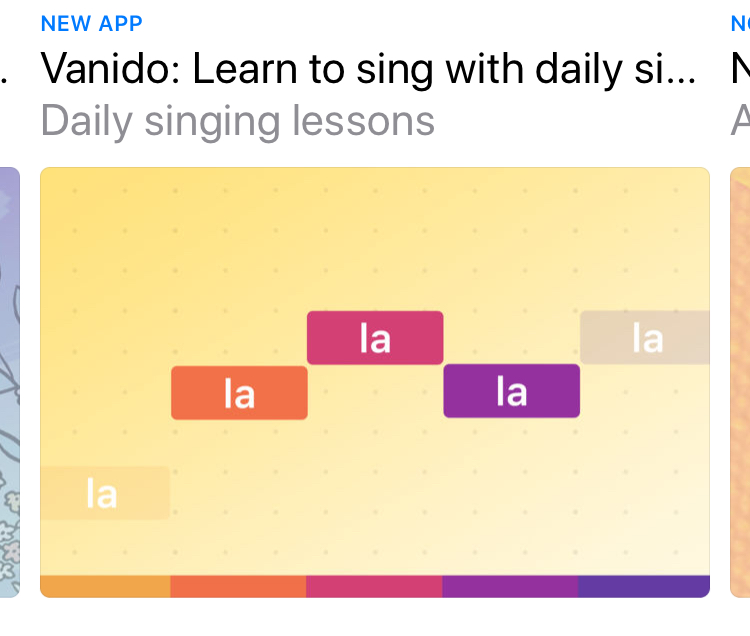
I want to achieve some center paging for a banner view in my app. I want to do something similar to the new iOS 11 AppStore. With the main cell in center and then the right and left are peaking out in the sides.
I hope that some one can help me 😄
// Kim
 kimdv
kimdv
All 9 comments
If you are interested in the snapping to center and not the structure to do horizontal scrolling in a section. Here is how I did ut:
adapter.scrollViewDelegate = self
and then in the horizontal paging wrapping section controller:
extension WrappingSectionController: UIScrollViewDelegate {

    func scrollViewWillEndDragging(_ scrollView: UIScrollView, withVelocity velocity: CGPoint, targetContentOffset: UnsafeMutablePointer<CGPoint>) {
        guard let collectionView = scrollView as? UICollectionView else { return }
        collectionView.snapToCell(velocity: velocity, targetOffset: targetContentOffset, spacing: cellSpacing)
        contentOffset = targetContentOffset.pointee.x
    }
}
The snap to cell is an extension on UICollectionView
extension UICollectionView {

    func snapToCell(velocity: CGPoint, targetOffset: UnsafeMutablePointer<CGPoint>, contentInset: CGFloat = 0, spacing: CGFloat = 0) {

        // No snap needed as we're at the end of the scrollview
        guard (contentOffset.x + frame.size.width) < contentSize.width else { return }
        guard let indexPath = indexPathForItem(at: targetOffset.pointee) else { return }
        guard let cellLayout = layoutAttributesForItem(at: indexPath) else { return }

        var offset = targetOffset.pointee

        if velocity.x < 0 {
            offset.x = cellLayout.frame.minX - max(contentInset, spacing)
        } else {
            offset.x = cellLayout.frame.maxX - contentInset + min(contentInset, spacing)
        }

        targetOffset.pointee = offset
    }
}
 heumn
on 22 Jun 2017
heumn
on 22 Jun 2017
Thanks @heumn !
I have tried your example, and can't get it working.
I have a custom UICollectionViewFlowlayout I know that works (Used in other projects)
Do you know if it is possible to use that? :)
kimdv
on 27 Jun 2017
Could you describe what doesn't work or even better, share some code? :)
heumn
on 27 Jun 2017
Okay I have my ViewController that contains a list of discoverItems
The first item of the list return a DiscoverBannerSectionController
 if discoverItem === self.trending {
            let sectionController = DiscoverBannerSectionController()

            sectionController.inset = UIEdgeInsets(top: 0, left: 0, bottom: 0, right: 0)

            return sectionController
 }
The DiscoverBannerSectionController loks like this
final class DiscoverBannerSectionController: ListSectionController, ListAdapterDataSource {
    private var item: DiscoverItem?

    lazy var adapter: ListAdapter = {
        let adapter = ListAdapter(updater: ListAdapterUpdater(),
                                  viewController: self.viewController)
        adapter.dataSource = self
        return adapter
    }()

    override func sizeForItem(at index: Int) -> CGSize {
        let width = collectionContext?.containerSize.width ?? 0
        return CGSize(width: width, height: width * 9 / 16)
    }

    override func cellForItem(at index: Int) -> UICollectionViewCell {
        guard let cell = collectionContext?.dequeueReusableCell(of: EmbeddedBannerCollectionViewCell.self,
                                                                for: self,
                                                                at: index) as? EmbeddedBannerCollectionViewCell else {
                                                                    fatalError("Something went wrong in DiscoverBannerSectionController")
        }

        self.adapter.collectionView = cell.collectionView
        self.adapter.scrollViewDelegate = self
        return cell
    }

    override func didUpdate(to object: Any) {
        item = object as? DiscoverItem

        self.adapter.reloadData(completion: nil)
    }

    // MARK: ListAdapterDataSource

    func objects(for listAdapter: ListAdapter) -> [ListDiffable] {
        guard let item = item else { return [] }

        return item.items
    }

    func listAdapter(_ listAdapter: ListAdapter, sectionControllerFor object: Any) -> ListSectionController {
        return EmbeddedBannerSectionController()
    }

    func emptyView(for listAdapter: ListAdapter) -> UIView? {
        let spinner = UIActivityIndicatorView()
        spinner.activityIndicatorViewStyle = .gray

        return spinner
    }
}

extension DiscoverBannerSectionController: UIScrollViewDelegate {

    func scrollViewWillEndDragging(_ scrollView: UIScrollView, withVelocity velocity: CGPoint, targetContentOffset: UnsafeMutablePointer<CGPoint>) {
        guard let collectionView = scrollView as? UICollectionView else { return }
        collectionView.snapToCell(velocity: velocity, targetOffset: targetContentOffset, spacing: 50)
        contentOffset = targetContentOffset.pointee.x
   }
}
The EmbeddedBannerCollectionViewCell is a cell containing a UICollectionViewController with a UICollectionViewFlowlayout
The EmbeddedBannerSectionController return a single cell containing an image.
The size of the cell is
override func sizeForItem(at index: Int) -> CGSize {
        guard  let height = collectionContext?.containerSize.height,
            let width = collectionContext?.containerSize.width else {
                fatalError("This should not happen")
        }

        return CGSize(width: width - 50, height: height)
    }
Hope this is enough :)
kimdv
on 27 Jun 2017
Back at the computer tomorrow. Will take a look then:)
heumn
on 27 Jun 2017
I got it!
I could use my CenterCellCollectionViewFlowLayout
Just forgot to diable paging.... 🤦♂️🤦♂️🤦♂️🤦♂️🤦♂️🤦♂️🤦♂️🤦♂️🤦♂️🤦♂️🤦♂️🤦♂️🤦♂️🤦♂️
// Source: http://blog.karmadust.com/centered-paging-with-preview-cells-on-uicollectionview/

import UIKit

class CenterCellCollectionViewFlowLayout: UICollectionViewFlowLayout {
    var mostRecentOffset: CGPoint = CGPoint.zero

    override func targetContentOffset(forProposedContentOffset proposedContentOffset: CGPoint, withScrollingVelocity velocity: CGPoint) -> CGPoint {

        if velocity.x == 0 {
            return self.mostRecentOffset
        }

        guard let cv = self.collectionView,
            let attributesForVisibleCells = self.layoutAttributesForElements(in: cv.bounds) else {
                // Fallback
                self.mostRecentOffset = super.targetContentOffset(forProposedContentOffset: proposedContentOffset)
                return self.mostRecentOffset
        }

        let halfWidth = cv.bounds.size.width * 0.5

        var candidateAttributes: UICollectionViewLayoutAttributes?
        for attributes in attributesForVisibleCells {

            // Skip comparison with non-cell items (headers and footers)
            if attributes.representedElementCategory != UICollectionElementCategory.cell {
                continue
            }

            if (attributes.center.x == 0) || (attributes.center.x > (cv.contentOffset.x + halfWidth) && velocity.x < 0) {
                continue
            }

            candidateAttributes = attributes
        }

        // Beautification step , I don't know why it works!
        if proposedContentOffset.x == -(cv.contentInset.left) {
            return proposedContentOffset
        }

        guard let attributes = candidateAttributes else {
            return mostRecentOffset
        }

        self.mostRecentOffset = CGPoint(x: floor(attributes.center.x - halfWidth), y: proposedContentOffset.y)

        return self.mostRecentOffset
    }
}
Glad you fixed it :)
heumn
on 27 Jun 2017
Odd question, what is contentOffset you are setting @heumn / @kimdv? I don't see a declaration or where else it is being used.
Thanks!
 trsneed
on 21 May 2018
trsneed
on 21 May 2018
I still need help on this, anybody has any idea?
 CavalcanteLeo
on 20 Jun 2018
CavalcanteLeo
on 20 Jun 2018
Related issues
 alexwillrock
·
3Comments
alexwillrock
·
3Comments
 krysztalzg
·
3Comments
krysztalzg
·
3Comments
 FazeelAkhtar
·
3Comments
FazeelAkhtar
·
3Comments
 omerfarukyilmaz
·
3Comments
omerfarukyilmaz
·
3Comments
 jessesquires
·
3Comments
jessesquires
·
3Comments
Most helpful comment
Odd question, what is contentOffset you are setting @heumn / @kimdv? I don't see a declaration or where else it is being used.
Thanks!