Ifcopenshell: blenderbim: using clash logic of ifcclash inside blender?
The "IFC Clash Sets" functionality is an amazing tool!
It massively helped me to build a little clash pipeline for a set of big ifc files!
I was wondering if it could be used also inside a blenderbim scene instead of external ifc files,
given two sets of elements? :
{
    "clash_candidates_a": blender_objs_a
    "clash_candidates_b": blender_objs_b,
}
...to get back a dict like the json result from ifcclash.IfcClasher ?
 fbpyr
fbpyr
All 20 comments
A reminder to myself to hack on this this Friday 5:30pm. I've got a sports thing at 7 (not 7:30 as I initially thought) so we'll see how much we get done in an hour :)
 Moult
on 25 Nov 2020
Moult
on 25 Nov 2020
@Moult thank you so much again, for the great session!
I get some strange behaviour for some objects, though:
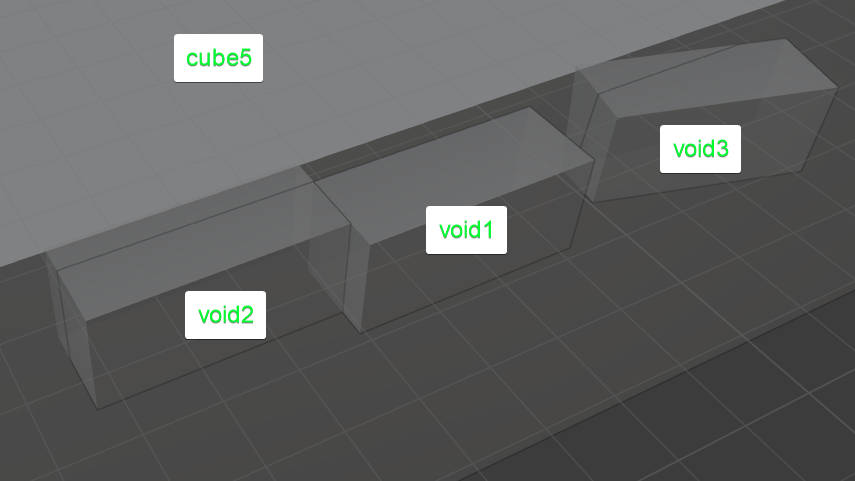
Blender clash results from separate individual clash checks:
a: void1 - b: void2 : clash 🆗
a: void1 - b: void3 : no clash 🆗
a: void2 - b: cube5 : no clash 🤔
a: void3 - b: cube5 : no clash 🤔
a: void1, void2, void3 - b: cube5 : no clash 🤔
The last three seem pretty strange, since they clearly intersect, as shown with the x-ray mode.
cube5 is just a mesh cube I added to the scene and snapped coplanar to void1.
void1 and void2 are actual IfcBuildingElementProxy/ProvisionForVoid
from a project imported as IFC, void 3 is a rotated copy with
one vertex moved slightly off.
When I check the bounding box coordinates between void2 and cube5,
there is clearly an overlap on all three axis :
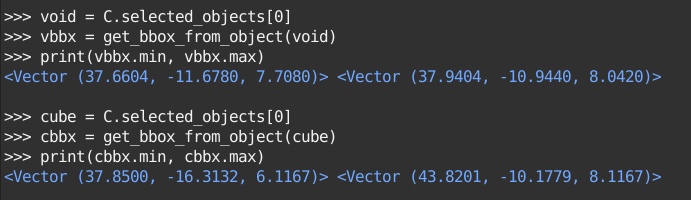
Do you have an idea where this might come from or how I would debug it?
I can also send you that .blend ( ~500kb ) if that helps.(?)
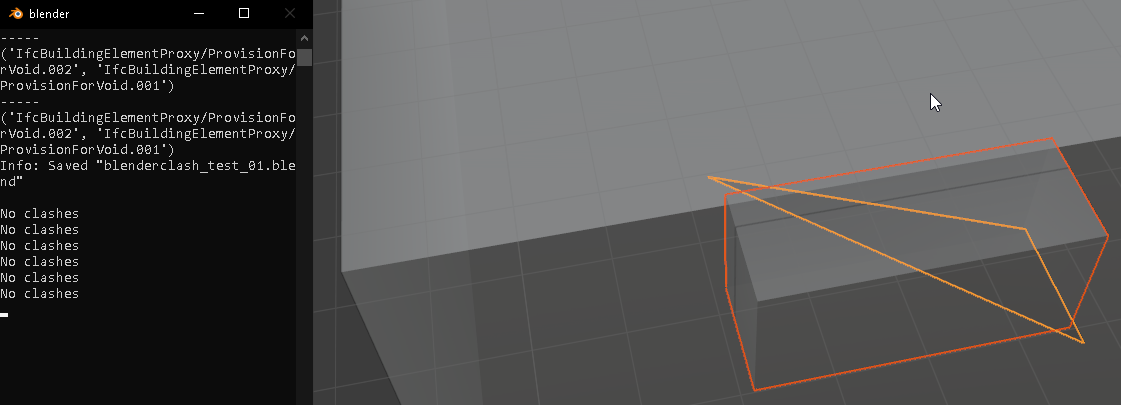
When I build a slightly offset mesh triangle through void2,
blender clasher also claims, that they would not intersect:
fbpyr
on 27 Nov 2020
@fbpyr can you upload a Blend file here?
Moult
on 27 Nov 2020
Had just sent it to you as email, if that is ok?
fbpyr
on 27 Nov 2020
@fbpyr took a brief glance and if I apply transformations (i.e. ctrl-a All Transforms) to the object then the clash results work as expected. I see that cube5 has a scale applied to it. The matrix_world includes scale in the matrix, so my next guess is maybe that fcl's clash objects don't understand scale? Maybe.
Hope that provides enough as a hint? Worst case scenario just apply the scale transformation to the vertices.
Moult
on 29 Nov 2020
@Moult thanks a lot for the pointer!!
that seems to be it (and solves it for me) - once I have scale on the objects for all dimensions on 1,
it works as expected here as well! 😌
( although it would of course be great if it worked even with scale.
..just out of curiosity: is there a way to visualize the mesh that is used by fcl?)
fbpyr
on 30 Nov 2020
@fbpyr would you mind editing the code so that it applies the scale transformation on verts? That way it can work on scales too.
Not sure of any easy way to visualise fcl meshes ... I've written little bits to get portions of data back into Blender (e.g. contact point positions and vectors) for debugging.
Moult
on 1 Dec 2020
Would you like to also continue hacking on this to allow self collision, and saving to JSON or even BCF?
Moult
on 1 Dec 2020
@fbpyr in addition to applying the scale transformation on verts, it would be good to put together a quick minimum working example of two cubes. One with a scale and one without that demonstrates this problem. It would be good to post an issue upstream to see whether or not we missed something basic, since I would expect the transform to allow scaling :)
Moult
on 1 Dec 2020
I have a small sample, which I will post here once I have cleaned it. 🙂
It is quite a curious one to me, as - at least to me - telling by the geometry, it should intersect regardless of scale 1 or 0.66.
fbpyr
on 1 Dec 2020
@fbpyr if it should intersect regardless of scale, maybe that suggests that the scale in the matrix is being applied in a funny way. Maybe order of operations? Dunno. Best to present to upstream and see what they think?
Moult
on 1 Dec 2020
yes, I also think there might be something weird going on with scale != 1
should we have another screen share to poke at it? (before presenting it upstream?)
fbpyr
on 3 Dec 2020
@fbpyr sure thing. I'd like to do a release this weekend sometime or maybe Monday, and it'd be nice to include this as a more packaged feature before then. When works or you?
Moult
on 3 Dec 2020
cool! would same time&place work for you?
fbpyr
on 3 Dec 2020
@fbpyr sure thing - let's do Friday sydney time 5:30pm on the /openbim jitsi channel!
Moult
on 3 Dec 2020
here the sample where I get no clashes,
but when scale is set to 1 it finds intersections,
even though it intersects in both scenarios:
20201203_clash_sample_01.blend.txt
sorry for txt file extension rename due to upload file filter.
fbpyr
on 3 Dec 2020
Bumping issue for the public record that it was confirmed that upstream fcl doesn't support scale in the transformation matrix. Hence as a solution we apply the matrix transform to the coordinates.
To close this bug, ping @fbpyr it would be good so that it could export the results to JSON as well as selecting the clashed objects, so that it can be used by users who don't know how to read console output :)
Moult
on 14 Dec 2020
@fbpyr I've just built support for exporting clashes out to BCF, including optional snapshot generation using Blender's OpenGL render. Might be a fun thing to add :)
Moult
on 30 Dec 2020
@Moult amazing!! 🙂 👍
currently I am again deep in checking external IFC models&clashes mode,
but I will definitively check it out!
fbpyr
on 6 Jan 2021
Closing as it probably isn't vital to implement Blender-native clashing to BCF for now, and the original issue was solved.
Moult
on 16 Feb 2021
Related issues
Moult
·
7Comments
 otsoa
·
8Comments
Moult
·
5Comments
Moult
·
12Comments
otsoa
·
8Comments
Moult
·
5Comments
Moult
·
12Comments
 harrycollin
·
12Comments
harrycollin
·
12Comments