Ifcopenshell: Using the IfcPresentationLayerAssignment for grouping and visibility control
Hi,
So this might not necessarily be an issue with ifcopenshell or BlenderBIM, but perhaps more a question regarding understanding\using the IfcPresentationLayerAssignment. Based on the statement in the docs "The IfcPresentationLayerAssignment corresponds to the term "CAD Layer" and is used mainly for grouping and visibility control." I was under the impression that it can serve as a way of controlling the visibility of certain elements in my IFC file.
I am able to produce the IfcPresentationLayerAssignment object in my Ifc file using Ifcopenshell and the file imports nicely into BlenderBIM (which does not give any error message when verifying the imported file). However, I see no change in visibility or no list of layers to hide.
So I guess my question is how can the IfcPresentationLayerAssignment be utilized in BlenderBIM (is it supported, or is there something wrong in my implementation\understanding?). Ideally there is a default "hidden" layer\group where I can add the elements that I do not want to visualize when opening my IFC file in BlenderBIM.
In the attached example (found inside MyLayerTest.zip) I have a built up box-girder made up of indvidual plates welded together. I need to keep the contextual information of my beam (height, width, flange and web thickness' currently present in the IfcBeam object) AND I need to have each individual plate represented as IfcPlate objects. Both IfcPlate and IfcBeam objects serve purposes downstream with regards to either fabrication purposes or structural analyses. However for visualization purposes I do not want the ifcplates AND ifcbeam to be visualized at the same time (as shown below).
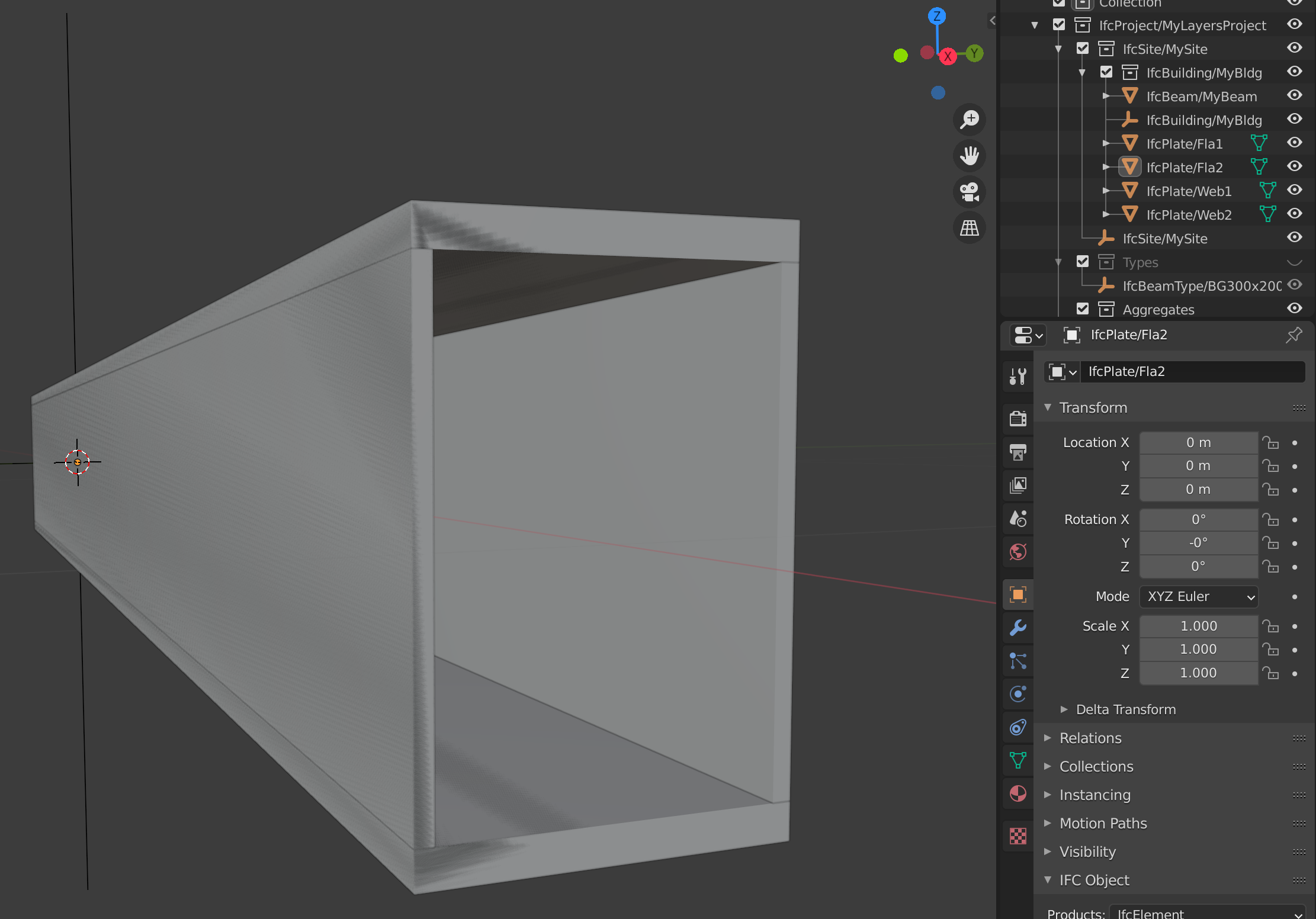
Therefore I turned to the IfcPresentationLayerAssignment thinking I could use it to hide the IfcBeam geometry in a layer I can "hide".
In the attached example I tried to add the beam IfcShapeRepresentation of the Beam to a list and pass it to the IfcPresentationLayerAssignment object. For good measure I tested the IfcPresentationLayerWithStyle to see if that made any difference.
hidden_layers = []
...
body = ifcfile.createIfcShapeRepresentation(context, "Body", "SolidModel", [ifcextrudedareasolid])
hidden_layers.append(body)
...
pres = ifcfile.createIfcPresentationLayerAssignment('Layertest1', 'a hidden layer', hidden_layers, '10')
pres2 = ifcfile.createIfcPresentationLayerWithStyle('Layertest2', 'A layer with style', hidden_layers, '11', False)
The code successfully created the following Ifc elements (which returns no error messages in BlenderBIM (or Xbim) during verification
#205=IFCPRESENTATIONLAYERASSIGNMENT('Layertest1','a hidden layer',(#110),'10');
#206=IFCPRESENTATIONLAYERWITHSTYLE('Layertest2','A layer with style',(#110),'11',.F.,$,$,$);
The versions I tested this on:
- BlenderBim v201025
- ifcopenshell v0.6.0
Let me know if there is any further information I can provide to help advance this issue,
Best Regards
Kristoffer
 Krande
All 16 comments
@Krande you are correct in your understanding of IfcPresentationLayerAssignment. Currently, the BlenderBIM Add-on only has support for _exporting_ this assignment, and does not have support for showing layers nor toggling visibility based on layers.
This is a good, straightforward, feature request. Are you able to code? Would you like to give it a shot? If not, I can help build it.
 Moult
on 1 Nov 2020
Moult
on 1 Nov 2020
Sure, I can give it a shot!
I have a fork already, and I can start preparing to make a pull request. Regarding the code itself. I think I have a handle on the LayerAssignments for each Body representation. But let me know if you have a minute to discuss where and how you would want me to start adding this into the (I guess it would be the import_ifc.py file?). I just recently started experimenting with the blender api, so a little help to get started would be much appreciated! :)
Best Regards
Kristoffer
Krande
on 1 Nov 2020
The first thing would be to familiarise how the presentation layers work - which I think you've done already: https://standards.buildingsmart.org/IFC/RELEASE/IFC4/ADD2_TC1/HTML/link/ifcpresentationlayerassignment.htm - you'll notice a presentation layer is more than just a layer name. It can also have a description and identifier. However, in the BlenderBIM Add-on, we currently only store one attribute, which is the name. We treat the Name as a unique key.
In particular, the presentation layer name is stored here: https://github.com/IfcOpenShell/IfcOpenShell/blob/v0.6.0/src/ifcblenderexport/blenderbim/bim/prop.py#L1468 as a string.
I would recommend as a first step, prior to building import features, is to make it so that we can store more than just a Name - we should store all data related to the presentation layer. Here are a few tips - prior to making code changes, see if you can spot how to fill out the name in the UI and do an export with a presentation layer to make sure it works.
The first change I'd make is that presentation_layer property should be changed to a PointerProperty (see this as an example) and we need to create a new type for that pointer to point to, perhaps called PresentationLayer (see this example of how a type is defined). This pointer property lets a single object point to a PresentationLayer type class - thus assigning an object to a layer. This type class should contain a name, description, and an identifier attribute as strings, as well as layer_on, layer_frozen, etc as boolean. All these changes are in the prop.py file - this file stores all Blender properties. They usually mirror the IFC spec 1:1. Finally, we need a new CollectionProperty, assigned to the scene's BIMProperties perhaps called presentation_layers. This will contain a list of all layers in the IFC.
When you add a new type class, or any class, you need to add it to the init so it gets loaded - or you'll see errors in the console.
Then, after changing the properties, the export function will break. Now, I'd update the UI - currently the UI is one line of code to let the user to type in a layer name: https://github.com/IfcOpenShell/IfcOpenShell/blob/v0.6.0/src/ifcblenderexport/blenderbim/bim/ui.py#L622 This needs to be heavily updated. I think it would need an entire UI panel dedicated to presentation layers which would show a list of all layers in the project. Then, there needs to be buttons / operators which does create / update / delete / assign layers. There is plenty of sample code in other parts of the UI which does this. I'd recommend looking at the code for the ODS Schedule panel for inspiration. You'll need to create a new panel class. All this UI work should happen in the ui.py file.
The UI will refer to operators (buttons) like this example. They correspond to operators like this defined in the operator.py file. You'll need to create new operators for adding, deleting, and assigning. There is no need to create a edit operator, as changes to the UI elements are mirrored in the properties on the fly.
Now that the properties and UI is updated, it is time to update the export function. The export code is split into two halves. The IfcParser gets data out from Blender, and the IfcExporter writes the IFC. This is the first half and this is the second half. They'll need to be rewritten a bit to support the new richer data model.
Then... build import support :) Which by this time you should be very familiar with the codebase and it should be quite easy. And then fun features like building layer visibility toggles and so on.
Sorry for the very long post, I hope it made sense, please ask as many questions as you need! I'm also generally online during Sydney waking hours at the ##architect channel on Freenode IRC.
Moult
on 1 Nov 2020
Ping @Krande - how is it going? Anything I can help with?
Moult
on 4 Nov 2020
Hey, it took me some time to figure out a good local development setup, but I think I've found a setup that works okay now,
This is where I am at for now:
- I managed to find the presentation_layer in the ui and exported successfully a new presentation layer assignment using the ui
- I have converted the presentation_layer attribute in the BIMMeshProperties to PointerProperty here.
- I created a PresentationLayer class here
- And I've played a bit with the ui here
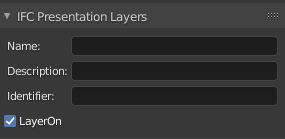
It's still a lot of areas that I'm unsure of, but I think I'm heading in the right direction.
The key areas that seem to be missing in my code (and general understanding) is the link between the actual import\export of ifc content and the ui properties).
Any help along the way is of course much appreciated :)
Best Regards
Kristoffer
Krande
on 4 Nov 2020
Fantastic progress! You're definitely heading in the right direction. The pointer property is correct. The PresentationLayer class is also correct.
You are missing a collection property though to store the list of all presentation layers in the project. A pointer property only creates the relationship between the mesh and a presentation layer, but that's all it does - it "points" but cannot hold the full list of layers.
As for the UI, I would recommend to have a UI in two locations. The first would belong to the data tab, exactly like you've already done. Then, I would recommend creating a _new_ UI panel in the scene properties (bl_context="scene") which then shows all layers in the project using a template_list UI element like this. Use inspiration from this code, with the difference that it should link to the collection property.
Then, you'll need to create a new operator to add presentation layers and remove presentation layers.
Hope it helps!
Moult
on 4 Nov 2020
I'm having a hard time getting my presentation_layer collection property to register when importing my local blenderbim.
here is the complete message i get in my blender system console:
Warning: class BIM_OT_copy_attributes_to_selection contains a property which should be an annotation!
C:\code\blender_addons\src\addons\blenderbimdev\bim\__init__.py:338
    assign as a type annotation: BIM_OT_copy_attributes_to_selection.prop_base
    assign as a type annotation: BIM_OT_copy_attributes_to_selection.prop_name
    assign as a type annotation: BIM_OT_copy_attributes_to_selection.sub_props
    assign as a type annotation: BIM_OT_copy_attributes_to_selection.collection_element
Warning: class BIM_OT_add_annotation contains a property which should be an annotation!
C:\code\blender_addons\src\addons\blenderbimdev\bim\__init__.py:338
    assign as a type annotation: BIM_OT_add_annotation.obj_name
    assign as a type annotation: BIM_OT_add_annotation.data_type
TypeError: CollectionProperty(...): expected an RNA type, failed with: RuntimeError: , missing bl_rna attribute from 'RNAMetaPropGroup' instance (may not be registered)

Exception in module register(): C:\code\blender_addons\src\addons\blenderbimdev\__init__.py
Traceback (most recent call last):
  File "C:\Program Files\Blender Foundation\Blender 2.90\2.90\scripts\modules\addon_utils.py", line 382, in enable
    mod.register()
  File "C:\code\blender_addons\src\addons\blenderbimdev\bim\__init__.py", line 338, in register
    bpy.utils.register_class(cls)
ValueError: bpy_struct "BIMProperties" registration error: presentation_layers could not register
Are there some additional steps I need to take in order to add a collection property to the BIMProperties class?
Best Regards
Kristoffer
Krande
on 5 Nov 2020
You load your presentation layer here:
... which is after the BIMProperties is loaded here:
Therefore the class cannot be loaded :)
Moult
on 5 Nov 2020
Okay, here's an update.
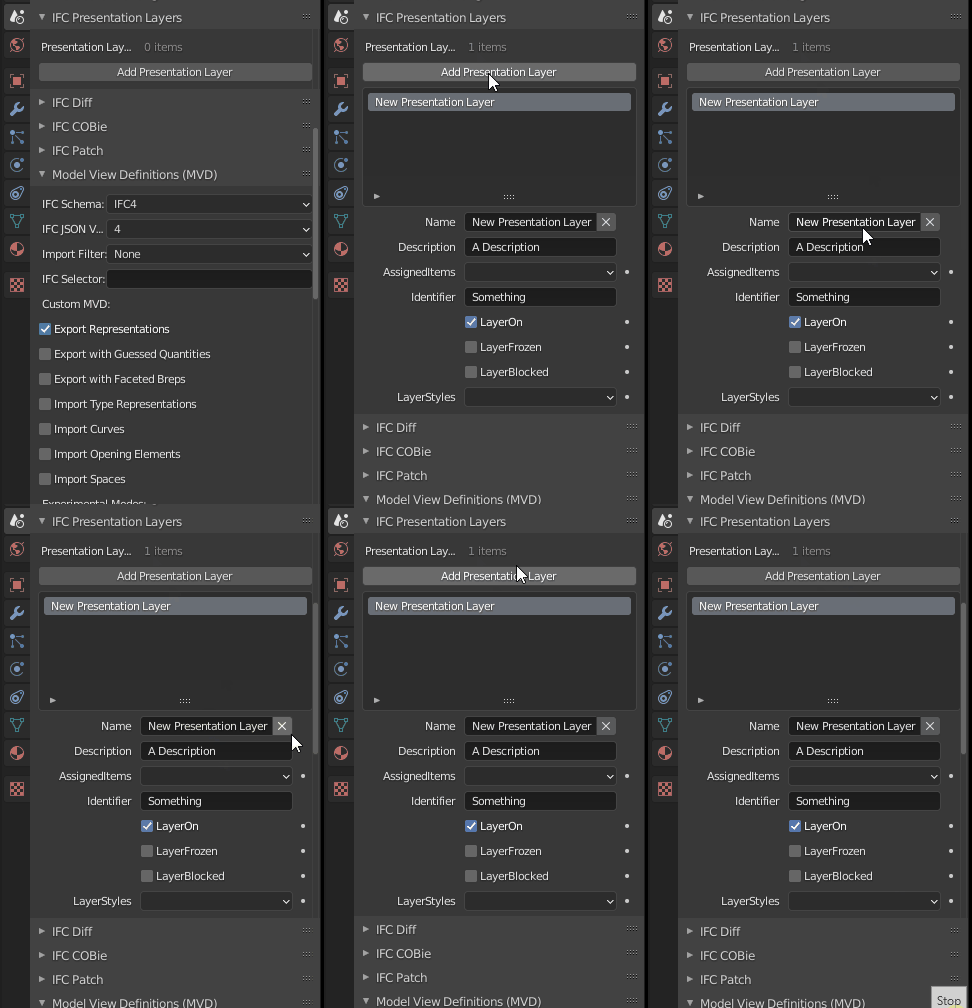
I've created a separate UI for the scene collection property and I'm able to add\remove Presentation Layers (I based it on the Constraints Class).
Regarding the UI for the presentation layer within the mesh panel I have added a "add to presentation layer" with a list and a button to select which layer you wish to add the active object to.
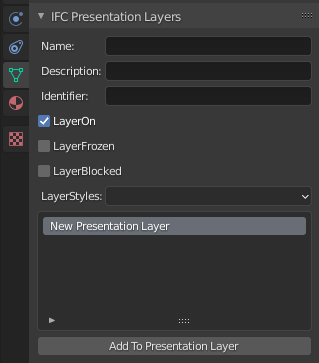
However, I am doing something wrong when I try to append the current active element to the EnumProperty "AssignedItems" (operator.py, ui.py). My error is:
location: <unknown location>:-1
Error: Traceback (most recent call last):
  File "C:\code\blender_addons\src\addons\blenderbimdev\bim\operator.py", line 4231, in execute
    new.assigned_items.items.add(self.guid)
AttributeError: 'str' object has no attribute 'items'
Any help is much appreciated :)
Best Regards
Kristoffer
Krande
on 5 Nov 2020
Blender EnumProperties only hold an enumeration of strings, and are generally not to be edited on the fly like a list.
I see you are attempting to make it so that the layers have a list of objects that are assigned to it. Instead of an EnumProperty try a CollectionProperty of type bpy.types.Object.
Alternatively, you can do the opposite: have each object link to a layer (so the layer itself doesn't know the objects in it). So I'd recommend removing assigned_items then the operator becomes simpler, like:
    def execute(self, context):
        bpy.context.active_object.BIMObjectProperties.presentation_layer = bpy.context.scene.BIMProperties.presentation_layers[self.index]
        return {"FINISHED"}
I'm not sure which approach is better :) one way to find out!
Moult
on 5 Nov 2020
Thanks for the quick reply!
I gave both a try, and the first one gave me a register issue and the second one seems to give me a "read only" error message AttributeError: bpy_struct: attribute "presentation_layer" from "BIMObjectProperties" is read-only.
If the "read only" error is fixable in your second alternative, I'll give that a go!
Best Regards
Kristoffer
Krande
on 5 Nov 2020
@Krande ah yes, sorry, I wasn't thinking when i posted. Just assign the name of the presentation layer, which we'll treat as a unique key.
    def execute(self, context):
        bpy.context.active_object.BIMObjectProperties.presentation_layer.name = bpy.context.scene.BIMProperties.presentation_layers[self.index].name
        return {"FINISHED"}
Okay,
I'm getting a bit further along so here is another update. I can now create/remove presentation layers globally and add\remove objects to each layer with a final successful export to IFC. I will now start to implement support for importing presentation layer information from ifc.
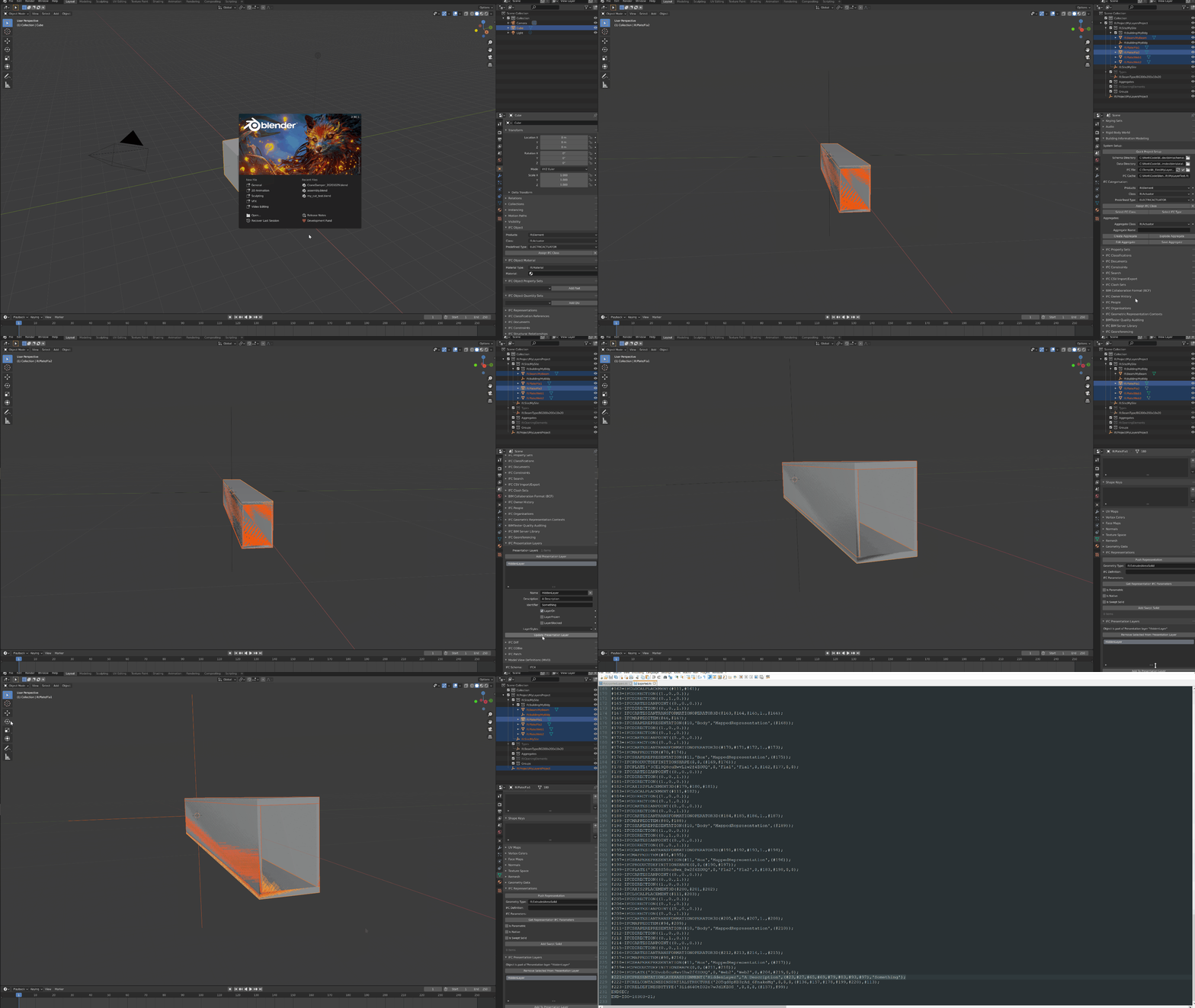
Some considerations to be discussed
IfcPresentationLayerWithStyle versus IfcPresentationLayerAssignment
Currently I switch to a IfcPresentationLayerWithStyle in the case the user chooses layerON=False as shown here. otherwise I just create the basic "IfcPresentationLayerAssignment". It can easily be modified, but for my current use case I am only investigating the layerON (which I presume controls visibility).
Assign elements in presentation layers to Blender view_layers
In order to actually hide\unhide elements assigned to presentation layers in Blender, I create a view layer in Blender with the same name as the presentation layer. However I could not really find the necessary code to add selected objects to different view_layers. See my attempt here. Any ideas how to make it work? I guess I would have to create a collection of sorts? Or perhaps there are easier way of doing this?
Best Regards
Kristoffer
Krande
on 9 Nov 2020
Additional update.
Importing presentation layers from ifc is now also supported here :)
Best Regards
Kristoffer
Krande
on 9 Nov 2020
Sorry for the delay in replying! Github notifications were going to my spam folder for some reason... awesome work! It looks allllmost there!
Shouldn't https://github.com/Krande/IfcOpenShell/blob/26510de9e09cf6d8f4b41d8ca8a6dd16e272d2d2/src/ifcblenderexport/blenderbim/bim/export_ifc.py#L2034 be if pl.layer_on is True? Or am I misunderstanding the variable...
I think a view layer in Blender is simply a preset of whether objects are hidden or shown. It would be roughly similar to the concept of a "Layer Combination" in ArchiCAD, or the visibility settings of a View Template in Revit. I do not think a view layer corresponds to a presentation layer in IFC. Therefore, I would delete this operator, as it is not needed.
For now, I would simply loop through objects and hide and show them depending on the layer. You can use obj.hide_set(True/False) to hide or show. In operator.py you can see multiple examples of this hide_set in use.
Alternatively, would you like to create a PR with the code in its current state, and I can look at how to implement the layer toggle? If so, I plan to do a release tomorrow, and this feature can be included in it :)
Moult
on 13 Nov 2020
No worries:)
I assumed the LayerON flag is True when its objects are visible? Therefore, the pl.layer_on is False is (for now) the only switch I look for when deciding which type of layer-assignment I use.
I created a pull request #1106 now and we can continue the conversation there!
Best Regards
Kristoffer
Krande
on 13 Nov 2020
Related issues
Moult
·
8Comments
 tpaviot
·
12Comments
tpaviot
·
12Comments
 otsoa
·
8Comments
Moult
·
11Comments
otsoa
·
8Comments
Moult
·
11Comments
 olomakovskyi-blackbird
·
5Comments
olomakovskyi-blackbird
·
5Comments
Most helpful comment
The first thing would be to familiarise how the presentation layers work - which I think you've done already: https://standards.buildingsmart.org/IFC/RELEASE/IFC4/ADD2_TC1/HTML/link/ifcpresentationlayerassignment.htm - you'll notice a presentation layer is more than just a layer name. It can also have a description and identifier. However, in the BlenderBIM Add-on, we currently only store one attribute, which is the name. We treat the Name as a unique key.
In particular, the presentation layer name is stored here: https://github.com/IfcOpenShell/IfcOpenShell/blob/v0.6.0/src/ifcblenderexport/blenderbim/bim/prop.py#L1468 as a string.
I would recommend as a first step, prior to building import features, is to make it so that we can store more than just a Name - we should store all data related to the presentation layer. Here are a few tips - prior to making code changes, see if you can spot how to fill out the name in the UI and do an export with a presentation layer to make sure it works.
The first change I'd make is that
presentation_layerproperty should be changed to a PointerProperty (see this as an example) and we need to create a new type for that pointer to point to, perhaps calledPresentationLayer(see this example of how a type is defined). This pointer property lets a single object point to aPresentationLayertype class - thus assigning an object to a layer. This type class should contain a name, description, and an identifier attribute as strings, as well as layer_on, layer_frozen, etc as boolean. All these changes are in theprop.pyfile - this file stores all Blender properties. They usually mirror the IFC spec 1:1. Finally, we need a new CollectionProperty, assigned to the scene's BIMProperties perhaps calledpresentation_layers. This will contain a list of all layers in the IFC.When you add a new type class, or any class, you need to add it to the init so it gets loaded - or you'll see errors in the console.
Then, after changing the properties, the export function will break. Now, I'd update the UI - currently the UI is one line of code to let the user to type in a layer name: https://github.com/IfcOpenShell/IfcOpenShell/blob/v0.6.0/src/ifcblenderexport/blenderbim/bim/ui.py#L622 This needs to be heavily updated. I think it would need an entire UI panel dedicated to presentation layers which would show a list of all layers in the project. Then, there needs to be buttons / operators which does create / update / delete / assign layers. There is plenty of sample code in other parts of the UI which does this. I'd recommend looking at the code for the ODS Schedule panel for inspiration. You'll need to create a new panel class. All this UI work should happen in the
ui.pyfile.The UI will refer to operators (buttons) like this example. They correspond to operators like this defined in the
operator.pyfile. You'll need to create new operators for adding, deleting, and assigning. There is no need to create a edit operator, as changes to the UI elements are mirrored in the properties on the fly.Now that the properties and UI is updated, it is time to update the export function. The export code is split into two halves. The
IfcParsergets data out from Blender, and theIfcExporterwrites the IFC. This is the first half and this is the second half. They'll need to be rewritten a bit to support the new richer data model.Then... build import support :) Which by this time you should be very familiar with the codebase and it should be quite easy. And then fun features like building layer visibility toggles and so on.
Sorry for the very long post, I hope it made sense, please ask as many questions as you need! I'm also generally online during Sydney waking hours at the ##architect channel on Freenode IRC.