Ifcopenshell: "Add drawing" awkward behavior
Hi Dion,
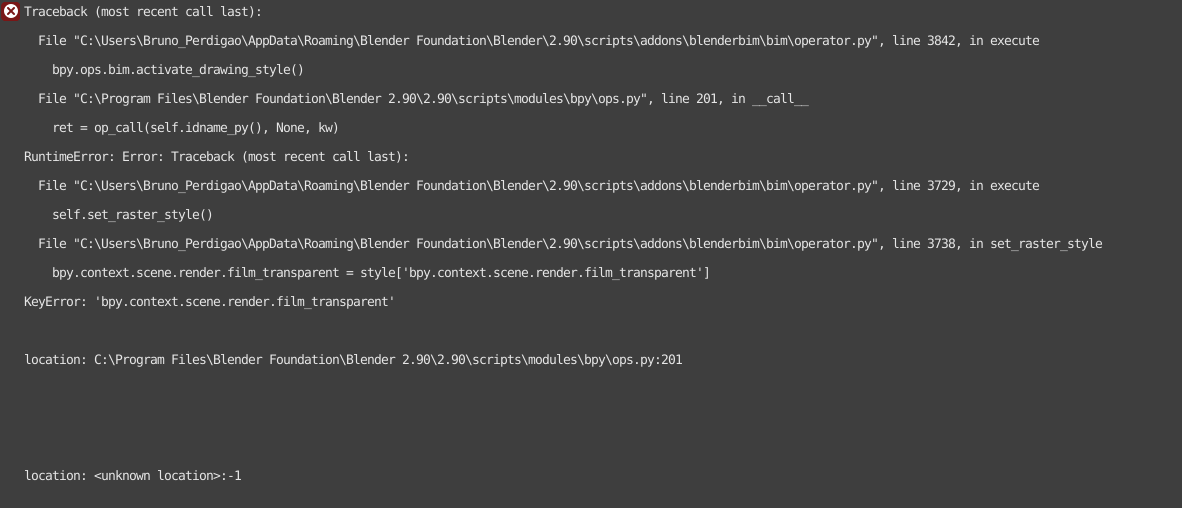
I was following your recent video "Create drawings" and it showed this error message when I clicked the "Add drawing" button. This happened while using Blender 2.9
Then I tried this using 2.83. It worked but the door was not showing properly in the svg file.

I am sending the files attached.
Thanks!
 brunoperdigao
All 7 comments
confirmed.
Traceback (most recent call last):
  File "C:\Users\ryan\AppData\Roaming\Blender Foundation\Blender\2.90\scripts\addons\blenderbim\bim\operator.py", line 3842, in execute
    bpy.ops.bim.activate_drawing_style()
  File "C:\Program Files\Blender Foundation\Blender 2.90\2.90\scripts\modules\bpy\ops.py", line 201, in __call__
    ret = op_call(self.idname_py(), None, kw)
RuntimeError: Error: Traceback (most recent call last):
  File "C:\Users\ryan\AppData\Roaming\Blender Foundation\Blender\2.90\scripts\addons\blenderbim\bim\operator.py", line 3729, in execute
    self.set_raster_style()
  File "C:\Users\ryan\AppData\Roaming\Blender Foundation\Blender\2.90\scripts\addons\blenderbim\bim\operator.py", line 3738, in set_raster_style
    bpy.context.scene.render.film_transparent = style['bpy.context.scene.render.film_transparent']
KeyError: 'bpy.context.scene.render.film_transparent'

location: C:\Program Files\Blender Foundation\Blender 2.90\2.90\scripts\modules\bpy\ops.py:201


location: <unknown location>:-1
 theoryshaw
on 19 Sep 2020
theoryshaw
on 19 Sep 2020
Yeah basically in the last release, I added support for drawing styles to remember output transparency. Since you were using the feature prior to that release, it wasn't storing that information. Such is the nature of alpha software when adding features whilst people are using it :) I suspect new files with the new release would not have this problem.
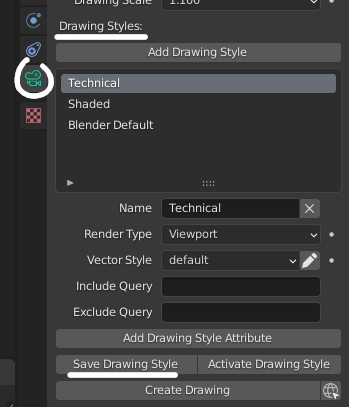
Try clicking on your drawing style and pressing save drawing style, which should now store the transparency data, that _should_ fix it.
 Moult
on 20 Sep 2020
Moult
on 20 Sep 2020
Oh, as for the missing door, in the older version of the add-on, it had some bugs in exporting 2D and also didn't enable the 2D export by default (i.e. the plan representation was disabled in the scene properties tab). I wouldn't worry too much about it - the new version should have it all fixed.
Moult
on 20 Sep 2020
Not sure that's it.
I created a new file, and still got some errors...
Video:https://www.dropbox.com/s/i3stckb0vmnl9ly/2020-09-20_09-16-33.mp4?dl=0
Might be related to #1006, as well.
theoryshaw
on 20 Sep 2020
@theoryshaw I still think that's the reason - the issue is that the add-on remembers settings, so even in a fresh file, upon startup, it's still applying the old settings. Try this: File > Defaults > Load Factory Settings. Then, once that's done, I forget if it's as simple as restarting Blender (i.e. Blender simply remembers your new add-on version settings from then on) or you need to re-enable the add-on and and save new defaults.
Give it a shot, happy to catch me online on ##architect for a screenshare to get it sorted too! And sorry for the pain :(
Moult
on 21 Sep 2020
still got the following after 'loading factory settings' and re-enabling plugins...
Version: 0.0.200912
bpy.ops.mesh.add_wall(align='WORLD', location=(0, 0, 0), rotation=(0, 0, 0))
bpy.ops.outliner.collection_drop()
Traceback (most recent call last):
  File "C:\Users\ryan\AppData\Roaming\Blender Foundation\Blender\2.90\scripts\addons\blenderbim\bim\operator.py", line 3842, in execute
    bpy.ops.bim.activate_drawing_style()
  File "C:\Program Files\Blender Foundation\Blender 2.90\2.90\scripts\modules\bpy\ops.py", line 201, in __call__
    ret = op_call(self.idname_py(), None, kw)
RuntimeError: Error: Traceback (most recent call last):
  File "C:\Users\ryan\AppData\Roaming\Blender Foundation\Blender\2.90\scripts\addons\blenderbim\bim\operator.py", line 3729, in execute
    self.set_raster_style()
  File "C:\Users\ryan\AppData\Roaming\Blender Foundation\Blender\2.90\scripts\addons\blenderbim\bim\operator.py", line 3738, in set_raster_style
    bpy.context.scene.render.film_transparent = style['bpy.context.scene.render.film_transparent']
KeyError: 'bpy.context.scene.render.film_transparent'

location: C:\Program Files\Blender Foundation\Blender 2.90\2.90\scripts\modules\bpy\ops.py:201


location: <unknown location>:-1

bpy.context.space_data.context = 'DATA'
bpy.context.object.data.BIMCameraProperties.active_drawing_style_index = 2
Traceback (most recent call last):
  File "C:\Users\ryan\AppData\Roaming\Blender Foundation\Blender\2.90\scripts\addons\blenderbim\bim\operator.py", line 3729, in execute
    self.set_raster_style()
  File "C:\Users\ryan\AppData\Roaming\Blender Foundation\Blender\2.90\scripts\addons\blenderbim\bim\operator.py", line 3738, in set_raster_style
    bpy.context.scene.render.film_transparent = style['bpy.context.scene.render.film_transparent']
KeyError: 'bpy.context.scene.render.film_transparent'

location: <unknown location>:-1

Traceback (most recent call last):
  File "C:\Users\ryan\AppData\Roaming\Blender Foundation\Blender\2.90\scripts\addons\blenderbim\bim\operator.py", line 2121, in execute
    bpy.ops.bim.activate_view(drawing_index=bpy.context.scene.DocProperties.drawings.find(camera.name.split('/')[1]))
  File "C:\Program Files\Blender Foundation\Blender 2.90\2.90\scripts\modules\bpy\ops.py", line 201, in __call__
    ret = op_call(self.idname_py(), None, kw)
RuntimeError: Error: Traceback (most recent call last):
  File "C:\Users\ryan\AppData\Roaming\Blender Foundation\Blender\2.90\scripts\addons\blenderbim\bim\operator.py", line 2397, in execute
    bpy.ops.bim.activate_drawing_style()
  File "C:\Program Files\Blender Foundation\Blender 2.90\2.90\scripts\modules\bpy\ops.py", line 201, in __call__
    ret = op_call(self.idname_py(), None, kw)
RuntimeError: Error: Traceback (most recent call last):
  File "C:\Users\ryan\AppData\Roaming\Blender Foundation\Blender\2.90\scripts\addons\blenderbim\bim\operator.py", line 3729, in execute
    self.set_raster_style()
  File "C:\Users\ryan\AppData\Roaming\Blender Foundation\Blender\2.90\scripts\addons\blenderbim\bim\operator.py", line 3738, in set_raster_style
    bpy.context.scene.render.film_transparent = style['bpy.context.scene.render.film_transparent']
KeyError: 'bpy.context.scene.render.film_transparent'

location: C:\Program Files\Blender Foundation\Blender 2.90\2.90\scripts\modules\bpy\ops.py:201


location: C:\Program Files\Blender Foundation\Blender 2.90\2.90\scripts\modules\bpy\ops.py:201


location: <unknown location>:-1
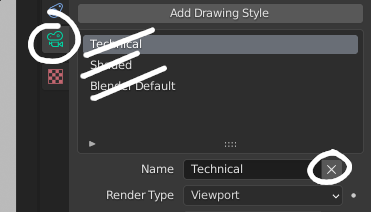
This bug is now fixed. The film_transparent issue is due to remembering settings from the old version of the add-on. Simply delete all drawing styles and then reload your file, ensuring that you have a fresh factory settings loaded - reloading will prompt it to regenerate the default drawing styles, thus fixing the issue.
Moult
on 9 Oct 2020
Related issues
 yorikvanhavre
·
13Comments
yorikvanhavre
·
13Comments
 olomakovskyi-blackbird
·
5Comments
olomakovskyi-blackbird
·
5Comments
 Ahmed-Abdelhak
·
11Comments
Moult
·
11Comments
Ahmed-Abdelhak
·
11Comments
Moult
·
11Comments
 harrycollin
·
12Comments
harrycollin
·
12Comments
Most helpful comment
This bug is now fixed. The
film_transparentissue is due to remembering settings from the old version of the add-on. Simply delete all drawing styles and then reload your file, ensuring that you have a fresh factory settings loaded - reloading will prompt it to regenerate the default drawing styles, thus fixing the issue.