Ifcopenshell: Support for IFCJSON
Still highly experimental, but now that something has been released, it would be a good idea to keep a close eye on it: https://github.com/IFCJSON-Team/IFC.JSON-4
 Moult
Moult
All 34 comments
IFCJSON support can be done right now by using a converter - not the most efficient, but it gets data out :)
https://github.com/IFCJSON-Team/IFC2JSON_python
Relevant Github issue about integration: https://github.com/BIM-Tools/IFC2JSON_python/issues/1
Moult
on 13 May 2020
@Moult Given the positive response from @janbrouwer I will give it a try over the next few days as you suggested here
 Jesusbill
on 17 May 2020
Jesusbill
on 17 May 2020
@Moult , @Jesusbill , Thanks for including this! :-D
I updated the license to MIT.
I tried to align a bit more with your implementation, latest changes are on the IFC.JSON team repo: https://github.com/IFCJSON-Team/IFC2JSON_python
We are currently working on 2 versions:
Version 4 tries to be compatible with the IFC4 EXPRESS schema.
Version 5a is about new approaches for next generation IFC.
If you have any ideas for the development of IFC.JSON, please let us know on https://github.com/IFCJSON-Team
 janbrouwer
on 21 May 2020
janbrouwer
on 21 May 2020
Sounds great @janbrouwer! I saw yesterday that you had made some advancements in the forked repository in IFCJSON-Team but I thought it was best to go with the initial implementation as a first approach. I will be following your developments and I think we could integrate the changes in the future in BlenderBIM.
If you have any ideas for the development of IFC.JSON, please let us know on https://github.com/IFCJSON-Team
Will certainly do!
Jesusbill
on 21 May 2020
@janbrouwer can I make a suggestion that the code be structured in a way that it can be imported as a Python lib, where we can directly input an IfcOpenShell file object or a filepath.
Currently, @Jesusbill has copied over the code and wrapped it a bit - this creates extra maintenance work, and demonstrates that it needs a bit of work to be a drop-in implementation for a vendor. If, instead, the changes were made upstream in the IfcJSON team's repo that it could be just loaded as a library, then instead of duplicating your code, we could simply include your library as a dependency, which is half the work, and ensures the users always get the latest version of your specification. This also helps battle test it to ensure that future vendors can very easily use your implementation.
I see you've already made some changes, so perhaps it's already been done :) but if not, more than happy to help do this as a PR if you'd like and would love to hear your thoughts!
Moult
on 22 May 2020
@Moult I converted into a combination of a module and a stand-alone tool, in the forked project repo https://github.com/IFCJSON-Team/IFC2JSON_python.
Does that work for you?
For now it takes a filepath as input because I'm experimenting with OBJ geometry generated using binary IfcConvert in the 5a version.
If you have any suggestions or improvements as a PR, they are most welcome!
janbrouwer
on 22 May 2020
It looks like @Jesusbill 's code basically takes an IfcOpenShell file object (instead of an actual file in the original IFC2JSON_python code) and creates the json file from it right? Amazing... That could be used almost without any change in FreeCAD as well.
As you asked for it @janbrouwer ;) I would suggest you allow that as well upstream (init the IFC2JSON object with either a physical IFC file or an IfcOpenShell file object)... At the end of the FreeCAD IFC export, we have a complete IfcOpenShell file object, ready for disk write... It would be a very simple thing to then divert it through IFC2JSON.
 yorikvanhavre
on 22 May 2020
yorikvanhavre
on 22 May 2020
@yorikvanhavre Cool! Good idea.
I don't know how to implement that neatly for both JSON versions while keeping the same interface. Any ideas? This is how I call them know for the commandline input: https://github.com/IFCJSON-Team/IFC2JSON_python/blob/master/ifc2json.py
janbrouwer
on 22 May 2020
Bump - progress on this?
Moult
on 4 Jul 2020
Bump - progress on this?
I think @janbrouwer has already done most of the work needed.
A last touch could possibly be in ifc2json4.py to have instead of
    def __init__(self, ifcFilePath):
        self.ifcFilePath = ifcFilePath
        self.ifcModel = ifcopenshell.open(ifcFilePath)
something along these lines
    def __init__(self, ifcFilePath, filePath=True):
        if filePath:
            self.ifcFilePath = ifcFilePath
            self.ifcModel = ifcopenshell.open(ifcFilePath)
        else:
            self.ifcFilePath = None
            self.ifcModel = ifcFilePath
perhaps using ifcFile instead of ifcFilePath to be more precise.
Thoughts?
Jesusbill
on 14 Jul 2020
Yeah, maybe that's the best option. I can't think of anyting more "elegant" ;-)
We are still figuring out the exact versions we want to use for ifcjson.
The IFC4 version is quite far, but for the IFC5 direction there is still some ongoing discussion.
The current python script for IFC5 also uses the binary "ifcconvert" for creating OBJ meshes.
What are your ideas on this? Would it be easier/more robust to include pythonocc and generate(OBJ/glTF) meshes on the fly?
janbrouwer
on 16 Jul 2020
@janbrouwer You don't need PythonOCC for that. IfcOpenShell can deliver meshed representations from ifcopenshell.geom.convert_shape() without it. It's a bunch of flattened Python lists for vertices and indices, but equivalent to OBJ output.
 aothms
on 16 Jul 2020
aothms
on 16 Jul 2020
Whoa! Cool! Thanks Thomas! Also including opening elements etc?
janbrouwer
on 16 Jul 2020
@aothms do you also have ideas for meshes as glTF? Probably no python wrappers for that ifcconvert output?
janbrouwer
on 16 Jul 2020
Whoa! Cool! Thanks Thomas! Also including opening elements etc?
Yes, depending on settings, on by default.
do you also have ideas for meshes as glTF? Probably no python wrappers for that ifcconvert output?
Well gltf is basically binary OBJ, with a minimal json wrapper. Both can be quickly created from the meshed representations IfcOpenShell gives you.
aothms
on 16 Jul 2020
Yes, depending on settings, on by default.
Nice
Well gltf is basically binary OBJ, with a minimal json wrapper. Both can be quickly created from the meshed representations IfcOpenShell gives you.
Hmmm than I still didn't understand glTF properly, I thought .glTF was pure json and only .glb was binary. But it makes much sense for filesize and efficiency. I only now found out glb is just a container for the seperate .bin and json files. Have to think on how to implement that in ifcjson. Sticking with OBJ for now :-D
janbrouwer
on 16 Jul 2020
@aothms Can you point me to the right file in the code? I can't find the "ifcopenshell.geom.convert_shape()" method
janbrouwer
on 16 Jul 2020
@janbrouwer I believe he meant create_shape https://github.com/IfcOpenShell/IfcOpenShell/blob/v0.6.0/src/ifcopenshell-python/ifcopenshell/geom/main.py#L173
Jesusbill
on 16 Jul 2020
@aothms @janbrouwer glTF's output is or can be binary but it's pure JSON (and I think they have one of the best as well as clear documentation)
However, I think Thomas knows limitations about WebGL, glTF, ... (https://github.com/KhronosGroup/glTF/issues/1783), and even their efficiency/performance (including JSON-based solutions), so this is why he constantly mentioned "binary" approach
 EAzari
on 16 Jul 2020
EAzari
on 16 Jul 2020
@janbrouwer although more ideal to output to glTF directly, perhaps you could use obj2gltf in the meantime?
Moult
on 17 Jul 2020
@janbrouwer although more ideal to output to glTF directly, perhaps you could use obj2gltf in the meantime?
@Moult I think then the systemcall to ifcconvert is easier in the meantime. obj2gltf would mean porting that from javascipt or including node or something don't you think?
janbrouwer
on 17 Jul 2020
@aothms @janbrouwer glTF's output is or can be binary but it's pure JSON (and I think they have one of the best as well as clear documentation)
I need to do some more reading about the internal workings of glTF, first the base using OBJ...
janbrouwer
on 17 Jul 2020
something along these lines
def __init__(self, ifcFilePath, filePath=True):
    if filePath:
        self.ifcFilePath = ifcFilePath
        self.ifcModel = ifcopenshell.open(ifcFilePath)
    else:
        self.ifcFilePath = None
        self.ifcModel = ifcFilePath
perhaps using ifcFile instead of ifcFilePath to be more precise.
Thoughts?
Or like this:
 def __init__(self, ifcFilePath):
     if isinstance(filePath,ifcopenshell.file):
        self.ifcModel = ifcFilePath
    else:
        self.ifcModel = ifcopenshell.open(ifcFilePath)
@janbrouwer I believe he meant
create_shapehttps://github.com/IfcOpenShell/IfcOpenShell/blob/v0.6.0/src/ifcopenshell-python/ifcopenshell/geom/main.py#L173
Cool! Got it, I used that method before, but had to dig a little deeper ;-)
janbrouwer
on 17 Jul 2020
Or like this:
Good one, that's even neater!
janbrouwer
on 17 Jul 2020
janbrouwer
on 17 Jul 2020
I also removed the dependency on subprocess and ifcconvert, much better now, thanks for the help everyone!
https://github.com/IFCJSON-Team/IFC2JSON_python/commit/9f01f9078574dd39758cd9abde2d9278137302da
janbrouwer
on 30 Jul 2020
@janbrouwer awesome work! Now we can use IFCJSON without any wrapper!
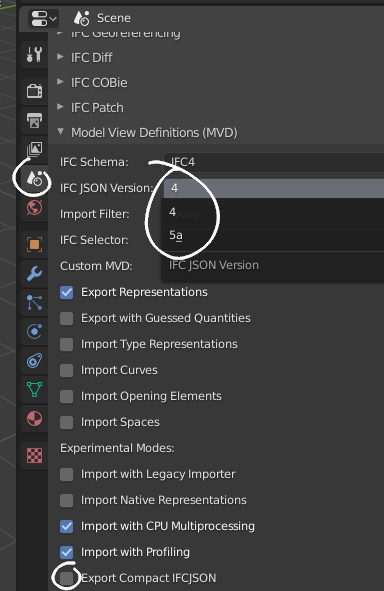
The latest version of the BlenderBIM Add-on will now support exporting IFCJSON files, both compact and non-compact, v4 and v5a. Any further changes you make to the repo, assuming your API doesn't change, will automatically be made available in all future BlenderBIM Add-on releases too so that more people can help test :)
Moult
on 9 Aug 2020
@janbrouwer awesome work! Now we can use IFCJSON without any wrapper!
The latest version of the BlenderBIM Add-on will now support exporting IFCJSON files, both compact and non-compact, v4 and v5a. Any further changes you make to the repo, assuming your API doesn't change, will automatically be made available in all future BlenderBIM Add-on releases too so that more people can help test :)
Cool! And thanks again 😄
janbrouwer
on 9 Aug 2020
This is awesome @Moult. This will cut development time of the standard in half, easily!
aothms
on 9 Aug 2020
Does IFCJSON support Ifc2JSON, and IFC2JSON?
I mean does it generate schema/spec?
EAzari
on 9 Aug 2020
@EAzari the IFC schema is identical for both JSON and SPF - they are simply two formats of representing data from the same schema, so there is no conversion.
Unless you mean the spec of the file format, in which case usually file format specifications are specified as a separate document.
Moult
on 10 Aug 2020
JFYI FreeCAD now (finally) exports to ifcjson as well: https://github.com/FreeCAD/FreeCAD/commit/c3b0af2d8de25c1fc2e595d6222682c366ed3f37
yorikvanhavre
on 27 Nov 2020
@yorikvanhavre, @Jesusbill
The reporitory for ifcJSON just got it's definitive place at https://github.com/buildingSMART/ifcJSON.
All sub-projects are merged there, including the ifc2json and json2ifc tools.
janbrouwer
on 28 Nov 2020
Related issues
 otsoa
·
8Comments
otsoa
·
8Comments
 Skyndia
·
13Comments
Skyndia
·
13Comments
 AlexanderNitsch
·
4Comments
AlexanderNitsch
·
4Comments
 aahoo
·
9Comments
aahoo
·
9Comments
 harrycollin
·
12Comments
harrycollin
·
12Comments
Most helpful comment
JFYI FreeCAD now (finally) exports to ifcjson as well: https://github.com/FreeCAD/FreeCAD/commit/c3b0af2d8de25c1fc2e595d6222682c366ed3f37