Identityserver4: Identity Server 4 Redirect Fails In Edge and IE 11
I'm experiencing a very weird issue in our redirects with Microsoft's browsers.
We have two web applications secured behind an identity server 4 implementation. One of these applications (Sales App) is an angular 5 app with a very basic MVC application serving it up, and the other (Admin App) is a fully fledged MVC application.
When we try to load SalesAppUrl it redirects to our identity portal, as I'd expect, and allows us to login. After the redirect, though, Edge and IE both give the error INET_E_DOWNLOAD_FAILURE, and look like they did not even try to load the page (from network traffic). The redirect from the identity server occur, but all other calls stay stuck at "pending" with a 0s time. The only console information is navigation occured and "CSS3121: The media query -ms-viewport has been deprecated."
The real weird thing is that when we try to go to AdminAppUrl, it does the same thing for Edge, but actually loads fully in IE 11 without issue.
When I run the SalesApp locally, connected to the same identity server as the live version, everything works fine.
Our middleware configuration is in this SO question
I am working at creating a minimally functional version of this to show the issue (though it's a challenge due to the fact that local code works fine).
Versions:
Microsoft Edge 41.16299.967.0
Microsoft EdgeHTML 16.16299
Internet Explorer 11.0.110
IdentityServer4.AspNetIdentity (2.3.0)
IdentityServer4.Entity.Framework(2.3.2)
.Net Core 2.1
 dresdor
All 16 comments
Sorry no idea. Any update?
 brockallen
on 10 Apr 2019
brockallen
on 10 Apr 2019
Unfortunately other priorities have taken precedence over this issue. I
will be looking at it hopefully soon.
-Marshall
On Wed, Apr 10, 2019 at 1:45 PM Brock Allen notifications@github.com
wrote:
Sorry no idea. Any update?
—
You are receiving this because you authored the thread.
Reply to this email directly, view it on GitHub
https://github.com/IdentityServer/IdentityServer4/issues/3101#issuecomment-481814864,
or mute the thread
https://github.com/notifications/unsubscribe-auth/Af-JauJvbwc3MxICyF_8msC2e2kB8xOlks5vfjFkgaJpZM4b1LF4
.
dresdor
on 11 Apr 2019
I'll close this for now then until you have an update.
brockallen
on 11 Apr 2019
We are able able to reproduce this bug. We are using IdentityServer4.
When using Chrome or FF we are able to authenticate. When using IE 11 or Edge we do not get redirected.
The network traffic goes to /callback/authorize/callback?...
to
Would it be best to reopen this bug or to submit a new bug?
 BertCotton
on 10 Dec 2019
BertCotton
on 10 Dec 2019
We can reopen. Can you provide repo steps?
brockallen
on 11 Dec 2019
Sure thing.
We have IdentityServer4 setup with federated login to O365
We have a local web app that requests the user be logged in. This web app is using DotNet Core 2.1 with the extension method "services.AddOpenIdconnect()"
When I go to our web app in IE 11 or Chrome my network traffic looks like this:
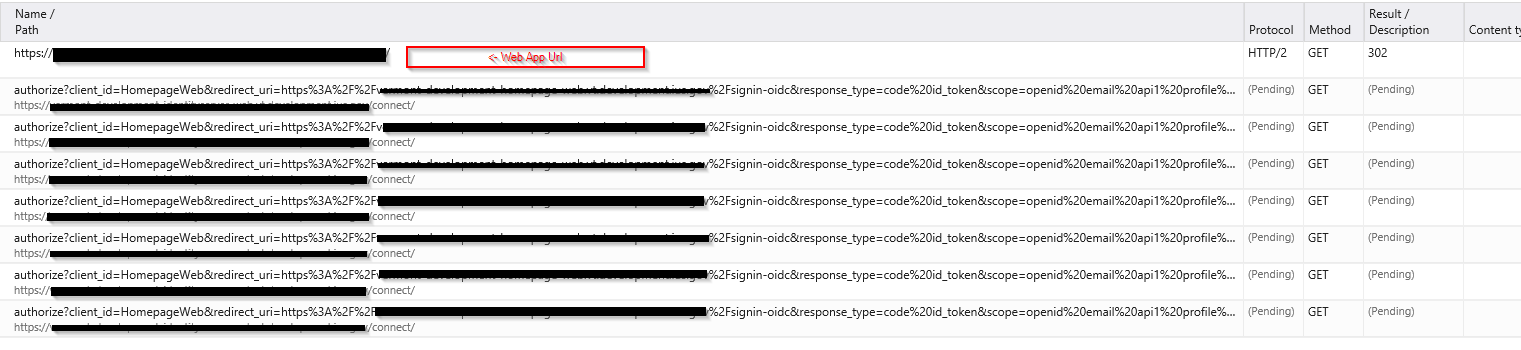
It is odd that we see 7 requests and they are all pending.
Doing the same test (going to the web page) in Chrome or FF does not have this effect. A single request to the /connect/authorize is returned as a 302, and we proceed to /Login then to O365 /authorize and then to /Account/ExternalLoginCallback in IdentityServer.
BertCotton
on 11 Dec 2019
This issue has been automatically marked as stale because it has not had recent activity. It will be closed if no further activity occurs. Thank you for your contributions.
![stale[bot] picture](https://avatars3.githubusercontent.com/in/1724?v=4&s=40) stale[bot]
on 10 Jan 2020
stale[bot]
on 10 Jan 2020
Hi,
We had the same issue - a combination of nginx/Edge/HTTP2 (https://github.com/kubernetes/ingress-nginx/issues/3499). Hope this helps.
Cheers
 egissan
on 13 Jan 2020
egissan
on 13 Jan 2020
We're having the same issue. Also running this in a kube pod with nginx. Works fine in Chrome/FF, but not IE/Edge.
Using IdentityServer4 to connect to Azure AD. I get thru the login.microsoft.com page, but on redirect back, no joy.
Also, /.well-known/openid-configuration isn't working.
 DaleyKD
on 17 Jan 2020
DaleyKD
on 17 Jan 2020
Additional info: If Fiddler is open, it works. I guess that's because Fiddler is acting as a proxy?
DaleyKD
on 17 Jan 2020
"Fiddler doesn't support HTTP2 yet so, the connection changes to HTTP 1.1".
The solution is in the link I've posted. Basically you need to set http2-max-field-size: "16k" in nginx settings.
egissan
on 19 Jan 2020
I have the opposite issue... in chrome, it does not work but edge (latest one) works perfectly.
in chrome, I'm going into login page infinite loop.
Google Chrome is up to date
Version 79.0.3945.130 (Official Build) (64-bit)
 Gutek
on 3 Feb 2020
Gutek
on 3 Feb 2020
@egissan : Was finally able to test out what you suggested. Bumping http2-max-field-size and http2-max-header-size to 64k fixed two issues for us!
DaleyKD
on 3 Feb 2020
We had the same problem with Angular + .NET Core 3 with SignalR, Nginx in front via HTTP/2. Increasing these two limits solved the problem. Note that the reaching of limit is clearly stated in Nginx log files if you enable the debug log.
 krisztiankocsis
on 9 Mar 2020
krisztiankocsis
on 9 Mar 2020
Given the future of IE/Edge, I think we can close this.
brockallen
on 7 Sep 2020
This issue has been automatically locked since there has not been any recent activity after it was closed. Please open a new issue for related bugs.
![github-actions[bot] picture](https://avatars2.githubusercontent.com/in/15368?v=4&s=40) github-actions[bot]
on 26 Nov 2020
github-actions[bot]
on 26 Nov 2020
Related issues
 cixonline
·
3Comments
cixonline
·
3Comments
 chrisrestall
·
3Comments
chrisrestall
·
3Comments
 agilenut
·
3Comments
agilenut
·
3Comments
 not-good-with-usernames
·
3Comments
not-good-with-usernames
·
3Comments
 user1336
·
3Comments
user1336
·
3Comments