Identityserver4: integration test 's open id connect throw "System.Net.CookieException : The 'Path'='/signin-oidc' part of the cookie is invalid "
I have a mvc client use the oidc feature with asp.net identity.Config in startup is that:
            services.AddAuthentication(options =>
            {
                options.DefaultScheme = "Cookies";
                options.DefaultChallengeScheme = "oidc";
            })
            .AddCookie("Cookies")
            .AddOpenIdConnect("oidc", options =>
            {
                options.SignInScheme = "Cookies";

                //44341 is the port of Identity.API project
                options.Authority = "https://localhost:44341";

                options.RequireHttpsMetadata = false;

                options.ClientId = "mvc";

                options.ClientSecret = "secret";

                options.ResponseType = "code id_token";

                options.SaveTokens = true;

                options.GetClaimsFromUserInfoEndpoint = true;

                options.Scope.Add("api1");

                options.Scope.Add("offline_access");

            });
Integration test code use this httpclient:
             var client = mvcFactory.CreateClient(new
             Microsoft.AspNetCore.Mvc.Testing.WebApplicationFactoryClientOptions()
            {
                HandleCookies=true,
                AllowAutoRedirect=false,
                BaseAddress=new Uri ("https://localhost:44332/")
            })
or this from the identity model's code:
            var client = new BrowserClient(new BrowserHandler(mvcHandler))
            {
                AllowCookies=true,
                BaseAddress=new Uri("https://localhost:44332/"),
                AllowAutoRedirect=false
            };
Then run the test show this error:
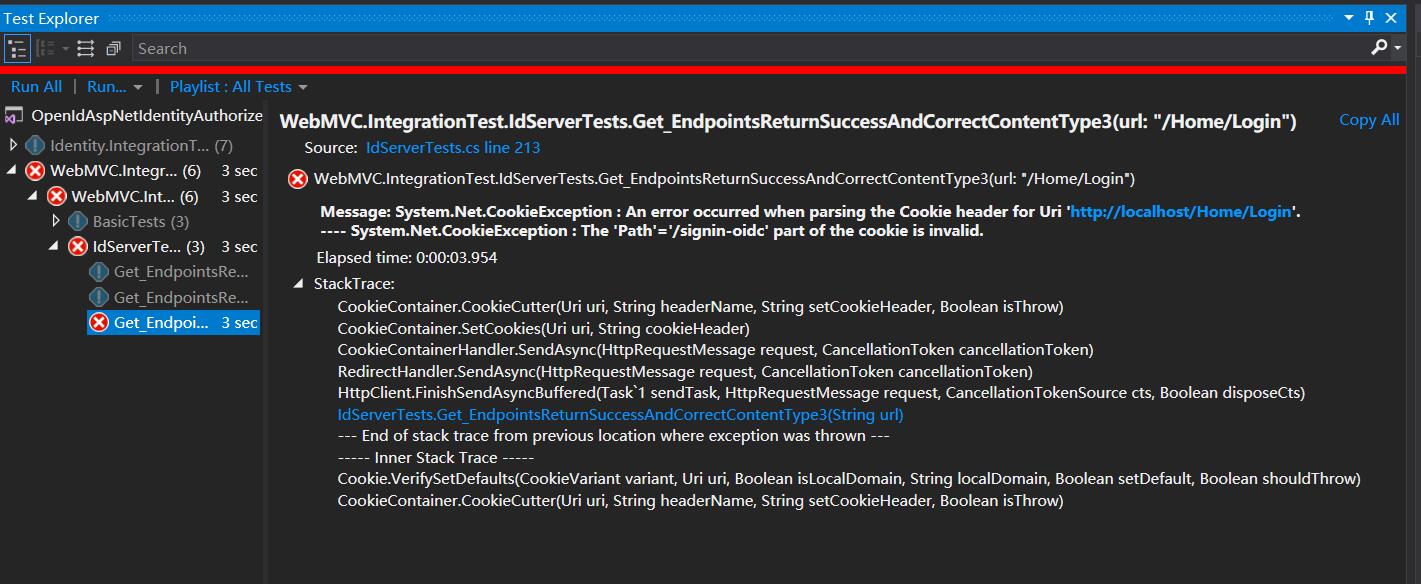
Message: System.Net.CookieException : An error occurred when parsing the Cookie header for Uri 'https://localhost:44332/Home/Login'.
---- System.Net.CookieException : The 'Path'='/signin-oidc' part of the cookie is invalid.
Do that because I want get the access_token from
HttpContext.GetTokenAsync("access_token");
Because I do the oidc with the authorize feature, so I can get access token by used the id and secure,but this token didn't had the correct role for access the protected api.
So I do above code to simulator the login round trip to get the logined access_token.
 jingliancui
All 27 comments
Then today I check the source code of the .net core 's CookieContainerHandler here
and the handler of the identity sample code here
exception throw in the SetCookies method of the class CookieContainer.
That all info now I can provide.
jingliancui
on 5 Jan 2019
Please show the configuration information code of your identity server for more information
 AutismPatient
on 11 Jan 2019
AutismPatient
on 11 Jan 2019
Hi @AutismPatient
Here is the config of the identity server:
public List<Client> GetClients()
{
var result = new List<Client>
{
new Client
{
ClientId = "mvc",
ClientName = "MVC Client",
AllowedGrantTypes = GrantTypes.HybridAndClientCredentials,
RequireConsent = false,
AlwaysIncludeUserClaimsInIdToken = true,
AlwaysSendClientClaims = true,
//Claims=
UpdateAccessTokenClaimsOnRefresh = true,
RefreshTokenUsage = TokenUsage.OneTimeOnly,
ClientSecrets =
{
new Secret("secret".Sha256())
},
//44332 is the port of mvc porject
RedirectUris = { "https://localhost:44332/signin-oidc" },
PostLogoutRedirectUris = { "https://localhost:44332/signout-callback-oidc" },
AllowedScopes =
{
IdentityServerConstants.StandardScopes.OpenId,
IdentityServerConstants.StandardScopes.Profile,
"api1"
},
AllowOfflineAccess = true
}
};
return result;
}
and config in startup.cs :
services.AddIdentityServer(options =>
{
options.Events.RaiseSuccessEvents = true;
options.Events.RaiseFailureEvents = true;
options.Events.RaiseErrorEvents = true;
})
.AddDeveloperSigningCredential()
.AddConfigurationStore(options =>
{
options.ConfigureDbContext = builder =>
builder.UseMySql(connStr,
sql => sql.MigrationsAssembly(migrationsAssembly));
})
.AddOperationalStore(options =>
{
options.ConfigureDbContext = builder =>
builder.UseMySql(connStr,
sql => sql.MigrationsAssembly(migrationsAssembly));
options.EnableTokenCleanup = true;
options.TokenCleanupInterval = 30;
})
.AddAspNetIdentity<IdApiUser>();
Do you use in pipe set Configure: Initializes the authentication method
AutismPatient
on 14 Jan 2019
app.UseIdentityServer();
had been in the Configure method.
Is it the initializes method you said ?
jingliancui
on 14 Jan 2019
app.UseAuthentication();
AutismPatient
on 14 Jan 2019
The mvc client's Configure method of startup.cs had been use the
app.UseAuthentication();
jingliancui
on 14 Jan 2019
options.RequireHttpsMetadata = false; Take it out and see what happens
AutismPatient
on 14 Jan 2019
Take it out options.RequireHttpsMetadata = false;
Same error :
jingliancui
on 14 Jan 2019
The url in your header is incorrect because it does not point to your identity server address
AutismPatient
on 14 Jan 2019
I understand your said ,but I can't figure it out all these run in in-memory(test environment).
And I had prepared 2 project, 1 is Identityserver with oidc, another is the mvc client.
Then ,2 project run fine in debug and release.(interact with the real webside).
Above things as the basis, I then create a mvc client's integration test project .
- Reference idserver project and the mvc client project.
- create 2 customize WebApplicationFactory , one for the identityserver and one for mvc client
- config the testserver's baseurl (optional step)
- use
WebApplicationFactory.CreateClientcreate the mvc's httpclient to serve the home/login url
These 4 step is now I do, the httpclient create from the factory has been config handle cookie by default.
You said that it does not point to identityserver address because is it the integration test still can not be interact with two WebApplicationFactory(2 testserver,1 is identityserver and 1 is mvc client) ?
jingliancui
on 14 Jan 2019
This may be because the callback address specified by the identity server is not the same as the address you used in the integration test, typically /sigin-oidc instead of /login
AutismPatient
on 15 Jan 2019
Hey dudes
could any one send me a sample of configured identity server4 with asp.net
core Mvc client and entityframework core
On Tue, Jan 15, 2019 at 6:11 AM Salif Dianda notifications@github.com
wrote:
This may be because the callback address specified by the identity server
is not the same as the address you used in the integration test, typically
/sigin-oidc instead of /login—
You are receiving this because you are subscribed to this thread.
Reply to this email directly, view it on GitHub
https://github.com/IdentityServer/IdentityServer4/issues/2925#issuecomment-454235817,
or mute the thread
https://github.com/notifications/unsubscribe-auth/AYmz-gul_KGZeCoHc83nyZaxwT38EAFjks5vDTG_gaJpZM4Zpszu
.
 tamimehsas
on 15 Jan 2019
tamimehsas
on 15 Jan 2019
@tamimehsas EF' s Sample Just check here:
http://docs.identityserver.io/en/latest/reference/ef.html
and here:
https://github.com/IdentityServer/IdentityServer4.Samples
jingliancui
on 15 Jan 2019
@AutismPatient
No/login for me .
The /Home/Login I pass to the test method just this in mvc controller:
[Authorize]
public IActionResult Login()
{
return Content("Login");
}
Because I know after add [Authorize] to action will redirect user to the login page which in identity server oidc if user not logined.
jingliancui
on 15 Jan 2019
@AutismPatient
Or do you need the sample code ?
if yes I upload this sample for you .
jingliancui
on 15 Jan 2019
[Authorize]
public ....... Home(){
return View();
}
Your validator doesn't have to be on Login, it has to be somewhere else
AutismPatient
on 16 Jan 2019
I don't understand what you said.
Can you tell me more detail?please
jingliancui
on 16 Jan 2019
It also doesn't get to the root of the problem
AutismPatient
on 22 Jan 2019
@AutismPatient yep...
jingliancui
on 22 Jan 2019
So did you all sort out if there's a problem or not? I don't think anyone here has had time to look into this.
 brockallen
on 24 Jan 2019
brockallen
on 24 Jan 2019
I just ran into a very similar problem today when trying to get an integration test working. I managed to solve it by setting the cookie paths like this:
.AddOpenIdConnect(OpenIdConnectDefaults.AuthenticationScheme, options =>
                {
                    options.CorrelationCookie.Path = "/";
                    options.NonceCookie.Path = "/";
It seems like the cookie paths defaults to the same value as that of options.CallbackPath. I think that "/" would be a better default for the cookie paths. (Some more security minded person might disagree...)
 twogood
on 1 Feb 2019
twogood
on 1 Feb 2019
After devising my own solution I also found this example of the same fix in code by @Tratcher:
twogood
on 1 Feb 2019
@twogood Thanks so much , I'll test your solution later : )
So I want keep this issue still open status.
@brockallen
@AutismPatient
jingliancui
on 1 Feb 2019
@twogood It's work!!!Thanks so much.It's really useful to use the cookie,or I have do much code work in the project code to do simulated.
And with your help , I have reach the last step of the process of the integration test.And the last problem here https://github.com/IdentityServer/IdentityServer4/issues/3067
It's seem like that is an issue,we can discuss in the new thread 😀
jingliancui
on 28 Feb 2019
FYI, there is more information about the underlying problem on https://github.com/dotnet/corefx/issues/27520 and here https://github.com/dotnet/corefx/issues/29651
Once that last issues is addressed this workaround should no longer be necessary.
 westonpace
on 26 Apr 2019
westonpace
on 26 Apr 2019
This thread has been automatically locked since there has not been any recent activity after it was closed. Please open a new issue for related bugs.
![lock[bot] picture](https://avatars1.githubusercontent.com/in/6672?v=4&s=40) lock[bot]
on 11 Jan 2020
lock[bot]
on 11 Jan 2020
Related issues
 agilenut
·
3Comments
agilenut
·
3Comments
 not-good-with-usernames
·
3Comments
not-good-with-usernames
·
3Comments
 klioqc
·
3Comments
klioqc
·
3Comments
 createroftheearth
·
3Comments
createroftheearth
·
3Comments
 chrisrestall
·
3Comments
chrisrestall
·
3Comments
Most helpful comment
I just ran into a very similar problem today when trying to get an integration test working. I managed to solve it by setting the cookie paths like this:
It seems like the cookie paths defaults to the same value as that of options.CallbackPath. I think that "/" would be a better default for the cookie paths. (Some more security minded person might disagree...)