Identity: Setting the LoginPath not working int ASP.NET Core 2.0
        services.ConfigureApplicationCookie(options =>
        {
            options.LoginPath = "/Login/Index";
            options.ReturnUrlParameter = "RedirectUrl";
            options.LogoutPath = "/Login/Logout";
            options.AccessDeniedPath = "/Login/Index";
            options.ExpireTimeSpan = new TimeSpan(0, 15, 0);

        });
After setting this "/Account/Login?RedirectUrl=%2F" is being used. I can manually go to the login page and login. Is there another options I need to set now? I can see that it is using ReturnUrlParameter and ExpireTimeSpan.
 anester
All 9 comments
How is the challenge triggering? Is it just via [Authorize]? Can you show us all your config?
 blowdart
on 6 Sep 2017
blowdart
on 6 Sep 2017
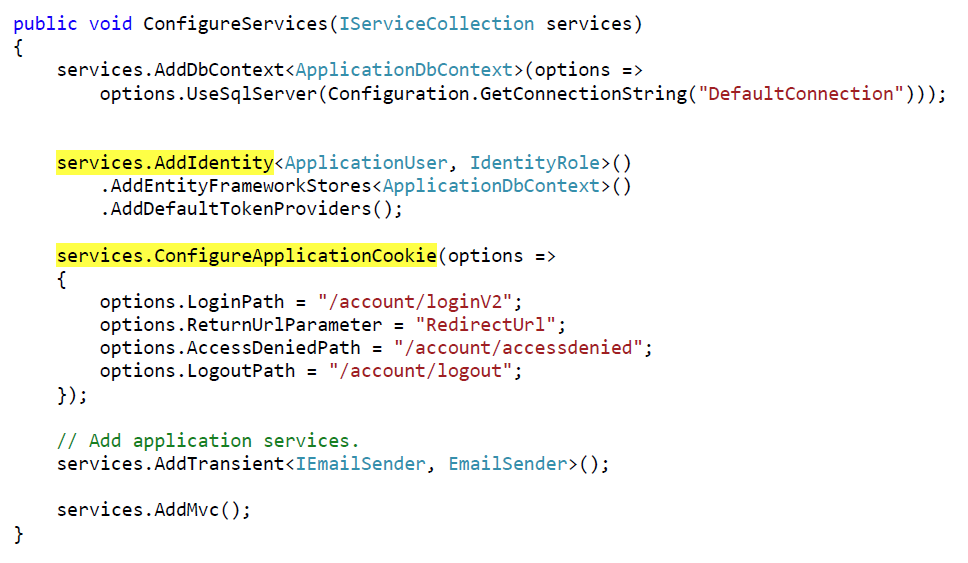
Try configuring "Services.AddIdentity" then "Services.ConfigureApplicationCookie" as shown below.
 justin-ruffin
on 8 Sep 2017
justin-ruffin
on 8 Sep 2017
@justin-ruffin 's suggestion worked for me
 dkent600
on 19 Sep 2017
dkent600
on 19 Sep 2017
Where is that stated in the documentation?
 develax
on 19 Apr 2018
develax
on 19 Apr 2018
Why does the order affect behavior?
This isn't obvious at all and is driving me insane.
 worldbeater
on 21 Apr 2018
worldbeater
on 21 Apr 2018
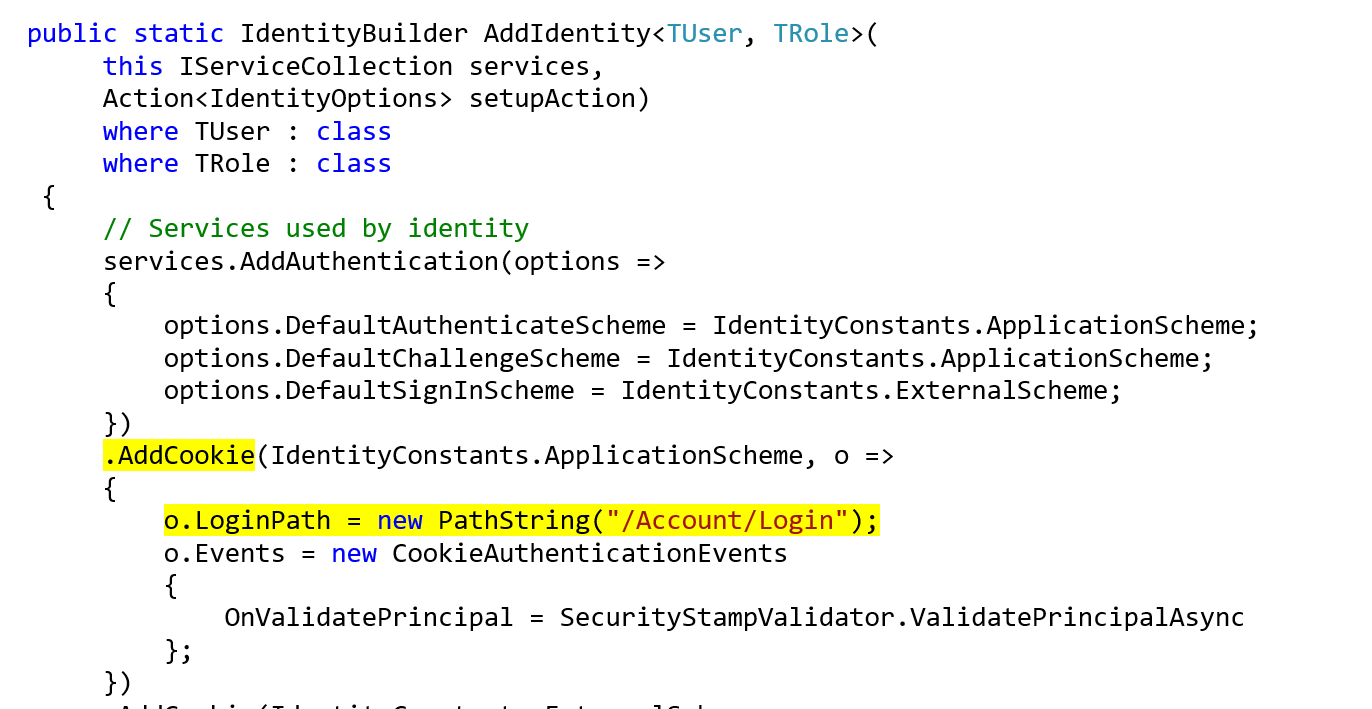
The reason the order matters is because "AddIdentity" configures the application cookie.
If you call "ConfigureApplicationCookie" prior to "AddIdentity" then your custom configuration is overwritten.
See Below:
justin-ruffin
on 21 Apr 2018
Hi I still facing this issue even after placing ConfigureApplicationCookie after AddDefaultIdentity.
Any suggestions?
Here is my ConfigureServices:
>
>
>
public void ConfigureServices(IServiceCollection services)
{services.Configure<CookiePolicyOptions>(options => { options.CheckConsentNeeded = context => true; options.MinimumSameSitePolicy = SameSiteMode.None; }); services.AddSingleton<IDatabaseFactory, DatabaseFactory>(); services.AddTransient<ConferencesRepository>(); services.AddTransient<IUserStore<IdentityUser>, UserStore>(); services.AddTransient<IEmailSender, EmailSender>(s => new EmailSender( Configuration["EmailSender:Host"], ..... Configuration["EmailSender:Password"] ) ); services.AddDefaultIdentity<IdentityUser>(); services.Configure<IdentityOptions>(options => { // Password settings. options.Password.RequireDigit = false; ..... options.User.RequireUniqueEmail = false; }); services.ConfigureApplicationCookie(options => { options.LoginPath = new PathString("/Account/LoginRegister"); }); services.AddMvc().SetCompatibilityVersion(CompatibilityVersion.Version_2_1); }
Forgot to mention that I am using ASP.NET Core 2.1.1
 wutever0
on 15 Oct 2018
wutever0
on 15 Oct 2018

I commented .AddDefaultUI() and it worked!
 hatefghani
on 3 Nov 2018
hatefghani
on 3 Nov 2018
Hi, anyone could do it with ASP.NET IdentityServer4? I have set it after adding Identity and even after IdentityServer configuration (I also tried before too), and removed the AddDefaultUI, but it still redirects me to /account/login. Here is the code:
            services.AddDbContext<ApplicationDbContext>(options =>
                options.UseSqlServer(apiSettings.ConnectionStrings.BibliIdContext));
            services.AddIdentity<IdentityUser, IdentityRole>()
                .AddEntityFrameworkStores<ApplicationDbContext>()
                .AddDefaultTokenProviders();
                //.AddDefaultUI();

            var migrationsAssembly = typeof(Startup).Assembly.GetName().Name;

            services
                .AddIdentityServer()
                .AddDeveloperSigningCredential()
                .AddConfigurationStore(options =>
                {
                    options.ConfigureDbContext = builder =>
                    {
                        builder.UseSqlServer(
                            apiSettings.ConnectionStrings.BibliIdContext,
                            sql => sql.MigrationsAssembly(migrationsAssembly));
                    };
                })
                .AddOperationalStore(options =>
                {
                    options.ConfigureDbContext = builder =>
                    {
                        builder.UseSqlServer(
                            apiSettings.ConnectionStrings.BibliIdContext,
                            sql => sql.MigrationsAssembly(migrationsAssembly));
                    };

                    options.EnableTokenCleanup = true;
                })
                .AddAspNetIdentity<IdentityUser>();

            services.ConfigureApplicationCookie(options =>
            {
                options.LoginPath = "/Identity/Account/LoginTest";
                options.LogoutPath = "/Identity/Account/Logout";
            });


            services
                .AddMvc()
                .SetCompatibilityVersion(CompatibilityVersion.Version_2_1);
EDIT: Founded the solution from IdentityServer's documentation. For those who search for it later:
                .AddIdentityServer(options =>
                {
                    options.UserInteraction.LoginUrl = "/Identity/Account/Login";
                    options.UserInteraction.LogoutUrl = "/Identity/Account/Logout";
                })
 datvm
on 9 Nov 2018
datvm
on 9 Nov 2018
Related issues
 VR-Architect
·
6Comments
VR-Architect
·
6Comments
 Vaylandt
·
9Comments
Vaylandt
·
9Comments
 PaulRReynolds
·
4Comments
PaulRReynolds
·
4Comments
 richerp
·
9Comments
richerp
·
9Comments
 hikalkan
·
6Comments
hikalkan
·
6Comments
Most helpful comment
Try configuring "Services.AddIdentity" then "Services.ConfigureApplicationCookie" as shown below.