Identity: How to include Roles in IdentityUser?
https://github.com/aspnet/Identity/commit/f555a26b4a554f73eea70b4b34fca823fab9a643
I see the change by making roles optional....
As I need to use the roles in IdentityUser, how can I do that?
Not using compatibility namespace I hope...
 andrew-vdb
All 44 comments
// <summary>
/// Navigation property for the roles this user belongs to.
/// </summary>
public virtual ICollection<IdentityRole> Roles { get; } = new List<IdentityRole>();
Once I add this to my poco object, another issue come up, it seems IdentityRole property changed from RoleId to Id
andrew-vdb
on 15 Aug 2017
hi @andrew-vandenbrink same issue here although i got a little further: it has to be public ICollection<IdentityUserRole<string>> Roles { get; set; } because user to role relation is m2n. that way my code is compiling but have trouble when starting. if i do nothing ef generates another user id property in the userroles table.
then i added the following in OnModelCreating
builder.Entity<MyUser>()
.HasMany( p => p.Roles )
.WithOne()
.HasForeignKey( p => p.UserId )
.HasPrincipalKey( p => p.Id )
then i got the following during migration:
"The relationship from 'IdentityUserRole<string>' to 'MyUser' with foreign key properties {'UserId' : string} cannot target the primary key {'Id' : string} because it is not compatible. Configure a principal key or a set of compatible foreign key properties for this relationship."
so i dunno why string is not compatible with string as this was used in efcore 1.1 to join them...
 JanEggers
on 15 Aug 2017
JanEggers
on 15 Aug 2017
@JanEggers thanks, as you suggest it should be IdentityUserRole instead of IdentityRole
Once I change it to that, I can at least SignIn now.
I still have another issue during upgrading the razor thus I can't test your case yet...
andrew-vdb
on 16 Aug 2017
I just "stole" a line from the sources
builder.Entity<MyUser>().HasMany(p => p.Roles).WithOne().HasForeignKey(p => p.UserId).IsRequired();
 MaximBalaganskiy
on 16 Aug 2017
MaximBalaganskiy
on 16 Aug 2017
how can i migrate to core 2.0?
public class ApplicationUser : IdentityUser {}
public class ApplicationRole : IdentityRole{}
public class ApplicationUserRole : IdentityUserRole {}
 adeministr
on 16 Aug 2017
adeministr
on 16 Aug 2017
@adeministr I did the following which was enough
public class User {
public virtual ICollection<IdentityUserRole<string>> Roles { get; } = new List<IdentityUserRole<string>>();
}
public class MyContext : IdentityDbContext<User, Role, string> {
protected override void OnModelCreating(ModelBuilder builder) {
builder.Entity<User>(b => {
b.HasMany(x => x.Roles).WithOne().HasForeignKey(ur => ur.UserId).IsRequired();
});
}
}
@MaximBalaganskiy tried your code, but it does not work for me. when i add a migration ef still creates another MyUserId column like that: (from ModelSnapshot)
modelBuilder.Entity("Microsoft.AspNetCore.Identity.IdentityUserRole<string>", b =>
{
b.Property<string>("UserId");
b.Property<string>("RoleId");
b.Property<string>("MyUserId");
b.HasKey("UserId", "RoleId");
b.HasIndex("MyUserId");
b.HasIndex("RoleId");
b.ToTable("AspNetUserRoles");
});
that is quite confusing as the modelbuilder in onmodelcreating seems to pick it up correctly (OnModelCreating => builder.Model.DebugView)
EntityType: IdentityUserRole<string>
Properties:
RoleId (string) 0 0 -1 -1 -1
UserId (string) Required FK Index 1 1 0 -1 0
Foreign keys:
IdentityUserRole<string> {'UserId'} -> MaintenanceUser {'Id'} ToDependent: Roles
Annotations:
RelationshipDiscoveryConvention:NavigationCandidates: System.Collections.Immutable.ImmutableSortedDictionary`2[System.Reflection.PropertyInfo,System.Type]
I did have a duplicate column before I added the manual mapping for the
navigation property
On 17 Aug 2017 3:52 PM, "JanEggers" notifications@github.com wrote:
@MaximBalaganskiy https://github.com/maximbalaganskiy tried your code,
but it does not work for me. when i add a migration ef still creates
another MyUserId column like that: (from ModelSnapshot)modelBuilder.Entity("Microsoft.AspNetCore.Identity.IdentityUserRole
", b =>
{
b.Property("UserId");
b.Property("RoleId");
b.Property("MyUserId");
b.HasKey("UserId", "RoleId");
b.HasIndex("MyUserId");
b.HasIndex("RoleId");
b.ToTable("AspNetUserRoles");
});that is quite confusing as the modelbuilder in onmodelcreating seems to
pick it up correctly (OnModelCreating => builder.Model.DebugView)EntityType: IdentityUserRole
Properties:
RoleId (string) 0 0 -1 -1 -1
UserId (string) Required FK Index 1 1 0 -1 0
Foreign keys:
IdentityUserRole{'UserId'} -> MaintenanceUser {'Id'} ToDependent: Roles
Annotations:
RelationshipDiscoveryConvention:NavigationCandidates: System.Collections.Immutable.ImmutableSortedDictionary`2[System.Reflection.PropertyInfo,System.Type]—
You are receiving this because you were mentioned.
Reply to this email directly, view it on GitHub
https://github.com/aspnet/Identity/issues/1361#issuecomment-322975581,
or mute the thread
https://github.com/notifications/unsubscribe-auth/ADimvKunXQnADyLp2ev73FaLk2tNHxrLks5sY9UggaJpZM4O3gPY
.
MaximBalaganskiy
on 17 Aug 2017
This was working in version 1, I'm not quite a fan of EF, is this caused by the same issue that you are facing now @JanEggers ?
var usersData = _userManager.Users.Include(u => u.Roles).Skip(parameter.Skip).Take(parameter.Take)
.ToList();
//Microsoft.Data.Sqlite.SqliteException: 'SQLite Error 1: 'no such column: u.Roles.ApplicationUserId'.'
I had the same issue when there was no mapping setup for the navigation property. In this case EF creates the default mapping which has a different column name.
MaximBalaganskiy
on 17 Aug 2017
This was working in version 1, I'm not quite a fan of EF, is this caused by the same issue that you are facing now @JanEggers ?
@andrew-vandenbrink : jup that is exact my issue.
I had the same issue when there was no mapping setup for the navigation property. In this case EF creates the default mapping which has a different column name.
@MaximBalaganskiy: as i said i used your code and the mapping is still wrong
JanEggers
on 17 Aug 2017
@HaoK official feedback would be very welcome btw
JanEggers
on 17 Aug 2017
I haven't actually tried to create a new migration. Just with this change current code base works with the existing DB. It might be that the current snapshot is out of sync with models and this is preventing migration engine from working correctly. May be you need to tweak the snapshot to remove that mapping so that new run does not create a duplicate field.
MaximBalaganskiy
on 17 Aug 2017
@JanEggers I guess it would make it faster, if you had a reproduction repo
MaximBalaganskiy
on 17 Aug 2017
@JanEggers I just add what @MaximBalaganskiy suggest

I don't run any ef migrations and it just works
andrew-vdb
on 17 Aug 2017
@andrew-vandenbrink if this workaround creates the identical snapshot then it's fine. I got an impression that the following migration failed. This could mean that models and current snapshot are out of sync. But again, can only be confirmed with the demo repo.
MaximBalaganskiy
on 17 Aug 2017
@andrew-vandenbrink thx for the context i had my line before calling base.OnModelCreating(builder).
when putting it after that line it works.
JanEggers
on 17 Aug 2017
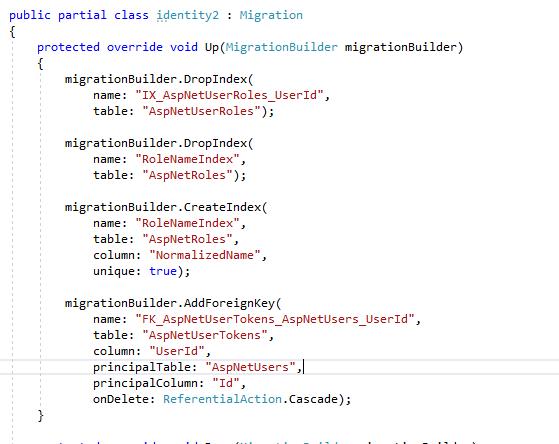
@MaximBalaganskiy I brave enough to try migration...
dotnet ef migrations add identity2
dotnet ef database update

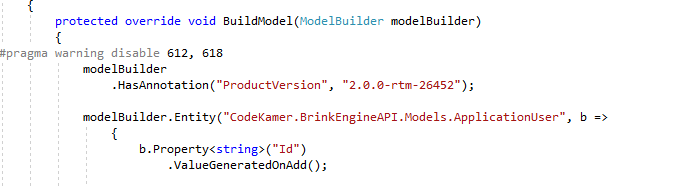
and.... it still not working, i still need to put the workaround in ApplicationDbContext then it works again
I think the issue is, in this case SQLite
and this workaround
builder.Entity<ApplicationUser>().HasMany(p => p.Roles).WithOne().HasForeignKey(p => p.UserId).IsRequired();
equals to
migrationBuilder.AddForeignKey(
name: "FK_AspNetUserTokens_AspNetUsers_UserId",
table: "AspNetUserTokens",
column: "UserId",
principalTable: "AspNetUsers",
principalColumn: "Id",
onDelete: ReferentialAction.Cascade);
which not working as you can see in the screenshot... (red colored message) therefore the workaround still need to be applied
andrew-vdb
on 17 Aug 2017
@HaoK is this workaround expected or I miss something?
andrew-vdb
on 17 Aug 2017
That mapping was copied from the previous identity context code for SQL
server. I suggest you checkout identity repo for 1.2 and copy the
respective line from sqlite related context
On 17 Aug 2017 10:33 PM, "andrew-vandenbrink" notifications@github.com
wrote:
@HaoK https://github.com/haok is this workaround expected or I miss
something?—
You are receiving this because you were mentioned.
Reply to this email directly, view it on GitHub
https://github.com/aspnet/Identity/issues/1361#issuecomment-323059175,
or mute the thread
https://github.com/notifications/unsubscribe-auth/ADimvFH5HI6agk_yVfoc_c2B3MxODeyrks5sZDMJgaJpZM4O3gPY
.
MaximBalaganskiy
on 17 Aug 2017
He doesn't care to comment in this thread but here is his answer

In other word, the workaround is needed.
andrew-vdb
on 18 Aug 2017
@ajcvickers I read the whole thing and didn't come to a conclusion, is it possible to have ICollection<TRole> Roles in User like we used to have in the previous version of ASP.NET Identity?
 weitzhandler
on 30 Nov 2017
weitzhandler
on 30 Nov 2017
I'm burning so many hours trying to find a solution!
When you remove a feature, please at least provide some basic guidance on how to work around it.
I followed the instructions here, but when calling dbContext.Database.MigrateAsync(), I'm getting the following exception:
System.Data.SqlClient.SqlException: 'Introducing FOREIGN KEY constraint 'FK_UserRoles_Users_UserId' on table 'UserRoles' may cause cycles or multiple cascade paths. Specify ON DELETE NO ACTION or ON UPDATE NO ACTION, or modify other FOREIGN KEY constraints.
Could not create constraint or index. See previous errors.'
I suggest this issue to be reopened.
weitzhandler
on 1 Dec 2017
@weitzhandler I think it has to be ICollection<TUserRole> Roles. With ICollection<TRole> Roles you create another relationship which results in a cycle when a user is deleted.
MaximBalaganskiy
on 4 Dec 2017
I got it to work.
Here's my set up:
public partial class User : IdentityUser<int>, IUser
{
  public virtual ICollection<UserRole> UserRoles { get; set; }
}

public partial class Role : IdentityRole<int>
{  }

public partial class UserRole : IdentityUserRole<int>
{
  public virtual User User { get; set; }
  public virtual Role Role { get; set; }
}

public class ApplicationDbContext
  : IdentityDbContext<User, Role, int, IdentityUserClaim<int>,
    UserRole, IdentityUserLogin<int>,
    IdentityRoleClaim<int>, IdentityUserToken<int>>
{

  public ApplicationDbContext(DbContextOptions options) : base(options)
  {
  }


  protected override void OnModelCreating(ModelBuilder builder)
  {
    base.OnModelCreating(builder);
    builder.Entity<User>(b =>
    {
      b.ToTable("Users");
      b.HasMany(u => u.UserRoles)
       .WithOne(ur => ur.User)
       .HasForeignKey(ur => ur.UserId)
       .IsRequired();
    });

    builder.Entity<Role>(role =>
    {
      role.ToTable("Roles");
      role.HasKey(r => r.Id);
      role.HasIndex(r => r.NormalizedName).HasName("RoleNameIndex").IsUnique();
      role.Property(r => r.ConcurrencyStamp).IsConcurrencyToken();

      role.Property(u => u.Name).HasMaxLength(256);
      role.Property(u => u.NormalizedName).HasMaxLength(256);

      role.HasMany<UserRole>()
          .WithOne(ur => ur.Role)
          .HasForeignKey(ur => ur.RoleId)
          .IsRequired();
      role.HasMany<IdentityRoleClaim<int>>()
          .WithOne()
          .HasForeignKey(rc => rc.RoleId)
          .IsRequired();
    });

    builder.Entity<IdentityRoleClaim<int>>(roleClaim =>
    {
      roleClaim.HasKey(rc => rc.Id);
      roleClaim.ToTable("RoleClaims");
    });

    builder.Entity<UserRole>(userRole =>
    {
      userRole.ToTable("UserRoles");
      userRole.HasKey(r => new { r.UserId, r.RoleId });
    });

    builder.Entity<IdentityUserLogin<int>>().ToTable("UserLogins");
    builder.Entity<IdentityUserClaim<int>>().ToTable("UserClaims");
    builder.Entity<IdentityUserToken<int>>().ToTable("UserTokens");
  }
}
Any further official update on this?
 YodasMyDad
on 12 Dec 2017
YodasMyDad
on 12 Dec 2017
@YodasMyDad
Achieving a Roles property in the User entity, involves a greater issue which is the lack of support for many-to-many relationship without a join table in EF Core.
The issue is tracked here: https://github.com/aspnet/EntityFrameworkCore/issues/1368, please vote and comment.
weitzhandler
on 12 Dec 2017
@weitzhandler I don't think that is the issue in this case, as identity in EF Core 2 has a AspNetUserRole table? This is the join table is it not?
YodasMyDad
on 12 Dec 2017
@YodasMyDad
It is, hence you can't have a reference of ICollection<Role> in your User entity directly and a ICollection<User> in your Role entity, as we were used to when using EF6.
You will always need to manually load the join and the reference (UserRole+Role for User).
weitzhandler
on 12 Dec 2017
@weitzhandler
Where is iUser defined? I cannot find it in the EF 2.0 or on this page.
 lpinter
on 5 Jan 2018
lpinter
on 5 Jan 2018
I've just read through entire thread. If there's no official update, and no simple workaround, why the issue is closed? Maybe it should be reopened, @andrew-vandenbrink?
 prostakov
on 4 Feb 2018
prostakov
on 4 Feb 2018
@prostakov https://github.com/aspnet/Identity/issues/1361#issuecomment-322928934
MaximBalaganskiy
on 4 Feb 2018
@MaximBalaganskiy
I think the issue really lies on supporting implicit many to many relations.
weitzhandler
on 4 Feb 2018
To people who say it doesn't work, it works, just read the thread properly...
Once you make it work, you can make a query to show users and its role
var roles = roleManager.Roles.ToDictionary(r=>r.Id,r=>r.Name);

var usersWithRoles = userManager.Users.Include(u=>u.Roles).AsEnumerable().Select(u =>
{
  var obj=(JObject)JToken.FromObject(u);
  var rolesName= string.Join(",",u.Roles.Select(r=>roles[r.RoleId]).ToArray());
  obj["Roles"]=rolesName;
  return obj;
 }
);
@andrew-vandenbrink, @MaximBalaganskiy, thanks, guys! I just hadn't had any time lately to test your proposed solutions... I will certainly take a look!
prostakov
on 19 Feb 2018
@prostakov There is way too much confusion regarding these navigation properties. See https://github.com/aspnet/Identity/issues/1364#issuecomment-334077681 for a little more detail. The next step for MSFT should be to get these added to the default templates that are defined for new projects using individual user accounts.
 mguinness
on 20 Feb 2018
mguinness
on 20 Feb 2018
this may help you : http://johnatten.com/2014/06/22/asp-net-identity-2-0-customizing-users-and-roles/
 waiseman
on 8 Mar 2018
waiseman
on 8 Mar 2018
@waiseman That blog post is 4 years old and isn't for ASP.NET Identity Core. I suppose some concepts carry forward but it just adds to the confusion IMHO.
mguinness
on 8 Mar 2018
@weitzhandler Thanks for that. I had to make a correction in order to add the nav property to the Role entity as well:
- I added the collection to the Role Class
- Changed the model builder code from
role.HasMany<UserRole>()torole.HasMany(r => r.UserRoles)
 AlejandroFlorin
on 28 Mar 2018
AlejandroFlorin
on 28 Mar 2018
Hi there i think the problem is about where to place this line of code:
base.OnModelCreating(modelBuilder);
when placed at the beginning of the method everything works fine, else it creates duplicate foreign keys.
 Mozart-Alkhateeb
on 17 Apr 2018
Mozart-Alkhateeb
on 17 Apr 2018
Here's my full solution (using default table names): https://stackoverflow.com/a/51005445/5392786
 andyfurniss4
on 24 Jun 2018
andyfurniss4
on 24 Jun 2018
We're spending time on this... Dear Microsoft - don't make such changes plz.
 freerider7777
on 17 Jul 2018
freerider7777
on 17 Jul 2018
@andyfurniss4 About your stackoverflow, thanks a lot I finally succeeded to use UserRole after many months of try. But I had to modify your answer to make it work correctly, in the startup, to avoid this error: "Cannot create a DbSet for 'IdentityUserRole
        services.AddIdentity<User, Role>()
            .AddEntityFrameworkStores<AppDbContext>()
            .AddDefaultTokenProviders()
            .AddUserStore<UserStore<User, Role, AppDbContext, Guid,IdentityUserClaim<Guid>, UserRole,IdentityUserLogin<Guid>, IdentityUserToken<Guid>, IdentityRoleClaim<Guid>>>()
            .AddRoleStore<RoleStore<Role, AppDbContext, Guid,UserRole,IdentityRoleClaim<Guid>>>();
 ranouf
on 8 Sep 2018
ranouf
on 8 Sep 2018
@ranouf Thanks for the update. I'm glad you managed to sort it out. I hadn't come across this issue personally but hopefully this will be helpful to anyone else who experiences it.
andyfurniss4
on 8 Sep 2018
Related issues
 PaulRReynolds
·
4Comments
PaulRReynolds
·
4Comments
 Vaylandt
·
9Comments
Vaylandt
·
9Comments
 seven1986
·
6Comments
seven1986
·
6Comments
 konraddysput
·
8Comments
konraddysput
·
8Comments
 divega
·
5Comments
divega
·
5Comments
Most helpful comment
I got it to work.
Here's my set up: