Idea-gitignore: "Add to .gitignore" option missing from context menu
I have a project with multiple repositories set up (for different modules) - don't know if this is relevant, but I don't get the context menu option "Add to .gitignore" for any of my files within the PSI tree. Using newest plugin and IDEA release build. Tried disabling all other plugins, still happening.
 pwilkin
All 20 comments
@pwilkin Do you have any of *ignore file in your project ? Can you provide me more details about your case ?
 hsz
on 9 Jun 2015
hsz
on 9 Jun 2015
Yes, I have quite a few of them. At least one per VCS root. What would you like to know?
pwilkin
on 9 Jun 2015
(I can provide you with any debugging info you want if you need it)
pwilkin
on 9 Jun 2015
I'll try to give as much relevant info that I can think of:
- I made certain that the plugin loaded correctly. The icon near .gitignore files changed, I have the custom editor for .gitignore files, have the add .gitignore file action etc.
- Happens on both my IDEA installations, both on my laptop and my desktop. They share a similar project structure
- My project has multiple modules, each of them corresponding to a single project imported from Eclipse. They are all grouped within module groups.
- Each module has its separate VCS root. The root of the module is the root of the respective VCS (I have a single module on my desktop which does not conform to this rule)
- Each module has a .gitignore file in its root directory and at least one other .gitignore file somewhere else in the structure
- The .gitignore file itself is ignored
- All the .gitignore entries are marked gray an the inspection reports they are "never used"
pwilkin
on 9 Jun 2015
- The .gitignore file itself is ignored
Will it work properly if you remove this rule ?
hsz
on 10 Jun 2015
@pwilkin Can you verify it with the latest v1.3.3 version ?
hsz
on 5 Apr 2016
Yes, it still persists (the context option is still missing).
I might try to debug it if I get some free time.
pwilkin
on 5 Apr 2016
Also, if it is of any help: the relative paths are recognized properly in the .gitignore file (marked as green). the absolute paths are not (marked as gray). So for example, if I have a .gitignore file in the root of my module VCS, then a "bin" entry is recognized properly, but a "/logs/" one is not.
pwilkin
on 5 Apr 2016
I am using v1.4.1 with the latest IntelliJ IDEA, and I do not have this option as well.
 bamapookie
on 7 Jun 2016
bamapookie
on 7 Jun 2016
Can confirm the issue aswell, context menu entry is missing.
 a200612
on 16 Jun 2016
a200612
on 16 Jun 2016
This is also an issue in Rider.
 charlwillia6
on 3 Aug 2017
charlwillia6
on 3 Aug 2017
Can I ask you to check if this issue is still present in v2.1.1?
hsz
on 24 Aug 2017
This is an issue if you add a maven module to an existing one.
For example, if you 'open' a maven project it is added to the project view. If you then through the maven projects view add another project (via the green plus icon), the context menu doesn't appear for any files in the newly added project, but it does for the original.
In my experience the 'hide ignored files' doesn't work on these added projects either.
To recreate:
- open a new project in IntelliJ
- in the maven projects view add a new project (this will cause the project to appear in the project view (alt+1)
- any files in the original project (from point 1 above) will have the "add to .gitignore" context menu option, but files in project from point 2 above will not.
- files in project 2 will not auto-hide when already in the .gitignore file and looking in the project view
The above was confirmed using latest IntelliJ (2017.2.3 build #IC-172.3968.16) and latest .gitignore plugin (v2.1.1) versions
 themoffster
on 4 Sep 2017
themoffster
on 4 Sep 2017
I can confirm the bug description by @themoffster with the latest IntelliJ (2018.1 build #IU-181.4203.550) and latest .gitignore plugin (v2.5.0) still.
 jo-ka
on 4 Apr 2018
jo-ka
on 4 Apr 2018
This is happening to me as well now (Idea v2019.1.1 and .ignore v3.1.2.191). Tried deleting local caches and rebuilding project directories as well as having tried cloning to a new directory directly from GitHub. Cannot add files to .gitignore from the context menu and plugin also doesn't recognize files I manually add to .gitignore when trying to hide them from the project file tree tool window.
 adstotz
on 22 May 2019
adstotz
on 22 May 2019
Also I encounter this problem, after reinstalling my laptop with everything freshly installed.
I only have the 'unignore' option, but none of my files can be added to the .ignore file:

Strange thing is that before I re-installed everything, adding did work correctly!
Here some extra info.
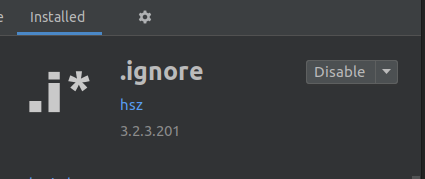
Plugin version:
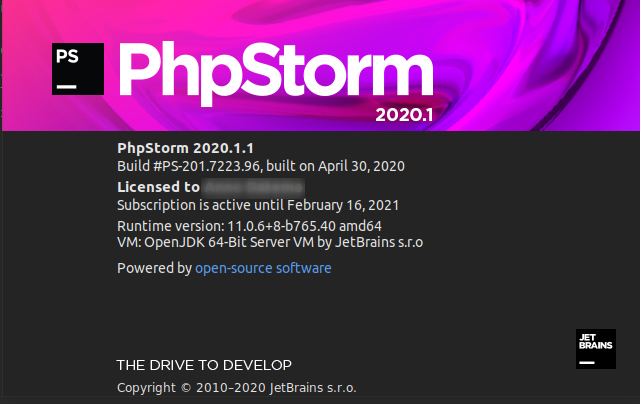
PhpStorm version:
 ametad
on 15 May 2020
ametad
on 15 May 2020
I just found out that the context menu does work in the case of
- an unversioned file
- in the 'commit' tab of PhpStorm

Can this function add to gitignore also be used in the 'project' tab in PhpStorm?
ametad
on 15 May 2020
@ametad since 2019.2 the Add to gitingore is the platform functionality, which does not require the .ignore plugin. See #587 (comment)
It is git-related, so it is under GIt menu in the project tab.

The unignore action comes from the plugin though, so it is in a different place. I think we will move it to the Git submenu also.
 dmitriysmirnovjb
on 15 May 2020
dmitriysmirnovjb
on 15 May 2020
@dmitriysmirnovjb Thank you for the info. I found it!
ametad
on 18 May 2020
BTW only "Unversioned Files" have the option Git > Add to .gitignore > ... Is this indeed how it suppose to be? I guess to ignore already tracked files, the should first be removed from the repo and than added to the .gitignore file. Right?
ametad
on 18 May 2020
Related issues
 klevie
·
6Comments
klevie
·
6Comments
 mfursov
·
3Comments
mfursov
·
3Comments
 hoangtranwork
·
3Comments
hoangtranwork
·
3Comments
 Vampire
·
5Comments
Vampire
·
5Comments
 sercheo87
·
5Comments
sercheo87
·
5Comments
Most helpful comment
This is an issue if you add a maven module to an existing one.
For example, if you 'open' a maven project it is added to the project view. If you then through the maven projects view add another project (via the green plus icon), the context menu doesn't appear for any files in the newly added project, but it does for the original.
In my experience the 'hide ignored files' doesn't work on these added projects either.
To recreate:
The above was confirmed using latest IntelliJ (2017.2.3 build #IC-172.3968.16) and latest .gitignore plugin (v2.1.1) versions