Idea-gitignore: All files are marked as ignored
Just updated to version 3.1.1.191 and all my files are now marked as ignored.
Here is my .gitignore file:
public_html/.maintenance
.idea
protected/data/script_map.json

config/docker/logs/
config/docker/etc/php.d/local-xxx.ini
config/docker/local/.bash_history
.sass-cache
/cache.properties
/build/logs/
/build/coverage/
scripts/deploy/
.php_cs.cache
public_html/sitemaps/*

/tests/Codeception/_output/
/tests/Codeception/_support/_generated/

config/php/settings.php
build

public_html/bower/
/phpunit.xml
node_modules/
/public_html/build/
PhpStorm 2019.1.2
Build #PS-191.7141.52, built on May 8, 2019
JRE: 1.8.0_202-release-1483-b49 amd64
JVM: OpenJDK 64-Bit Server VM by JetBrains s.r.o
Windows 10 10.0
 b1rdex
All 48 comments
@b1rdex Thank you for creating this issue.
I've created a new .gitignore file with the rules that you've provided, but unfortunately the problem is not reproducable for me.
Above rules don't contain any specific syntax that would lead to match every file in the root directory.
Can you please provide a minimal project setup that would lead us to get simmilar result?
 hsz
on 14 May 2019
hsz
on 14 May 2019
Yes I see there are no rules to ignore all files. This is my work project so I can't share it.
This .gitignore file wasn't changed for a while, but today I updated plugin and problem happend. Restarted phpstorm 2 times and had to disable plugin becuase of this issue.
b1rdex
on 14 May 2019
@b1rdex I understand, sorry for the inconvenience.
I really would like to help you with that, but this looks like an issue related to the project structure (specific modules setup/symlinks) or maybe some global ignore rules (global .gitignore/excludes files).
Are you able to create another small project scaffold that will let us reproduce this problem?
hsz
on 14 May 2019
Maybe removing all of your rules and restoring back one by one would reveal, which one is failing?
To make IDE notified about the change sometimes it's useful to trigger Ctrl+S for manual save.
hsz
on 14 May 2019
In addition - what is the full path to your project (/home/b1rdex/projects/....) and does any part of this patch matches any of the .gitignore rules?
hsz
on 14 May 2019
I'm on Windows. Full path is C:\xxx-vm\dev.xxx.
вт, 14 мая 2019 г. в 15:04, Jakub Chrzanowski notifications@github.com:
In addition - what is the full path to your project (
/home/b1rdex/projects/....) and does any part of this patch matches any
of the .gitignore rules?—
You are receiving this because you were mentioned.
Reply to this email directly, view it on GitHub
https://github.com/hsz/idea-gitignore/issues/581?email_source=notifications&email_token=AACMMF3BDEUSAL3SQ4KQNG3PVJB45A5CNFSM4HMUWWFKYY3PNVWWK3TUL52HS4DFVREXG43VMVBW63LNMVXHJKTDN5WW2ZLOORPWSZGODVKIWFI#issuecomment-492079893,
or mute the thread
https://github.com/notifications/unsubscribe-auth/AACMMFZLA7JJZ2RJTDBNQKDPVJB45ANCNFSM4HMUWWFA
.
--
Анатолий Пашин.
b1rdex
on 14 May 2019
I just disabled this plugin, It ignores all of my files and folders in my project
 botjaeger
on 14 May 2019
botjaeger
on 14 May 2019
I just disabled this plugin, It ignores all of my files and folders in my project
Glad to know I'm not alone :)
b1rdex
on 14 May 2019
Yea, I thought I misconfigured my gitignore file but not.
This happen after an update from this plugin.
botjaeger
on 14 May 2019
@b1rdex Yeah, yes and no. ;-) But maybe it'll let us hunt down the problem faster.
@botjaeger Can you please go through the below list to help me track the root of this issue?
- Paste the
.gitignorefile's content - Do you use any external/global gitignore files (i.e.
.git/info/excludeor global file)? - Remove all of the gitignore rules and restore one by one to check at which point problem is back? (press Ctrl+S after each addition).
- Can you provide minimal project scaffold that can reproduce the issue?
- What's your IDE/OS version?
hsz
on 14 May 2019
/.web-server-pid
/app/config/parameters.yml
/phpunit.xml
/var/*
!var/cache/.gitkeep
!var/logs/.gitkeep
!var/sessions/.gitkeep
!var/SymfonyRequirements.php
!/var/jwt/
!var/xdebug/.gitkeep
/vendor/
/web/bundles/
/web/uploads/
.idea/*
/node_modules/
/web/build/
.phraseapp.yml
/app/Resources/translations/*
!/app/Resources/translations/.gitkeep
/phraseapp/phraseappclient
.DS_Store
/package-lock.json
- my project's .gitignore
- No, none.
- Already did, still the same.
- my project is Symfony 3.4 and it's weird because I can't reproduce it to my other projects.
PhpStorm 2019.1.2
Build #PS-191.7141.52, built on May 8, 2019
Licensed to Lamudi Services Pte. Ltd / Michael Gotostos
Subscription is active until September 5, 2019
JRE: 1.8.0_202-release-1483-b49 amd64
JVM: OpenJDK 64-Bit Server VM by JetBrains s.r.o
Linux 4.18.0-18-generic
@botjaeger So after keeping the .gitignore empty, whole project tree is still marked as ignored?
hsz
on 14 May 2019
after keeping the
.gitignoreempty, whole project tree is still marked as ignored?
Yes.
b1rdex
on 14 May 2019
@botjaeger So after keeping the
.gitignoreempty, whole project tree is still marked as ignored?
except /vendor/ /node_modules/
botjaeger
on 14 May 2019
Ok, when you'll keep .gitignore empty, try to:
- Close any other projects (but I assume, that's the only opened project, right?)
- _File > Invalidate Caches / Restart_ - so IDE should be completly restarted
hsz
on 14 May 2019
Same result. All files are marked as ignored.
вт, 14 мая 2019 г. в 16:08, Jakub Chrzanowski notifications@github.com:
Ok, when you'll keep .gitignore empty, try to:
- Close any other projects (but I assume, that's the only opened
project, right?)- File > Invalidate Caches / Restart - so IDE should be completly
restarted—
You are receiving this because you were mentioned.
Reply to this email directly, view it on GitHub
https://github.com/hsz/idea-gitignore/issues/581?email_source=notifications&email_token=AACMMFZ4MNKIGCA73JK7P4TPVJJPVA5CNFSM4HMUWWFKYY3PNVWWK3TUL52HS4DFVREXG43VMVBW63LNMVXHJKTDN5WW2ZLOORPWSZGODVKLUUI#issuecomment-492091985,
or mute the thread
https://github.com/notifications/unsubscribe-auth/AACMMF5I4ZJ6J6JMMIKSS23PVJJPVANCNFSM4HMUWWFA
.
--
Анатолий Пашин.
b1rdex
on 14 May 2019
Same result. All files are marked as ignored. вт, 14 мая 2019 г. в 16:08, Jakub Chrzanowski notifications@github.com:
…
Ok, when you'll keep .gitignore empty, try to: - Close any other projects (but I assume, that's the only opened project, right?) - File > Invalidate Caches / Restart - so IDE should be completly restarted — You are receiving this because you were mentioned. Reply to this email directly, view it on GitHub <#581?email_source=notifications&email_token=AACMMFZ4MNKIGCA73JK7P4TPVJJPVA5CNFSM4HMUWWFKYY3PNVWWK3TUL52HS4DFVREXG43VMVBW63LNMVXHJKTDN5WW2ZLOORPWSZGODVKLUUI#issuecomment-492091985>, or mute the thread https://github.com/notifications/unsubscribe-auth/AACMMF5I4ZJ6J6JMMIKSS23PVJJPVANCNFSM4HMUWWFA .
-- Анатолий Пашин.
yep, mine too :(
botjaeger
on 14 May 2019
Both of you have Symfony/Laravel PHP project with vendors, right?
Some of the vendor dependency is causing that problem.
My friend was able to provide me the project scaffold, so I'm on it!
hsz
on 14 May 2019
I have the exact same issue, but with an Yii PHP project.
PhpStorm 2019.1.2
Build #PS-191.7141.52, built on May 8, 2019
JRE: 1.8.0_202-release-1483-b49 x86_64
JVM: OpenJDK 64-Bit Server VM by JetBrains s.r.o
macOS 10.14.4
 nickbg321
on 14 May 2019
nickbg321
on 14 May 2019
Just to double confirm: removing the vendor directory _resolves_ the issue?
hsz
on 14 May 2019
Yes, removing the vendor directory solves the problem.
nickbg321
on 14 May 2019
If it's of any help, you can grab the latest Yii release from https://github.com/yiisoft/yii2/releases/download/2.0.18/yii-basic-app-2.0.18.tgz
It comes with the vendor dependencies and I was able to reproduce the issue on it.
nickbg321
on 14 May 2019
Same issue for me...
I use composer and I have the vendor directory.
PhpStorm 2019.1.2
Build #PS-191.7141.52, built on May 8, 2019
JRE: 1.8.0_202-release-1483-b49 x86_64
JVM: OpenJDK 64-Bit Server VM by JetBrains s.r.o
macOS 10.14.4
 cyberdemon8
on 14 May 2019
cyberdemon8
on 14 May 2019
Same here: symfony project where are files (except .gitignore itself) are marked as ignored after updating to v3.1.1.191. When I remove the vendor folder, files are no longer ignored. Running composer install markes the files as ignored again.
PhpStorm 2019.1.2
Build #PS-191.7141.52, built on May 8, 2019
JRE: 1.8.0_202-release-1483-b49 x86_64
JVM: OpenJDK 64-Bit Server VM by JetBrains s.r.o
macOS 10.14.4
 wietsewarendorff
on 14 May 2019
wietsewarendorff
on 14 May 2019
Same here : all files marked as ignored, on all my projects containing a vendor directory. If I remove some folders from the vendor directory, things get weird: only a subset of the project files are ignored (for example : I have a web folder ignored but not the remaining directories, the list of ignored files is random, and seems to the be related of the amount of files in the vendor directory).
IntelliJ IDEA 2019.1.2 (Ultimate Edition)
Build #IU-191.7141.44, built on May 7, 2019
JRE: 1.8.0_202-release-1483-b49 amd64
JVM: OpenJDK 64-Bit Server VM by JetBrains s.r.o
Windows 10 10.0
 cedx
on 14 May 2019
cedx
on 14 May 2019
All right - fix is ready for the deployment. It turned out, that I was checking if the tested file is inside module (so it's not an outer file like /tmp/foo.txt) using module.getModuleContentScope().contains(file) and for some files, SDK returned false, but for their parents/grandparents - true.
In my opinion, it shouldn't work this way, but I've switched the test method to comparing the file's path and everything is displayed correctly.
I'll release v3.1.2 soon after testing for the previous IDE platforms (2018.x/2017.x).
hsz
on 14 May 2019
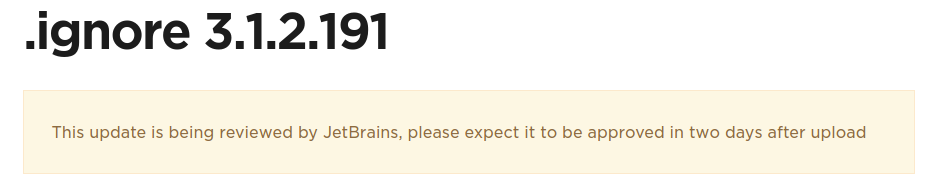
All right, fix has been released with v3.1.2. Now it has to be accepted by the Jetbrains team.
hsz
on 14 May 2019
同样的问题:更新到v3.1.1.191后,文件(.gitignore本身除外)全部被标记为忽略。删除vendor文件夹时,不再忽略文件。运行composer install会再次将文件标记为已忽略。
Translated with Google Translate results in:
The same problem: after updating to v3.1.1.191, the files (except .gitignore itself) are all marked as ignored. Files are no longer ignored when the vendor folder is deleted. Running composer install will mark the file as ignored again.
@gitzwt First of all, please, write in English, as it is the de facto language programmers use for communication. Then, read the discussion thoroughly, if you haven't. The comment above yours clearly states that the fix is in 3.1.2.191, which is awaiting JetBrains team's approval. Check the links below:
https://github.com/hsz/idea-gitignore/issues/581#issuecomment-492161993
https://plugins.jetbrains.com/plugin/7495--ignore
 thexpand
on 16 May 2019
thexpand
on 16 May 2019
I think all has been said. BTW thanks for the plugin, expect for this bug it works well. :smiley:
 COil
on 16 May 2019
COil
on 16 May 2019
Still having this bug on 2019.1.2, I'm missing the 3.1.2 update. Any ETA on that? I had to disable the plugin.
 Jean85
on 16 May 2019
Jean85
on 16 May 2019
@Jean85 Everything is on the @jerbrains side now. We all have to wait until they will finish this update process.
Sorry for the all inconveniences. 😔
hsz
on 16 May 2019
Still having this bug on 2019.1.2, I'm missing the 3.1.2 update. Any ETA on that? I had to disable the plugin.
@Jean85, read this: I am on 2019.1.2, as well; I _manually_ installed this new release, which fixes this issue.
 alle
on 16 May 2019
alle
on 16 May 2019
That's correct, I've published v3.1.2 plugin packages here: https://github.com/hsz/idea-gitignore/releases/tag/v3.1.2
You can get the proper one (depending on the IDE version) and install manually.
hsz
on 16 May 2019
@hsz i want to thank you for the good work and fixing this problem!
 darealfive
on 20 May 2019
darealfive
on 20 May 2019

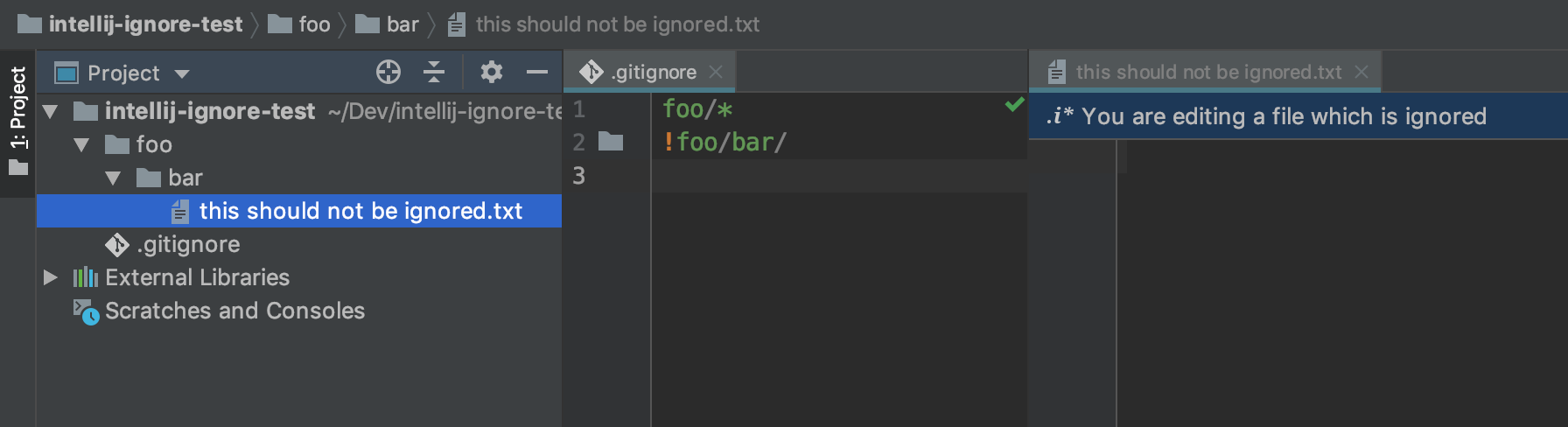
I have installed the latest release, which fixed the "all is ignored". But in my scenario there are still problems. See attached screenshot. I have ignored everything in a sub-directory and excluded two project relevant directories in there. The (e.g. bechlem) directory itself is not marked as ignored anymore in the project tree, but all files and directories below are still marked as ignored. That shouldn't be the case...
 EvilBMP
on 20 May 2019
EvilBMP
on 20 May 2019
@hsz I'm having the same issue as @EvilBMP on 3.1.2.191. Here's a minimal project that exhibits the issue: https://github.com/philipnewcomer/intellij-ignore-test
 philipnewcomer
on 20 May 2019
philipnewcomer
on 20 May 2019
Finally, JetBrains approved the new version!
wietsewarendorff
on 20 May 2019
@hsz Yeap, on my phpstom (2019.2.1) i have the same issue as @philipnewcomer and @EvilBMP after upgrade to 3.2.191 for your cool plugin.
 Neowar
on 20 May 2019
Neowar
on 20 May 2019
@hsz Why was the issue closed, when the fix is not working as expected? Should we open a follow up issue?
EvilBMP
on 23 May 2019
I don't see a problem after the upgrade. Everything is okay now.
thexpand
on 23 May 2019
@hsz I'm having the same issue as @EvilBMP on
3.1.2.191. Here's a minimal project that exhibits the issue: https://github.com/philipnewcomer/intellij-ignore-test
Same for me. I guess it's related to the *. Seems to be to eager and doesn't consider the following exceptions.
 dlubitz
on 28 May 2019
dlubitz
on 28 May 2019
I still have the same issue. Files visually look like being ignored while they are under version control. Pretty annoying.
Edit: I am using Plugin Version v3.1.2.191 and PHPStorm 2019.1.2
 alexandergirod
on 28 May 2019
alexandergirod
on 28 May 2019
I don't see a problem after the upgrade. Everything is okay now.
Seems that I was wrong. I tested the case and it hasn't been thoroughly fixed :(
thexpand
on 29 May 2019
I can confirm @dlubitz finding. The issue is related to using wildcards on directories.
 bjo3rnf
on 3 Jun 2019
bjo3rnf
on 3 Jun 2019
This issue should reopened because i still dont see any change after the update.
There are still all files marked as ignored.
Edit: I am using Plugin Version v3.1.2.191 and PHPStorm 2019.1.2
 Ablont
on 5 Jun 2019
Ablont
on 5 Jun 2019
Using /foo/*/ instead of /foo/* works for me.
bjo3rnf
on 6 Jun 2019
Using
/foo/*/instead of/foo/*works for me.
this doesnt work if you have files in the root of the foo drive.
 freestyledork
on 14 Jun 2019
freestyledork
on 14 Jun 2019
i am facing this issue in the latest PHP storm
 ziarv
on 13 Oct 2020
ziarv
on 13 Oct 2020
Related issues
 xaviergonz
·
6Comments
xaviergonz
·
6Comments
 yizems
·
4Comments
yizems
·
4Comments
 zb315044652
·
3Comments
zb315044652
·
3Comments
 shabtaisharon
·
6Comments
shabtaisharon
·
6Comments
 matewka
·
5Comments
matewka
·
5Comments
Most helpful comment
All right, fix has been released with
v3.1.2. Now it has to be accepted by the Jetbrains team.