Idea-gitignore: visibility of ignored files
IntelliJ's project view has a configuration option to 'Show excluded files'. When this option is enabled the excluded files are not displayed in the project view. I suspect idea-gitignore hides these files regardless of project view configuration.
 bliessens
All 10 comments
Somehow I am unable to convince IDEA to hide files from the project-view even when they are ignored in git. Funny, it does display them greyed so it does know they are hidden. How to hide them for good is still a mistery to me.
I don't want to mess with the general IDEA configuration, I just want to make hide the gitignored files.
 ssbarnea
on 1 Apr 2017
ssbarnea
on 1 Apr 2017
Can I ask you to check if this issue is still present in v2.1.1?
 hsz
on 24 Aug 2017
hsz
on 24 Aug 2017
FWIW i noticed this as well (ignored files being visible even though i told the plugin to hide ignored files), it was not until i restarted intellij that the ignored files effectively became hidden.
 jorgheymans
on 6 Oct 2017
jorgheymans
on 6 Oct 2017
actually it's not all that clear. I have a project containing two git repositories, with identical gitignore. The hide ignored files only works in the second git repo, not in the first one. hopefully the screenshot makes this clear:

i am using the latest version of the plugin (just installed this morning) and intellij 2017.2.5
jorgheymans
on 6 Oct 2017
I am also having this issue
 Alfriadox
on 21 Oct 2017
Alfriadox
on 21 Oct 2017
@hsz I'm also having this issue too +1, and this feature don't work with nested ignore files in multi-package repo. But, if I write in root ignore file something like
packages/**/*
!packages/**/lib
!packages/**/lib/**/*
!packages/**/tasks
!packages/**/tasks/**/*
!packages/**/storybook
!packages/**/storybook/**/*
!packages/**/.npmrc
!packages/**/.npmignore
!packages/**/yarn.lock
!packages/**/package.json
!packages/**/README.md
folder packages will be marked as ignored and hiding in tree view, while it have nested not ignored directories will be marked as not-ignored
 emolchanov
on 26 Oct 2017
emolchanov
on 26 Oct 2017
In Rider showing All files should do not show ignored files when Hide ignored files is selected.
 Indomitable
on 17 Jan 2018
Indomitable
on 17 Jan 2018
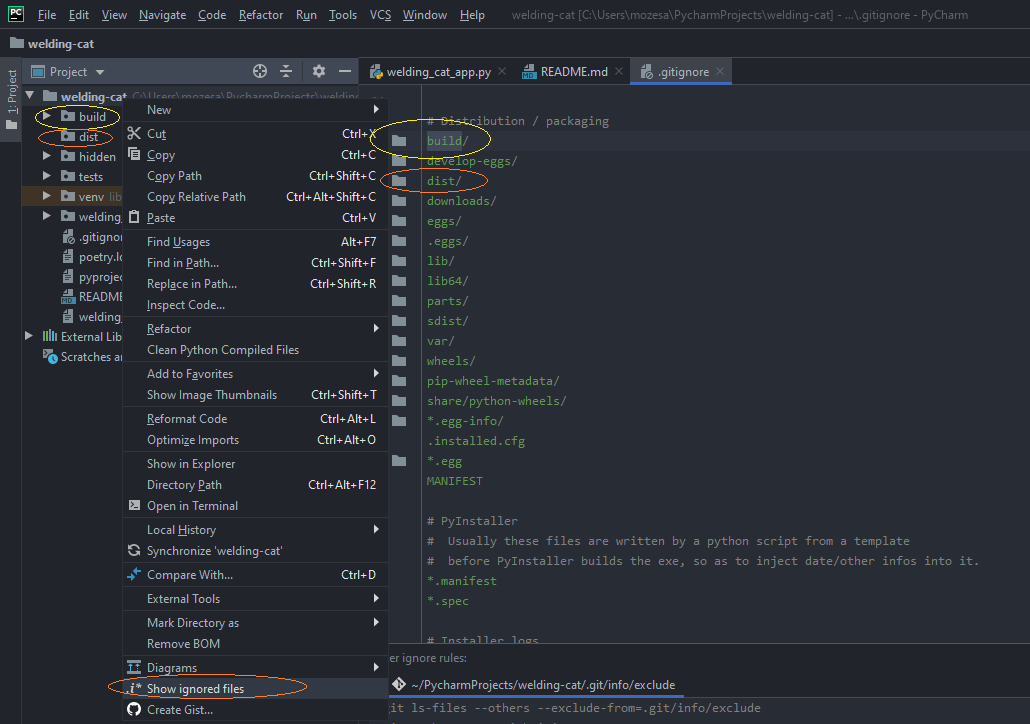
Hello,
my problem is that it doesn't hide the files/dirs ignored.
Please see the image below.
 mozesa
on 8 Nov 2019
mozesa
on 8 Nov 2019
In IntelliJ 2019.2 I see both the issue mentioned above ("dist" not being hidden), as well as the fact that checking "Show Excluded Files" doesn't allow me to see the files inside of dist.
This seems easy to reproduce to me. Simply clone this repo and open the project:
https://github.com/tommedema/serverless-mono-example
You'll need to install the packages and run the build command to populate the dist folder as well.
The behavior is slightly different depending on which view is used in the Project page ("Project Files" or "Project").
Would really appreciate some update on the disposition of this issue.
 medington
on 11 Dec 2019
medington
on 11 Dec 2019
IntelliJ IDEA 2019.2 introduced native support for the dot-ignore files handling of Git (.gitignore), Mercurial (.hgignore), and Perforce (.p4ignore). Because of that, such an issue is now obsolete.
hsz
on 28 Jan 2021
Related issues
 hoangtranwork
·
3Comments
hoangtranwork
·
3Comments
 zb315044652
·
3Comments
zb315044652
·
3Comments
 sercheo87
·
5Comments
sercheo87
·
5Comments
 archenroot
·
6Comments
archenroot
·
6Comments
 Ionaru
·
6Comments
Ionaru
·
6Comments
Most helpful comment
actually it's not all that clear. I have a project containing two git repositories, with identical gitignore. The hide ignored files only works in the second git repo, not in the first one. hopefully the screenshot makes this clear:
i am using the latest version of the plugin (just installed this morning) and intellij 2017.2.5