We will need to support vector tiled data for #3152 anyway, but there are other vector sources (e.g. QA layers) that would be great to bring into iD.
 bhousel
All 10 comments
We will need to support vector tiled data for #3152 anyway, but there are other vector sources (e.g. QA layers) that would be great to bring into iD.
There's lots of types of vector layers, what are we looking at supporting?
 pnorman
on 12 Jan 2017
pnorman
on 12 Jan 2017
There's lots of types of vector layers, what are we looking at supporting?
Not sure yet. It might be worth having something like (or built into) editor-layer-index but for vector layers that are useful for editing. This ticket is just to kick around ideas, and also to track that we need something like vector-tile-js.
bhousel
on 12 Jan 2017
4164 provides a starting point for bringing in vector QA layers from ArcGIS-based services, if that is of interest. Not vector tiles, but along the same lines and I think the implementation (in the Map Data expando-tab) could be similar. #3452 also mentions this and might be one way that #4164 could be helpful to start (read-only QA layers from ArcGIS sources).
 slibby
on 25 Jul 2017
slibby
on 25 Jul 2017
CC @kriscarle for visibility - I proposed this as a GSoC project, and would be great to get this support into iD sometime soon.
bhousel
on 21 Feb 2018
Just cross linking: https://www.openstreetmap.org/user/Princi%20Vershwal/diary/43802
 mmd-osm
on 29 Apr 2018
mmd-osm
on 29 Apr 2018
The first step towards supporting vector tiled data is that a user can add a URL and have the vector tiles show up on the screen. It will look something like this :
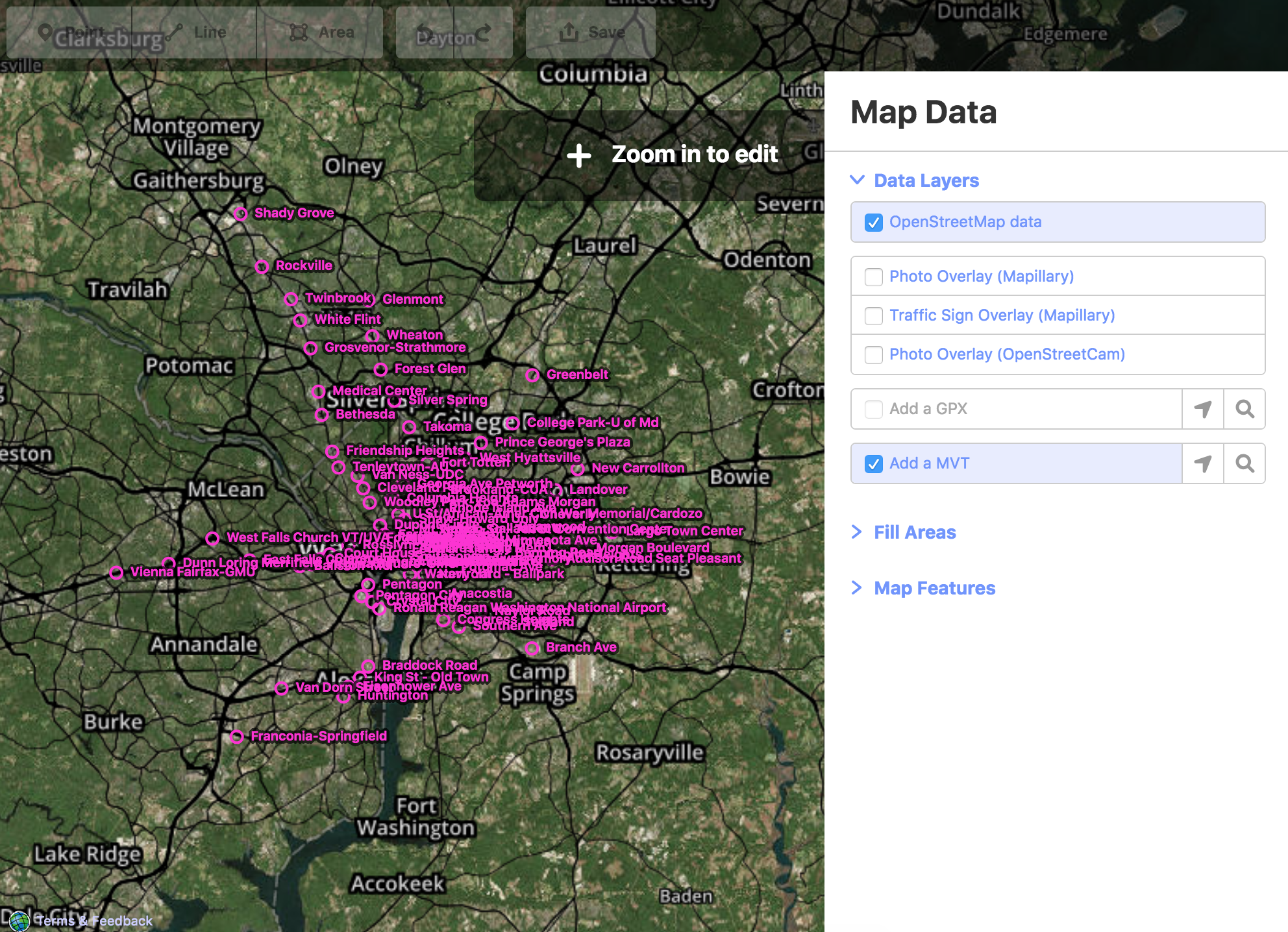
For this, I have added another layer 'mvt'. Currently, it will support .pbf(Protocolbuffer Binary Format) and .mvt(Mapbox Vector Tiles) format. These files contain data in Protocolbuffer binary format which is converted to geojson using mapbox's vector-tile-js and this data is passed directly to the D3 draw functions to show up the tiles on the screen.
All the code related to this will be here.
 vershwal
on 11 Jun 2018
vershwal
on 11 Jun 2018
For some details: https://www.openstreetmap.org/user/Princi%20Vershwal/diary/44151
vershwal
on 12 Jun 2018
This happened 🎉
bhousel
on 26 Aug 2018
I have tried the first step towards supporting vector tiled data is that a user can add a URL and have the vector tiles show up on the screen. It worked and it displayed as :

but the problem am facing is it is not loading on specific lat and long where it has to be. can you help me to fix this problem
 sahithiduddukuri
on 9 Jan 2020
sahithiduddukuri
on 9 Jan 2020
but the problem am facing is it is not loading on specific lat and long where it has to be.
@sahithiduddukuri Hmm I'm guessing that your data does not match the expected projection. Make sure it's in WGS84.
 quincylvania
on 9 Jan 2020
quincylvania
on 9 Jan 2020
Related issues
 thibaultmol
·
3Comments
thibaultmol
·
3Comments
 tordans
·
3Comments
tordans
·
3Comments
 Chaz6
·
3Comments
tordans
·
3Comments
Chaz6
·
3Comments
tordans
·
3Comments
 tmcw
·
3Comments
tmcw
·
3Comments