Icingaweb2: Setup Wizard MySQL database doesn't work
I'm trying to set up icingaweb2 using the wizard, because according to the docs this seems to be the easiest solution:
Finally visit Icinga Web 2 in your browser to access the setup wizard and complete the installation: /icingaweb2/setup.
Paste the previously generated token and follow the steps on-screen. Then you are done here.
Unfortunately, it doesn't work for me. I'm stuck in the database setup and I have no clue which settings/values to use here. Can you document the right values to use here somewhere? Being more elaborate on the wizard might help a lot of users... I tried using the defaults and "icingaweb2" for username and password. I am using Debian 9 using your official packages. I performed ALL steps according to your documentation from
- https://www.icinga.com/docs/icinga2/latest/doc/02-getting-started/
- https://github.com/Icinga/icingaweb2/blob/master/doc/02-Installation.md
Since both didn't work for me I tried to find necessary info in different tutorials but they all go down the "doing everything manually" or "use the wizard it works and now you're done" path.
Is this a bug or can you point me to some documentation describing a working setup using official documentation + official packages + webinterface?
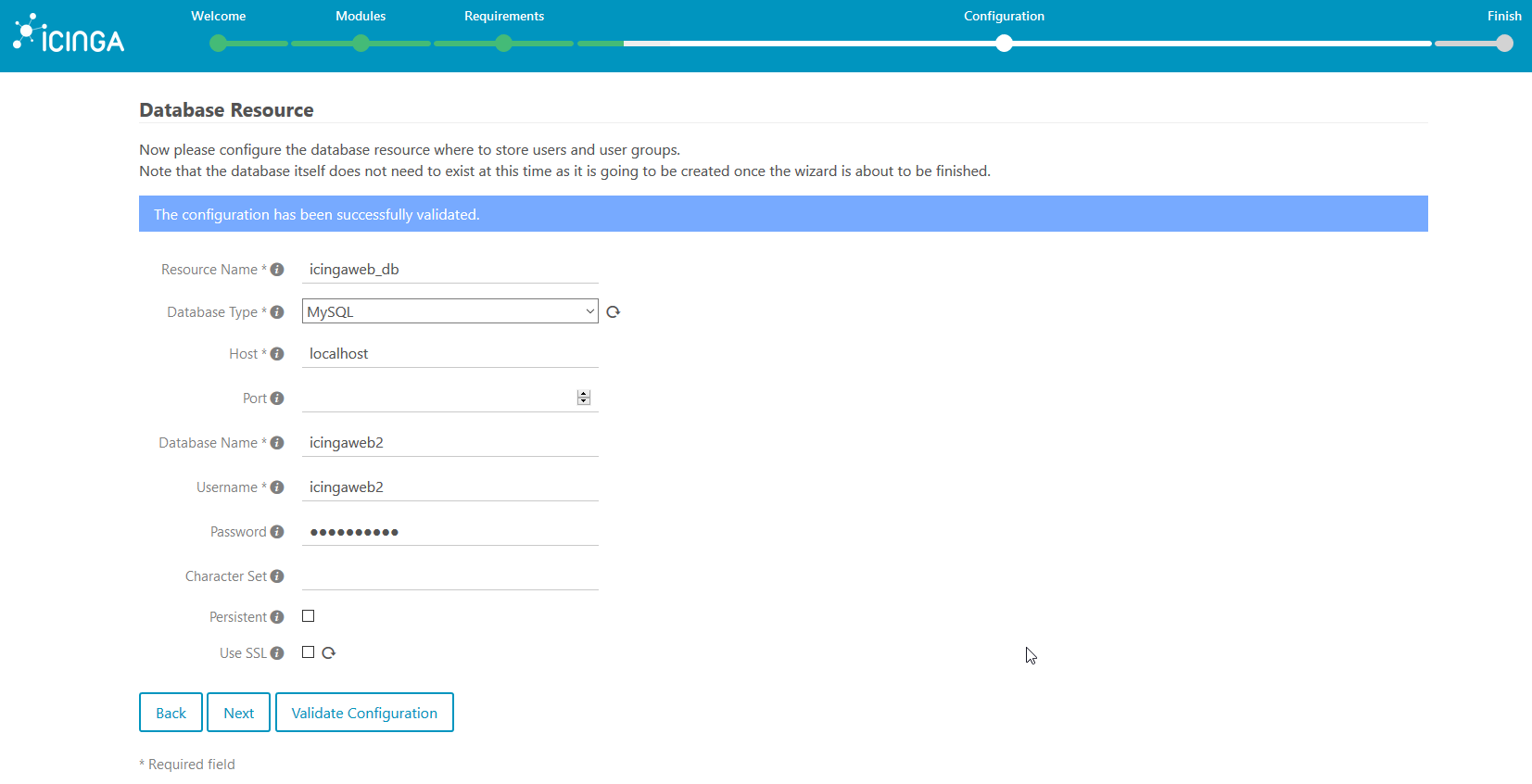
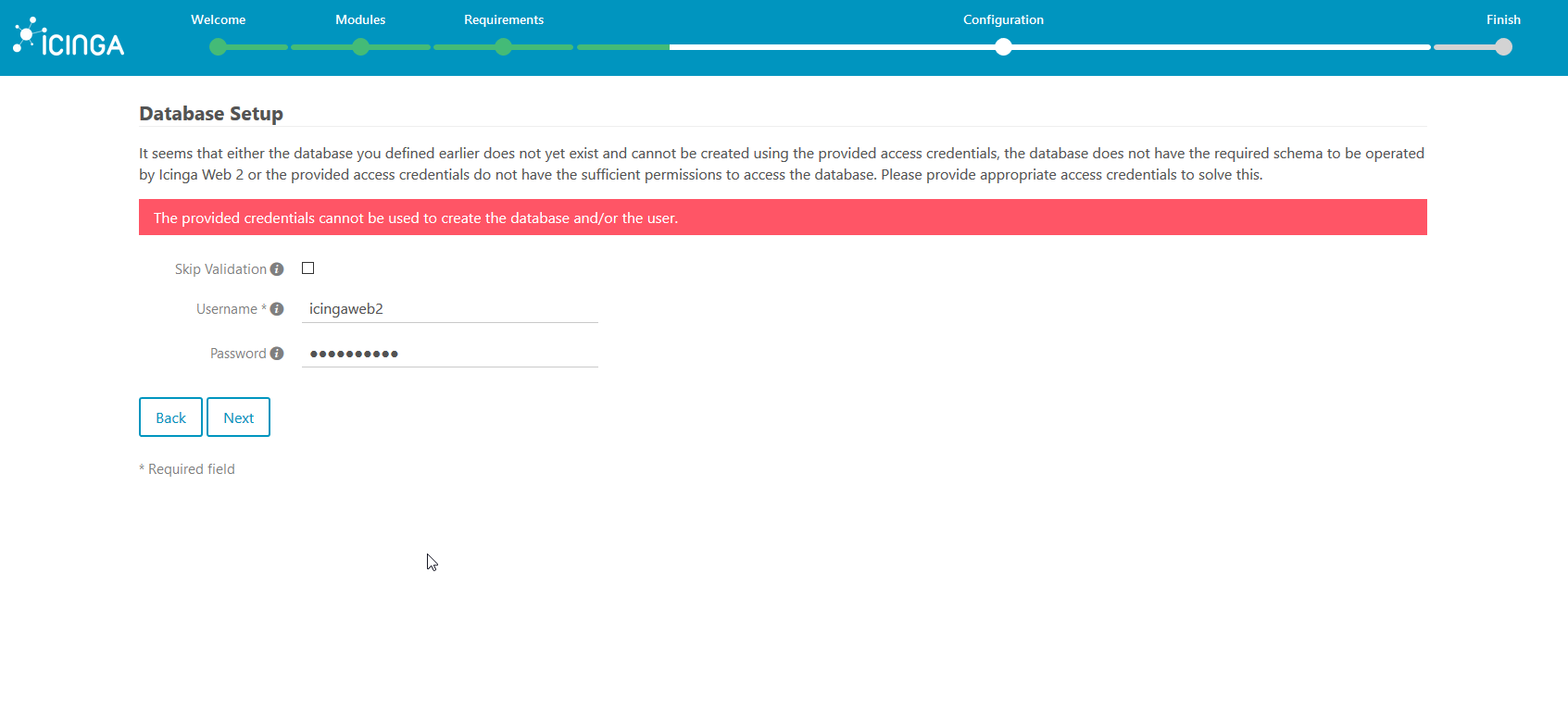
I hope I'm missing something and you can help me. If you need more information, don't hesitate to ask.
Expected Behavior
Following the setup interface should work without surprises like a database setup that is undocumented / doesn't work for novices to icingaweb2
Current Behavior
There is no documentation on user names / credentials to use here. There is no troubleshooting or helpful hint. Should I use icinga2 user + credentials? Internet says that it's a different one and you totally fuck up your setup using it. Should I use root? Is it my job to generate the database?
Possible Solution
Document the complete wizard. We are all techies, so tell us what those databases/users do and which settings work.
Steps to Reproduce (for bugs)
- Set up a fresh debian 9 VM
- Follow all Debian 9 related steps (according to official docs) to set up icinga2
- Decide to setup Icingaweb2, follow official docs
- Fail horribly using the setup wizard.
Context
- How has this issue affected you? What are you trying to accomplish? => I want to set up Icingaweb2 in order to monitor some systems. I have never done that before but I'm used to Debian/Linux, Servers, Web, the Internet and how all this stuff basically works. Also I learned that reading the docs is generally a good idea and usually leads to working results
Your Environment
- Icinga Web 2 version and modules (System - About):
- Version used (
icinga2 --version):
2# icinga2 --version
icinga2 - The Icinga 2 network monitoring daemon (version: r2.6.3-1)

Copyright (c) 2012-2017 Icinga Development Team (https://www.icinga.com/)
License GPLv2+: GNU GPL version 2 or later <http://gnu.org/licenses/gpl2.html>
This is free software: you are free to change and redistribute it.
There is NO WARRANTY, to the extent permitted by law.

Application information:
  Installation root: /usr
  Sysconf directory: /etc
  Run directory: /run
  Local state directory: /var
  Package data directory: /usr/share/icinga2
  State path: /var/lib/icinga2/icinga2.state
  Modified attributes path: /var/lib/icinga2/modified-attributes.conf
  Objects path: /var/cache/icinga2/icinga2.debug
  Vars path: /var/cache/icinga2/icinga2.vars
  PID path: /run/icinga2/icinga2.pid

System information:
  Platform: Debian GNU/Linux
  Platform version: 9 (stretch)
  Kernel: Linux
  Kernel version: 4.9.0-3-amd64
  Architecture: x86_64

Build information:
  Compiler: GNU 6.3.0
  Build host: 3f3b85544828
- Operating System and version: Debian 9 Stretch
- Enabled features (
icinga2 feature list):
 icinga2 feature list
Disabled features: command compatlog debuglog gelf graphite influxdb livestatus opentsdb perfdata statusdata syslog
Enabled features: api checker ido-mysql mainlog notification
- Config validation (
icinga2 daemon -C):
# icinga2 daemon -C
information/cli: Icinga application loader (version: r2.6.3-1)
information/cli: Loading configuration file(s).
information/ConfigItem: Committing config item(s).
information/ApiListener: My API identity: svgmonitor
warning/ApplyRule: Apply rule 'satellite-host' (in /etc/icinga2/conf.d/satellite.conf: 29:1-29:41) for type 'Dependency' does not match anywhere!
information/ConfigItem: Instantiated 1 ApiUser.
information/ConfigItem: Instantiated 1 ApiListener.
information/ConfigItem: Instantiated 1 Zone.
information/ConfigItem: Instantiated 1 FileLogger.
information/ConfigItem: Instantiated 1 Endpoint.
information/ConfigItem: Instantiated 2 NotificationCommands.
information/ConfigItem: Instantiated 13 Notifications.
information/ConfigItem: Instantiated 201 CheckCommands.
information/ConfigItem: Instantiated 1 Downtime.
information/ConfigItem: Instantiated 1 Host.
information/ConfigItem: Instantiated 1 IcingaApplication.
information/ConfigItem: Instantiated 2 HostGroups.
information/ConfigItem: Instantiated 1 UserGroup.
information/ConfigItem: Instantiated 1 User.
information/ConfigItem: Instantiated 12 Services.
information/ConfigItem: Instantiated 3 TimePeriods.
information/ConfigItem: Instantiated 3 ServiceGroups.
information/ConfigItem: Instantiated 1 ScheduledDowntime.
information/ConfigItem: Instantiated 1 CheckerComponent.
information/ConfigItem: Instantiated 1 IdoMysqlConnection.
information/ConfigItem: Instantiated 1 NotificationComponent.
information/ScriptGlobal: Dumping variables to file '/var/cache/icinga2/icinga2.vars'
information/cli: Finished validating the configuration file(s).
- If you run multiple Icinga 2 instances, the
zones.conffile (oricinga2 object list --type Endpointandicinga2 object list --type Zone) from all affected nodes. Nope, I don't anything else but this one icinga2 on this machine.
 edermi
All 40 comments
Hi,
Thanks for providing all the details. There is an error message and a description on the screen. It tells you to provide a database user which has the appropriate permissions to create the icingaweb2 database for you since you did not create it beforehand. In most cases, this is the root user of your database.
I'm not quire sure what's misleading in the presented error message. Any suggestions?
Best regards,
Eric
 lippserd
on 3 Aug 2017
lippserd
on 3 Aug 2017
I tried root, but I get a different error message stating that root is not allowed to log on (This may be because of the mysql_secure_installation?). I followed your setup steps in detail and using the root user in this case is neither documented, nor does it work.
So again, is it possible to document the wizard steps as well? Following your documentation does not lead to a working instance on a fresh Debian 9, which is in my opinion worth fixing...
edermi
on 3 Aug 2017
Puh, such a harsh tone from yours.
I'd check whether you are able to login with root:password on the CLI, and fix that prior to running it inside the Icinga Web 2 wizard.
Apart from that, I'd suggest to continue over at the community channels (forum, ML, etc.) as this doesn't seem to be a bug at first glance.
 dnsmichi
on 3 Aug 2017
dnsmichi
on 3 Aug 2017
I'm sorry for my harsh tone, I think I'm a bit annoyed because I spent several hours on this setup problem and the issue got immediately closed...
I am able to log in via console and tried to fix everything, but I don't know how what icigaweb2 assumes to find in the database.
For me, this is still something that needs to get written down somewhere. As I said, the setup instructions are currently not working for me and probably many others, too.
edermi
on 3 Aug 2017
Can you share the exact CLI tests you're doing (without the password of course)?
dnsmichi
on 3 Aug 2017
Basically, I created the icingaweb2 database using the shipped schema file and granted my icingaweb2 user access to it. Yet, continuing the wizard led to this error.
I will try to provide the exact commands and outputs/errors tomorrow, at the moment I can not access the system.
edermi
on 3 Aug 2017
So you've already mixed things up here. The wizard excepts a non-existing database and will attempt to create one, import the schema and so on, based on your provided mysql root credentials.
Just curious - who told you to import the schema manually? That's not written in the docs.
dnsmichi
on 3 Aug 2017
It is! After some hours trying to figure out what's going on, I tried to convince Icingaweb2 setup to go further by preparing the environment as described for the automated setup (Step 4):
https://github.com/Icinga/icingaweb2/blob/master/doc/02-Installation.md#automating-the-installation-of-icinga-web-2
Everything else was already in place because of earlier steps, so I thought preparing the database on my own wouldn't hourt, and there was a chance to progress.
This was after following the instructions carefully and trying to solve the problem with less "direct" solutions (e.g. trying root for database login)
edermi
on 3 Aug 2017
It is a dedicated chapter for automated setups, stop nit-picking please.
This one just says to follow instructions in your browser.
Icinga Web 2 Setup Wizard

Finally visit Icinga Web 2 in your browser to access the setup wizard and complete the installation: /icingaweb2/setup.

Paste the previously generated token and follow the steps on-screen. Then you are done here.
Obviously you would be stuck at the screen where you provide your MySQL root user. I'm still curious if you're omitting the -p parameter or using .my.cnf in your tests leading to wrong assumptions.
dnsmichi
on 3 Aug 2017
I'm sorry, but you may seem to understand that I'm quite lost and trying everything to get this up and running because I think Icingaweb2 is a piece of software that's worth it...
I'm running as root and I'm connected via ssh.
For database connections I'm running mysql -u root -p, inserting the password when getting asked by the prompt afterwards. I did not set up any .my.cnf file on my own. The absolute only thing apart from running the Debian installer was installing vim, tmux and sudo before starting straigth with the icinga setup using official repos and official guides.
edermi
on 3 Aug 2017
The Web wizard detects whether the database has been created already and whether the schema has been imported. So this should not be an issue if we're not facing a bug here.
Could you please share how you created the Icinga Web 2 database user and post the output of mysql -D icingaweb2 -e 'SHOW TABLES();'
Just for the records, MariaDB in Debian 9 uses unix socket authentication. Thus CLI commands just work if you're running them as root or w/ sudo.
lippserd
on 3 Aug 2017
@edermi try it with the suggested changes in #2913 please :)
dnsmichi
on 11 Aug 2017
I didn't manage to try it yet. I'll come to it within the next two weeks; thanks for your help so far =)
edermi
on 11 Aug 2017
Today I managed to take a look at this again.
- Fresh Debian 9 VM
- Nothing but vim, tmux, sudo
What I noticed:
- Setting up the mysql database for Icinga 2:
I think here's the first misleasding info:# mysql -u root -pis wrong since I ran the mysql_secure_installation script and disabled remote login for root. I also set a root password, but as @lippserd mentioned Unix sockets are used for authentication. So, as a normal user this does not work even if you have the root password of the DB (I tried). If you are running this as root, you can omit the-pflag.
Apart from this, the setup with your cleaner instructions went well, thanks a lot!
To further improve the setup, document best-practice default settings. After logging in, I got the first stack trace after trying to mute a warning (no swap) because Can't send external Icinga command to the local command file "/var/run/icinga2/cmd/icinga2.cmd": Permission denied. - I guess I should have used the API instead of CMD file option, but went with the default which was probably not the best solution.
// edit: Had to enable command plugin, works now. Nevertheless, best practices would be nice
edermi
on 18 Aug 2017
Hi all,
I have to setup icinga2 + web2 multiple times in an automated manner.
Doing this I had the same issue as the thread creator edermi.
I actually have access to the system I'm installing and I'm doing it with the ansible-playbooks you provided.
We should reopen this and indeed there seems to be a bug somewhere.... let me explain:
My underlying System is Debian 9 (Stretch) with all latest updates applied.
- Running the ansible playbook with the following script:
https://github.com/mwiora/ansible-playbooks/blob/master/icinga2-ansible-web2-ui.sh
using the following ansible-file:
https://github.com/mwiora/ansible-playbooks/blob/master/icinga2-ansible-web2-ui.yml
(I've extracted the variables to a separated inventory file) - after the successful server installation the web setup wizard can be called under http://IP//icingaweb2/setup
Note:
I verified the existance and permissions of the users created by the ansible-playbooks with:
"mysql -u icinga2 -p" and "mysql -u icingaweb -p" and noticed that they were prefilled with content by the ansible-playbook...
Running this web setup wizard I fill in the database-name "icingaweb", username "icingaweb" and the corresponding generated password:
which results in:
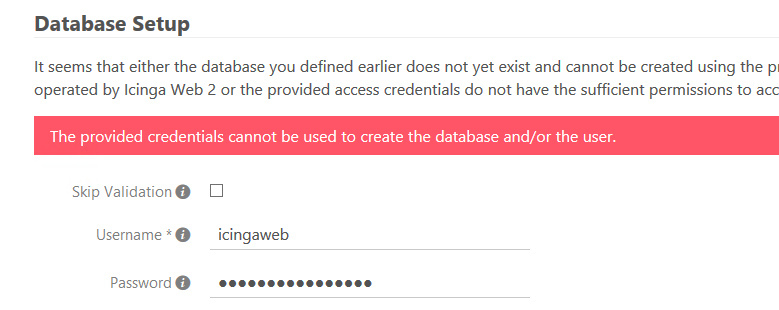
when filling these fields with the same database-name "icingaweb", but with mysql-root credentials the setup procedure continues.
This error does not occur for the icinga2-database. The given database-name "icinga2", username "icinga2" and the corresponding generated password are accepted.
But here is the interesting point:
As soon as the Setup is completed I'm able to change the username and password in the configuration of the icinga2 web2 () to the original user "icingaweb" with it's corresponding password and the configuration still works...
IMHO the setup wizard is trying to do something that only root is able to.
Maybe I've missed something - if so please tell me.
Cheers,
Matthias
P.S.: The configuration validation button here always gives a positive return - even if the password is wrong... This does not happen with the second configuration part (icinga2 - ido). There is also a database-connection-validation status information available.
P.P.S.: This database-topic seems to be unclear since years :D https://lists.icinga.org/pipermail/icinga-users/2014-July/008424.html
 mwiora
on 15 Oct 2018
mwiora
on 15 Oct 2018
\
Puh, such a harsh tone from yours.
@dnsmichi, the OP simply stated the facts. What is harsh about it? You don't seem to like hearing that he followed your (a.k.a. Icingaweb2 document's) instructions and it doesn't work. The web setup wizard document sucked in 2017 and it still sucks in 2019. Similar inconsistencies, similar errors.
May I suggest you to try replacing your Icinga2 dev hat with that of a novice, and use only the published documentation to stand up an Icinga box with a web interface. Please avoid undocumented tweaking and workarounds, and use just the plain doco as it is published today, January 2019. I'd be interested to know whether it works at first try, without any undocumented under-the-hood geeky tweaks that you're obviously aware of and do by instinct without even thinking. Try CentOS 7 minimal install with default settings to start with.
I wouldn't comment if things would work as documented. But I've been trying to make it work for days and my frustration is growing, even more so when I see your dismissive attitude.
\
On a more constructive note, talking about the web setup wizard, if the wizard would display some comments and suggested default values that match those in the documentation, would go a long way. These values that even a rookie like me can match to those in the documentation would help disperse much of the confusion, and you'd get fewer such comments to deal with. It would be a win-win situation.
Thanks,
Z.
 ekzp
on 25 Jan 2019
ekzp
on 25 Jan 2019
Hey guys,
I was just starting with icinga today and I'm about to get it running on a raspberry pi 3, running raspbian. I ran into the same issue, after some fiddeling around I think the issue is that since mysql 5.7 root login requires sudo (see https://askubuntu.com/questions/763336/cannot-enter-phpmyadmin-as-root-mysql-5-7/763359#763359 ). That means that putting root here in the wizard will not work.
What you have to do (What I have done) is to manually create a user with ALL PRIVILEGES ON * . * TO myuser; FLUSH PRIVILEGES; and restarted the mysql service.
Then used that user, and it worked.
I think this would be worth noticing in the docs...
 jebos
on 10 Mar 2019
jebos
on 10 Mar 2019
We will update our docs.
lippserd
on 6 May 2019
IMHO we'll need to look at that validation step in the Wizard too.
For instance, a login that doesn't work on the command line:
[root@centos1 ~]# mysql -uicingaweb -picingaweb
ERROR 1045 (28000): Access denied for user 'icingaweb'@'localhost' (using password: YES)
gives the following statement when pressing Validate Configuration on the Database Resource screen:
_The configuration has been successfully validated._
(N.B.: There is no icingaweb@localhost user/grant on this mysqld, only an icingaweb@$IP user):
MariaDB [(none)]> show grants for [email protected];
+--------------------------------------------------------------------------------------------------------------------+
| Grants for [email protected]                                                                                   |
+--------------------------------------------------------------------------------------------------------------------+
| GRANT USAGE ON *.* TO 'icingaweb'@'10.24.1.181' IDENTIFIED BY PASSWORD '*C7DE9D84FF4930475B93F2B18DA51EBDF1546FEF' |
| GRANT ALL PRIVILEGES ON `icingaweb`.* TO 'icingaweb'@'10.24.1.181'                                                 |
+--------------------------------------------------------------------------------------------------------------------+
MariaDB [(none)]> show grants for icingaweb;
ERROR 1141 (42000): There is no such grant defined for user 'icingaweb' on host '%'
MariaDB [(none)]> show grants for icingaweb@localhost;
ERROR 1141 (42000): There is no such grant defined for user 'icingaweb' on host 'localhost'
In the next step Database Setup, I'm getting the same error message as on the command line.
I haven't looked at the code that runs the validation, but regardless of what it is validating, its output is confusing by stating that it's valid. In this context, I'm pretty sure users are actually expecting that valid includes the fact that icingaweb can connect to the database using that username and password, if not to set it up, then at least to SELECT from it, but that's not the case.
In this particular case, 10.24.1.181 IS localhost, but the tooltip on the set-up UI says to use localhost for unix socket connections. (Unless those connections resolve to IP connections?)
At the very least, the same credentials using GRANT ALL PRIVILEGES cannot both validate in the first step and get permission denied in the second.
 kwisatz
on 14 Jul 2019
kwisatz
on 14 Jul 2019
@kwisatz It's the case. It all works fine if you'll provide the step which asks for "appropriate access credentials" with valid credentials. Though, since Mysql 5.7 you can't simply put your root credentials in there anymore. And that's what this issue is all about.
Oh, and 10.24.1.181 is surely not localhost. That's most probably still 127.0.0.1. Though, just use 'username'@'localhost' for your grants if you don't access Mysql from the outside.
 nilmerg
on 15 Jul 2019
nilmerg
on 15 Jul 2019
@nilmerg maybe my issue is different from OP's then. I'm not trying to use the root account, but a dedicated one I gave ALL privileges. My point being that the positive validation message is confusing, maybe even incorrect.
I meant to say that 10.24.1.181 is this system's IP on it's public interface.
kwisatz
on 15 Jul 2019
It's not incorrect. It does exactly what you described. It tries to establish a connection, if the provided credentials don't work it asks for another set of credentials. That's root most of the time. It even says that in the second screen posted by the OP. I don't know what's confusing here.
nilmerg
on 15 Jul 2019
@nilmerg what's confusing is the message The configuration has been successfully validated. in the first screen. It suggests the application was able to connect to the database using the supplied credentials.
If that's not the case (i.e. it doesn't try establishing a connection) then what exactly does it validate?
In other words:
In the first screen,
When I supply credentials that cannot connect to the database
And I click on `Validate configuration`
Then I expect to see an error message.
Or in yet other words:
"Can you explain why I'm seeing a positive validation result for a user that has not been granted privileges?"
kwisatz
on 15 Jul 2019
what exactly does it validate?
1) Is the host reachable?
2) Does the database exist, can we connect to it?
3) Is the db you've configured the one of Icinga 2? (that's wrong, btw)
4) If it's PostgreSql, is the version at least v9.1?
- and 2. though don't complain if a failure is the result of incorrect/missing credentials. Again, to make you aware of this is the task of the next step which asks for your
rootcredentials and also explains why it does so.
I hope you'll now understand why I don't see any confusion here, and never will.
nilmerg
on 15 Jul 2019
@nilmerg wrote:
- Does the database exist, can we connect to it?
That's my point. I don't understand why that succeeds in my case. The user I gave icingaweb@localhost doesn't have any privileges. It shouldn't be able to connect. Unless by connecting you mean you're checking whether port 3306 on $host is reachable.
- Is the db you've configured the one of Icinga 2? (that's wrong, btw)
Do you mean that it checks for tables of the IDO database?
kwisatz
on 15 Jul 2019
I don't understand why that succeeds in my case.
It doesn't. It just doesn't tell you this at this stage. It's the next stage which clearly states that the provided access credentials do not have the sufficient permissions to access the database.
Do you mean that it checks for tables of the IDO database?
Yes.
--
Honestly, I'm now done here. If you want to know what and how exactly the wizard validates something, look at the code: https://github.com/Icinga/icingaweb2/blob/184d4afdbdb945fd0ce25c499ea368999a8b8105/modules/setup/application/forms/DbResourcePage.php#L110
nilmerg
on 15 Jul 2019
I don't mean to troll @nilmerg, maybe I'm just mentally blocked. I'll take a look at the validation code to understand what is going on exactly and only then check back in again to avoid annoying you and everyone else in this thread.
It doesn't. It just doesn't tell you this at this stage.
That's exactly my point. Instead, it says "The configuration has been successfully validated."
Which, I, at least, have mis-interpreted to include sufficient permissions.
That's all I'm saying.
kwisatz
on 15 Jul 2019
@nilmerg @lippserd I took a look at the code and I had someone else take a second look to make sure and there's a problem with that function. In case of a MySQL-compatible database, it will always return true, even in case of a connection error. I'm assuming that's why we're seeing The configuration has been successfully validated.
kwisatz
on 15 Jul 2019
Can you please share the details from your box (OS, distribution version as well as MySQL and PHP versions) as well as the code flow you've now analysed?
dnsmichi
on 15 Jul 2019
Hi, @dnsmichi, gladly.
I'll be on and off though, we have both an intern and a new employee starting today.
kwisatz
on 15 Jul 2019
No more details needed, IMHO @kwisatz did enough to help us here. Thank you for our patience! Had a quick look, guess this is the problematic block he's talking about. $state will not be false, even with a $connectionError.
Cheers,
Thomas
 Thomas-Gelf
on 15 Jul 2019
Thomas-Gelf
on 15 Jul 2019
@Thomas-Gelf Take a look again. Especially on lines 151 and 160. If you've meant this instead, then yes, it's not set, but that's entirely intentional.
nilmerg
on 15 Jul 2019
And really, before anyone else thinks about to contribute to this discussion, I want a clear step-by-step instruction from @kwisatz on how to reproduce his issue.
nilmerg
on 15 Jul 2019
@nilmerg: you can either show the error message and return on #129 or do so afterwards. It currently never happens as the if/else section will probably not match. I'm leaving the discussion, sorry for bothering you.
Thomas-Gelf
on 15 Jul 2019
@nilmerg @dnsmichi @Thomas-Gelf
On line 123, you're setting $state = true;.
On line 127, you try to connect to the DB, but if this fails, then $state remains true until the very end where it is returned.
Line 132 doesn't play because $connectionError will be a reference to the Exception thrown during connectToDb and line 142 won't play because this is a MariaDB database, not Postgres.
Which means that line 165 will return true even if connectToDb threw an exception.
kwisatz
on 15 Jul 2019
@dnsmichi I've done this on a Centos 7
[centos@centos1 ~]$ cat /etc/centos-release
CentOS Linux release 7.6.1810 (Core)
using
Name        : mariadb
Arch        : x86_64
Epoch       : 1
Version     : 5.5.60
Release     : 1.el7_5
The set-up is part of my larger attempt at extending icinga2/ansible-icinga2 and I'm certain there are other issues with my set-up. The present case here is easy to reproduce though and independent of ansible.
As I've shown above, I have a grant for [email protected] and in the Database Resource form, I'm inserting localhost for host and icingaweb for user. And it will return the successful validation message as described above.
kwisatz
on 15 Jul 2019
As I've shown above, I have a grant for [email protected] and in the Database Resource form, I'm inserting localhost for host and icingaweb for user.
That's exactly what I already told you above. That's incorrect. You're connecting with icingaweb@localhost by using the wizard. That's even what you got on the cli as error. The grant for [email protected] only works if your connection attempt is external.
Which it is only if your web-server is on another host than that of your database.
Is this the case?
nilmerg
on 15 Jul 2019
I know that it's wrong @nilmerg. For the sake of this ticket, it's wrong on purpose. And yet, the Database Resource step returns __The configuration has been successfully validated.__ for exactly this incorrect credentials/configuration. That was the point of my ticket all along. I'm sorry if I'm not expressing myself clearly.
Maybe someone else can re-explain this in another way, I don't know how to explain it differently and I'm running out of time.
kwisatz
on 15 Jul 2019
And yet, the Database Resource step returns The configuration has been successfully validated. for exactly this incorrect credentials/configuration.
As I outlined earlier, this is intended. The only thing that's incorrect are the access credentials. Everything else is correct.
I won't repeat myself any longer. End of discussion.
nilmerg
on 15 Jul 2019
Just tried the installation myself with a fresh Debian 9 Stretch. Followed the instructions in our installation documentation to the letter. The only thing I had to comprehend myself is that if the documentation/wizard speaks of database authentication I need to install a database server. The documentation for Icinga Web 2 of course doesn't cover how that's done, nor does it explain in detail how a database's authentication/authorization mechanisms work. Knowledge about this is assumed a given, since it's a technical documentation not a tutorial of any sort.
The wizard progressed flawlessly then, everything green. Login to Icinga Web 2 worked fine as well.
A second try where I deliberately made some mistakes and didn't do things written in the documentation resulted in the same error as in the OP. Though again, having some knowledge how a database does authorization should help to correct these.
--
So for me this topic is ultimately solved. Especially since @dnsmichi restructured the documentation with #2913 in response to @edermi. :tada:
The next time someone has an issue with the installation of Icinga Web 2, please first head over to our forums https://community.icinga.com in order to narrow down the actual problem. Only if it's not an issue on your end (and also others besides yourself are convinced about this) it's time to head over here. Thanks.
nilmerg
on 19 Jul 2019
Related issues
 Al2Klimov
·
6Comments
Al2Klimov
·
6Comments
 jschoone
·
7Comments
jschoone
·
7Comments
 log1-c
·
5Comments
nilmerg
·
6Comments
log1-c
·
5Comments
nilmerg
·
6Comments
 mhutter
·
10Comments
mhutter
·
10Comments
Most helpful comment
Hey guys,
I was just starting with icinga today and I'm about to get it running on a raspberry pi 3, running raspbian. I ran into the same issue, after some fiddeling around I think the issue is that since mysql 5.7 root login requires sudo (see https://askubuntu.com/questions/763336/cannot-enter-phpmyadmin-as-root-mysql-5-7/763359#763359 ). That means that putting root here in the wizard will not work.
What you have to do (What I have done) is to manually create a user with ALL PRIVILEGES ON * . * TO myuser; FLUSH PRIVILEGES; and restarted the mysql service.
Then used that user, and it worked.
I think this would be worth noticing in the docs...