Icinga2: MySQL ibdata1 file size is increasing very fast
Describe the bug
MySQL database file "ibdata1" size is increasing too fast & I feel something wrong here.
Total Host Monitored - 1486 and Services - 9246
Expected behavior
The Disk space should not increase so fast
Screenshots

Your Environment
- Icinga Web 2 version and modules (System - About): icingaweb2-2.7.3-1.el7.icinga
- OS used: CentOS 7
- Icinga 2 version used (
icinga2 --version): icinga2-2.11.1-1.el7.icinga - PHP version used (
php --version): PHP-71
 phankare
All 36 comments
Do you have a sense of the rate of growth? Is this a new installation? Was it very small a week ago? Or has it been gradually growing for years?
Since ibdata1 can be storing data from multiple schemas, can you run this command in MySQL to confirm which schema(s) are using the most space?
SELECT TABLE_SCHEMA AS "Schema", ROUND(SUM(data_length) / 1024 / 1024, 2) AS "Data MB", ROUND(SUM(index_length) / 1024 / 1024, 2) AS "Index MB", ROUND(SUM(data_length + index_length) / 1024 / 1024, 2) AS "Total MB" FROM information_schema.TABLES GROUP BY TABLE_SCHEMA;
If it is the icinga schema taking up the majority of the space, can you run:
SELECT TABLE_NAME AS "Table", ROUND(data_length / 1024 / 1024, 2) AS "Data MB", ROUND(index_length / 1024 / 1024, 2) AS "Index MB", ROUND((data_length + index_length) / 1024 / 1024, 2) AS "Total MB" FROM information_schema.TABLES WHERE TABLE_SCHEMA='icinga';
You may also want to consider using innodb_file_per_table, which has been the default since MySQL 5.6.6.
 leeclemens
on 14 Apr 2020
leeclemens
on 14 Apr 2020
This is just a 6-8 month old installation. The database grown very fast after adding about 200 more host with approx 19 services checks each host.
"icinga" schema is taking up majority of the space. Below is the screenshot.

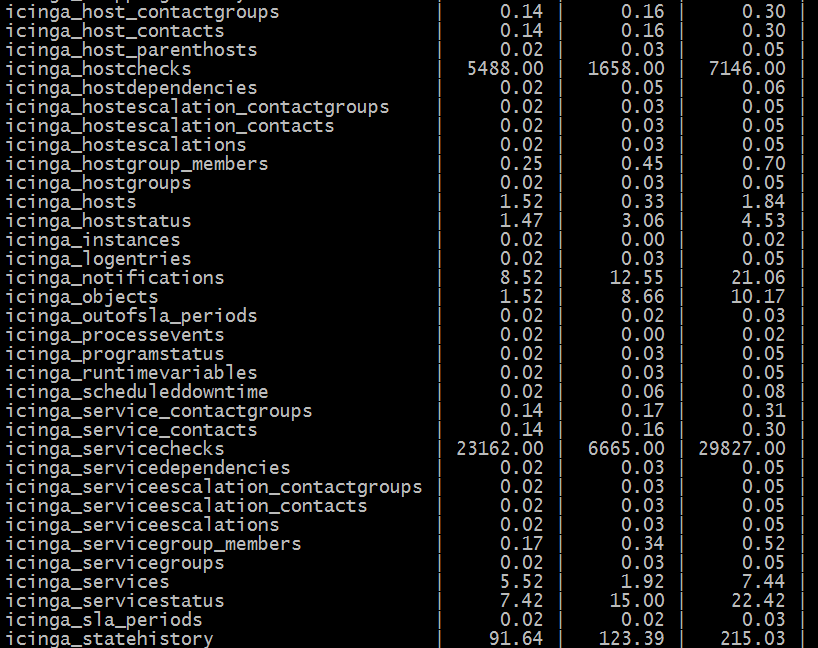
After checking the "icinga" schema using 2nd command provided. I can see "icinga_hostchecks" and "icinga_servicechecks" is taking up the majority of the space. Below is the Screenshot.
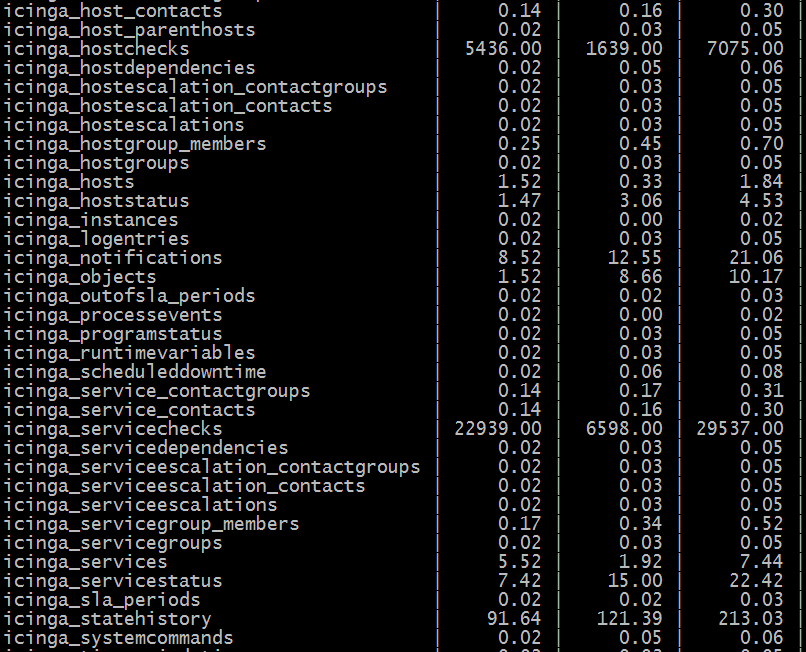
Currently I'm using MySQL 5.5.60.
phankare
on 15 Apr 2020
I don't have any rows in either of those tables. The best I can find reference Icinga 1. Are you running Icinga 1 somewhere?
Servicechecks Table
Description: This table is used to store a historical record of service checks that have been performed. NOTE: This table is usually trimmed periodically by the IDO2DB daemon, as it would otherwise grow to an enormous size.
There are some cleanup items you can specify in the IdoMySqlConnection object.
servicechecks_age references the servicechecks table. However hostchecks_age references the hostalives table (code seems to use the variable as the table name, so looks like a documentation bug).
Those may help, but does not explain why I have 0 rows and cleanup is not configured (default is Never).
MySQL 5.5.60 does support innodb_file_per_table, I only mentioned 5.6 since it was changed to be the default - suggesting it is generally favorable. I don't want to get sidetracked so I won't go into details, just suggesting you may want to consider it.
leeclemens
on 15 Apr 2020
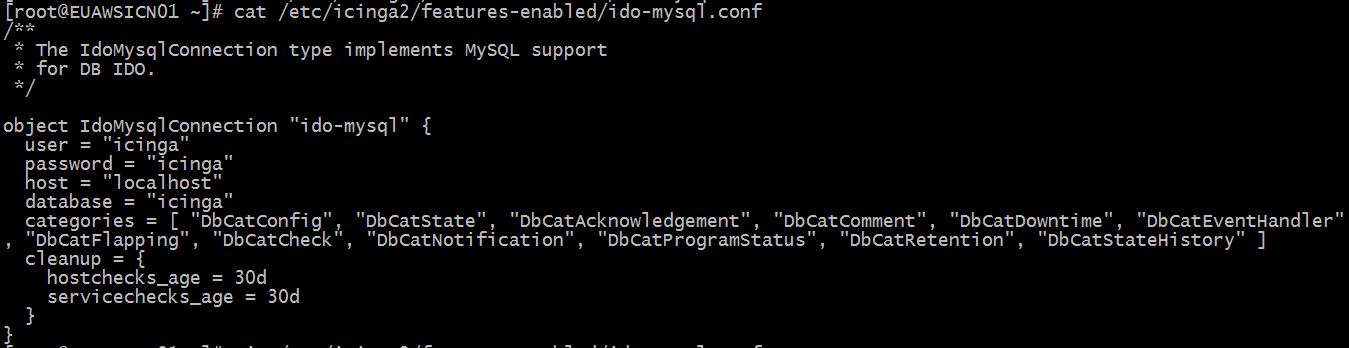
Below is what I have in the IdoMySqlConnection
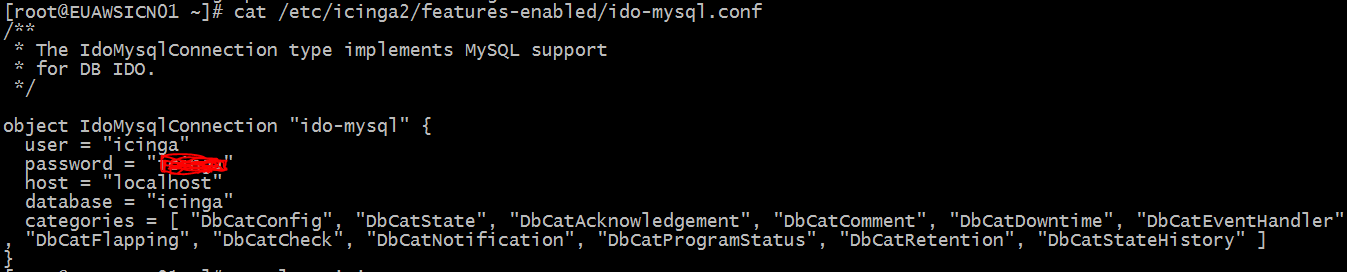
Should I change sometime here. I am not a DevOps person, so please guide me on this.
phankare
on 15 Apr 2020
That makes sense, it looks like DbCatCheck is why those tables are populated for you.
You can add a cleanup dictionary to the IdoMysqlConnection object similar to:
  cleanup = {
    hostchecks_age = 48h
    servicechecks_age = 31d
  }
I haven't seen the "categories" attribute in any default configuration earlier of MySqlConnection. I suspect that the "categories" attribute is added automatically by the "Reporting Module" enabled in Icinga2 Director. Correct me if wrong.
phankare
on 15 Apr 2020
I don't think it would have been able to, that's an icinga2 config file, not icingaweb2.
leeclemens
on 15 Apr 2020
I have added the "cleanup" dictionary and restarted mariadb and icinga2 service. However, no change in database size.
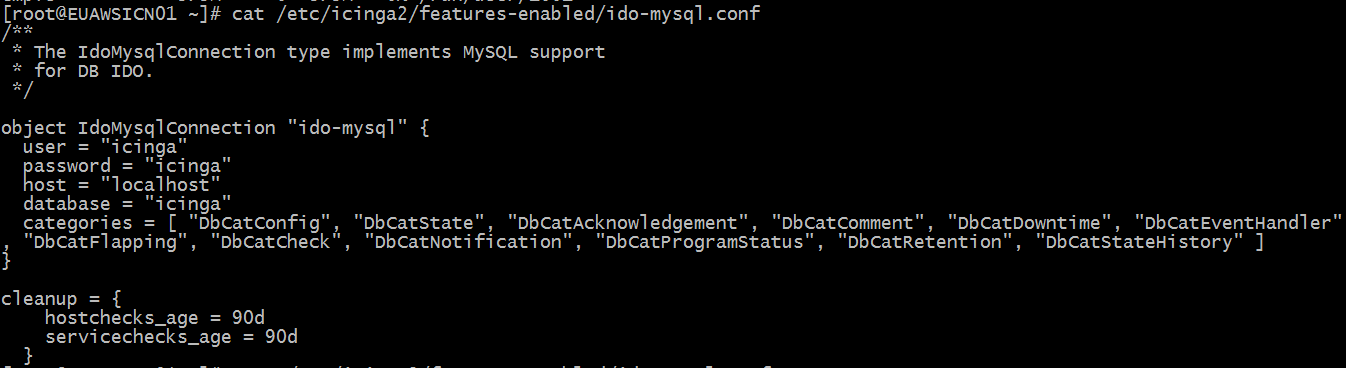
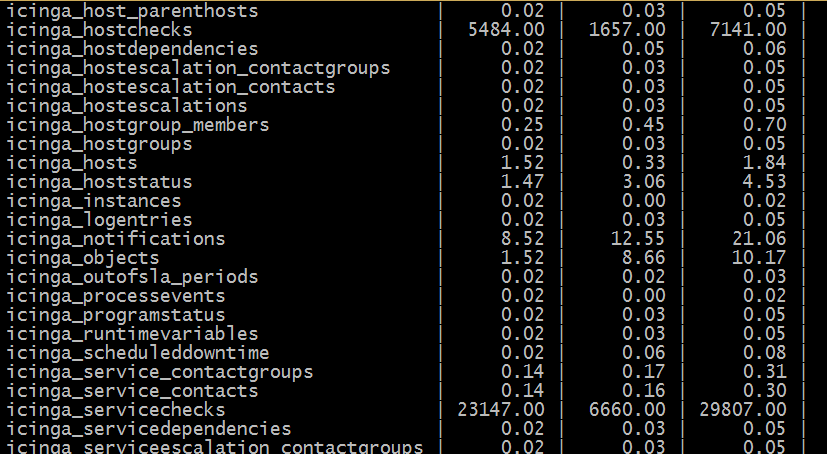
phankare
on 15 Apr 2020
It needs to be inside the object definition, same as categories.
leeclemens
on 15 Apr 2020
Okay. However, Still the database size has not changed even after restarting icinga2 and mariadb.
phankare
on 15 Apr 2020
It may not have run yet, did youcheck the logs for anything related to clean up those two table names?
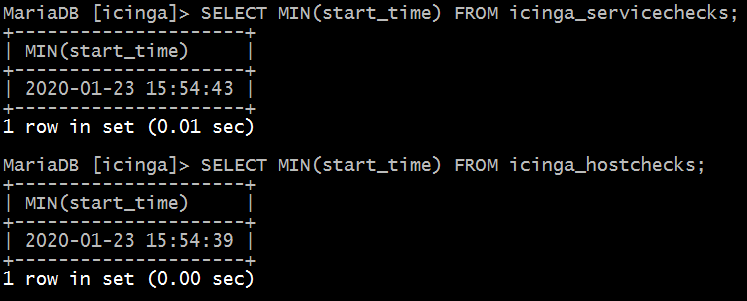
Can you run this, it should be a better gauge than the table size (or COUNT(*)):
SELECT MIN(start_time) FROM icinga_servicechecks;
I ran the command and the out put is as below.
And this is what I found in logs.

My disk space is very low now and need to resolve this ASAP. Please help.
phankare
on 15 Apr 2020
Hi @phankare,
as @leeclemens pointed out, DbCatCheck is the culprit for all that useless data. I have no idea how categories finished up in your configuration. Please remove either DbCatCheck, or even better: the whole category setting. The default is fine, there is no need to tweak this.
The tables icinga_servicechecks and icinga_hostchecks contain completely useless data, I do not know any tool that makes use of them. They store EVERY SINGLE check result, an insane amount of data.
So please wipe them completely:
TRUNCATE icinga_servicechecks;
TRUNCATE icinga_hostchecks;
Now remains the problem that your ibdata file is too large. Bad news: it will not shrink. That's why every, EVERY MySQL/MariaDB installation should set innodb_file_per_table (as suggested by @leeclemens). This must be configured at the very beginning, as it has no influence on existing tables. Using one file per table is the default since a very, very long time - but "thanks" to some conservative distributions only recently this seems to be true also for packages shipped by them.
Please change this setting, please stop Icinga, take a mysqldump of ALL your databases, DROP all databases (all but mysql and performance_schema), stop MariaDB, remove ibdata1 and ib_logfile*, start MariaDB (it will re-create those files), restore your DB dump and start Icinga again. If you do not feel comfortable with those steps please search the web for shrink ibdata1 - you'll find similar step-by-step tutorials.
Cheers,
Thomas
 Thomas-Gelf
on 15 Apr 2020
Thomas-Gelf
on 15 Apr 2020
A new problem has raised don't no why.
In icinga2 log file I see error as " critical/IdoMysqlConnection: Error "Lock wait timeout exceeded; try restarting transaction"
Please help...
phankare
on 15 Apr 2020
This is because you introduced that cleanup section. You keep hammering the DB with useless data and told Icinga to clean it up again and again. Seems that the cleanup is too slow and blocks the normal operation. Completely remove both cleanup and categories from your IdoMysqlConnection and restart Icinga. Then run the shown TRUNCATE commands. It should then operate normally and you can go on to getting rid of that huge ibdata file.
Thomas-Gelf
on 15 Apr 2020
Thank You, Lee Clemens and Thomas-Gelf for your support. I have removed the "cleanup" section and it is working normally now.
I did not Truncate the mentioned table but will plan this after understanding it properly and need to plan a downtime as it is a production server for us.
Thank You Again... :)
phankare
on 15 Apr 2020
Hi Friends,
I did try to shrink the "ibdata1" file by method explained by "Thomas". However after restoring the data icingaweb2 stoped working with error saying "unable/no icinga.icinga_object table" found.
I took the backup, deleted all the databases excluding mysql, information schema and performance schema. Then deleted the "ibdata1" file including all the ibdatalog* files. Then tried to restore database but was unable to do so. For that to work I had to create all the database file's which were dropped(e,g director,graphite,icingaweb2,etc). even after that icingaweb2 kept showing the same error. To make it work I had to import the icinga schema as we do while creating database for the first time and then it started working.
However, the icingaweb2 started working but unfortunately all the director data was lost, don't know why. Even my graphite graphs were also not working. all the endpoints, zones, api-users were lost which were created using director.
I imported graphite database schema and graphite started working but still director data was lost.
Please help, what can be done to restore all the host, services, templates, endpoints, zones, api-users, etc which were created by using director.
phankare
on 16 Apr 2020
How did you take your backup?
Thomas-Gelf
on 16 Apr 2020
using mysqldump "mysqldump -u root -p -h 'localhost' --all-database > /mnt/backup/all-databases.sql"
phankare
on 16 Apr 2020
And then you successfully restored it running mysql < /mnt/backup/all-databases.sql?
Thomas-Gelf
on 16 Apr 2020
No, i used "mysqldump -u root -p -h 'localhost' (databasename) < /mnt/backup/all-databases.sql". But failed so, i had to recreate database first and then used the same command and was successfull.
phankare
on 16 Apr 2020
Could me please point me to the instructions you followed? Anyway, mysqldump will not restore data - please use mysql to do so. Your backup should still be fine, so you can give the restore procedure another try.
Thomas-Gelf
on 16 Apr 2020
Unfortunetly, I deleted backup accidently so cannot restore the data. However, I am restoring my AMI now, we can give it a try again. Need to know step by step procedure to backup and restore the database. Can you please provide me that.
I followed some procedures from here -> https://stackoverflow.com/questions/3456159/how-to-shrink-purge-ibdata1-file-in-mysql
phankare
on 16 Apr 2020
I have restored my AMI now, We can do the shrinking procedure again. Need your help to perform this activity. Help me out with the step by step procedure.
phankare
on 16 Apr 2020
- stop Icinga 2 and eventually other daemons writing to a database on this MariaDB instance
- run above truncate statements to avoid having that useless data in your backup
- take a backup as follows:
mysqldump -u [username] -p --all-databases --events --routines --triggers --single-transaction > full_backup.sql
- drop all databases
- stop MariaDB
- configure innodb_file_per_table
- remove ibdata1 and ib_logfile*
- start MariaDB
- restore your backup:
mysql -u [username] -p < full_backup.sql
Last but not lease make sure to have removed the categories setting from your IdoMysqlConnection and start Icinga
Thomas-Gelf
on 16 Apr 2020
Yes, I have removed the "categories" setting from the IdoMySqlConnection. Truncated the hostchecks and servicechecks table.
Do you want me to drop all the databases?
phankare
on 16 Apr 2020
AFTER you took a backup, yes :-)
Thomas-Gelf
on 16 Apr 2020
Are you sure you want me to drop mysql and performance schema database?
phankare
on 16 Apr 2020
Wouldn't be tragic, but...
[..] DROP all databases (all but
mysqlandperformance_schema) [..]
...keep them. Same goes for information_schema.
Thomas-Gelf
on 16 Apr 2020
Will "mysql -u [username] -p < full_backup.sql" fail since, we already have mysql, performance_schema and information_schema database in mariadb.
phankare
on 16 Apr 2020
Did you try it?
Thomas-Gelf
on 16 Apr 2020
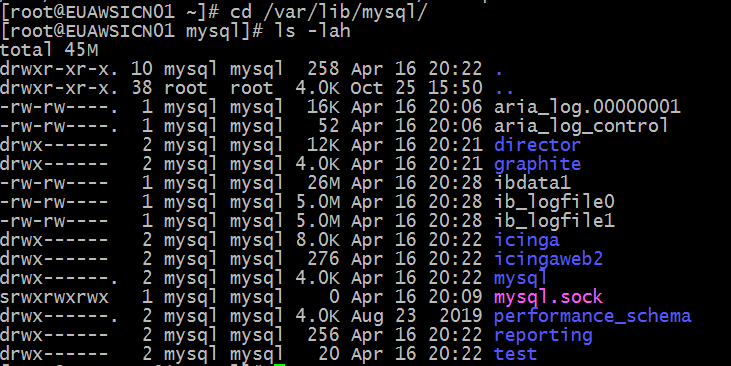
It worked like a charm.
Thank You, Thomas for helping me out.
phankare
on 16 Apr 2020
You're welcome! Just in case we meet each other in person some day after Corona: you owe me a beer ;-)
Thomas-Gelf
on 16 Apr 2020
Sure, For that you need to travel Mumbai,India. Till then Stay Safe and Health Wishes.
Closing the issue...
phankare
on 16 Apr 2020
For a beer, why not :laughing:
Thomas-Gelf
on 16 Apr 2020
Related issues
 silenceJI
·
5Comments
silenceJI
·
5Comments
 BuildTheRobots
·
6Comments
BuildTheRobots
·
6Comments
 marek130
·
6Comments
marek130
·
6Comments
 lamaral
·
4Comments
lamaral
·
4Comments
 ggzengel
·
4Comments
ggzengel
·
4Comments