Icinga2: Analyze Windows reload behaviour
This sources from #6367 with ongoing investigation.
- [x] Socket stays open on shutdown, and the new service cannot bind it
- [x] Reload with config validation may last forever in a second service
6371 has been merged which might influence the socket handling, we at least should ensure to test the build based on this. Build has been triggered: https://build.icinga.com/view/Icinga%202/job/icinga2-windows-package/680/console
Related issues could be:
- #3269
- #3129
- #6154
- #4068
- #4763
- #5105
- #6112
 dnsmichi
All 13 comments
I just tested the new build for the Agent (x64) on Windows and the socket problem is not resolved there:
[2018-06-15 14:58:19 +0200] information/ApiListener: Restarting after configuration change.
[2018-06-15 14:58:21 +0200] information/Application: Got reload command: Starting new instance.
[2018-06-15 14:58:24 +0200] information/ApiListener: 'api' started.
[2018-06-15 14:58:24 +0200] information/ApiListener: Adding new listener on port '5665'
[2018-06-15 14:58:24 +0200] critical/TcpSocket: Invalid socket: 10048, "Normalerweise darf jede Socketadresse (Protokoll, Netzwerkadresse oder Anschluss) nur jeweils einmal verwendet werden."
Context:
    (0) Activating object 'api' of type 'ApiListener'

[2018-06-15 14:58:24 +0200] critical/ApiListener: Cannot bind TCP socket for host '::' on port '5665'.
Context:
    (0) Activating object 'api' of type 'ApiListener'

[2018-06-15 14:58:24 +0200] critical/ApiListener: Cannot add listener on host '::' for port '5665'.
Context:
    (0) Activating object 'api' of type 'ApiListener'
How to reproduce
- Deploy new configuration with the Icinga Director
- Start checking plenty of services for the Host with 'Check Now' over Icinga Web 2
- Wait until the log tells you the Agent crashed with an invalid socket
 LordHepipud
on 15 Jun 2018
LordHepipud
on 15 Jun 2018
I encountered now the issue many run into. The Icinga 2 Agent received a new configuration and would like to apply it:
Debug.log
[2018-06-15 16:10:33 +0200] information/Application: Got reload command: Starting new instance.
[2018-06-15 16:10:33 +0200] notice/Process: Running command '"C:\Program Files\ICINGA2\sbin\icinga2.exe" daemon --validate': PID 4048
[2018-06-15 16:10:35 +0200] notice/JsonRpcConnection: Received 'event::Heartbeat' message from 'sales-demo-icinga2b'
[2018-06-15 16:10:35 +0200] notice/Process: PID 4048 ('"C:\Program Files\ICINGA2\sbin\icinga2.exe" daemon --validate') terminated with exit code 0
Icinga2.log
[2018-06-15 16:10:31 +0200] information/ApiListener: Updating configuration file: C:\ProgramData\icinga2\var/lib/icinga2/api/zones/director-global//.timestamp
[2018-06-15 16:10:31 +0200] information/ApiListener: Updating configuration file: C:\ProgramData\icinga2\var/lib/icinga2/api/zones/director-global//.timestamp
[2018-06-15 16:10:31 +0200] information/ApiListener: Applying configuration file update for path 'C:\ProgramData\icinga2\var/lib/icinga2/api/zones/director-global' (17 Bytes). Received timestamp '2018-06-15 16:10:03 +0200' (1529071803.524146), Current timestamp '2018-06-15 15:55:16 +0200' (1529070916.090325).
[2018-06-15 16:10:31 +0200] information/ApiListener: Applying configuration file update for path 'C:\ProgramData\icinga2\var/lib/icinga2/api/zones/director-global' (17 Bytes). Received timestamp '2018-06-15 16:10:03 +0200' (1529071803.524146), Current timestamp '2018-06-15 15:55:16 +0200' (1529070916.090325).
[2018-06-15 16:10:31 +0200] information/ApiListener: Updating configuration file: C:\ProgramData\icinga2\var/lib/icinga2/api/zones/sales-demo-windows//.timestamp
[2018-06-15 16:10:31 +0200] information/ApiListener: Updating configuration file: C:\ProgramData\icinga2\var/lib/icinga2/api/zones/sales-demo-windows//_etc/api_test_user.conf
[2018-06-15 16:10:31 +0200] information/ApiListener: Applying configuration file update for path 'C:\ProgramData\icinga2\var/lib/icinga2/api/zones/sales-demo-windows' (102 Bytes). Received timestamp '2018-06-15 16:10:03 +0200' (1529071803.520592), Current timestamp '2018-06-15 14:58:17 +0200' (1529067497.591288).
[2018-06-15 16:10:31 +0200] information/ApiListener: Restarting after configuration change.
[2018-06-15 16:10:31 +0200] information/ApiListener: Finished sending replay log for endpoint 'sales-demo-icinga2b' in zone 'icinga2-master-zone'.
[2018-06-15 16:10:31 +0200] information/ApiListener: Finished syncing endpoint 'sales-demo-icinga2b' in zone 'icinga2-master-zone'.
[2018-06-15 16:10:31 +0200] information/ApiListener: Finished sending replay log for endpoint 'sales-demo-icinga2a' in zone 'icinga2-master-zone'.
[2018-06-15 16:10:31 +0200] information/ApiListener: Finished syncing endpoint 'sales-demo-icinga2a' in zone 'icinga2-master-zone'.
[2018-06-15 16:10:33 +0200] information/Application: Got reload command: Starting new instance.
Within the task manager, both Icinga 2 Services are running
icinga2.exe - PID 2072 - Memory 26.580 K
icinga2.exe - PID 2492 - Memory 22.404 K
The CPU usage is remaining on 0 for both processes and the memory does not change as well. The Agent is now simply frozen and cannot be accessed over the API. Within Icinga Web 2 itself the Agent is flagged as "Not connected to instance".
The process with PID 4048 was successfully terminated, so the previous icinga2.exe successfully closed itself as it cannot be found within the current active applications. The new process however is not continuing it's work at the moment and simply frozen.
LordHepipud
on 15 Jun 2018
I just had a debugging session with @Crunsher for this issue. Atleast on my machine we were able to reproduce the issue now.
It seems to occure because of hashing plain-text passwords for API users.
Creating a hashed password with
icinga2 api user --user testing --password testing
as example on a Icinga 2 Linux machine and replacing
password = 'testing'
for
password_hash = '<your hashed password here>'
resolved the issue. The Icinga 2 Agent just restarted fine and continued the work.
lib\base\tlsutility.cpp
/* Ensure that password generation is atomic. RAND_bytes is not thread-safe
 * in OpenSSL < 1.1.0.
 */
boost::mutex::scoped_lock lock(l_RandomMutex);

if (!RAND_bytes(bytes, length)) {
    delete [] bytes;

    char errbuf[120];

    Log(LogCritical, "SSL")
        << "Error for RAND_bytes: " << ERR_peek_error() << ", \"" << ERR_error_string(ERR_peek_error(), errbuf) << "\"";
    BOOST_THROW_EXCEPTION(openssl_error()
        << boost::errinfo_api_function("RAND_bytes")
        << errinfo_openssl_error(ERR_peek_error()));
}

lock.unlock();
Once @Crunsher looked into this and provided a fix, we will continue testing if the freezing still occures and continue with the socket issues.
LordHepipud
on 15 Jun 2018
This is likely to have to do with #6279
 Crunsher
on 18 Jun 2018
Crunsher
on 18 Jun 2018
Famous last words: Completely dropping the ApiUser password_hash functionality solves the Windows reload problem.
Test Scenario
Master
Sync an ApiUser object, and change the password all the time. winmif is the zone name for my Windows client.
mbmif /usr/local/icinga2/etc/icinga2/zones.d (master *) # vim winmif/apiuser.conf

object ApiUser "icinga" {
  password = "icinga2"
  //test
  //test2
  //test3
}
Note
We've learned that many users just sync the ApiUsers via cluster config sync to their satellites and clients. This is not considered best practice as we normally deploy that on-demand for security reasons. Nevertheless, this is the bug target.
Client
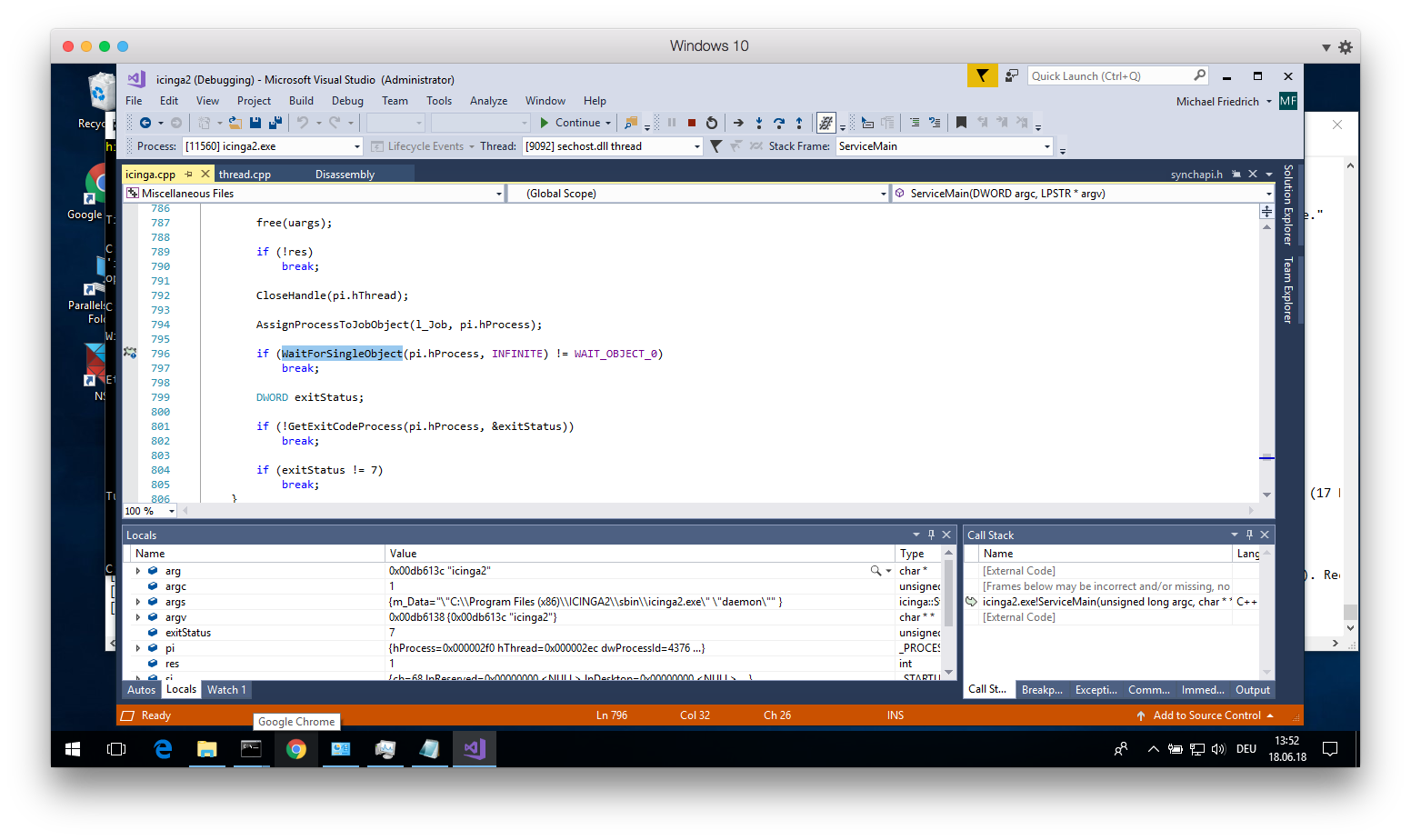
Broken reload
Just hangs in there. VS 2017 debugger just tells me that the process and its threads are locked and idle, not more insights in there unfortunately.
information/Application: Got reload command: Starting new instance.
Working reload
[2018-06-19 09:18:07 +0200] information/ApiListener: New client connection for identity 'mbmif.int.netways.de' to [10.0.10.30]:5665
[2018-06-19 09:18:07 +0200] information/ApiListener: Finished reconnecting to endpoint 'mbmif.int.netways.de' via host 'mbmif.int.netways.de' and port '5665'
[2018-06-19 09:18:07 +0200] information/ApiListener: Requesting new certificate for this Icinga instance from endpoint 'mbmif.int.netways.de'.
[2018-06-19 09:18:07 +0200] information/WorkQueue: #9 (JsonRpcConnection, #1) items: 2, rate:  0/s (0/min 0/5min 0/15min); empty in 10 seconds
[2018-06-19 09:18:07 +0200] information/ApiListener: Sending config updates for endpoint 'mbmif.int.netways.de' in zone 'master'.
[2018-06-19 09:18:07 +0200] information/ApiListener: Finished sending config file updates for endpoint 'mbmif.int.netways.de' in zone 'master'.
[2018-06-19 09:18:07 +0200] information/ApiListener: Applying config update from endpoint 'mbmif.int.netways.de' of zone 'master'.
[2018-06-19 09:18:07 +0200] information/ApiListener: Syncing runtime objects to endpoint 'mbmif.int.netways.de'.
[2018-06-19 09:18:07 +0200] information/ApiListener: Finished syncing runtime objects to endpoint 'mbmif.int.netways.de'.
[2018-06-19 09:18:07 +0200] information/ApiListener: Finished sending runtime config updates for endpoint 'mbmif.int.netways.de' in zone 'master'.
[2018-06-19 09:18:07 +0200] information/ApiListener: Updating configuration file: C:\ProgramData\icinga2\var/lib/icinga2/api/zones/global-templates//.timestamp
[2018-06-19 09:18:07 +0200] information/ApiListener: Sending replay log for endpoint 'mbmif.int.netways.de' in zone 'master'.
[2018-06-19 09:18:07 +0200] information/ApiListener: Finished sending replay log for endpoint 'mbmif.int.netways.de' in zone 'master'.
[2018-06-19 09:18:07 +0200] information/ApiListener: Finished syncing endpoint 'mbmif.int.netways.de' in zone 'master'.
[2018-06-19 09:18:07 +0200] information/ApiListener: Applying configuration file update for path 'C:\ProgramData\icinga2\var/lib/icinga2/api/zones/global-templates' (17 Bytes). Received timestamp '2018-06-19 09:17:51 +0200' (1529392671.138486), Current timestamp '2018-06-19 09:15:13 +0200' (1529392513.347982).
[2018-06-19 09:18:07 +0200] information/ApiListener: Updating configuration file: C:\ProgramData\icinga2\var/lib/icinga2/api/zones/winmif//.timestamp
[2018-06-19 09:18:07 +0200] information/ApiListener: Updating configuration file: C:\ProgramData\icinga2\var/lib/icinga2/api/zones/winmif//_etc/apiuser.conf
[2018-06-19 09:18:07 +0200] information/ApiListener: Applying configuration file update for path 'C:\ProgramData\icinga2\var/lib/icinga2/api/zones/winmif' (97 Bytes). Received timestamp '2018-06-19 09:17:51 +0200' (1529392671.141248), Current timestamp '2018-06-19 09:15:13 +0200' (1529392513.350818).
[2018-06-19 09:18:07 +0200] information/ApiListener: Restarting after configuration change.
[2018-06-19 09:18:08 +0200] information/Application: Got reload command: Starting new instance.
[2018-06-19 09:18:22 +0200] information/ApiListener: 'api' started.
[2018-06-19 09:18:22 +0200] information/ApiListener: Adding new listener on port '5665'
[2018-06-19 09:18:22 +0200] information/CheckerComponent: 'checker' started.
[2018-06-19 09:18:22 +0200] information/ApiListener: Reconnecting to endpoint 'mbmif.int.netways.de' via host 'mbmif.int.netways.de' and port '5665'
[2018-06-19 09:18:22 +0200] information/ConfigItem: Activated all objects.
[2018-06-19 09:18:22 +0200] information/ApiListener: New client connection for identity 'mbmif.int.netways.de' to [10.0.10.30]:5665
[2018-06-19 09:18:22 +0200] information/ApiListener: Finished reconnecting to endpoint 'mbmif.int.netways.de' via host 'mbmif.int.netways.de' and port '5665'
[2018-06-19 09:18:22 +0200] information/ApiListener: Requesting new certificate for this Icinga instance from endpoint 'mbmif.int.netways.de'.
[2018-06-19 09:18:22 +0200] information/ApiListener: Applying config update from endpoint 'mbmif.int.netways.de' of zone 'master'.
[2018-06-19 09:18:22 +0200] information/ApiListener: Sending config updates for endpoint 'mbmif.int.netways.de' in zone 'master'.
[2018-06-19 09:18:22 +0200] information/ApiListener: Finished sending config file updates for endpoint 'mbmif.int.netways.de' in zone 'master'.
[2018-06-19 09:18:22 +0200] information/ApiListener: Syncing runtime objects to endpoint 'mbmif.int.netways.de'.
[2018-06-19 09:18:22 +0200] information/ApiListener: Finished syncing runtime objects to endpoint 'mbmif.int.netways.de'.
[2018-06-19 09:18:22 +0200] information/ApiListener: Finished sending runtime config updates for endpoint 'mbmif.int.netways.de' in zone 'master'.
[2018-06-19 09:18:22 +0200] information/ApiListener: Sending replay log for endpoint 'mbmif.int.netways.de' in zone 'master'.
[2018-06-19 09:18:23 +0200] information/ApiListener: Finished sending replay log for endpoint 'mbmif.int.netways.de' in zone 'master'.
[2018-06-19 09:18:23 +0200] information/ApiListener: Finished syncing endpoint 'mbmif.int.netways.de' in zone 'master'.
Test API Connection
Broken reload
michi@mbmif ~/coding/icinga/icinga-vagrant/standalone (master=) $ curl -k -s -u icinga:icinga https://10.0.10.13:5665/v1
{"error":401.0,"status":"Unauthorized. Please check your user credentials."}
Client
[2018-06-19 09:16:47 +0200] information/ApiListener: New client connection from [::ffff:10.0.10.57]:49367 (no client certificate)
[2018-06-19 09:16:47 +0200] information/HttpServerConnection: Request: GET /v1 (from [::ffff:10.0.10.57]:49367, user: <unauthenticated>)
[2018-06-19 09:16:47 +0200] warning/HttpServerConnection: Unauthorized request: GET /v1
Context:
    (0) Handling new API client connection

[2018-06-19 09:17:41 +0200] warning/TlsStream: TLS stream was disconnected.
Successful reload
michi@mbmif ~/coding/icinga/icinga-vagrant/standalone (master=) $ curl -k -s -u icinga:icinga2 https://10.0.10.13:5665/v1?pretty=1 -H 'Accept: application/json'
{
    "results": [
        {
            "info": "More information about API requests is available in the documentation at https://docs.icinga.com/icinga2/latest.",
            "permissions": [

            ],
            "user": "icinga",
            "version": "v2.8.4-760-g157882b19"
        }
    ]
}
Client
[2018-06-19 09:22:08 +0200] information/ApiListener: New client connection from [::ffff:10.0.10.57]:49437 (no client certificate)
[2018-06-19 09:22:08 +0200] information/HttpServerConnection: Request: GET /v1?pretty=1 (from [::ffff:10.0.10.57]:49437, user: icinga)
6387 fixes the hanging reload problem, this solely occurs with synced apiusers.
The socket binding problem is the next investigation in this issue.
dnsmichi
on 19 Jun 2018
So far, I'm not able to reproduce the problem with sockets on reload on Windows 10.
This involves the test config from the other problem with syncing an apiuser which always gets a new password, to just trigger a reload.
Once the configuration is edited, just send kill -HUP $(pidof icinga2).
The Windows client itself just got a bunch of command_endpoint checks in a frequent interval, to pile up the connections and forcefully cause problems on shutdown.
object Host "winmif" {
  check_command = "dummy"
}

apply Service "disk" {
  check_command = "disk-windows"
  command_endpoint = host.name
  assign where host.name == "winmif"
  check_interval = 5s
  retry_interval = 5s
}
apply Service "memory" {
  check_command = "memory-windows"
  command_endpoint = host.name
  assign where host.name == "winmif"
  check_interval = 5s
  retry_interval = 5s
}
apply Service "network" {
  check_command = "network-windows"
  command_endpoint = host.name
  assign where host.name == "winmif"
  check_interval = 5s
  retry_interval = 5s
}
apply Service "perfmon-disk-writes" {
  check_command = "perfmon-windows"
  command_endpoint = host.name
  assign where host.name == "winmif"
  check_interval = 5s
  retry_interval = 5s

  vars.perfmon_win_counter = "\\PhysicalDisk(_Total)\\Avg. Disk Bytes/Write"
  vars.perfmon_win_syntax = "physical_disk_total_avg_bytes_per_write"
}
apply Service "perfmon-cpu" {
  check_command = "perfmon-windows"
  command_endpoint = host.name
  check_interval = 5s
  retry_interval = 5s
  assign where host.name == "winmif"

  vars.perfmon_win_counter = "\\Processor(_Total)\\% Idle Time"
  vars.perfmon_win_syntax = "processor_total_idle_time_percent"
}

/*
C:\Users\michi>typeperf "\PhysicalDisk(_Total)\Avg. Disk Bytes/Write"

"(PDH-CSV 4.0)","\\WINMIF\PhysicalDisk(_Total)\Avg. Disk Bytes/Write"
"06/19/2018 12:31:04.146","0.000000"
"06/19/2018 12:31:05.146","8192.000000"
"06/19/2018 12:31:06.147","0.000000"
"06/19/2018 12:31:07.177","0.000000"
"06/19/2018 12:31:08.178","20480.000000"
"06/19/2018 12:31:09.193","0.000000"
"06/19/2018 12:31:10.209","0.000000"

The command completed successfully.
*/

apply Service "service" {
  check_command = "service-windows"
  command_endpoint = host.name
  assign where host.name == "winmif"
  check_interval = 5s
  retry_interval = 5s

  vars.service_win_service = "Windows Update"
}
apply Service "update" {
  check_command = "update-windows"
  command_endpoint = host.name
  assign where host.name == "winmif"
  check_interval = 5s
  retry_interval = 5s
}
apply Service "uptime" {
  check_command = "uptime-windows"
  command_endpoint = host.name
  assign where host.name == "winmif"
  check_interval = 5s
  retry_interval = 5s
}
@N-o-X please join the debug team tomorrow for the connection pile up thing, might need a catch up with @LordHepipud too :-)
dnsmichi
on 19 Jun 2018
Never mind. Missread the last message.
LordHepipud
on 20 Jun 2018
As discussed w/ @LordHepipud (offline):
- Regular master-agent setup
- WinNT agent is busy w/ checks
- Master gets reloaded and distributes config changes of the own filesystem (no director needed!) to the agent
- Agent crashes
 Al2Klimov
on 21 Jun 2018
Al2Klimov
on 21 Jun 2018
Note: reproduced on Win10 w/ the current master in 3/3 cases.
Al2Klimov
on 22 Jun 2018
Just tested the Reload Snapshot Build provided by @Al2Klimov on Windows 2012 R2.
Made 6 tests in a row now and no Socket error occured.
The problem seems to be fixed now. Good job :)
LordHepipud
on 22 Jun 2018
Thanks a lot @Al2Klimov and @LordHepipud for your magnificent work. I'm sure many customers and our support will high-five with you soon 💪
dnsmichi
on 22 Jun 2018
Related issues
 adamparker
·
5Comments
adamparker
·
5Comments
 BuildTheRobots
·
6Comments
BuildTheRobots
·
6Comments
 ggzengel
·
4Comments
ggzengel
·
4Comments
 Duffkess
·
6Comments
Duffkess
·
6Comments
 silenceJI
·
5Comments
silenceJI
·
5Comments
Most helpful comment
Thanks a lot @Al2Klimov and @LordHepipud for your magnificent work. I'm sure many customers and our support will high-five with you soon 💪