Icinga2: check_perfmon.exe doesn't support cyrillic names of perf counters
On localized Windows (russian language) perfmon counters have russian names. Check_perfmon returns first symbols of result until it meets non-english symbol. For example let's take cpu load. In russian counter name is "\Процессор(_Total)\% загруженности процессора". In english "\Processor(_Total)\% Processor Time". In russian we get
PERFMON OK "\
In english we get nothing (empty line at all).
Therefore, get values from counters with russian names is impossible.
Counters with english names (like "\ReportServer:Service\Active Connections") working perfectly, returning
PERFMON OK "\ReportServer:Service\Active Connections" = 0 | "\ReportServer:Service\Active Connections"=0;;;;
Command "check_perfmon.exe --print-objects" also not working (no object infos are printed).
I use Icinga2 v 2.7.0 x64 in Windows 7sp1 Professional x64.
 DimaBrest
All 23 comments
Hmm, this is annoying. Not sure yet how I would easily reproduce this, changing the system locale is not as easy as it used to be.
But _setmode _O_U16TEXT seems to be the way to go about supporting all the unicode without switching codepages around http://archives.miloush.net/michkap/archive/2008/03/18/8306597.html
 Crunsher
on 12 Sep 2017
Crunsher
on 12 Sep 2017
Hello @DimaBrest and thank you for reporting!
I've got (hopefully) good news for you...
I've switched my Win10 to Russian, installed all the Icinga 2 dev stuff and built the check plugins. Then I opened PerfMon and tried to copy a counter's name by saving it as HTML first. I opened the HTML file and saw... no cyrilic characters at all!

The Russian names shown in the perfmon window seem to be just display names, but check_perfmon seem to accept (or require?) the actual names which are in English.
Please could you test this method and tell whether it works?
Best,
AK
 Al2Klimov
on 22 Nov 2018
Al2Klimov
on 22 Nov 2018
PS: I'm asking you for testing just because I'm not quite sure about whether the initial OS language matters – mine was English, yours is and have always been Russian... right?
Al2Klimov
on 22 Nov 2018
This will not resolve the issue:
C:\Program Files\ICINGA2\sbin> .\check_perfmon.exe -P '\Processor(*)\% processor time'
Das angegebene Objekt wurde nicht auf dem Computer gefunden.
C:\Program Files\ICINGA2\sbin> .\check_perfmon.exe -P '\Prozessor(*)\Prozessorzeit (%)'
PERFMON OK for '\Prozessor(*)\Prozessorzeit (%)' = 44.6325 | '\Prozessor(*)\Prozessorzeit (%)'=44.6325;;;;
The Icinga Perfmon check is using the wrong libraries in my opinion, resulting in the usage of the wrong names for the counters.
In the linked issue I send a code example on how to fetch the counters properly, using their english name instead of the localised one. It is written in PowerShell, but the Libraries should be available for C++ as well.
In my opinion we will have to fix this within the plugin directly.
Edit:
In .NET, the secret is to use the System.Diagnostics.PerformanceCounter library instead of anything else.
 LordHepipud
on 22 Nov 2018
LordHepipud
on 22 Nov 2018
Hello @LordHepipud, I've almost forgot that Russian isn't the only non-English language. 😉
Your first command differs a lot from mine (see screenshot, cmd.exe – bottom left corner). Please re-try exactly as I did.
Al2Klimov
on 22 Nov 2018
It doesn't matter - same result. I was simply using PowerShell instead of Cmd to execute the binary.
Switching the shell is not changing the result - same behaviour and sames result as before:
C:\Program Files\ICINGA2\sbin>check_perfmon.exe -P "\Processor(*)\% processor time"
Das angegebene Objekt wurde nicht auf dem Computer gefunden.
C:\Program Files\ICINGA2\sbin>check_perfmon.exe -P "\Prozessor(*)\Prozessorzeit (%)"
PERFMON OK for '\Prozessor(*)\Prozessorzeit (%)' = 48.8958 | '\Prozessor(*)\Prozessorzeit (%)'=48.8958;;;;
Have you installed your Windows in english and defined it as default system language? In case you did, of course the english namings will work for you.
LordHepipud
on 22 Nov 2018
I've downloaded the IE/Edge VM form MS and set my language to Russian and rebooted just after the usual updates hell and before VS, CMake, Icinga, etc..
Al2Klimov
on 22 Nov 2018
Weird about that. I tested this on several machines now and got the same result - only localised counters are working instead of the english names.
They were however all installed as german. I'm not sure what happens behind when using a different language then german / english for this.
LordHepipud
on 22 Nov 2018
Unfortunately I haven't enough disk space left for another Win10 VM with all the same stuff in DE.
But you can do the following if you want:
- Get the Win10+Edge one from https://developer.microsoft.com/en-us/microsoft-edge/tools/vms/
- Wait for all updates to complete – especially the red icon in the task bar telling you about important updates needs some clicking by hand
- Add DE and set it as the system language
- Reboot
- https://blog.netways.de/2015/08/24/developing-icinga-2-on-windows-10-using-visual-studio-2015/
- I used VS 2017 community
- I didn't run "b2 --toolset=msvc-14.0", but just "b2"
- I left out "-DICINGA2_UNITY_BUILD=OFF"
- In VS I just hit compile. The errors don't matter, the only important thing are the plugins' exe files.
- Execute the commands as I did on cmd
Al2Klimov
on 22 Nov 2018
By the way my DE-native Win10 (at home) also shows EN keys in the HTML file.
Al2Klimov
on 22 Nov 2018
Can you upload your check_perfmon Plugin somewhere so I can test it? As it works on your Env, it should work on mine as well then.
For the HTLM file: It doesn't matter what language you are running on, as the HTML file is always containing the english path for the counter.
LordHepipud
on 22 Nov 2018
@LordHepipud I've set up a native-RU Win10, compiled the plugins... and reproduced this issue. You were right. 😞
Al2Klimov
on 23 Nov 2018
Note: I've recorded my testing of a native-RU system in the hope to prove my workaround. The workaround didn't work around, but I've uploaded the record anyway – on principle.
https://youtu.be/ZMKjco8sT3M (if you've got little time and just trust me that I haven't overseen any elephant, just skip the first 9,5m)
Al2Klimov
on 23 Nov 2018
Thanks for the video. Can you please try with these counters:
\Processor(*)\% Processor Time
\Processor(_Total)\% Processor Time
\Processor(0)\% Processor Time
\Memory\committed bytes
If they are not working, then we require to find another solution for this.
LordHepipud
on 24 Nov 2018
Finally someone says thanks for a video instead of complaining about it!
@LordHepipud Counters: https://youtu.be/jBJooVeCZGc
@Crunsher What's your opinion? Shall the plugin accept english or native counters?
Al2Klimov
on 26 Nov 2018
The important part is that the non-localized/english names are supported. Everything else is nice to have but not necessary.
Crunsher
on 26 Nov 2018
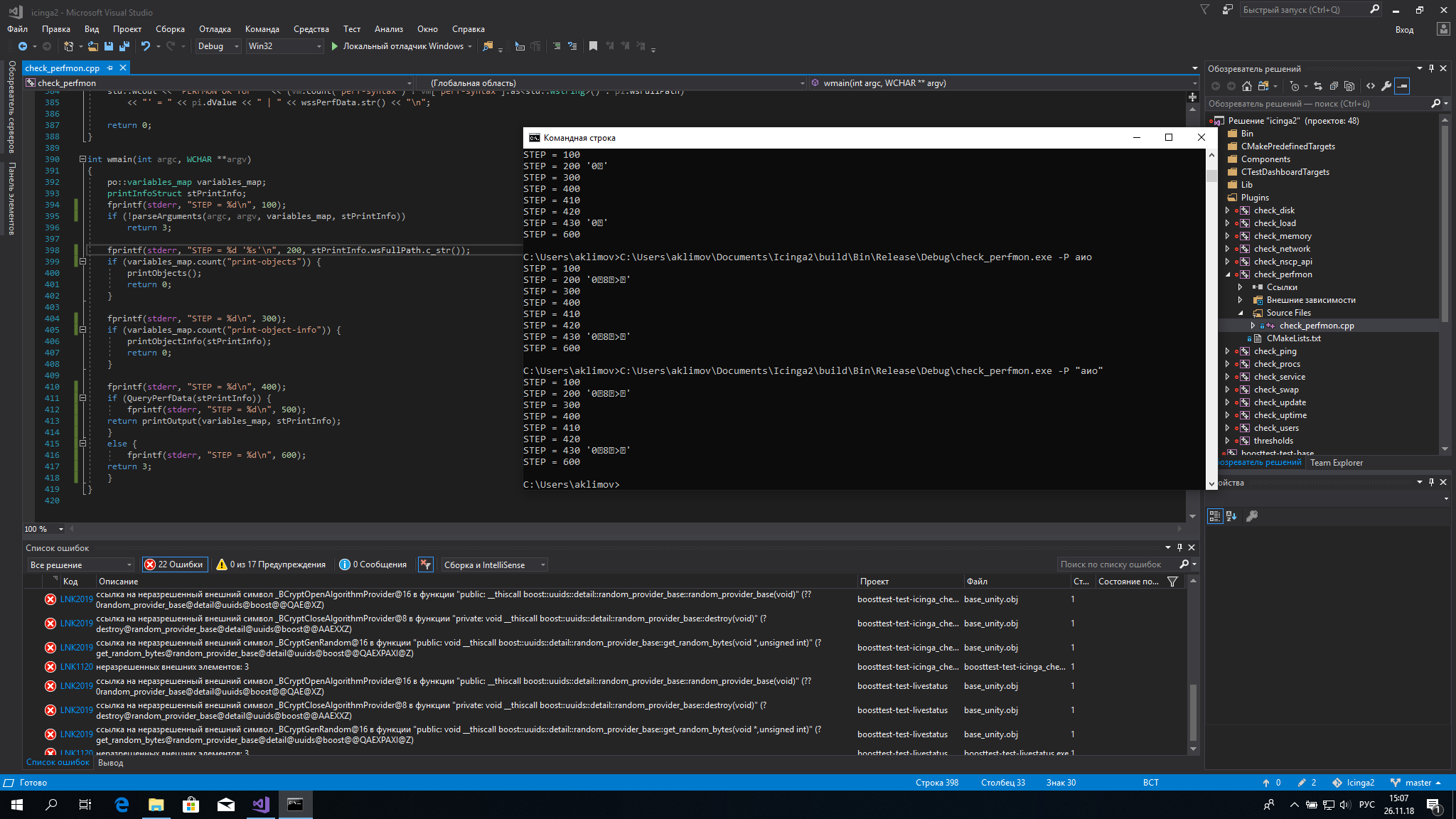
@Crunsher, you've written the plugin after all. Please have a look at my changes and the output. There's something fundamentally wrong, right?

Al2Klimov
on 26 Nov 2018
Similar thing here:
Al2Klimov
on 26 Nov 2018
I haven't found the time to work with the Windows Plugins in quite a while. Considering how small they are your guess is as good as mine :woman_shrugging:
Crunsher
on 26 Nov 2018
Do you remember at least why we're using wmain() instead of main()?
Al2Klimov
on 26 Nov 2018
Read somewhere Windows has an easier time handling everything as wchar :woman_scientist:
Crunsher
on 26 Nov 2018
The important part is that the non-localized/english names are supported. Everything else is nice to have but not necessary.
While I agree that the important part are the English names, we can not drop the support for the localized names now. This would break existing checks which currently using localized names.
The method PdhAddCounter() expects the localized names, this is why on a Window version with German localization the English names for the performance counters won't work. Luckily there is the function PdhAddEnglishCounter() which expects the English names, by using tthis function on a German Windows version the English performance counter names will work.
Below an example for a patch:
By default search the for the English name, if not found search for an localized name. By this both names will work.
diff --git a/plugins/check_perfmon.cpp b/plugins/check_perfmon.cpp
index e9d44cf55..132a62954 100644
--- a/plugins/check_perfmon.cpp
+++ b/plugins/check_perfmon.cpp
@@ -297,7 +297,16 @@ bool QueryPerfData(printInfoStruct& pI)
        if (FAILED(status))
                goto die;

-       status = PdhAddCounter(hQuery, pI.wsFullPath.c_str(), NULL, &hCounter);
+       std::wcout << "Trying to find english performance counter...\n";
+
+       status = PdhAddEnglishCounter(hQuery, pI.wsFullPath.c_str(), NULL, &hCounter);
+
+       if (FAILED(status)) {
+               std::wcout << "English failed. Trying to find localized performance counter...\n";
+
+               status = PdhAddCounter(hQuery, pI.wsFullPath.c_str(), NULL, &hCounter);
+       }
+
        if (FAILED(status))
                goto die;
Output:
PS C:\Users\Michael\Coding\icinga2\build\Bin\RelWithDebInfo\Debug> .\check_perfmon.exe -P "\Prozessor(*)\Prozessorzeit (%)"
Trying to find english performance counter...
English failed. Trying to find localized performance counter...
PERFMON OK for '\Prozessor(*)\Prozessorzeit (%)' = 0.524524 | '\Prozessor(*)\Prozessorzeit (%)'=0.524524;;;;


PS C:\Users\Michael\Coding\icinga2\build\Bin\RelWithDebInfo\Debug> .\check_perfmon.exe -P "\Processor(_Total)\% Processor Time"
Trying to find english performance counter...
PERFMON OK for '\Processor(_Total)\% Processor Time' = 1.25904 | '\Processor(_Total)\% Processor Time'=1.25904;;;;
I ran this on a localized Windows version and both names (German and English) are now working.
 mcktr
on 26 Nov 2018
mcktr
on 26 Nov 2018
Hello @mcktr!
If you'd like the plugin to be improved, please open a PR and we can discuss there about that.
@Crunsher – an I2 core dev – seems to like your idea so there's not much in your way.
Best,
AK
Al2Klimov
on 26 Nov 2018
Related issues
 Thomas-Gelf
·
5Comments
Thomas-Gelf
·
5Comments
 adamparker
·
5Comments
adamparker
·
5Comments
 miso231
·
4Comments
miso231
·
4Comments
 ak2766
·
7Comments
ak2766
·
7Comments
 xeiss
·
6Comments
xeiss
·
6Comments
Most helpful comment
While I agree that the important part are the English names, we can not drop the support for the localized names now. This would break existing checks which currently using localized names.
The method
PdhAddCounter()expects the localized names, this is why on a Window version with German localization the English names for the performance counters won't work. Luckily there is the functionPdhAddEnglishCounter()which expects the English names, by using tthis function on a German Windows version the English performance counter names will work.Below an example for a patch:
By default search the for the English name, if not found search for an localized name. By this both names will work.
Output:
I ran this on a localized Windows version and both names (German and English) are now working.