Icevision: UnicodeDecodeError when installing
🐛 Bug
Describe the bug
Error when I install through pip.
To Reproduce
Steps to reproduce the behavior:
- run
pip install git+git://github.com/lgvaz/mantisshrimp.git
...
"c:\users...\appdata\local\programs\python\python37\lib\encodings\cp1252.py", line 23, in decode
return codecs.charmap_decode(input,self.errors,decoding_table)[0]
UnicodeDecodeError: 'charmap' codec can't decode byte 0x8f in position 554: character maps to
----------------------------------------
ERROR: Command errored out with exit status 1: python setup.py egg_info Check the logs for full command output.
Expected behavior
Installation
Desktop (please complete the following information):
- OS: [win 10]
Additional context
Add any other context about the problem here.
 tazu786
All 16 comments
Thank you for the bug report. I am too able to reproduce the bug.
OS windows 10 pro 64bit
Python version 3.6
PS C:\Users\hp> pip uninstall manstisshrimp
WARNING: Skipping manstisshrimp as it is not installed.
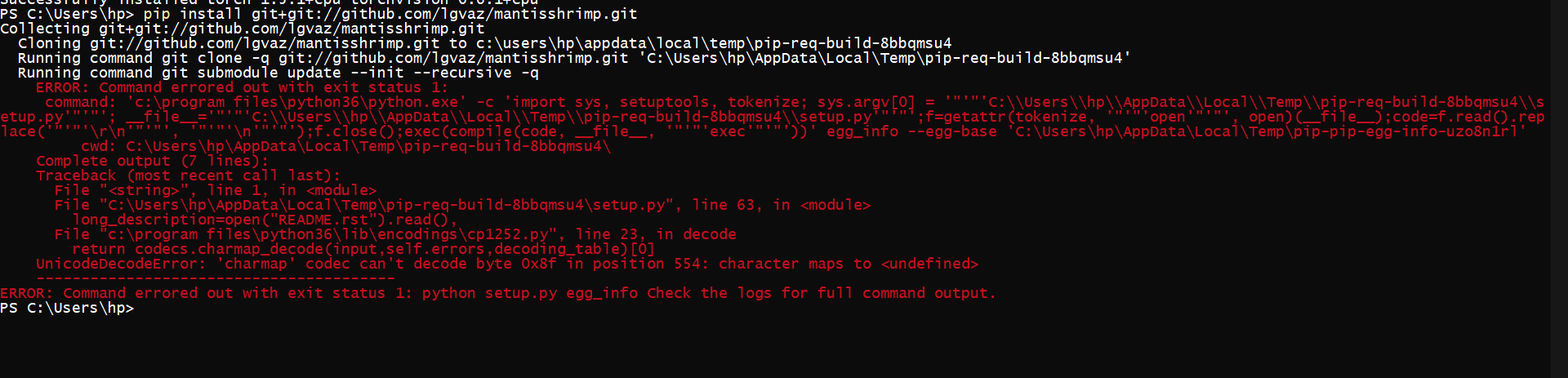
PS C:\Users\hp> pip install git+git://github.com/lgvaz/mantisshrimp.git
Collecting git+git://github.com/lgvaz/mantisshrimp.git
  Cloning git://github.com/lgvaz/mantisshrimp.git to c:\users\hp\appdata\local\temp\pip-req-build-piohh5yv
  Running command git clone -q git://github.com/lgvaz/mantisshrimp.git 'C:\Users\hp\AppData\Local\Temp\pip-req-build-piohh5yv'
  Running command git submodule update --init --recursive -q
    ERROR: Command errored out with exit status 1:
     command: 'c:\program files\python36\python.exe' -c 'import sys, setuptools, tokenize; sys.argv[0] = '"'"'C:\\Users\\hp\\AppData\\Local\\Temp\\pip-req-build-piohh5yv\\setup.py'"'"'; __file__='"'"'C:\\Users\\hp\\AppData\\Local\\Temp\\pip-req-build-piohh5yv\\setup.py'"'"';f=getattr(tokenize, '"'"'open'"'"', open)(__file__);code=f.read().replace('"'"'\r\n'"'"', '"'"'\n'"'"');f.close();exec(compile(code, __file__, '"'"'exec'"'"'))' egg_info --egg-base 'C:\Users\hp\AppData\Local\Temp\pip-pip-egg-info-s1vdaybl'
         cwd: C:\Users\hp\AppData\Local\Temp\pip-req-build-piohh5yv\
    Complete output (7 lines):
    Traceback (most recent call last):
      File "<string>", line 1, in <module>
      File "C:\Users\hp\AppData\Local\Temp\pip-req-build-piohh5yv\setup.py", line 63, in <module>
        long_description=open("README.rst").read(),
      File "c:\program files\python36\lib\encodings\cp1252.py", line 23, in decode
        return codecs.charmap_decode(input,self.errors,decoding_table)[0]
    UnicodeDecodeError: 'charmap' codec can't decode byte 0x8f in position 554: character maps to <undefined>
    ----------------------------------------
ERROR: Command errored out with exit status 1: python setup.py egg_info Check the logs for full command output.
PS C:\Users\hp>
PS C:\Users\hp>
 oke-aditya
on 18 Jun 2020
oke-aditya
on 18 Jun 2020
Thank you @tazu786
The library works fine on Linux systems. It installed on Google Colab which is Ubuntu 18.04 system.
https://colab.research.google.com/drive/13bWiJKT-jitZCJAhOPusHcXaq8pz3Bsc?usp=sharing
This is OS-specific issue. It will be fixed soon. Sorry for inconvenience. For now, you may use Google Colab and it should work fine.
oke-aditya
on 18 Jun 2020
Thank you @oke-aditya
I managed to install it just with pip install mantisshrimp. Most of the imports work fine except for
from mantisshrimp.hub.detr import *
for which I get
Traceback (most recent call last):
File "", line 1, in
ModuleNotFoundError: No module named 'mantisshrimp.hub'
tazu786
on 18 Jun 2020
It is working on colab @tazu786 . I will check on windows. The package is not realeased on PyPi so pip install might not work.
oke-aditya
on 18 Jun 2020
Thank you @oke-aditya , I installed manually and it works.
tazu786
on 18 Jun 2020
Hello @tazu786 , thanks for reaching out
Did you managed to fix the error at the end?
 lgvaz
on 18 Jun 2020
lgvaz
on 18 Jun 2020
Hi @lgvaz , thank you for your great work on this repo!
Not really, I just copied the package manually within the environment lib folder. All the imports work but I haven't tested it yet because of an issue with run_detr, which I posted here https://github.com/lgvaz/mantisshrimp/issues/39#issuecomment-646096910
tazu786
on 18 Jun 2020
I'll check the issue and get back to you asap 😄
lgvaz
on 18 Jun 2020
@oke-aditya is this the error related to pycocotools you were talking about?
I updated the install instructions and successfully installed on macOS. Can you still reproduce the error on windows?
lgvaz
on 18 Jun 2020
Yes still error is prevailing
oke-aditya
on 18 Jun 2020
Yes still error is prevailing. I will fix it up.
oke-aditya
on 18 Jun 2020
Meanwhile @tazu786 , I added a new example to colab, everything is working no additional setup required
be sure to check it out 😁
lgvaz
on 18 Jun 2020
PR opened for this. #95
oke-aditya
on 18 Jun 2020
The problem is not with pycoco tools thats another issue. It isn't our problem pycoco tools do not support windows.
It was simple file encoding utf-8 which linux assumes by defualt and hence CI / Colab / MacOS built it easily.
oke-aditya
on 18 Jun 2020
Can you try again from the original method suggested in the readme. Setup.py should work now. I am able to install as per README.md file by running
pip install git+git://github.com/lgvaz/mantisshrimp.git
oke-aditya
on 18 Jun 2020
both the installation and the new colab work fine! Thank you both! @oke-aditya @lgvaz
tazu786
on 19 Jun 2020
Related issues
lgvaz
·
4Comments
 ncduy0303
·
3Comments
lgvaz
·
5Comments
lgvaz
·
5Comments
ncduy0303
·
3Comments
lgvaz
·
5Comments
lgvaz
·
5Comments
 shimsan
·
3Comments
shimsan
·
3Comments
Most helpful comment
both the installation and the new colab work fine! Thank you both! @oke-aditya @lgvaz