First of all, good job on this crate. It's very impressive. I am still dipping my toes in Rust, and currently working on a simple MacOS/Windows application which should display a list of items in a 'table view'-like component. Think of it like:
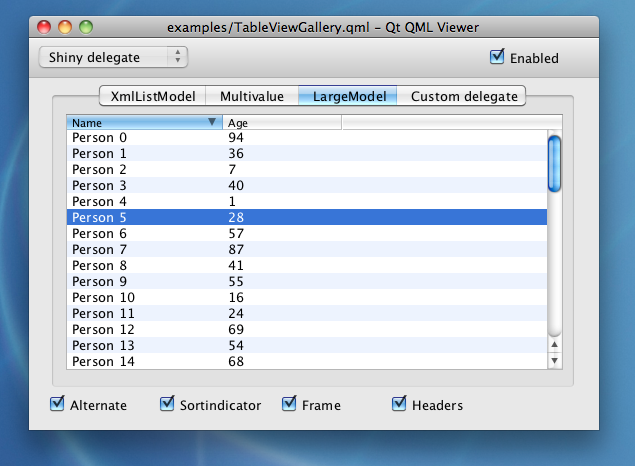
I am reaching out because I am a little unsure what you would do in a situation like this. Is it best to go ahead an use a combination of Row with a Scrollable? I don't think dequeuing will be required since I wouldn't have a that big (< 100) list. However small details such as the header titles would be awesome.
Do you have any suggestion how I could tackle this? I looked at #189 which looked like something i could use maybe.
Thanks a lot.
 casperstorm
All 2 comments
It's hard to say how I would tie everything together without actually working actively on it. In any case, here are some initial thoughts:
- My first approach would consist in building a custom
Tablewidget to layout contents based on column widths and reuse theScrollableevent logic. - There would be some
table::Statewhich would only hold thescrollable::State, column widths, and the current active column ordering. - I would try to keep table data and column definition completely decoupled from the
table::State. The data and the columns would be provided in theviewlogic. Therefore, the widget logic should assume they could change at any time. - It would be great to define columns as a name and a first-class "mapper" (i.e. a function
&T -> Stringor a trait). Then, the input of the table could be a simple iterator of&Tvalues (Iterator<Item = &T>). The widget would deal with mapping an&Tto aStringfor each column, sort accordingly, and finally present the data. - The logic that would handle the resize of columns by dragging should be very similar to the resizing logic of the
PaneGridwidget (see #397). elm-sortable-tableis a nice Elm package that implements sortable tables and I believe we could draw some inspiration from it.
Hope that helps!
 hecrj
on 5 Jul 2020
hecrj
on 5 Jul 2020
Thank you @hecrj. This was exactly the response I was looking for.
Again, good job on this project. Amazing work.
Closing this issue down for now.
casperstorm
on 5 Jul 2020
Related issues
 Charles-Schleich
·
3Comments
Charles-Schleich
·
3Comments
 kszlim
·
4Comments
kszlim
·
4Comments
 michael-hart
·
4Comments
hecrj
·
3Comments
michael-hart
·
4Comments
hecrj
·
3Comments
 aentity
·
4Comments
aentity
·
4Comments
Most helpful comment
It's hard to say how I would tie everything together without actually working actively on it. In any case, here are some initial thoughts:
Tablewidget to layout contents based on column widths and reuse theScrollableevent logic.table::Statewhich would only hold thescrollable::State, column widths, and the current active column ordering.table::State. The data and the columns would be provided in theviewlogic. Therefore, the widget logic should assume they could change at any time.&T -> Stringor a trait). Then, the input of the table could be a simple iterator of&Tvalues (Iterator<Item = &T>). The widget would deal with mapping an&Tto aStringfor each column, sort accordingly, and finally present the data.PaneGridwidget (see #397).elm-sortable-tableis a nice Elm package that implements sortable tables and I believe we could draw some inspiration from it.Hope that helps!