Hyrax: Image Viewer shows on public image work with private image file
Moved from Nurax: https://github.com/curationexperts/nurax/issues/232
Given that a repo is using the UV, and the work is public, but the primary files is an image and is set to PRIVATE, the image viewer is still showing with a 404 or unauthorized message.
Create a private work
attach 1 file, an image
Set the file to private, leaving the work public
Log out and view the work
See ex: https://nurax.curationexperts.com/concern/images/8p58pc99n?locale=en#?c=0&m=0&s=0&cv=0&xywh=-652%2C-3%2C1755%2C604

UPDATE: See comment from Linda that shows private thumbnail is being exposed on a multi-file work.
 julesies
All 25 comments
@julesies What is the expected behavior in this scenario? Hide the viewer entirely or something different?
 cjcolvar
on 12 Mar 2018
cjcolvar
on 12 Mar 2018
@vantuyls thoughts?? this affects all file types. I didn't realize but you can download the thumbnail for the private file/public work combo see (log out to view) https://nurax.curationexperts.com/concern/images/6682x395j?locale=en
julesies
on 12 Mar 2018
with the decision to hide private files, is this going to be an issue anymore? @julesies @cjcolvar
 vantuyls
on 12 Mar 2018
vantuyls
on 12 Mar 2018
@vantuyls I think a fix would still need to happen for works since they show their representative files.
cjcolvar
on 13 Mar 2018
@cjcolvar Ok per @vantuyls let's show the default thumbnail icon (not the actual file thumbnail) and remove any link to download via the thumbnail or under the thumbnail.
Let me know if this doesn't make sense!
julesies
on 13 Mar 2018
To be clear, the thumbnail you want displayed is this one, right?

 elrayle
on 13 Mar 2018
elrayle
on 13 Mar 2018
yup. thanks!
vantuyls
on 13 Mar 2018
I uploaded a work with two files - the first public and the second private. I'm seeing an actual thumbnail (not a generic thumbnail) for the private file, in the image viewer, when not logged in. I see the 'unauthorized' message when I click on the thumbnail, in the image viewer, for the private file. I assume we would not want users to see a thumbnail for a private file. https://nurax.curationexperts.com/concern/images/cn69m425b
 newmanld
on 13 Mar 2018
newmanld
on 13 Mar 2018
@newmanld yes thank you!
julesies
on 13 Mar 2018
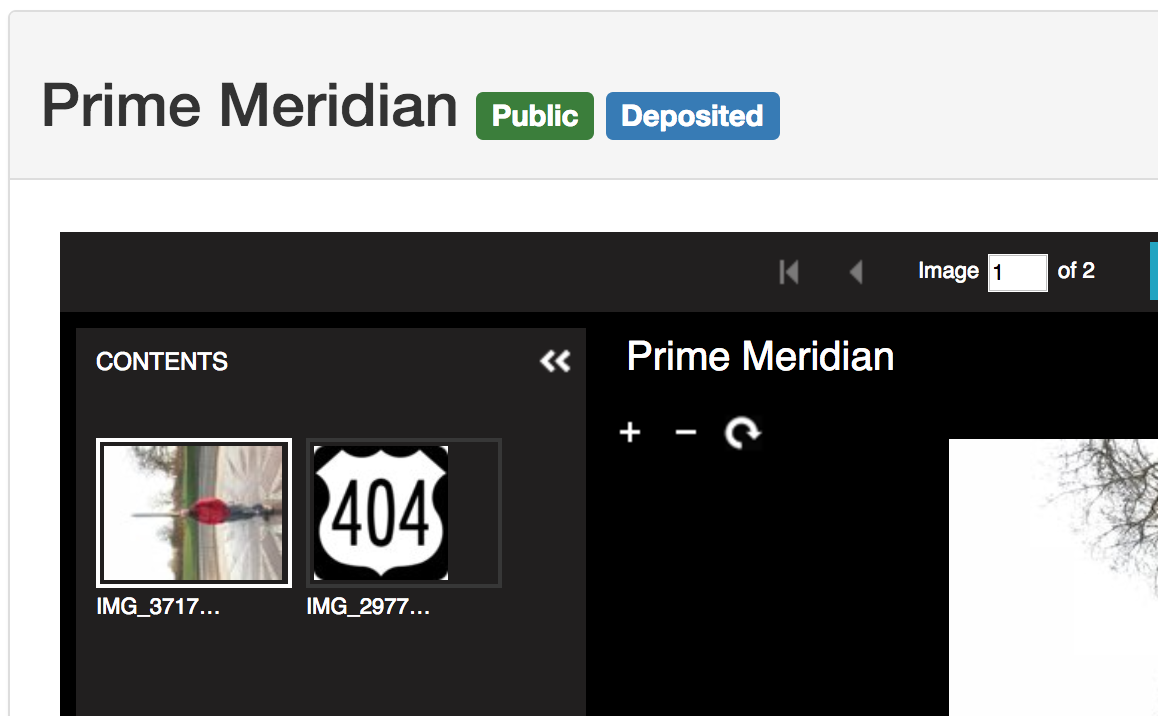
I wonder if this is a nurax specific issue? I'm not seeing that behavior in my local app or hyrax development instance. Instead of the second private thumbnail I see the RIIIF default error image (the 404 badge).
cjcolvar
on 15 Mar 2018
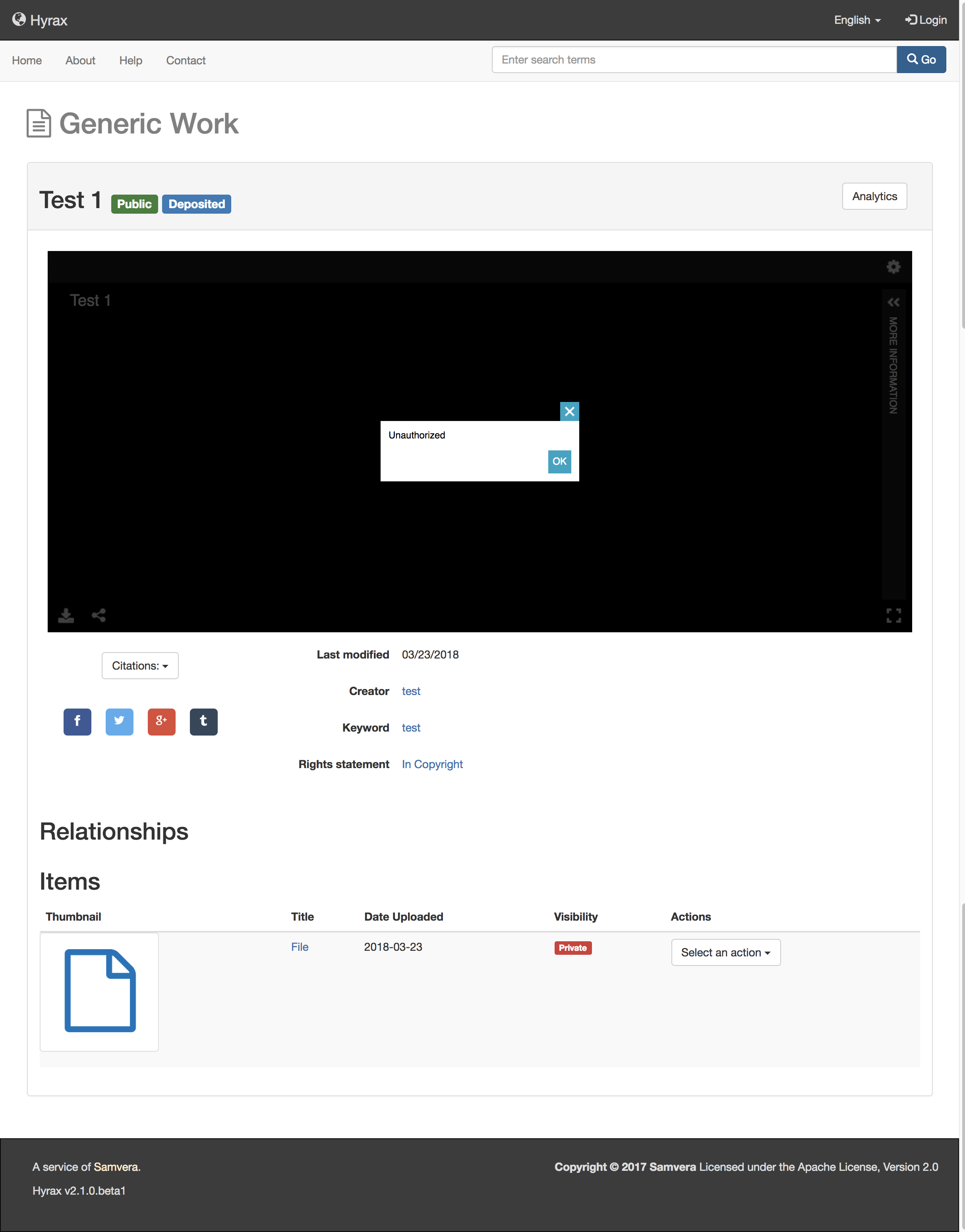
FYI, I was able to reproduce this bug in my local environment. A public work with a single private image shows the image viewer with an "unauthorized" message.
I'm believe we want the work show page to display as if the private file is not an image. No image viewer showing at all.
 hortongn
on 23 Mar 2018
hortongn
on 23 Mar 2018
@hortongn I was able to reproduce that issue locally. I wasn't able to reproduce the issue that @newmanld saw where thumbnails of private files show for a multi-file work. Maybe the latter should be split out into a separate ticket to avoid confusion.
I wonder what the desired behavior should be when works are viewable by the user but the files inside are not. Maybe it should break down this way:
Viewable work, 1 non-viewable file - No viewer or download link shown (either UV or any other attempted representation of the file)
Viewable work, multiple files all of which are non-viewable - same as above
Viewable work, multiple files some viewable some not with non-viewable representative - show UV but not other viewers
Viewable work, multiple files some viewable some not with viewable representative - show all viewers and download link for representative media
Viewable work, multiple files all viewable - show all viewers and download link
This would mean that the issue that reported by @newmanld in this comment would still be present and not hidden with the viewer. So it would still need to get fixed or resolved on nurax.
cjcolvar
on 23 Mar 2018
@cjcolvar I think your suggestions sound like a good approach.
Regarding @newmanld's bug that she commented on, like @cjcolvar I was not able to reproduce that behavior in my local Hyrax test instance. I was able to reproduce it on nurax.curationexperts.com. I also spun up Nurax in my local environment and did not see the bug there. So it appears to only be a problem on curationexperts.com. Maybe the problem only shows itself when running in production mode, or under Passenger, etc.?
I'll move forward resolving the bug reported at the top of this issue.
hortongn
on 23 Mar 2018
I agree that this seems to be two bugs not one, although both seem to fit in the scope of the issue by title. But the original description of this issue describes a public work with one private image file and no public image file. My comment above (https://github.com/samvera/hyrax/issues/2802#issuecomment-372781656) reports a similar issue for a public work with the first file public and a second file private.
@hortongn comments that the bug I reported doesn't show up in a development or local test instance, but is reproducible on nurax.curationexperts.com, so it may be specific to either running in production mode, or to the curationexperts.com environment (and in either case could be seen in most production instances of Hyrax). So when the first bug is resolved, if the second bug I reported still exists, should I write this up (or will someone write this up?) as a separate issue, and should this be in Nurax (https://github.com/curationexperts/nurax) or Hyrax (https://github.com/samvera/hyrax)? Thanks.
newmanld
on 23 Mar 2018
@elrayle @julesies @cjcolvar I think I have this largely resolved, but I'd like to clarify the desired behavior for this situation:
- A
publicwork with multiple images attached. The representative image isprivateand the rest of the images arepublic
Example: https://nurax.curationexperts.com/concern/images/rx913p94m
Should the universal viewer be displayed and show only the two public files? Or should the viewer not show at all because the representative image is private?
hortongn
on 26 Mar 2018
Personally, i think it’s reasonable to expect the representative file to be set to an image to be set to public for the viewer to show. not sure what would show in this case though? what do other people think? I've pinged @geekscruff on Slack too...
julesies
on 26 Mar 2018
I think that universal viewer should show all public image files irrespective of the status of the representative. Otherwise we are loading expectations on the representative image beyond 'if I am an image, show the universal viewer'.
 geekscruff
on 26 Mar 2018
geekscruff
on 26 Mar 2018
just to be clear...in the case where PDF is representative and there is an image file attached in the work...the UV doesn't show. example: https://nurax.curationexperts.com/concern/images/707957706?locale=en
So we are thinking in the case: A public work with multiple images attached. The representative image is private and the rest of the images are public, then show the UV viewer.
Does this sound right?
julesies
on 26 Mar 2018
Yes.
geekscruff
on 26 Mar 2018
I'm good with that ☝️ . Sound okay @hortongn ? I think @vantuyls would be okay with this approach, but he may not get a chance to quickly weigh in.
julesies
on 26 Mar 2018
Sounds good. Thanks for the feedback!
hortongn
on 26 Mar 2018
That all sounds good to me.
cjcolvar
on 26 Mar 2018
@cjcolvar @elrayle I've pushed up a proposed fix for this in case anyone wants to try it:
https://github.com/samvera/hyrax/pull/2846/files
Going to work on tests for it now.
hortongn
on 26 Mar 2018
this looks to be working great. @newmanld would you mind checking it out?
julesies
on 5 Apr 2018
@julesies - the work I updated earlier now shows as expected. When not logged in, I don't see the thumbnail for the private file. When logged in as the owner of the work, I do see both files. There was what was presumably a cacheing issue (using Chrome), as after I logged out as the owner, I still saw both files. I don't think closing this issue requires addressing that cacheing issue.
I was going to create new works to test further, and right now, Nurax is not letting me attach files to my work. I completed a submission with two private files and the files don't show up at all. Tried more than once. Will try again tomorrow. Assume this is an environmental issue with Nurax right at the moment.
newmanld
on 6 Apr 2018
Related issues
 carolyncole
·
5Comments
carolyncole
·
5Comments
 svanschuyver
·
5Comments
svanschuyver
·
5Comments
 jcoyne
·
3Comments
jcoyne
·
3Comments
 straleyb
·
6Comments
straleyb
·
6Comments
 mbklein
·
4Comments
mbklein
·
4Comments