Hypothesis: Not possible to debug with Visual Studio Code
Environment data
- VS Code version: 1.26.0
- Python Extension version: 2018.7.1
- OS and version: Linux Mint 18.3
- Python version: Anaconda custom (64-bit) Python 3.6.5 (base)
- Type of virtual environment used: N/A
Actual behavior
It is not possible to debug decorated functions with "@given" annotation because the debugger does not stop on breakpoints that were set inside.
Expected behavior
Debugger should be able to debug those functions.
Steps to reproduce:
This function cannot be debugged placing a breakpoint on the assertion line
@given(st.lists(st.integers()))
def test_sorted_idempotent(l):
    assert sorted(sorted(l)) == sorted(l)
But other decorated functions such as the following do work:
def decorator_maker_with_arguments(decorator_arg1):
    def my_decorator(func):
        def wrapped():
            return func(decorator_arg1)
        return wrapped
    return my_decorator

def inc(x):
    return x + 1

@decorator_maker_with_arguments(4)
def test_answer(arg):
    assert inc(arg) == 5
I pretend to be "generating" values as Hyphotesis does.
 nicoabie
All 17 comments
I'm able to reproduce this issue.
It's also happening in Visual Studio 2017.
The sample decorated function is also working.
Will try to check this further on VS 2017.
Might be a common issue.
 whatevergeek
on 27 Aug 2018
whatevergeek
on 27 Aug 2018
since it's happening for both vscode and vs2017,
my hunch is that it has something to do with interactions with ptvsd
https://github.com/Microsoft/ptvsd
whatevergeek
on 27 Aug 2018
I mentioned that this reminded me of #1518 - it's not literally the same cause, but got me on the right track: this is probably because we run stuff under coverage.
So: does the issue still appear if you run with the setting use_coverage=False?
Also likely to be related to #1392.
 Zac-HD
on 27 Aug 2018
Zac-HD
on 27 Aug 2018
Hi @Zac-HD, I checked and I don't have installed the pytest-cov module.
Also I'm also debugging the test directly from visual studio code, not running any command line in particular.
I followed the instructions given here and when I try the --no-cov flag, VS for some reason cannot find the tests anymore.
If you can provide me with a debugging command that I can run an attach the debugger I'd gladly give you more information.
Thanks in advance.
nicoabie
on 27 Aug 2018
Hypothesis actually uses the coverage library directly, whether you use pytest-cov or not! Unfortunately I don't use VS so I can't give more useful advice at the moment :cry:
Zac-HD
on 27 Aug 2018
@Zac-HD I tested it with the annotation:
@settings(use_coverage = False)
And now I'm able to debug the content of the test.
@whatevergeek checkout if you can debug the test with this configuration.
The drawback is that one will have to set this for every test.
I haven't found a way to set it for all, anyways this is my second week using python xD
nicoabie
on 27 Aug 2018
@nicoabie did you import something to make settings decorator to work?
whatevergeek
on 27 Aug 2018
@whatevergeek
from hypothesis import settings
Also I found a way to force it for all test in the file at least
settings.register_profile("debug", use_coverage = False)
settings.load_profile("debug")
@nicoabie @Zac-HD
I've also tried the same approach on Visual Studio 2017
and yes, it worked! :-)
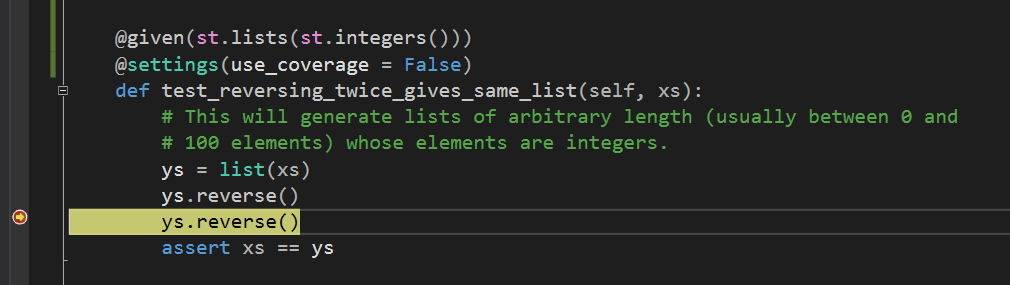
whatevergeek
on 27 Aug 2018
thanks @nicoabie
the following also worked on VS 2017
settings.register_profile("debug", use_coverage = False)
settings.load_profile("debug")
Looks like the underlying problem is well known: it's not possible to run both coverage and a debugger at the same time, because they both need access to sys.settrace (Microsoft/vscode-python#693).
We therefore can't fix this, but we can document the problem and maybe throw a decent error if we can detect a debugger (the trick is distinguishing that from an external coverage context, which we patch data back to).
Zac-HD
on 30 Aug 2018
Thanks for the explanation @Zac-HD, I hope this proposal on their end gets implemented as a simple workaround at least.
nicoabie
on 30 Aug 2018
Me too, though note that even if or when they do it won't help with Hypothesis - setting coverage=False is the only actual fix for this!
I'll close this issue when we have documented that you have to set coverage=False to use a debugger, investigated a runtime error or warning, and either implemented it or decided not to.
Zac-HD
on 30 Aug 2018
Thanks @Zac-HD & @DRMacIver for fixing this. I'd have never imagined the issue was so deep that you had to rip it off!!!
nicoabie
on 8 Sep 2018
Thanks @Zac-HD & @DRMacIver for fixing this. I'd have never imagined the issue was so deep that you had to rip it off!!!
Well, it probably wasn't, it was more that there was a large number of different issues that were caused by this feature and we decided that it was easier to just remove the feature given its relatively poor cost : benefit analysis.
 DRMacIver
on 8 Sep 2018
DRMacIver
on 8 Sep 2018
Looks like the underlying problem is well known: it's not possible to run both
coverageand a debugger at the same time, because they both need access tosys.settrace(microsoft/vscode-python#693).We therefore can't _fix_ this, but we can document the problem and _maybe_ throw a decent error if we can detect a debugger (the trick is distinguishing that from an external coverage context, which we patch data back to).
Just found this out as well when trying to get my debug test to work, would be great if that would give some kind of understandable error and a clear note here https://code.visualstudio.com/docs/python/testing#_debug-tests
 eavanvalkenburg
on 10 Jul 2020
eavanvalkenburg
on 10 Jul 2020
Just found this out as well when trying to get my debug test to work, would be great if that would give some kind of understandable error and a clear note here
The feature causing this interaction no longer exists in Hypothesis, hence this issue being closed. Any further issues with debugging in visual studio are, as far as we can tell, nothing to do with us and should be reported as issues with visual studio.
DRMacIver
on 10 Jul 2020
Related issues
Zac-HD
·
7Comments
DRMacIver
·
8Comments
 rlgomes
·
3Comments
rlgomes
·
3Comments
 sobolevn
·
8Comments
sobolevn
·
8Comments
 pckroon
·
4Comments
pckroon
·
4Comments