Hyperhtml: Setting disabled prevents onconnected event on Firefox
First of all, I would like to thank the creator of hyperHTML for the awesome work that has been put into this library. I am enjoying using it as an alternative to a full framework.
My problematic use case
I decided to use _redux_ for state management. I created a wrapper class for hyper.Component that would subscribe to the store on connected and unsubscribe on disconnected events.
My containers that need access to the store would have onconnected=${this} ondisconnected=${this} event listeners on the top elements they render.
It worked well until I created a button that had to be disabled based on the state. When it was initially disabled, the onconnected event wouldn't fire, effectively not connecting to the store. This button stayed disabled the whole time since it did not have any reason to change.
Code sample where the bug occurs
I have created a simple example that would resemble my use case:
class CustomButton extends hyperHTML.Component {
  get defaultState() {
    return {
      disabled: true
    };
  }

  onconnected() {
    console.log('Connected');
    this.setState({
      disabled: false
    });
  }

  ondisconnected() {
    console.log('Disconnected');
  }

  render() {
    const disabled = this.state.disabled;
    console.log(disabled);

    return this.html`
      <button onconnected=${this} ondisconnected=${this}
        disabled=${disabled}
      >
        Custom button
      </button>
    `;
  }
}
This button is initially disabled and after the onconnected event, it becomes enabled.
Here is the CodePen with the full example.
On Chrome and Edge, it works perfectly: the disabled button is rendered, onconnected is dispatched and the button becomes enabled.
The problem is in Firefox, where the onconnected event does not fire.
Workaround
My workaround, for now, is to nest the <button> tag inside a <div> and put onconnected on that <div>, like so:
    return this.html`
      <div onconnected=${this} ondisconnected=${this}>
        <button disabled=${disabled}>
          Custom button
        </button>
      </div>
    `;
How to fix it?
I have not looked into the library's source code thoroughly enough to make a pull request to fix this (if it's fixable at all), but hints where to look would be welcome, as I'd be happy to contribute.
 Gelio
Gelio
All 17 comments
Great bug report, thanks .
This looks like another Firefox bug to track because the library does nothing more than using mutation observer.
There are two possibilities here:
- Firefox for some reason doesn’t reach the code that setup the mutation observer
- Firefox has a MutationObserver bug
I’m without a laptop till Monday so I can’t help much but if you could simply set a MotationObserver on an empty document body and append a button already created and set as disabled you might validate the Firefox bug since connected has nothing to do with disabled.
If the record instead triggers I’ll have a look ASAP .
 WebReflection
on 8 Dec 2017
WebReflection
on 8 Dec 2017
I am unsure if this is what I was supposed to do, but here's the code:
// Setup button
const button = document.createElement('button');
button.disabled = true;
button.innerText = 'Button';

// Setup MutationObserver
const observer = new MutationObserver(mutations => {
  console.log(mutations);
});

const config = {
  attributes: true,
  childList: true,
  characterData: true
};
observer.observe(document.body, config);

// Add button to document
document.body.appendChild(button);
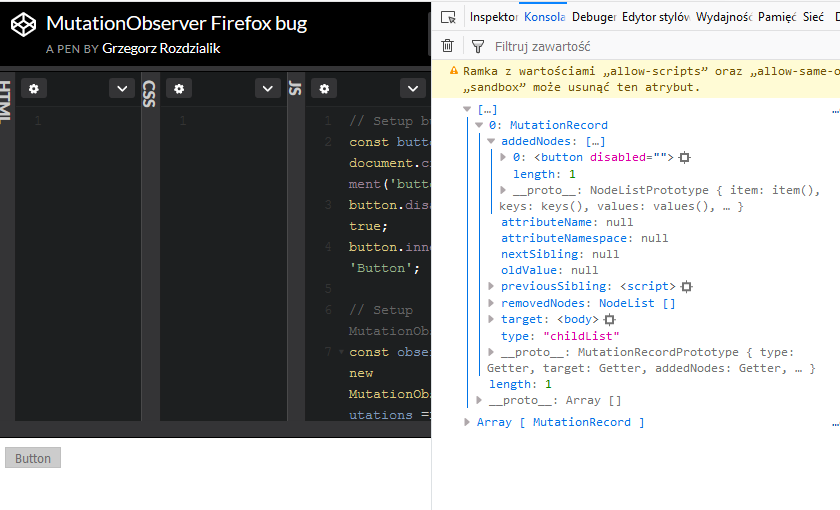
Both Firefox and Chrome log the button to the console once it's appended.
Firefox:
Chrome:
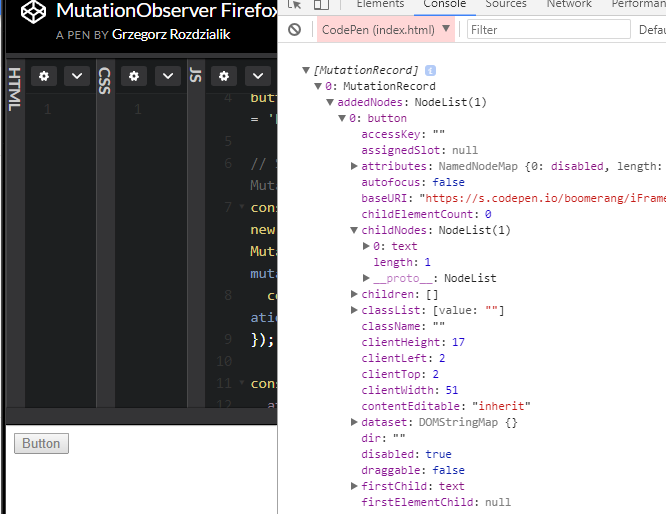
If there's anything I could do, please let me know. This bug is not critical to me, so there's no need to rush :smile:
Gelio
on 8 Dec 2017
That code is ok enough, I’ll figure it out on Monday, thanks
WebReflection
on 8 Dec 2017
Let me know if I need to do anything on the Firefox side.
 marcoscaceres
on 8 Dec 2017
marcoscaceres
on 8 Dec 2017
If anyone could put a debugger before the observe() call and tell me if that’s reached it’d be awesome 😂
You could use unpkg.com/hyperhtml@latest/index.js to use the non minified version, thanks
WebReflection
on 8 Dec 2017
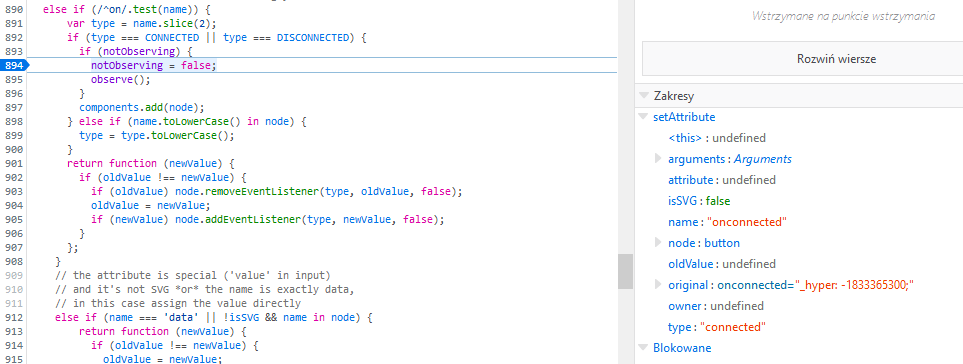
It is reached and observe is called,
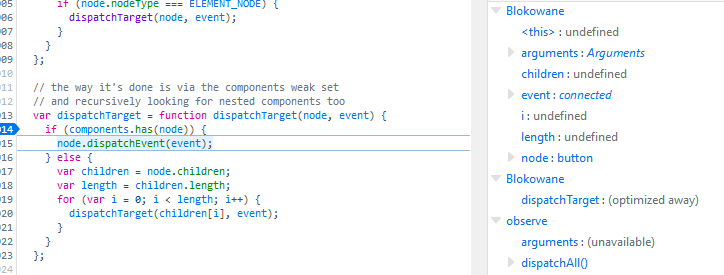
What's more, the connected event is dispatched to the button element, yet handleEvent in hyper.Component is not invoked
Gelio
on 8 Dec 2017
I have done some more testing and it turns out that when the button is disabled, Firefox does not invoke the handler.
const button = document.getElementById('button');

button.addEventListener('someevent', e => console.log(e, button.disabled));
button.dispatchEvent(new CustomEvent('someevent'));
// Event handler invoked in tested browsers

button.disabled = true;
button.dispatchEvent(new CustomEvent('someevent'));
// Event handler invoked in tested browsers except for Firefox
Here's a live example on CodePen
Chrome and Edge log to the console twice, once for each event, which is the expected behavior.
Firefox, on the other hand, does the console.log only when the button is not disabled.
I guess I can confirm that it's not an issue with the hyperHTML library, but with Firefox 😞
Gelio
on 8 Dec 2017
Thanks for the awesome job in nailing it down to a small, easy to reproduce, code.
Not only it’s a Firefox bug, there’s literally nothing I can do to pass-patch this without reinventing the whole event stack for Firefox.
This library is discovering so many quirks in FF, please anyone file a bug there .
This is horrible as much as the option selected one 😭
I’ll keep this open until it’s solved.
WebReflection
on 8 Dec 2017
Well, it's a good thing this library exists then! Good job, you're normalizing browsers 😄
I have filed a bug report on Bugzilla.
Gelio
on 8 Dec 2017
Thanks for filing the Firefox bug and figuring out a reduced test case. I’ll get it prioritized and hopefully fixed soon. Note that all of Mozilla is away next week at an all hands meet and then it’s xmas, so might not get fixed until mid January... but you never know 🎅 🎁
marcoscaceres
on 8 Dec 2017
You guys have fun at Mozilla but this bug means a disabled input won’t react to custom events triggered potentially to re-enable it ... it’s very high priority, IMO, forms can be fully broken on FF only otherwise.
Good there is a work around with hyperHTML but I find it super weird nobody has filed this already
WebReflection
on 8 Dec 2017
P.S. to be clear, the have fun was genuine, but I hope this get the right priority regardless when it’ll be actually solved.
Thank you both for the help
WebReflection
on 8 Dec 2017
The bug report I filed was marked as a duplicate of another bug that was reported 12 years ago! Quite shocking, especially considering the fact that the other bug is regarding native events, not custom ones, which I believe have a slightly different use and priority
Gelio
on 11 Dec 2017
@Gelio this is offtopic and has nothing to do with the issue at hand, but I am trying to integrate hyperHTML as well with Redux and would love to see more about your approach.
Just connecting the main Component to Redux and passing down the store or parts of it to all components which require it wouldn't be advisable because whenever anything in the store changes all components would rerender? Are you using the connect method from redux in your onconnected listeners?
Could you post the wrapper you used around hyper.Component and how you are using it with the methods from redux?
Thanks!
 jaschaio
on 18 May 2018
jaschaio
on 18 May 2018
@jaschaio Here is the project that I used hyperHTML in: https://github.com/Gelio/color-converter
I did not dive into performance. I just made sure it worked since it is a small app.
The src/utils directory contains HyperComponent and HyperContainer. HyperComponent is just a renamed hyperHTML's Component, whereas HyperContainer is the base class for components that access the store.
I subscribed to the store manually. The connect function is suited for React components and to my knowledge would not be applicable here (it comes from the react-redux package, not from redux).
However, HyperContainer only rerenders itself when there are changes in the container's state. Only the subtree will rerender. This should be performant either way due to hyperHTML's smart updating.
One thing to remember is to bind onconnected and ondisconnected listeners on the root component returned from HyperContainer's render methods (see example container in the src/containers directory).
This structure worked well for me and I did not have any issues, aside from the one that we are currently writing in.
Gelio
on 18 May 2018
@jaschaio Here, take a look at this gist. That's the way we do it on our project and it seems to work quite well so far. This approach is partially similar to how @Gelio does it, but also different in a few aspects (selectors support, slightly different typing, no tight coupling between the component and the store, and a few other minor things).
Here are some steps to follow if you want to use this code for your stuff.
- Derive your component classes that need to be subscribed to the redux store from the
Viewclass. If you use TypeScript as we do, then use the component state type as a generic parameter to the view. In our case it looks likeclass MyView extends View<SelectedSubState1 & SelectedSubState2 & ...>. Where these sub-state types are just types retuned by your selectors the view will be subscribed to. - Make sure the
onconnectedandondisconnectedhandlers inherited from the baseVieware attached in your new component rendered template, because that's where you component gets subscribed/unsubscribed automatically. This is exactly the same as in the @Gelio's approach. - Instantiate your view like this:
let view = initView(new MyView, selector1, selector2, ...);
Well, that's about it. The view will only get re-rendered when the selected part of redux store it's subscribed to changes, and hyperHTML of course does its magic to optimize re-rendering too, so its a win-win kind of thing :smile:
 yuretz
on 18 May 2018
yuretz
on 18 May 2018
Imma gonna leave this here:
https://twitter.com/marcosc/status/1057713116929093633
WebReflection
on 31 Oct 2018
Related issues
 pmowrer
·
5Comments
pmowrer
·
5Comments
 zaclummys
·
3Comments
jaschaio
·
3Comments
zaclummys
·
3Comments
jaschaio
·
3Comments
 abaksha-sc
·
6Comments
abaksha-sc
·
6Comments
 shanghaikid
·
8Comments
shanghaikid
·
8Comments
Most helpful comment
@jaschaio Here, take a look at this gist. That's the way we do it on our project and it seems to work quite well so far. This approach is partially similar to how @Gelio does it, but also different in a few aspects (selectors support, slightly different typing, no tight coupling between the component and the store, and a few other minor things).
Here are some steps to follow if you want to use this code for your stuff.
Viewclass. If you use TypeScript as we do, then use the component state type as a generic parameter to the view. In our case it looks likeclass MyView extends View<SelectedSubState1 & SelectedSubState2 & ...>. Where these sub-state types are just types retuned by your selectors the view will be subscribed to.onconnectedandondisconnectedhandlers inherited from the baseVieware attached in your new component rendered template, because that's where you component gets subscribed/unsubscribed automatically. This is exactly the same as in the @Gelio's approach.let view = initView(new MyView, selector1, selector2, ...);Well, that's about it. The view will only get re-rendered when the selected part of redux store it's subscribed to changes, and hyperHTML of course does its magic to optimize re-rendering too, so its a win-win kind of thing :smile: