Hyperapp: Standard folder structure/code organisation guidelines for hyper apps
Now that Hyperapp has been out for a while and used by many people, I thought I'd open this issue so that we can all share how we organise our hyper apps.
Maybe we can come up with some sort of standard/supported folder structure together?
Some people have started working on some CLI to setup HA projects, these could potentially benefit from what is discussed in this issue.
PS: I know that HA 2.0 is right around the corner, but I think it is still very valuable to discuss this now because:
- many people will still use HA 1 for some time
- from the look of it, the standard app structure for HA 2.0 will should be too different from the standard for HA 1
Looking forward to the discussions down below.
 Mytrill
All 8 comments
For the record, here is the folder structure that I found works best for me (it's for typescript, but the only typescript specific files are the api.ts):
App folder structure:
dist/       # bundled files
src/        # sources
  module1/     # module folders (detailed below)
  module2/
  common/      # ... common stuff, sometimes I call this lib/
  components   # implementations for simple components (props => VNode)
    Component1.scss
    Component1.tsx
    Component2.scss
    Component2.tsx
    index.ts       # export * from "./Component1"
                   # export * from "./Component2"
  api.ts    # the typescript definitions for the State, Actions, and all relevant types
  state.ts  # the state object
  view.ts   # the view function
  index.ts  # calls app(state, actions, view, element)
  index.html
  # other top level files
package.json
# other files ...
Module folder structure:
submodule1/  # nested modules, same folder structure as this
submodule2/
actions/     # implementations for actions (usage: import * as actions from "./actions")
  action1.ts
  action2.ts
  index.ts      # export * from "./action1"
                # export * from "./action2"
                # import * as submodule1 from "../submodule1/actions"
                # export { submodule1 }
components/  # implementations for simple components (props => VNode)
  Component1.scss
  Component1.tsx
  Component2.scss
  Component2.tsx
  index.ts      # export * from "./Component1"
                # export * from "./Component2"
api.ts    # the typescript definitions for the State, Actions, and all relevant types
state.ts  # the state object
LazyComponent1.scss # these are the lazy components (props => (state, actions) => VNode)
LazyComponent1.tsx
LazyComponent2.scss
LazyComponent2.tsx
index.ts
I guess, for most Web based projects, the tree folder structure can be simplified to this (using JSX).
├── public
│   └── js
│       └── bundle.js
└── src
    ├── components
    │   ├── about.jsx <-- requires partials/**/*
    │   ├── contact.jsx <-- requires partials/**/*
    │   ├── home.jsx <-- requires partials/**/*
    │   └── partials
    │       ├── footer.jsx
    │       ├── header.jsx
    │       └── main.jsx
    ├── index.html
    ├── index.jsx <-- requires components/*.jsx & utils/**/*
    └── utils
        ├── actions.jsx
        └── state.jsx
In my opinion, it looks cleaner and is safer to scale for small to mid-sized project using Hyperapp 1.x.x. I'm currently working on a Rollup based template for Hyperapp and this is the folder structure I'm currently testing in development to see how convenient it is for all kind of project. Let me know what you think about it!
 aminnairi
on 22 Jun 2018
aminnairi
on 22 Jun 2018
How I've done it with a couple projects now, and how I've implemented it in Hyperapp Kit, the structure is like so:
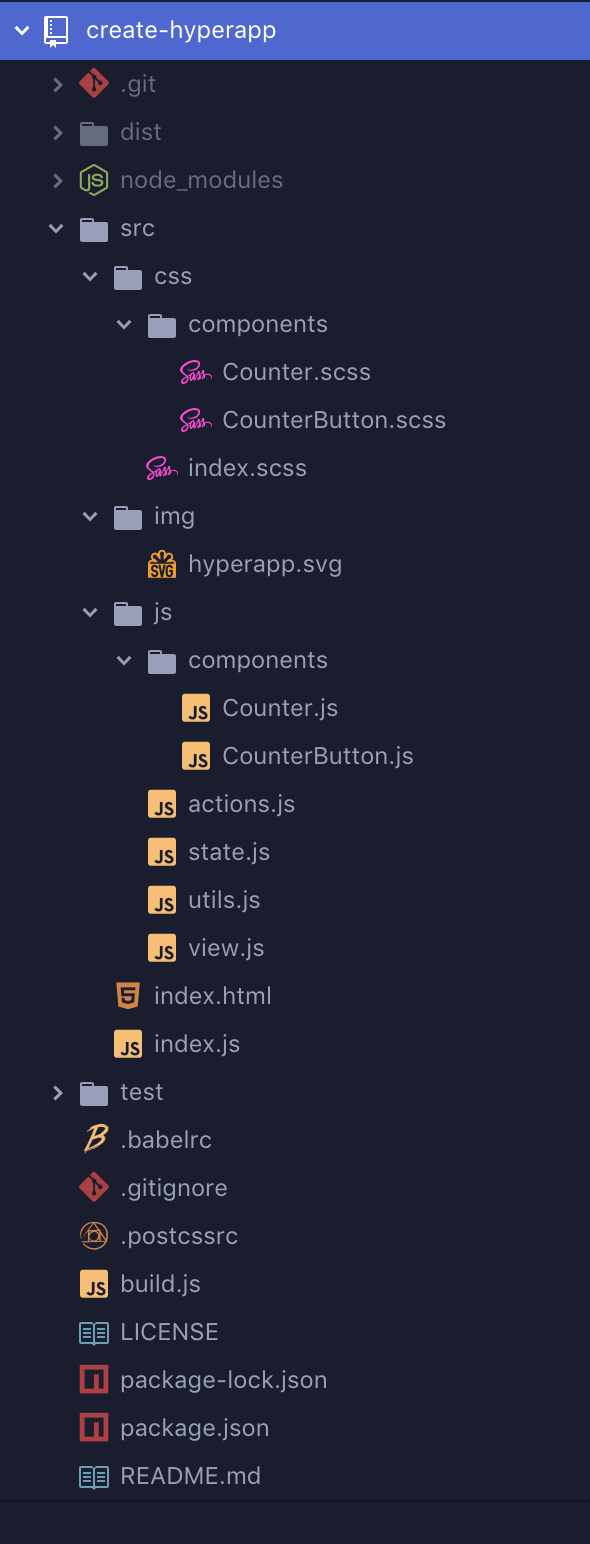
index.html contains the index.js script which mounts the app. The state, actions and view live in their own file. Each component gets its own JS and SCSS file separate with each component' styles being imported into index.scss. (I'd prefer them in the same file, but without CSS-in-JS this is an ok solution - main thing I dislike here is maintaining separate files for a component.)
img could be renamed to assets to house different types.
 atomiks
on 22 Jun 2018
atomiks
on 22 Jun 2018
I feel that an agreed upon folder structure is a great idea. I acknowledge it will be impossible to fit all use cases. This said, I feel that the above example from @aminnairi is simple, understandable, and a good base to start from.
One thing I would strongly advise against is the uppercase first letter present in the other 2 examples. It seems that this is being used to signify a component file. However these files can be identified in both folder structures as components due to residing in a "components" folder. This is unnecessary duplication of intent.
 BrianDGLS
on 25 Jun 2018
BrianDGLS
on 25 Jun 2018
I also like consistency in the naming convention of all stuff in my application whether it is a component or an exported function. But this is more of a personnal concern than a guideline as it is not impacting the organization.
I guess sometimes, the bundler help in a way that, for instance, with Webpack's alias, we can make a 1-2 level deep folders' structure, and just call things like :
// /app/jsx/app.jsx
import 'SCSS/app.scss'
with a Webpack configured like so :
module.exports = {
  resolve: {
    alias: {
      SCSS: __dirname + '/app/scss/'
    }
  }
}
instead of doing :
// /app/jsx/app.jsx
import '../scss/app.scss'
But this might be just me hating double-dot when we can use aliases in Webpack (not sure how it is done with other bundlers though). It has the advantage to be cleaner and easier to understand for newcomers inspecting the source code as every JSX will be in the same directory, every SCSS either etc... But I can see a problem when working in a large-scale application. There might be a perfect spot between aliasing low-level folders and subfolders by theme organization.
aminnairi
on 8 Aug 2018
@frenzzy @zaceno @lukejacksonn Do you have any opinion on this? Really just curious. 😄
 jorgebucaran
on 8 Aug 2018
jorgebucaran
on 8 Aug 2018
I’m not sure it’s a good idea to promote a “standard and official” folder structure. Everyone does it differently, and as long as everyone does what works for them, why argue with each other who does it better?
But @Mytrill s original suggestion of sharing and explaining the ideas behind it is great. Should be very helpful to newcomers!
 zaceno
on 8 Aug 2018
zaceno
on 8 Aug 2018
Here was a starting point to standardize a directory layout: Folder Structure Conventions
A folder structure mainly depends on the project type and may vary project to project. Only the base (always used files) could be at the same place.
For example the base directory layout of Hyperapp Starter:
.
├── build/                         # Compiled output
├── node_modules/                  # 3rd-party libraries and utilities
├── public/                        # Static files such as favicon.ico etc.
├── src/                           # Application source code
│   ├── app.js                     # Universal (Isomorphic) application entry point
│   ├── index.js                   # Client-side rendering, e.g. app(state, actions, view, container)
│   └── server.js                  # Server-side rendering, e.g. renderToString(view, state, actions)
├── .env                           # Environment variables
├── package.json                   # The list of project dependencies + NPM scripts
└── README.md                      # Getting started guide
The advanced directory layout of a huge project may look like this:
├── .circleci/                     # Continuous integration configuration files
├── .vscode/                       # Project snippets and run/debug configuration for Text Editor/IDE
├── benchmarks/                    # Load and stress tests
├── build/                         # Compiled output
├── configs/                       # Configuration overrides for Babel, Bundler, etc. Example: https://github.com/frenzzy/hyperapp-tools/tree/master/configs
├── docs/                          # Documentation files
├── migrations/                    # Database schema migration files
├── node_modules/                  # 3rd-party libraries and utilities
├── public/                        # Static files such as favicon.ico etc.
├── scripts/                       # Automation scripts (yarn update-schema etc.)
├── seeds/                         # Reference and seed data for the database
├── src/                           # Application source code
│   ├── common/                    # Shared Hyperapp/React components and HOCs
│   │   └── {component}/           # Any component name or reusable block
│   │       ├── {component}.js     # Or {component}.browser.js + {component}.node.js
│   │       ├── {component}.test.js
│   │       ├── {component}.css
│   │       ├── {component}.i18n.json
│   │       ├── {image}.{svg,png,jpg,gif}
│   │       ├── package.json       # Allows to use require('component') instead of require('component/component') and import different files for browser and server when necessary
│   │       └── README.md          # If necessary
│   ├── fonts/                     # Custom web fonts
│   ├── icons/                     # Reusable svg icons
│   ├── pages/                     # Web app pages (/news, /store, /users, /users/:id, /admin, etc)
│   │   └── {page}/                # The same structure as for common/ but the files are not reusable and the whole folder could be deleted safely
│   ├── server/                    # Server-side code (API, authentication, etc.)
│   ├── app.js                     # Universal (Isomorphic) application entry point
│   ├── app.test.js                # Unit tests for app.js
│   ├── app.css                    # Global styles (for html, body, h1 etc.)
│   ├── index.js                   # Client-side entry point
│   ├── server.js                  # Server-side entry point
│   ├── serviceWorker.js           # Service worker entry point
│   └── theme.js                   # UI theme variables (for example overrides for Material UI default styles)
├── ssl/                           # SSL certificates (for example for connecting to Cloud SQL instance)
├── tests/                         # End-to-end, integration tests
├── .env                           # Environment variables
├── .env.{environment}             # Environment variables overrides for a specific environment
├── docker-compose.yml             # Defines Docker services, networks and volumes
├── docker-compose.override.yml    # Overrides per developer environment (not under source control)
├── Dockerfile                     # Commands for building a Docker image for production
├── graphql.schema                 # GraphQL schema (auto-generated, used by Apollo or Relay)
├── package.json                   # The list of project dependencies + NPM scripts
└── README.md                      # Getting started guide
 frenzzy
on 8 Aug 2018
frenzzy
on 8 Aug 2018
Related issues
 ghost
·
3Comments
ghost
·
3Comments
 rbiggs
·
4Comments
rbiggs
·
4Comments
 dwknippers
·
3Comments
dwknippers
·
3Comments
 joshuahiggins
·
4Comments
joshuahiggins
·
4Comments
 jbrodriguez
·
4Comments
jbrodriguez
·
4Comments
Most helpful comment
I’m not sure it’s a good idea to promote a “standard and official” folder structure. Everyone does it differently, and as long as everyone does what works for them, why argue with each other who does it better?
But @Mytrill s original suggestion of sharing and explaining the ideas behind it is great. Should be very helpful to newcomers!