Hyperapp: 0.16.0: Uncaught TypeError: Cannot read property 'preventDefault' of undefined
Hello,
I Have the following code, which works fine in 0.15.1:
View snippet:
export const view = (state, actions) =>
  <div>
    <a href="/" onclick={actions.page}>Home</a>
  </div>;
Action snippet
export const actions = {
  page: (state, actions, event) => {
    event.preventDefault();
    return { page: '/foo' };
  },
After upgrading to 0.16.0, calling preventDefault results in the following error:
Uncaught TypeError: Cannot read property 'preventDefault' of undefined
    at Object.page (http://localhost:8084/app.js:9876:11)
    at HTMLAnchorElement.actions.(anonymous function) (http://localhost:8084/app.js:8294:33)
The function in HyperApp that causes the error
  function initDeep(state, actions, from, path) {
    Object.keys(from || {}).map(function(key) {
      if (typeof from[key] === "function") {
        actions[key] = function(data) {

          // The line that causes the error
          var result = from[key]((state = get(path, appState)), actions)
         ....
  }
Are there any breaking changes regarding how events are handled?
 leifoolsen
All 17 comments
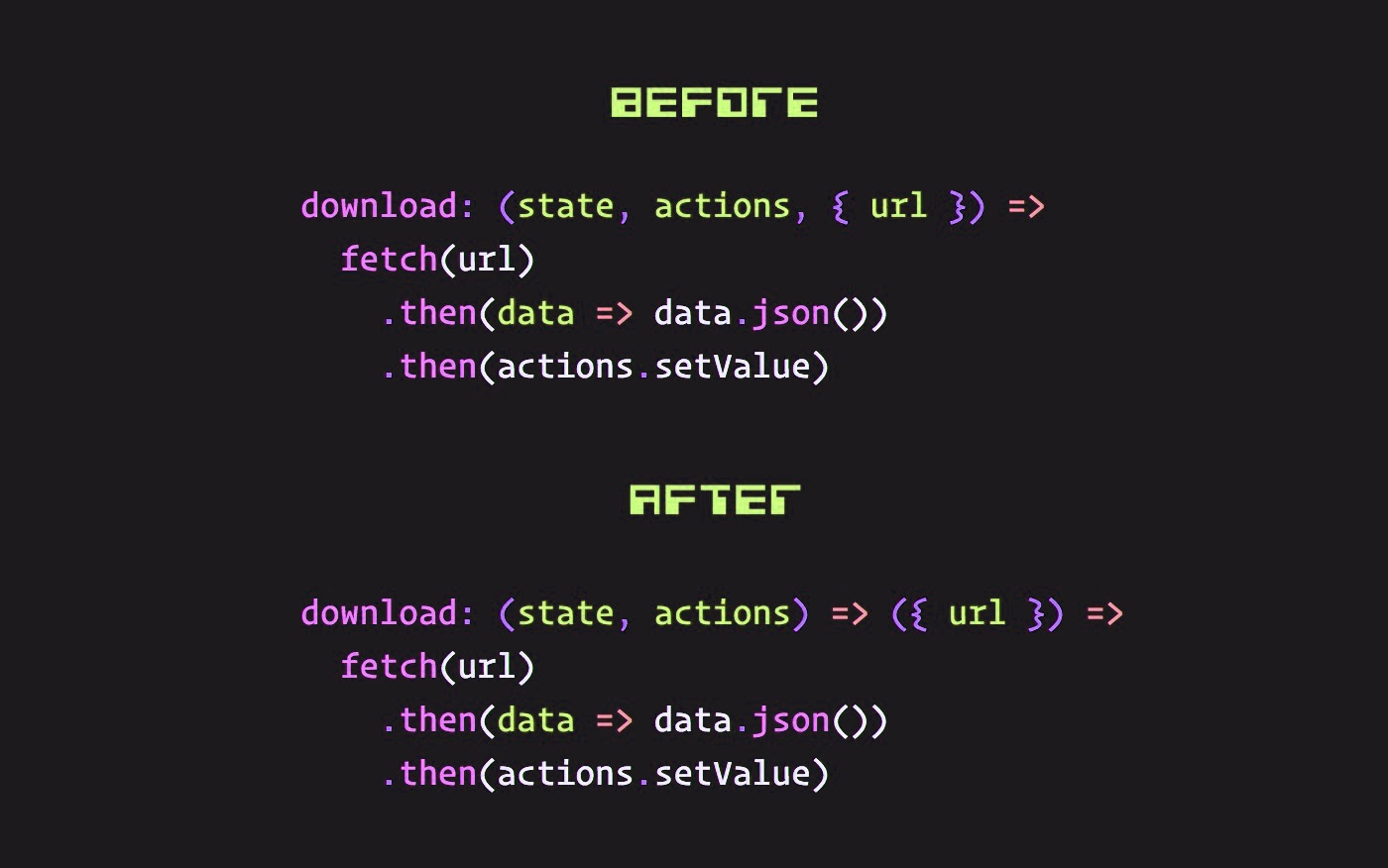
Hi @leifoolsen! I still haven't had time to update the release notes, explaining how to upgrade from <0.16.0, but in your case the solution is:
export const actions = {
  page: state => event => {
    event.preventDefault();
    return { page: '/foo' };
  },
The actions API changed slightly to better indicate which part is hyperapp's and which one is yours and to improve symmetry across the entire API, ie., now you can easily remember that all function signatures always starts with (state,actions).
actions: {
  foo: state => newState,
  bar: state => data => newState,
  baz: (state, actions) => data => newState,
}
 jorgebucaran
on 5 Nov 2017
jorgebucaran
on 5 Nov 2017
Hi @JorgeBucaran. Thanks for reply.
Using a chained function worked 👍
leifoolsen
on 5 Nov 2017
Hi @leifoolsen, just a brief poll. As you are a user.
What is your thoughts about this API change ?
 Swizz
on 5 Nov 2017
Swizz
on 5 Nov 2017

jorgebucaran
on 5 Nov 2017
Hi @Swizz. Currying is ok, but probably need some documentation.
leifoolsen
on 5 Nov 2017
Also the init function from #406 seems to be missing in 0.16.0
app({
  init(state, actions) {
    // Subscribe to global events, start timers, fetch resources & more!
  },
  state,
  actions,
  view,
  modules: { whopper, mouse }
})
How do I write the init function in 0.16.0?
leifoolsen
on 6 Nov 2017
@leifoolsen Still haven't had time to work on the release notes, but I will today. Here is the same code snippet updated for 0.16.0.
const actions = app({
  state,
  actions,
  view,
  modules: { whopper, mouse }
})

// Subscribe to global events, start timers, fetch resources & more!
Example
const actions = app(props)
setTimeout(actions.tick, 1000)
@JorgeBucaran Thans for reply.
I'll try that.
As I understand it (after some debugging), only actions are exposed from app. If I need access to state object (e.g. for copying to local storage) I must use an action?
leifoolsen
on 7 Nov 2017
@leifoolsen You only had access to the initial state inside init, so if you need access to the initial state outside the app, just put the state in a variable and use it.
const state  = { loggedUser: "me" }

const { commit } = app({ state, view, actions })

if (state.loggedUser !== "") {
   commit(state.loggedUser)
}
You would probably be better off just calling an action, which can access the state and do something with it. So, your action can copy to the local storage.
actions.copyToLocalStore({ some, data }) // The action already has access to the state.
Does this answer your question?
jorgebucaran
on 7 Nov 2017
Another solution to this is to make a component out of it. If you wanted to fetch a state from local storage when the app loads, and then store all subsequent state, you could create a component that accepts root level state/actions. If it is the first render then setup === false so we do some stuff, in this case we read from localStorage and replace our apps state with the value, using the commit action. If the component is already setup then the state must be new, so put it in storage.
let setup = false
const Tardis = ({ key, state, commit }) => {
  if (!setup) {
    commit(JSON.parse(localStorage.getItem(key)))
    setup = true
  } else localStorage.setItem(key, JSON.stringify(state))
}

app({
  state: {
    count: 0,
  },
  actions: {
    commit: () => state => state,
    up: state => ({ count: state.count + 1 }),
  },
  view: (state, actions) =>
    main([
      Tardis({
        key: 'hyperapp-state',
        state,
        commit: actions.commit,
      }),
      h1(state.count),
      button({ onclick: actions.up }, 'Increment'),
    ]),
})
I'm still not sure if I prefer this way to the good old init (yet) which sure was convenient.. but it has got me experimenting with different component patterns and as you can see, you can get quite a lot done just in the view.
 lukejacksonn
on 7 Nov 2017
lukejacksonn
on 7 Nov 2017
@leifoolsen Here are some options.
Save state every 1000ms
const state = JSON.parse(localStorage.getItem("state"))

const { getState } = app({
  state,
  actions: {
    getState: state => state
  }
})

setInterval(() => localStorage.setItem("state", JSON.stringify(getState())), 1000)
userland provided subscribe function
The subscribe function would inject code to run the callback for every action. This solves the problem, but requires you to use a function not provided by core.
const actions = app({
  state: JSON.parse(localStorage.getItem(key)),
  view,
  actions
})

subscribe(actions, state =>
  localStorage.setItem("state", JSON.stringify(state))
)
The first one is not really an option as it is not a solution to the problem and not all the code is there to actually make it work without breaking. So not really a fair code comparison either.
In the second soliution.. what does the subscribe function look like and what is it injecting? What about the key variable? Could create multiple of these or insert it at various levels in the state tree? This solution conflicts with modules too.
lukejacksonn
on 8 Nov 2017
@lukejacksonn You are right. The solution is to remove modules.
Modules are convenient, but they introduce a problem: now you have two ways to define state and actions. (edited)
How is this a problem? Well, it makes it very difficult to wrap your state and actions outside the app() call.
Without modules, we can assemble our state outside the app call (if there is a need) and only then app({ state }).
The snippet above using localStorage, is a good example. Your pointed what happens if there is nothing in the store and you were right. And how do I access the state injected by modules?
We need to either bring init back or simply remove modules leaving state assembly completely up to the user.
jorgebucaran
on 9 Nov 2017
We are doing this all to accommodate a more complicated solution to an already solved problem. Not just solved.. but solved simply and requires zero changes to any core features. Let us look at the actual copy/paste-able solution that works today in any hyperapp.
Notice the solution does not use modules but it also does not exclude their use just because it is the only way you can find to make it work any other way.
Above app:
let setup = false
const Tardis = ({ key, state, action }) => {
  if (!setup) {
    action(JSON.parse(localStorage.getItem(key)))
    setup = true
  } else localStorage.setItem(key, JSON.stringify(state))
}
In actions:
tardis: () => state => state
In view:
Tardis({
  key: 'hyperapp-state',
  state,
  action: actions.tardis,
})
If you are indeed intending on moving modules then people are going to have to wire up actions manually themselves. So importing this feature from a package on npm somewhere is still going to be as easy or easier than importing your solutions.
This is my main issue btw.. nothing is easy to share or compose in hyperapp. I always have to re-invent the wheel. Modules helped that a bit and in most cases you can get away with adding a very simple module and a component like the router which opens to door to portability of sorts.
import router, { Route, Link } from '@hyperapp/router'
Not all of us have the liberty of just being able to add/remove features because they aren't compatible with the problem space. So we work within the existing constraints. I have yet to hear why init was and why taking a component approach now it has gone is actually so bad. Until then I will keep building components as they feel simpler and more re-usable that other solutions that have been proposed.
lukejacksonn
on 9 Nov 2017
Thank you all for helpful answers.
This is what I ended up with:
  const dispatch = app({
    state,
    actions,
    view
  });
  window.addEventListener('beforeunload', () => dispatch.storeState());
@leifoolsen I removed modules from master and will publish later.
This should be the way forward:
const actions = app({
  state: JSON.parse(localStorage.getItem(key)),
  view,
  actions
})

window.addEventListener('beforeunload', () => dispatch.storeState())
And eventually, we may have a dedicated solution for subscriptions, like a function or functions run for each state update that would help you with the storeState step.
Thanks for bearing with us! 🙇
jorgebucaran
on 10 Nov 2017
Thanks again for helpful comments and answers. I now have a working demo application built with Hyperapp 0.16.0 (just waiting for the router to catch up), with the following features:
- Webpack3 with Node Express middleware and HMR
- PostCSS/cssnext/css-modules
Repo here: https://github.com/leifoolsen/webpack2-boilerplate
leifoolsen
on 14 Nov 2017
Related issues
 guy-kdm
·
4Comments
guy-kdm
·
4Comments
 dmitrykurmanov
·
3Comments
dmitrykurmanov
·
3Comments
 jamen
·
4Comments
jamen
·
4Comments
 jbrodriguez
·
4Comments
jbrodriguez
·
4Comments
 icylace
·
3Comments
icylace
·
3Comments