- [x] I am on the latest Hyper.app version
- [x] I have searched the issues of this repo and believe that this is not a duplicate
- OS version and name: macOS 10.13.6
- Hyper.app version: Hyper 3.0.2
- Link of a Gist with the contents of your .hyper.js: https://gist.github.com/kms-rscholz/b89fd0c43f55b99d619bfa2829daa424
- Relevant information from devtools _(CMD+ALT+I on macOS, CTRL+SHIFT+I elsewhere)_: N/A
- The issue is reproducible in vanilla Hyper.app: Is Vanilla
Issue
When trying to use Laravel’s valet share command in Hyper it throws the following error:
ERROR: Tunnel 'command_line' specifies an invalid or malformed address 'XXXXX:80': strange hostname
The command works fine in the native macOS Terminal and other terminal apps.
More info about the issue/error can be found here: https://github.com/laravel/valet/issues/790#issuecomment-522358081
 kms-rscholz
All 17 comments
same
 reppair
on 5 Sep 2019
reppair
on 5 Sep 2019
Same issue for me on a fresh macOS 10.14.x installation.
I also have another macOS device where Hyper and Valet runs since like a year fine and where the bug doesn’t exist.
 meduzen
on 1 Oct 2019
meduzen
on 1 Oct 2019
Still the case for me
 marijnbent
on 23 Nov 2020
marijnbent
on 23 Nov 2020
@marijnbent can you try the latest ci build https://github.com/vercel/hyper/actions/runs/378801823
and see if it's still happening
 LabhanshAgrawal
on 23 Nov 2020
LabhanshAgrawal
on 23 Nov 2020
Downloaded and tried it, but I get the same error as @kms-rscholz
marijnbent
on 23 Nov 2020
Same error for me, too.
meduzen
on 24 Nov 2020
Same issue here!
Does anyone have a solution?
 tejasamandaliya
on 8 Jan 2021
tejasamandaliya
on 8 Jan 2021
I've never used laravel, can anyone share some quick setup or example which I can use to test and debug this.
LabhanshAgrawal
on 21 Jan 2021
@LabhanshAgrawal
- Install Laravel valet as per the instructions of the docs: https://laravel.com/docs/8.x/valet
- Download or clone a php project, for example Kirby’s starterkit: https://github.com/getkirby/starterkit
- Open hyper and
cdinto the php project - Type
valet shareinto hyper to reproduce the error.
Doing the same with the nativ MacOS Terminal will create the desired result.
kms-rscholz
on 21 Jan 2021
@kms-rscholz thanks for the guide
I'm able to reproduce this
The error seems to be because of ansi color codes see cpriego/valet-linux#221
In Hyper
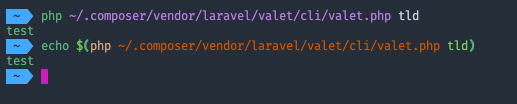
In Terminal

I tried again after replacing $TLD with test in ~/.composer/vendor/laravel/valet/valet and it started working.
I'm not sure why it's returning normal output in terminal and colored in hyper.
I've also compared environment variables to see if we're setting something which is causing this.
It gives normal output in Terminus and VS Code terminal.
This behavior also seems to sort of propagate down, if I run it in xterm.js demo started from hyper it gives colored output, and if started from terminal it gives normal output
@Tyriar can you please help us out a bit here, if we might be doing something wrong while using node-pty to start the shell or something else.
I don't have any other clue to push ahead. (Should've studied a bit on unix :sigh: :P)
LabhanshAgrawal
on 22 Jan 2021
@kms-rscholz @reppair
can you try once after running unset TERM_PROGRAM and check
LabhanshAgrawal
on 22 Jan 2021
Might be related to TERM? It's probably an issue of differing environments between Terminal and Hyper.
 Tyriar
on 22 Jan 2021
Tyriar
on 22 Jan 2021
@kms-rscholz @reppair
can you try once after runningunset TERM_PROGRAMand check
This fixes it for me
kms-rscholz
on 22 Jan 2021
Well, I've found the reason in an unexpected eureka moment, there's a library 'symfony' being used which is using the TERM_PROGRAM env var and if it detects Hyper it shows colored output, it's some sort of feature for when it's running on windows, based on the fact that windows console didn't use to be able to show ANSI colors, it detects if it's running on hyper and returns colored values as hyper can show them. It seems to use the colored version always on linux.
It should be handled in valet like it was done in valet-linux see
or maybe in symfony to stop using such detection as conhost also supports color now.
@Tyriar I'd checked TERM it was same (xterm-256color) everywhere, btw thanks for taking a look
Phew, For once I thought we're doing something really wrong enough to get different output from commands.
For the time being people can use unset TERM_PROGRAM or export TERM_PROGRAM=<something else> before using valet share, or set it in .bashrc etc
LabhanshAgrawal
on 22 Jan 2021
Fixed in valet v2.13.19 (release)
LabhanshAgrawal
on 23 Jan 2021
can you try once after running
unset TERM_PROGRAMand check
Well I am now running Debian based OS called PopOS v20.10 (no longer I use the MacBook) I also have Laravel valet (it's linux version - Valet Linux) and just downloaded and installed Hyper.deb (v3.0.2) - to my surprise the valet share command works just fine with this setup without running the above mentioned command, after running it it still works! :)
reppair
on 23 Jan 2021
Yeah, they had fixed the issue in their fork, I guess it was also there for other linux terminals.
LabhanshAgrawal
on 23 Jan 2021
Related issues
 weabot
·
3Comments
weabot
·
3Comments
 alejandrofloresm
·
3Comments
alejandrofloresm
·
3Comments
 leo
·
3Comments
leo
·
3Comments
 cilice
·
3Comments
cilice
·
3Comments
 rauchg
·
3Comments
rauchg
·
3Comments
Most helpful comment
@LabhanshAgrawal
cdinto the php projectvalet shareinto hyper to reproduce the error.Doing the same with the nativ MacOS Terminal will create the desired result.