Hyper: zsh processes accumulating under WSL; not being killed on window closure
- [x] I am on the latest Hyper.app version
[x] I have searched the issues of this repo and believe that this is not a duplicate
OS version and name: Windows 10 17763
- Hyper.app version: 3.0.0
- Link of a Gist with the contents of your .hyper.js: Gist
- Relevant information from devtools: N/A
- The issue is reproducible in vanilla Hyper.app: Yes
Issue
Using zsh under WSL, closing Hyper will not kill the zsh process.
If zsh is launched from a .bashrc, zsh processes will accumulate each time a terminal window is opened, leading to terminal slowdown after just a few windows have been opened and closed.
To reproduce, run zsh in Hyper using WSL shell, then close the terminal window. Repeat a few times, if desired. Then, open Task Manager (or run ps -ef; the output will be manageably short on WSL) and count the zsh instances.
 el3gy
el3gy
All 12 comments
Same here running:
- OS version and name: Windows 10, Version 1803 (OS Build 17134.706)
- Hyper.app version: 3.0.0
 flostadler
on 6 May 2019
flostadler
on 6 May 2019
Same Here on 3.0.0 with Windows 10, Version 1809
 stromcon
on 6 May 2019
stromcon
on 6 May 2019
Same here, Windows 10, Version 1803, Hyper version 3.0.2
 grasskind
on 11 Jun 2019
grasskind
on 11 Jun 2019
Yep just found this. Accidentally ran ps aux and found a billionty processes, then looked in my Task Manager and the number of 'bash' entries was crazy. This does not appear to be only related to zsh, however, since the issue remains even if I close out of zsh prior to closing the window/pane/tab.
Step 1: Launch Hyper (which fires up bash.exe and launches zsh). I have two /init processes, one /bin/bash --login, and one zsh.
Step 2a: Close window. Launch a new Hyper and run ps aux.
Result: I now have all of the original processes, plus a new /init, /bin/bash --login, and zsh. Repeat for every time I close the window.
ps ax
  PID TTY      STAT   TIME COMMAND
    1 ?        Ss     0:00 /init
    3 tty1     Ss     0:00 /init
    4 tty1     S      0:00 /bin/bash --login
    7 tty1     S      0:01 zsh
   30 tty2     Ss     0:00 /init
   31 tty2     S      0:00 /bin/bash --login
   36 tty2     S      0:00 zsh
   61 tty3     Ss     0:00 /init
   62 tty3     S      0:00 /bin/bash --login
   69 tty3     S      0:00 zsh
   96 tty4     Ss     0:00 /init
   97 tty4     S      0:00 /bin/bash --login
  104 tty4     S      0:00 zsh
  127 tty5     Ss     0:00 /init
  129 tty5     S      0:00 /bin/bash --login
  139 tty5     S      0:00 zsh
  162 tty6     Ss     0:00 /init
  163 tty6     S      0:00 /bin/bash --login
  176 tty6     S      0:00 zsh
  238 tty1     R      0:00 ps ax
Step 2b: Instead of closing the window/tab/pane at the zsh shell, exit out of zsh back to bash (exit/Ctrl-D). ps aux shows two /init processes, and one /bin/bash --login. Now close the window and relaunch Hyper, run ps aux.
Result: The original bash is still running, and I now have the new init, bash, and zsh. Performing this over and over gives the below result:
$ ps ax
  PID TTY      STAT   TIME COMMAND
    1 ?        Ss     0:00 /init
   33 tty2     Ss     0:00 /init
   34 tty2     S      0:00 /bin/bash --login
   67 tty3     Ss     0:00 /init
   68 tty3     S      0:00 /bin/bash --login
  123 tty5     Ss     0:00 /init
  124 tty5     S      0:00 /bin/bash --login
  210 tty1     Ss     0:00 /init
  211 tty1     S      0:00 /bin/bash --login
  244 tty4     Ss     0:00 /init
  245 tty4     S      0:00 /bin/bash --login
  273 tty6     Ss     0:00 /init
  274 tty6     S      0:00 /bin/bash --login
  302 tty7     Ss     0:00 /init
  303 tty7     S      0:00 /bin/bash --login
  331 tty7     R      0:00 ps ax
Note: Closing the window has the same result as using the hotkey to close a tab or pane.
Exiting bash using exit or Ctrl-D is the only way to actually close the processes outside of killing them manually from task manager/CLI.
 mryauch
on 13 Jun 2019
mryauch
on 13 Jun 2019
Yeah, my solution has just been to use Ctrl-D rather than closing out of the window. This seems to kill all of the processes as desired.
grasskind
on 13 Jun 2019
I've recently switched to Ubuntu 18 and started noticing this. Not sure if it happened before with 16..
I'm also noticing extremely slow starts after a few zsh processes accumulate, to the point that I need to clean them up to use hyper again.
 danmindru
on 2 Aug 2019
danmindru
on 2 Aug 2019
This issue with improper process-killing seems to be specifically caused by launching zsh from .bashrc, which was once required to use any non-bash shell with WSL.
chsh _didn't work due to the way WSL's /init daemon initially operated; details and rationale here._
I tried Windows Terminal today and had the same issue, meaning it's a problem with WSL, not hyper.
However, I discovered that since Windows 10 update 1803, chsh works in WSL.
Here's a medium article detailing the newer, proper way to use zsh with WSL, as well as the requisite hyper.js settings (and vscode settings, if you're into that sort of thing).
Thanks to @vinhphm for the article, and to @jsmestad for his blog post that led me to it.
_If you want to read more about or contribute to the WSL issue:
microsoft/WSL#3503 (closed)
microsoft/WSL#3914 (open)
microsoft/WSL#4138 (open)_
el3gy
on 6 Aug 2019
If I replicate this by running wsl.exe from the command prompt I get the zsh prompt. Closing the window kills the process started from the prompt.
I followed those instructions, I no longer have bash processes (only init and zsh), however if I simply close the Hyper window the processes remain.
As far as I can tell it's still a bug with Hyper.
➜  myauch echo $SHELL
/usr/bin/zsh
➜  myauch chsh
Password:
Changing the login shell for myauch
Enter the new value, or press ENTER for the default
        Login Shell [/usr/bin/zsh]:
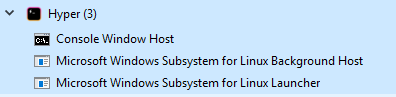
Closing the Hyper window with a single zsh shell results in:


Edit:
Also worth noting, these stay open when I close the window as well. Force closing this process kills the WSL processes:
mryauch
on 6 Aug 2019
@mryauch I can't replicate; closing hyper window terminates zsh properly for me (though I do often wind up with a "hanging" init that closes within about 10 seconds of closing the hyper window).
Did you make sure to set shell: 'C:\\Windows\\System32\\wsl.exe' in your hyper.js, and would you mind posting it?
I _was_ able to get some zombie bash and zsh processes by repeatedly changing shells in Windows Terminal (running bash, then zsh, then bash, etc); closing them left about 5 Console Window Host processes, as well.
However, I was unable to replicate this behaviour in hyper; closing hyper closed all bash, zsh, and Console Window Host processes (though not those that had been generated by Windows Terminal; launching and closing cmd killed them, though).
If you've got hyper configured properly and it's still not closing zsh, I'll reopen this, ~but from what I can see, it still looks like a problem related to launching shells from other shells on WSL, and, at least for me, hyper deals with it better than Windows Terminal (somehow).~
Known issue with Windows Terminal (microsoft/terminal#1971); still can't repro in hyper.
el3gy
on 7 Aug 2019
Both in the initial test and just now I've commented out my plugins, and I still got the issue.
I also just uninstalled completely and removed the configuration directory to get a fresh install of Hyper, with the same results.
Processes with first window open:
➜ myauch ps ax
PID TTY STAT TIME COMMAND
1 ? Ss 0:00 /init
3 tty1 Ss 0:00 /init
4 tty1 S 0:01 -zsh
75 tty1 R 0:00 ps ax
Processes after closing the window and reopening:
➜ myauch ps ax
PID TTY STAT TIME COMMAND
1 ? Ss 0:00 /init
3 tty1 Ss 0:00 /init
4 tty1 S 0:01 -zsh
80 tty2 Ss 0:00 /init
81 tty2 S 0:00 -zsh
102 tty2 R 0:00 ps ax
I also noticed that when Hyper is open in the foreground I get 8 processes under the Hyper heading, is this normal?
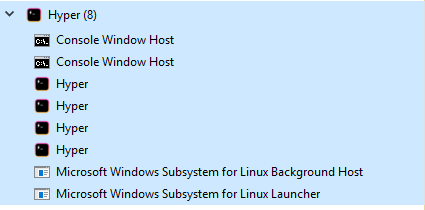
Then once I close the window it goes down to 3 processes, and those go into the background:

Below are both my initial configuration, and then at the very bottom is the configuration after I reinstalled and only changed the shell and shellArgs.
INITIAL CONFIG
https://gist.github.com/mryauch/ea8a3004d5c2b96203fcfa8efafc5b65
FRESH CONFIG
https://gist.github.com/mryauch/66a01a13952a50826794b94533a4febc
mryauch
on 7 Aug 2019
Hi again, I just installed WSL, Debian, Hyper, and zsh on my laptop and do NOT have this issue there. On the laptop I show a process winpty-agent.exe, which does not run on my desktop that is experiencing the issue. Other than that I am at a loss what could be causing it since there are no other processes running within the WSL environ. Either way, thanks for your attention, but yes it does appear currently that Hyper is not the culprit.
mryauch
on 7 Aug 2019
One last update to this issue:
I resolved it by merely reinstalling Windows. I hadn't refreshed since last year so it was a good time to do a fresh install!
1) Reinstalled Windows 10
2) Updated to 1903 (pretty sure it was on 1809 prior, I think that might have been it tbh)
3) Installed Firefox, Lastpass
4) Windows Subsystem for Linux
5) Debian
6) Hyper
7) Configured Hyper to use wsl.exe, installed zsh, set it as the default shell.
8) Profit!
mryauch
on 7 Aug 2019
Related issues
 stan-stripe
·
3Comments
stan-stripe
·
3Comments
 cilice
·
3Comments
cilice
·
3Comments
 ghost
·
3Comments
ghost
·
3Comments
 eoinmurray
·
3Comments
eoinmurray
·
3Comments
 legomushroom
·
3Comments
legomushroom
·
3Comments