Hyper: Powershell causes ArgumentNullException during Hyper startup
- [x] I am on the latest Hyper.app version
- [x] I have searched the issues of this repo and believe that this is not a duplicate
- OS version and name: Windows 10 1809
- Hyper.app version: 3.0.0 Canary 8 and 2.1.2
- Link of a Gist with the contents of your .hyper.js: https://gist.github.com/cdmihai/aca48f61697004281661ee11a7aee04e
Issue
By unzipping powershell 6.1.3 (no machine install) and pointing Hyper to its executable, I get the following:
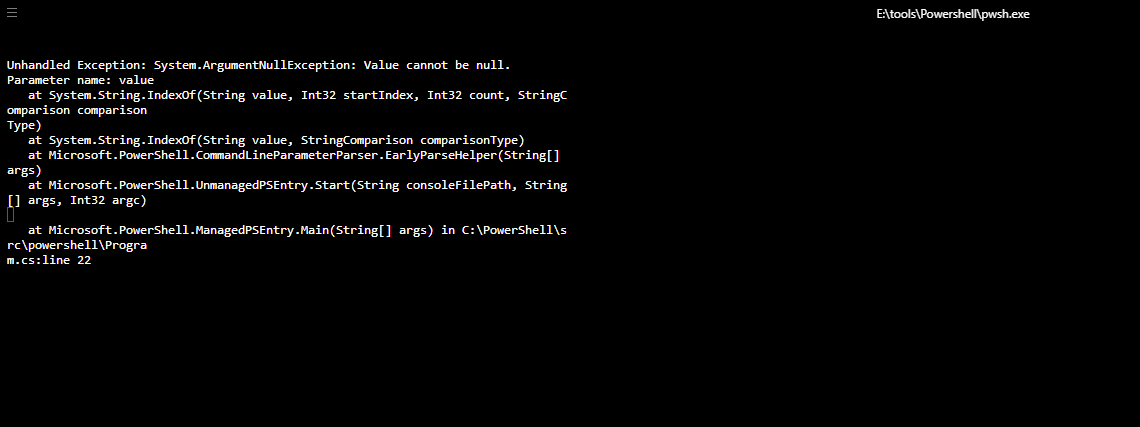
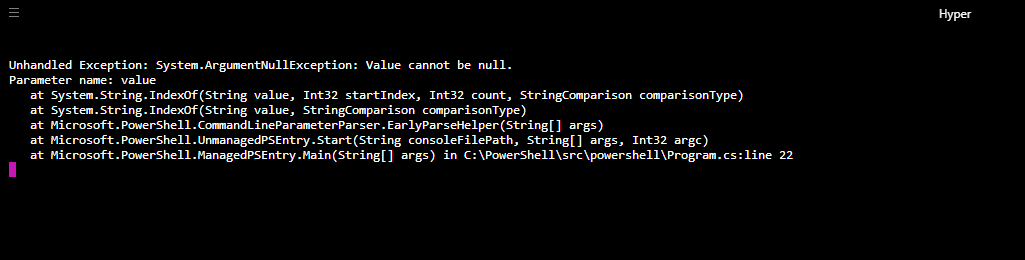
Hyper 2.1.2 has better formatting:
 cdmihai
All 13 comments
Seem like a Cmdlet problem. What are you trying to do? I could test this at my PC with hyper on it.
 ppot
on 27 Mar 2019
ppot
on 27 Mar 2019
I am trying to use the latest powershell release with Hyper. I unzip powershell, point .hyper.js to its exe, start up hyper, and I get that on startup. It's either a Hyper - Powershell compatibility problem (like powershell breaking back compat), or there's some random machine specific issue that's breaking my Hyper startup on powershell 6.1.3, but not on the machine installed powershell.
cdmihai
on 27 Mar 2019
I can't use psh with the lastest version...
ppot
on 28 Mar 2019
I can't use psh with the lastest version...
What is psh (perl shell, powershell) and whose latest version are you referring to (powershell, hyper)? But yes, that's also my impression, latest Hyper does not work with latest Powershell.
cdmihai
on 28 Mar 2019
powershell. I'm on 5 and won't upgrade at work on 6.x for development reason.
ppot
on 30 Mar 2019

 Stanzilla
on 31 Mar 2019
Stanzilla
on 31 Mar 2019
Looks like it's something specific to my machine. I tried it with all combinations, x86 / x64, zip / msi, and I get the same thing. I'll post the fix here when I get some time to debug it.
cdmihai
on 2 Apr 2019
There's some difference between running pwsh at launch or after. If pwsh.exe is specified as the shell to run when spawning a new session, hyper crashes with this exception. However, launching pwsh.exe from the default CMD shell works fine.
 Astrophizz
on 30 Apr 2019
Astrophizz
on 30 Apr 2019
@Stanzilla, I suggest you reopen the issue. I am launching powershell via the hyper.js script (link to contents in the description) when getting this error.
cdmihai
on 1 May 2019
@cdmihai Just tried again and it still works, both
shell: 'C:\\Program Files\\PowerShell\\6\\pwsh.exe',
with a system install and
shell: 'E:\\tools\\Powershell\\pwsh.exe', with the zip extracted version
Stanzilla
on 1 May 2019
I found how to make hyper spawn with pwsh.exe and not crash: shellArgs needs to be empty (an empty array). Interestingly the same solution is in another issue for a different error: https://github.com/zeit/hyper/issues/3269#issuecomment-433714051. In his scenario he was using the default shellArgs: ['--login']. In contrast, I was using shellArgs: [''] as suggested here https://github.com/zeit/hyper/issues/1020#issuecomment-272072997 and here https://github.com/zeit/hyper/issues/2438#issuecomment-342734721. The empty string solution no longer works - probably due to a change in how powershell handles arguments.
Astrophizz
on 1 May 2019
Unless I'm misreading something, this https://github.com/PowerShell/PowerShell/commit/1523c218a6537ad367f42fcd8ad85711d7596770#diff-72f893ea967967a637206a8b9a6385cbR543 converts the empty string to null and guarantees an exception. That change was released with Powershell 6.1.0.
Astrophizz
on 1 May 2019
@Astrophizz, that seems to be the issue, empty string being converted to null which leads to the exception. Using something benign like shellArgs: ['-NoLogo'] avoids that and makes it work. Interesting why @Stanzilla didn't hit it. @Stanzilla, what value did you use for shellArgs?
cdmihai
on 1 May 2019
Related issues
 yvan-sraka
·
3Comments
yvan-sraka
·
3Comments
 legomushroom
·
3Comments
legomushroom
·
3Comments
 stan-stripe
·
3Comments
stan-stripe
·
3Comments
 ConstantinChirila
·
3Comments
ConstantinChirila
·
3Comments
 sarneeh
·
3Comments
sarneeh
·
3Comments
Most helpful comment
I found how to make hyper spawn with
pwsh.exeand not crash:shellArgsneeds to be empty (an empty array). Interestingly the same solution is in another issue for a different error: https://github.com/zeit/hyper/issues/3269#issuecomment-433714051. In his scenario he was using the defaultshellArgs: ['--login']. In contrast, I was usingshellArgs: ['']as suggested here https://github.com/zeit/hyper/issues/1020#issuecomment-272072997 and here https://github.com/zeit/hyper/issues/2438#issuecomment-342734721. The empty string solution no longer works - probably due to a change in how powershell handles arguments.