- [x ] I am on the latest Hyper.app version
- [x ] I have searched the issues of this repo and believe that this is not a duplicate
- OS version and name: Windows 10 ver 1803
- Hyper.app version: 2.1.1
- Link of a Gist with the contents of your .hyper.js: https://gist.github.com/zamgill/fe80c14afe1d8ce12f5638040955d609
- Relevant information from devtools _(CMD+ALT+I on macOS, CTRL+SHIFT+I elsewhere)_:
- The issue is reproducible in vanilla Hyper.app: Yes
Issue
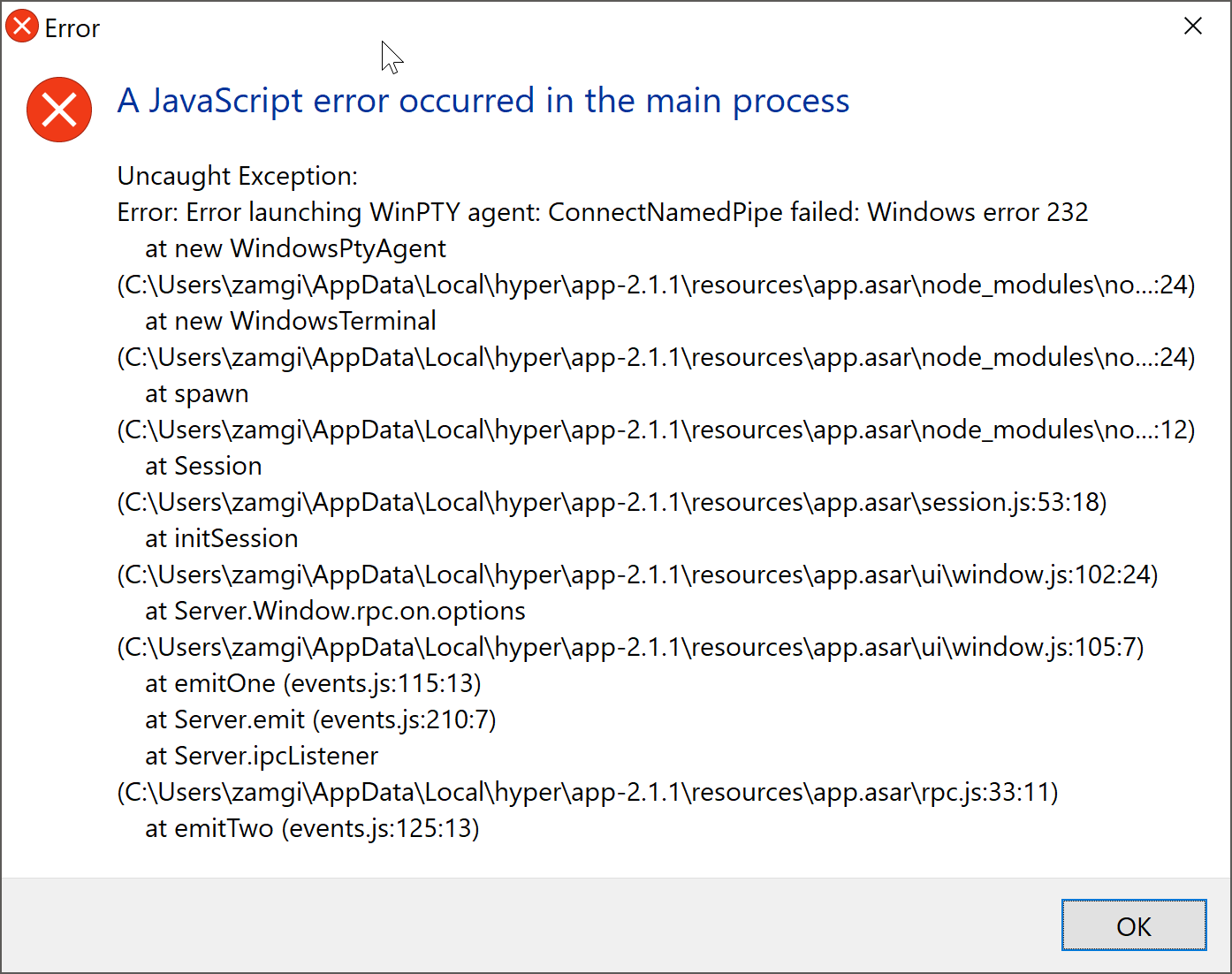
Getting the following error when launching hyper. This happens only with v 2.1.1. Hyper version 2.0.0 is working fine but whenever i install 2.0.0 it automatically updates to 2.1.1.
 zamgill
All 12 comments
I also had this problem, and i couldn't reactivate hyper.exe anymore.
 EliazTray
on 10 Jan 2019
EliazTray
on 10 Jan 2019
Same as mine.
Bad, bad news... :(
 grzegorzssu
on 15 Jan 2019
grzegorzssu
on 15 Jan 2019
Same here problem here.
- Windows 10;
- Hyper 2.1.1 (issue occured on 2.1.0 too);
- Disabled all plugins (deleted
/.hyper_plugins); - deleted
AppData/Local/hyper; - deleted
.hyper.jsconfig; - Exact same error message.
I Switched to the canary version (3.0.0-canary.4) and it seems to work, but without any plugins or custom config which is kind of useless.
Hope it helps,
if the issue is taken into account I'd be glad to investigate further. 🔍
 Alexfrits
on 16 Jan 2019
Alexfrits
on 16 Jan 2019
Same here problem here.
Windows 10;
Hyper version 2.0.0 is working well, but it automatically updates to 2.1.2.
2.1.2 has this Javascript error.
I tried other versions, like 2.1.0, 3.0.*, I even couldn't reactive hyper.exe. Which is quite annoying.
Then how could i stop automatic update ?
 PiaoLiangHXD
on 17 Apr 2019
PiaoLiangHXD
on 17 Apr 2019
This issue was being caused by McAfee AntiVirus. I added exception WinPTY Agent and everything worked fine.
Try disabling you antivirus and see if it starts working, if it does then add exception in your antivirus.
zamgill
on 17 Apr 2019
Thanks @zamgill,
looks like it could be the same cause. I also have McAffee here, however I won't be able to try your fix because I'm using an enterprise version and I don't have the rights (and it's against the company's policy) to disable my antivirus or even whitelist _WinPTY Agent_.
I may contact my administrator to try and find a solution.
Thanks for the follow up 👍
Alexfrits
on 23 Apr 2019
Thanks @zamgill,
looks like it could be the same cause. I also have McAffee here, however I won't be able to try your fix because I'm using an enterprise version and I don't have the rights (and it's against the company's policy) to disable my antivirus or even whitelist _WinPTY Agent_.
I may contact my administrator to try and find a solution.Thanks for the follow up 👍
Exactly the same situation! For me, I delete the folder 2.1.2 and update.exe to stop auto update. It seems work well! I just continue to use 2.0.0. Hope further version could have other solution with WinPTY.
PiaoLiangHXD
on 23 Apr 2019
should no longer happen with CI builds of canary and the next release
 Stanzilla
on 11 Oct 2019
Stanzilla
on 11 Oct 2019
I deleted McAfee but Hyper keeps crashing with the same message.
 ghost
on 8 Jan 2020
ghost
on 8 Jan 2020
Hyper terminal(version 3.0.2) JavaScript error on window 10
How to fix this error?
Reply ASAP
 rahatkar
on 13 Apr 2020
rahatkar
on 13 Apr 2020
 bet4it
on 13 Apr 2020
bet4it
on 13 Apr 2020
Still not working
It throws error saying "Installation has failed"
rahatkar
on 13 Apr 2020
Related issues
 aem
·
3Comments
aem
·
3Comments
 weabot
·
3Comments
weabot
·
3Comments
 anthonyettinger
·
3Comments
anthonyettinger
·
3Comments
 daenuprobst
·
3Comments
daenuprobst
·
3Comments
 eoinmurray
·
3Comments
eoinmurray
·
3Comments
Most helpful comment
Same here problem here.
/.hyper_plugins);AppData/Local/hyper;.hyper.jsconfig;I Switched to the canary version (3.0.0-canary.4) and it seems to work, but without any plugins or custom config which is kind of useless.
Hope it helps,
if the issue is taken into account I'd be glad to investigate further. 🔍