- [x] Your Hyper.app version is 2.1.0-canary.1. Please verify your using the latest Hyper.app version
- [x] I have searched the issues of this repo and believe that this is not a duplicate
Any relevant information from devtools? _(CMD+ALT+I on macOS, CTRL+SHIFT+I elsewhere)_:
Is the issue reproducible in vanilla Hyper.app?
Issue
hyper bugs:
- always shows a note that version 2.0 is ready, but installed version is 2.1.0
- Hyper CLI is installed, but I still see a menu item "Install Hyper CLI"
- "[Notification] Plugin error: Error occurred. Check Developer Tools for details". What do I need to check there? Some kind plugin returns an error on split and exit from split view.
- Last line is shrinked (See screenshoot)

hyper-opacity:
- doesn't works
hyper-search:
- doesn't shows search bar on Ctrl+F, but hides it on Ctrl+F
- search is case sensitive
- Next/Prev arrows shall be double clicked to reset search pointer
- GNOME Shell 3.28.1
- Debian GNU/Linux
- Hyper version: undefined "2.1.0-canary.1"
- OS ARCH VERSION: linux x64 4.16.0-1-amd64
- Electron: 1.8.4 LANG: en_US
SHELL: /usr/bin/zsh TERM: undefined
~/.hyper.js contents
      {

"updateChannel": "stable",

"fontSize": 12,

"fontFamily": "Menlo, \"DejaVu Sans Mono\", Consolas, \"Lucida Console\", monospace",

"fontWeight": "normal",

"fontWeightBold": "bold",

"cursorColor": "rgba(248,28,229,0.8)",

"cursorAccentColor": "#000",

"cursorShape": "BLOCK",

"cursorBlink": false,

"foregroundColor": "#fff",

"backgroundColor": "#000",

"selectionColor": "rgba(248,28,229,0.3)",

"borderColor": "#333",

"css": "",

"termCSS": "",

"showHamburgerMenu": "",

"showWindowControls": "",

"padding": "12px 14px",

"colors": {

"black": "#000000",

"red": "#C51E14",

"green": "#1DC121",

"yellow": "#C7C329",

"blue": "#0A2FC4",

"magenta": "#C839C5",

"cyan": "#20C5C6",

"white": "#C7C7C7",

"lightBlack": "#686868",

"lightRed": "#FD6F6B",

"lightGreen": "#67F86F",

"lightYellow": "#FFFA72",

"lightBlue": "#6A76FB",

"lightMagenta": "#FD7CFC",

"lightCyan": "#68FDFE",

"lightWhite": "#FFFFFF"

},

"shell": "",

"shellArgs": [

"--login"

],

"env": {},

"bell": "SOUND",

"copyOnSelect": false,

"defaultSSHApp": true,

"opacity": 0.85

}
{
"plugins": [
"hyper-search",
"hyperpower",
"hyper-opacity"
],
"localPlugins": []
}
 a2nt
a2nt
All 15 comments
You should create individual issues instead so that everyone can properly track a specific issue and/or discuss it more in depth if needed. I also recommend that you open plugin issues on their own repos so their authors can take a look:
 rfgamaral
on 18 May 2018
rfgamaral
on 18 May 2018
always shows a note that version 2.0 is ready, but installed version is 2.1.0
Because you have installed our canary release directly and not changed your updateChannel config to canary
Hyper CLI is installed, but I still see a menu item "Install Hyper CLI"
This is not easy to know if it has been installed. But PR is welcome.
"[Notification] Plugin error: Error occurred. Check Developer Tools for details". What do I need to check there? Some kind plugin returns an error on split and exit from split view.
Remove plugins that throw errors.
Last line is shrinked (See screenshoot)
Duplicates #2654
Plugins
As suggested by @rfgamaral, please open issue in plugin repo
Thank you for your feedback 🙏
Next time, please open an issue for each problem/suggestion
 chabou
on 18 May 2018
chabou
on 18 May 2018
"[Notification] Plugin error: Error occurred. Check Developer Tools for details". What do I need to check there? Some kind plugin returns an error on split and exit from split view.
I have the same issue and I think the problematic plugin is hyperpower 😅.
rfgamaral
on 18 May 2018
chabou
on 18 May 2018
Not for me, the error I get (besides the notification mentioned above) is this:
[Notification] Plugin error: Error occurred. Check Developer Tools for details
ignore pty exit: session removed by user
And for me it only happens when closing a split terminal.
rfgamaral
on 18 May 2018
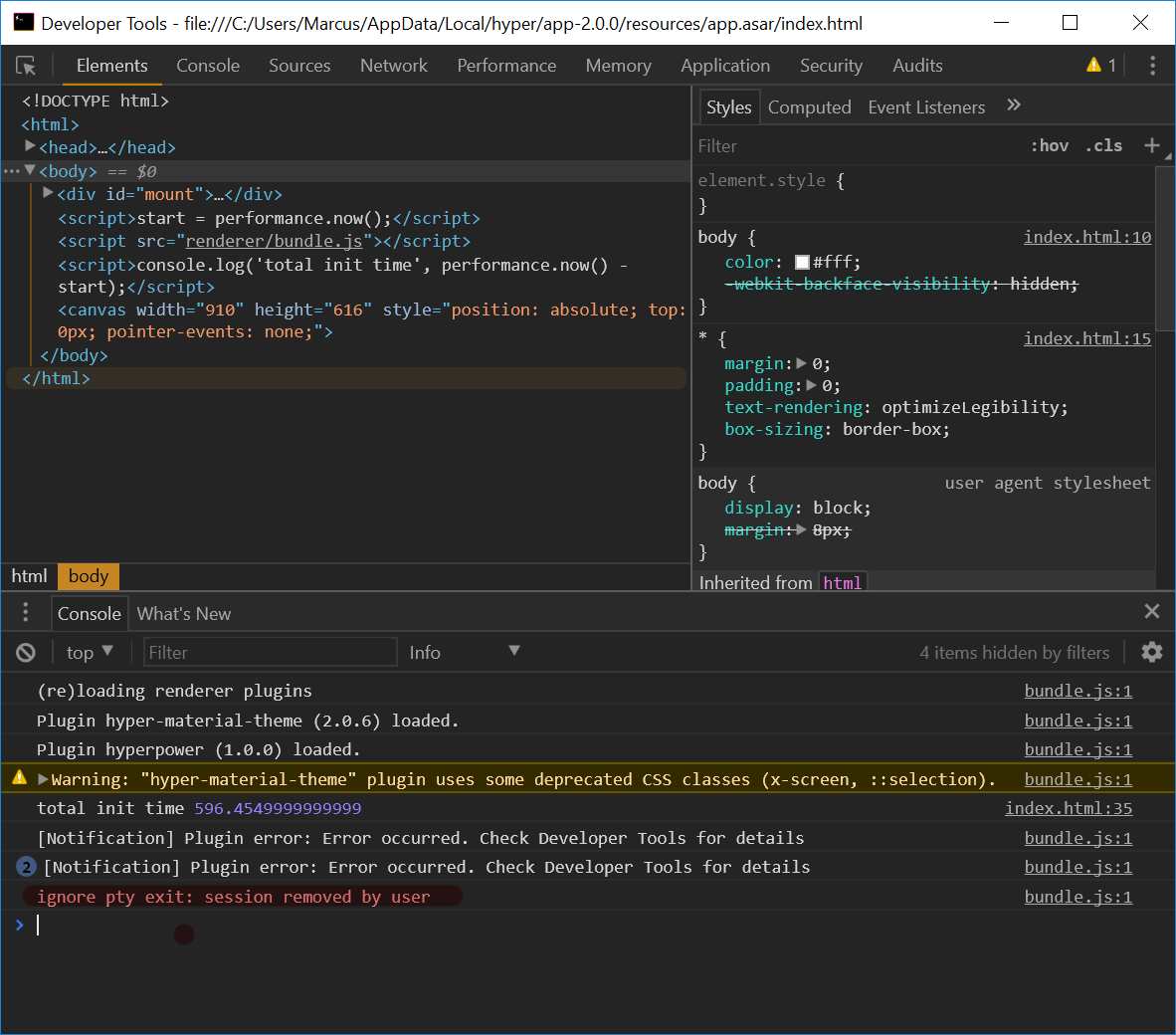
ignore pty exit: session removed by user
This is normal.
Please check details/error in your dev tools console
chabou
on 18 May 2018
That's from the dev tools console. There's nothing else there but that.
rfgamaral
on 18 May 2018
Oh... You're right.
You will have more details in our next canary release, thanks to https://github.com/zeit/hyper/pull/2955
But maybe you can try to build our canary branch?
chabou
on 18 May 2018
Maybe, but I'm out for a weekend off in a couple of hours, won't have time for that until next week.
rfgamaral
on 18 May 2018
Maybe we could close this issue @chabou ?
rfgamaral
on 25 Jun 2018
I am also getting ignore pty exit: session removed by user whenever splitting horizontally or vertically as well as when closing the split panes.
Using Hyper 2.0.0 on Windows 10
 zanona
on 1 Jul 2018
zanona
on 1 Jul 2018
I have the exact same issue on macOS High sierra, closing any tab in hyper.
I only have installed hyperpower plugin.
 Michael-Dawkins
on 2 Jul 2018
Michael-Dawkins
on 2 Jul 2018
@Michael-Dawkins hyperpower is causing the issue, removed it on a similar setup as you and now no longer getting that error message
 timothyrowan
on 25 Jul 2018
timothyrowan
on 25 Jul 2018
Issue with tabs and non-visible input: https://github.com/zeit/hyper/issues/2654#issuecomment-411638137
 webcoderkz
on 9 Aug 2018
webcoderkz
on 9 Aug 2018
Hyperpower seems to be one source of this bug
 taylor-smith
on 29 Nov 2018
taylor-smith
on 29 Nov 2018
Related issues
 dbkaplun
·
3Comments
dbkaplun
·
3Comments
 eoinmurray
·
3Comments
eoinmurray
·
3Comments
 ConstantinChirila
·
3Comments
ConstantinChirila
·
3Comments
 yvan-sraka
·
3Comments
yvan-sraka
·
3Comments
 cooperpellaton
·
3Comments
cooperpellaton
·
3Comments