Hyper: Can't make font any lighter on v2.0
- [x] I am on the latest Hyper.app version
- [x] I have searched the issues of this repo and believe that this is not a duplicate
- OS version and name: OS X High Sierra
- Hyper.app version: 2
- Link of a Gist with the contents of your .hyper.js: Config
- Relevant information from devtools _(CMD+ALT+I on macOS, CTRL+SHIFT+I elsewhere)_:
- The issue is reproducible in vanilla Hyper.app:
Issue
The issue doesn't happen on v1.x
Normal font weight (possible on hyper 1.4.6):
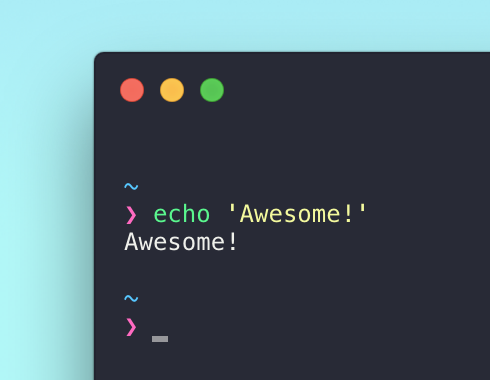
"Normal" font weight on 2.0
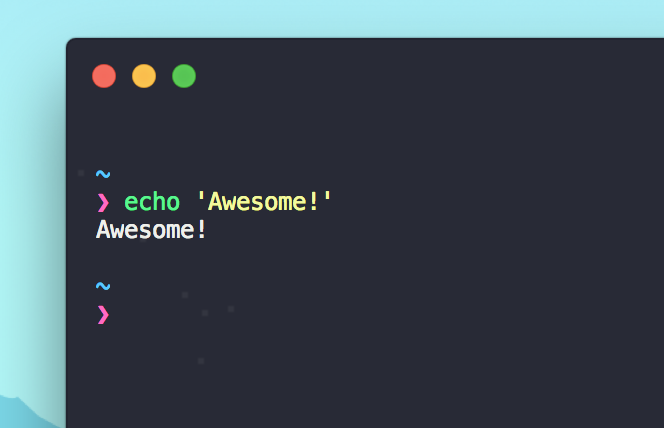
I have tried fontWeight: 'normal', fontWeightBold: 'normal', and fontWeight: '100', but none worked so far
 igoticecream
All 4 comments
Have you tried reloading fully (CMD+R) after changing this? I think we need to tell xterm to re-render the charAtlas after this setting is changed.
 albinekb
on 23 Apr 2018
albinekb
on 23 Apr 2018
Is "LCD font smoothing" enabled in System Preferences > General? If so, that may be your problem. Disabling the option makes the OS look better, and also applies in applications, so try disabling that.
 LoganDark
on 23 Apr 2018
LoganDark
on 23 Apr 2018
Check out this issue, it's defaulting the opacity to 0.6 in my terminals too and making it much darker than it should be: https://github.com/zeit/hyper/issues/2827
 iamthemovie
on 23 Apr 2018
iamthemovie
on 23 Apr 2018
@iamthemovie He means the font weight, not color.
LoganDark
on 23 Apr 2018
Related issues
 alejandrofloresm
·
3Comments
alejandrofloresm
·
3Comments
 sarneeh
·
3Comments
sarneeh
·
3Comments
 cooperpellaton
·
3Comments
cooperpellaton
·
3Comments
 leo
·
3Comments
leo
·
3Comments
 rauchg
·
3Comments
rauchg
·
3Comments
Most helpful comment
Is "LCD font smoothing" enabled in System Preferences > General? If so, that may be your problem. Disabling the option makes the OS look better, and also applies in applications, so try disabling that.