I have a semi transparent background and after some time of use I can see some "ghosts" of old commands/outputs in the background.
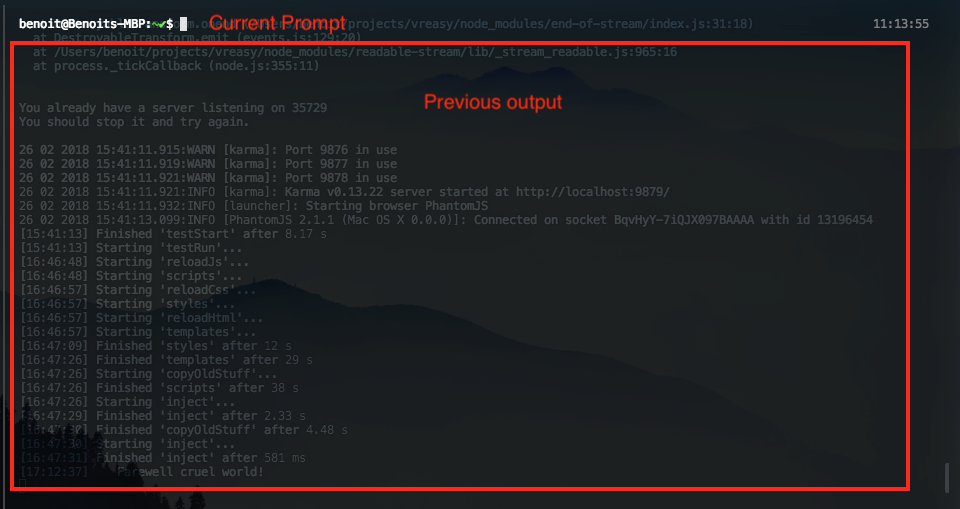
I was not able to reproduce it yet. Not sure if it happens in some particular cases or just randomly.
It looks like it's there are old DOM elements in the background.
 bboure
All 10 comments
I can confirm this happens on a clean install of both 1.4.8 and 2.0.0-canary.14.
Steps to reproduce:
- Install 1.4.8 or 2.0.0-canary.14.
- Edit
.hyper.js, set the terminal background color torgba(0,0,0,0.5)(or another transparent value) - To make sure the config is loaded properly, I restarted Hyper but this may be optional.
- Make sure there is some output on the screen (ie.
cat .hyper.js) - Resize the Hyper screen
- Clean the terminal with
Ctrl+Lto see the "ghost" effect
When the Hyper screen is not in focus, the ghost text disappears. This is also the case if the Hyper screen is resized again.
The ghosted text will be the text that was on-screen when the terminal was being resized.
 DuckThom
on 2 Mar 2018
DuckThom
on 2 Mar 2018
thanks @DuckThom +1 on reproduction steps. I knew it had to do with cleaning the terminal since I use cmd-K all the time.
bboure
on 5 Mar 2018
Comparing this behavior to what happens in iTerm2/Terminal upon clear:
In iTerm2 the pane is cleared by simply scrolling down until the previous text disappears. The basic mac Terminal app does something similar, but just scrolls a full window size down instead of just the few lines that iTerm does. That scrolling behavior does not seem to happen in Hyper, instead all previous commands appear to be hidden instead of this scrolling effect. I'm digging into the render cycle to try and pinpoint this but my guess is that this is causing the ghosting effect.
EDIT: I am quite sure this is actually an underlying issue in xterm. Nothing I was able to do in Hyper itself seemed to help this. I then pulled down the latest xterm in a test repo, and ran the following:
    term.open(document.getElementById('terminal'));
    term.write('Hello from \033[1;3;31mxterm.js\033[0m $ ')
    term.write('Should Get Hidden\r\n');
    term.write('Should Get Hidden\r\n');
    setTimeout(() => {
      term.clear();
      term.write('VERY VISIBLE\r\n');
    }, 100)
And tried it both with the standard black background, as well as theming the background with a transparency layer. The results:
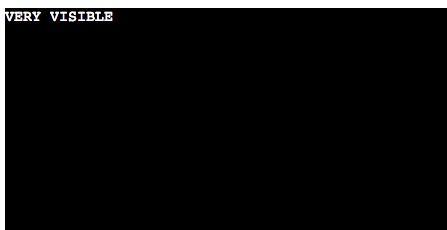
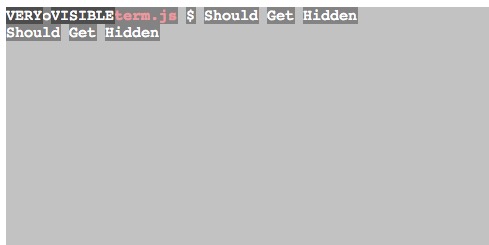
This leads me to believe that there is something within the clear() function in xterm which relied on a non-transparent background to mask what appears to be the underlying old commands.
 Lucretius
on 10 Mar 2018
Lucretius
on 10 Mar 2018
Hey there, to verify if this is indeed a Hyper issue or upstream at https://github.com/xtermjs/xterm.js/ could you please test if another xterm.js powered terminal shows the same problem you are experiencing? I suggest using https://github.com/Microsoft/vscode for testing. Thanks!
 Stanzilla
on 24 Apr 2018
Stanzilla
on 24 Apr 2018
Any updates on this?
 Jaden-Giordano
on 15 Jun 2018
Jaden-Giordano
on 15 Jun 2018
It should be fixed by our just-released canary: https://github.com/zeit/hyper/releases/tag/2.1.0-canary.2
Can you confirm this?
 chabou
on 15 Jun 2018
chabou
on 15 Jun 2018
I'm still getting the ghost text when the window isn't focused on 2.1.0-canary.2. Running on OSX High Sierra.
Edit:
It seems to be actually happening more frequently now.
Jaden-Giordano
on 16 Jun 2018
Any updates on this? Willing to contribute.
 agypsydiver
on 22 May 2020
agypsydiver
on 22 May 2020
@agypsydiver can you try the latest ci build and check if it's still happening.
 LabhanshAgrawal
on 29 Jun 2020
LabhanshAgrawal
on 29 Jun 2020
@LabhanshAgrawal Have been using that exact build for a week now, no ghosts! 😄
agypsydiver
on 9 Jul 2020
Related issues
 sarneeh
·
3Comments
sarneeh
·
3Comments
 anthonyettinger
·
3Comments
anthonyettinger
·
3Comments
 legomushroom
·
3Comments
legomushroom
·
3Comments
 daenuprobst
·
3Comments
daenuprobst
·
3Comments
 aem
·
3Comments
aem
·
3Comments
Most helpful comment
I can confirm this happens on a clean install of both 1.4.8 and 2.0.0-canary.14.
Steps to reproduce:
.hyper.js, set the terminal background color torgba(0,0,0,0.5)(or another transparent value)cat .hyper.js)Ctrl+Lto see the "ghost" effectWhen the Hyper screen is not in focus, the ghost text disappears. This is also the case if the Hyper screen is resized again.
The ghosted text will be the text that was on-screen when the terminal was being resized.