Hyper: how to stop hyper update notifications?
- [x] I am on the latest Hyper.app version
- [x] I have searched the issues of this repo and believe that this is not a duplicate
- OS version and name: Lubuntu 17.10
- Hyper.app version: Hyper version 1.4.8
Issue
I always get this update notification at the bottom when I open hyper.
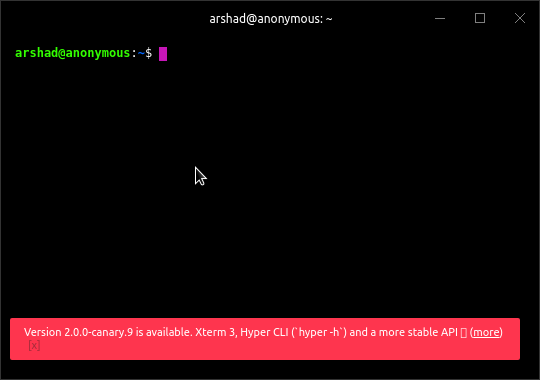
I clicked on this notification and downloaded the canary version but when I opened canary version I got a same notification for the version(1.4.8) on which I was already at before updating to canary.
How do i stop these update notifications and why is this recursive update thing going on?
 ar5had
All 9 comments
Argh. Sorry for that.
Please set updateChannel: 'canary' in your config file. It will stop to announce you 1.4.8 when 2.0.0-canary.X will be installed.
 chabou
on 13 Jan 2018
chabou
on 13 Jan 2018
Thanks, I wonder why I got update notification for canary release when updateChannel was stable?
ar5had
on 13 Jan 2018
- OS version and name: MacOS 10.13
- Hyper.app version: Hyper version 2.0.0-cannery.11
- Update channel:
'canary'
I am getting the 1.4.8 (stable) update notification.
EDIT: I think there is an underlying issue and not the setting itself. If I open my config in Atom, move updateChannel: 'canary', from the beginning of the config object to the end and save the file, Hyper will download 1.4.8.
 jaller94
on 26 Jan 2018
jaller94
on 26 Jan 2018
I'm getting update notifications for new canary version even though I am on stable channel. Very annoying - I'd rather not have an update notification than seeing an incorrect one every time I start the program., especially since it appears the only way to close the notification is to use the mouse.
 Valkhir
on 4 Feb 2018
Valkhir
on 4 Feb 2018
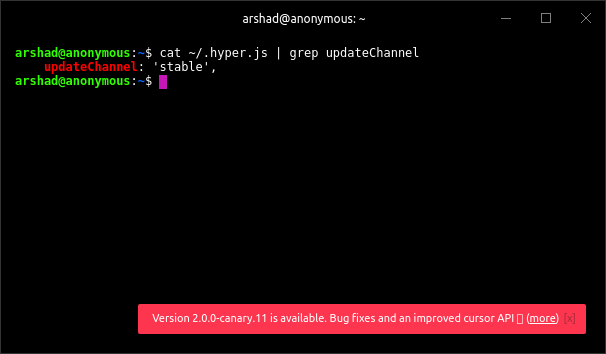
@Valkhir Can you double check your updateChannel in your ~/.hyper.js ? That should not happen. Please open another issue if you have stable and still are getting canary notifications. Thanks
 albinekb
on 5 Feb 2018
albinekb
on 5 Feb 2018
@albinekb
ar5had
on 16 Feb 2018
This is not a solution but you can just hide them in the configuration, it's what I did :
css: '.notification_indicator{display:none;}',
 justUmen
on 25 Feb 2018
justUmen
on 25 Feb 2018
Hey there, please try again with the new Hyper v2 release and open a new issue if the problem stills exists. Thank you!
 Stanzilla
on 23 Apr 2018
Stanzilla
on 23 Apr 2018
@justUmen Thanks works great! Although i do think there should be a setting for this.
 boycce
on 1 Feb 2019
boycce
on 1 Feb 2019
Related issues
 laur1s
·
3Comments
laur1s
·
3Comments
 weabot
·
3Comments
weabot
·
3Comments
 legomushroom
·
3Comments
legomushroom
·
3Comments
 sarneeh
·
3Comments
sarneeh
·
3Comments
 juicygoose
·
3Comments
juicygoose
·
3Comments
Most helpful comment
This is not a solution but you can just hide them in the configuration, it's what I did :
css: '.notification_indicator{display:none;}',