Hyper: Hyper can’t handle non-monospaced fonts
- [x] I am on the latest Hyper.app version
- [x] I have searched the issues of this repo and believe that this is not a duplicate
- OS version and name: macOS 10.12.6 (16G1036)
- Hyper.app version: 1.4.8 (stable)
- Link of a Gist with the contents of your .hyper.js: https://gist.github.com/henryhadlow/3d5a5ec3dd4284d2dbd558f1288d3915
- Relevant information from devtools N/A
- The issue is reproducible in vanilla Hyper.app: Change font to non-monospaced
Issue
If you change the font to non-monospaced, the cursor doesn’t stay with the end of the line.
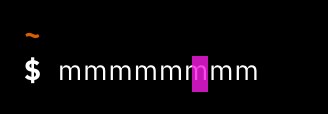
This is because it moves a specific number of px with every character, but with a non-monospaced font, certain characters are wider.
Now I know you’re thinking 'what kind of person uses a non-monospaced font in their Terminal' but wait!
iA writer have released a really nice 'duospaced' font, based on IBM’s new Plex type family.
This is mainly monospaced, but uses 1.5x spaces for the characters m, w, M and W.
I’m using it in Sublime Text and it’s great, much easier to read.
 henryhadlow
All 10 comments
The reason why terminals and editors use monospaced font is so that the code will line up, if you have 1.5x chars, it will shift that row by 0.5x char widths, which will make two lines that have the same amount of characters in them, not line up:
this line has 23 chars.
this lime has 23 chars.
the line with m 1.5x spaced will render kinda like this:
this line has 23 chars.
this lim e has 23 chars.
So even if we supported it, it wouldn't make sense? 🤔 Navigation up/down would be "skewed", pressing up would move the cursor .5 char widths to the left/right in this simple case
What you could try is using the canary build, you can find out how at https://ziet.co/blog/canary , in canary we have replaced the terminal rendering lib to the more mature xterm.js, I doubt it will work but it's worth a try.
 albinekb
on 6 Dec 2017
albinekb
on 6 Dec 2017
Just to add another motivation, support for non-monospaced fonts is necessary for powerline fonts, otherwise, some glyphs won't render nicely, which is the case for hyper.
 qobilidop
on 13 Dec 2017
qobilidop
on 13 Dec 2017
You can try Powerline fonts which are monospace fonts modified with extra characters for things like that
Follow the installation guide for the fonts. After that, you can change to that font in the config like so:
fontFamily: '"Ubuntu Mono derivative Powerline"'
You can also add fallback fonts like so:
fontFamily: '"Ubuntu Mono derivative Powerline", <other_font>'
 Thatkookooguy
on 16 Dec 2017
Thatkookooguy
on 16 Dec 2017
@Thatkookooguy thanks for the suggestion.
qobilidop
on 17 Dec 2017
How does other terminals handle this? @qobilidop
The only way I can think of is to treat all chars as monospaced and just let them overflow the box into the next one? Because shifting rows other than at the columns would break so many things (cursor nav, terminal-width reporting etc)
albinekb
on 18 Dec 2017
@albinekb Sorry I don't know the internal working of Hyper and other terminals, but I know that VS Code's terminal handles my fonts correctly.
qobilidop
on 18 Dec 2017
That's a good sign as we will handle the fonts exactly like VS Code's terminal does it. VS Code uses xterm version 3. We're currently using version 2.x in canary, but before the sharp release of hyper 2 we will most likely have migrated to the latest xterm === your fonts will work like in VS! 🎉
If you would like to test it now, try building https://github.com/zeit/hyper/tree/xterm3 from source, instructions in the readme, report back here if it fixes your font issues. Thanks ❤️ @qobilidop
albinekb
on 18 Dec 2017
usually, the terminal expects a monospaced font. don't think any terminal handles non-monospace. you might be able to set those fonts for the terminal, but the terminal won't fix the difference. it assumes the font it uses is monospaced as far as I know
Thatkookooguy
on 19 Dec 2017
@albinekb I tried the xterm3 version, and it indeed fixed my font issues. Thanks for the great work. I'm looking forward to the new release!
@henryhadlow Sorry I have hijacked your threads for my own issue, although I feel they are related in the first place.
qobilidop
on 4 Jan 2018
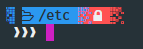
Just a short update here, I am facing some issues related to non monospaced fonts even in the latest canary version.
FuraCode NF Mono:

FuraCode NF:
Edit:
Forget it, it is not a hyper issue in my case. This is due to double-width glyphs, not monospaces or non-monospaced fonts.
https://github.com/bhilburn/powerlevel9k/issues/231
 dougmaitelli
on 21 Feb 2018
dougmaitelli
on 21 Feb 2018
Related issues
 weabot
·
3Comments
weabot
·
3Comments
 leo
·
3Comments
leo
·
3Comments
 sarneeh
·
3Comments
sarneeh
·
3Comments
 rauchg
·
3Comments
rauchg
·
3Comments
 legomushroom
·
3Comments
legomushroom
·
3Comments
Most helpful comment
@albinekb I tried the xterm3 version, and it indeed fixed my font issues. Thanks for the great work. I'm looking forward to the new release!
@henryhadlow Sorry I have hijacked your threads for my own issue, although I feel they are related in the first place.