Hyper: Windows 7 desktop shortcuts keep getting added
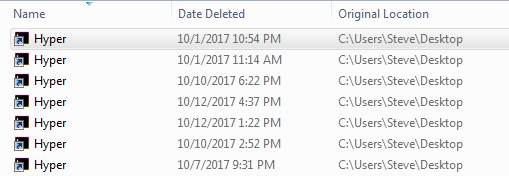
Hyper seems to constantly replace a shortcut on my desktop every time I open it, deleting the shortcut only works as long as I leave the program closed. Screenshot below shows the most recent attempts to delete this shortcut since I last cleared my recycle bin. As I write this I just noticed a new one get added to my desktop, how do I disable the creation of new desktop shortcuts?
    Hyper 2.0.2
    Electron 1.7.6
    win32 x64 6.1.7601
 stevenwoodson
All 3 comments
Hi! thanks for reporting this, I think we should change the code to only add the shortcut when installing and not running hyper 👍
 albinekb
on 13 Oct 2017
albinekb
on 13 Oct 2017
If I could make another suggestion along the same lines, what about including a setting in the user .hyper.js file to control the creation of the desktop shortcut? Obviously this would only apply after the first time it's installed, but if that user file isn't replaced on upgrade, this would at least let people specify whether or not they want a desktop shortcut going forward.
I for one am starting to get really tired of constantly deleting it now. Not everybody likes desktop shortcuts, you know... 🖖
 ZaLiTHkA
on 26 Oct 2017
ZaLiTHkA
on 26 Oct 2017
I'm still having this issue on Windows 10. Is there a fix going in for this?
 keithrfung
on 5 Apr 2018
keithrfung
on 5 Apr 2018
Related issues
 weabot
·
3Comments
weabot
·
3Comments
 cooperpellaton
·
3Comments
cooperpellaton
·
3Comments
 eoinmurray
·
3Comments
eoinmurray
·
3Comments
 laur1s
·
3Comments
laur1s
·
3Comments
 ghost
·
3Comments
ghost
·
3Comments
Most helpful comment
Hi! thanks for reporting this, I think we should change the code to only add the shortcut when installing and not running hyper 👍