Hyper: Plugin settings added to .hyper.js uniformly causes "Error loading config: SyntaxError..."
MacOS Version: Sierra 10.12.6
Hyper Version: 1.4.8
Gist of hyper.js: https://gist.github.com/silverjerk/c6709df5a21f7a7fa6880334adda1883
DevTools error: Unknown OSC code: "1"
Whenever I attempt to add config settings to my hyper.js file (no matter which plugin settings I'm adding), the application produces an "Error loading config: SyntaxError" notification and any existing settings -- like themes -- are disabled and the window reloads without any styling or core settings applied.
After a fresh install (using App Cleaner to remove all system files; and doing a rm -rf .hyper.js and .hyper_plugins), I receive the same error when I first load the app, but on subsequent loads it does not appear to happen.
I've installed plugins by manually editing the hyper.js file, and have also used hpm-cli; I've also attempted to load plugins individually and add config settings one at a time. Even the simplest settings (like the summon settings found in my gist) produce this error.
I also receive errors frequently when trying to install plugins (see the attached screenshot) via hpm-cli. Rather than open a separate issue, I assumed these could be related.
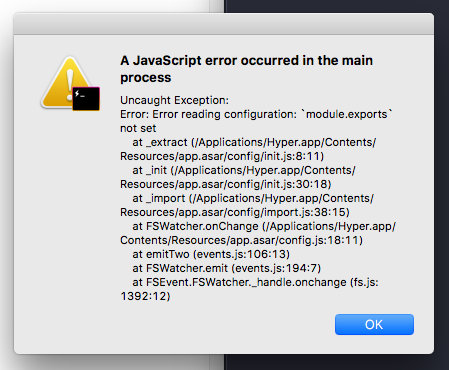
Edit: in a strange turn of events, I am now getting an infinitely looping "bell" chime once I load the app; after uninstalling and removing all the files from the file system, navigating to hyper.io's website produces the same infinitely looping "bell" chime.
 silverjerk
All 8 comments
@silverjerk hpm causes conflict with the stable version and canary in macOS. This problem does not occur in Windows and Linux versions. Possibly some plugins are cached and are causing a conflict when installing new plugins.
Please delete Hyper and reinstall it. If the problem persists let me know 😄
 markozxuu
on 28 Sep 2017
markozxuu
on 28 Sep 2017
Thanks for the reply. Unfortunately, I've already gone through the process of reinstalling, and even did the diligence to clean up all the files the app left behind to ensure there weren't any stragglers in the file system that were causing the issue. The problem persists...
silverjerk
on 28 Sep 2017
@silverjerk Okay, I'll start investigating your problem. When you have relevant information, I will let you know 😸
I'm sorry if Hyper is causing you problems, we're working hard to solve these bugs.
markozxuu
on 28 Sep 2017
No apology necessary. I want to report bugs to help improve the app, not out of frustration. I know you guys are working hard, and the effort is appreciated! 😄
silverjerk
on 28 Sep 2017
Experiencing the same issue here with 1.4.8 after I downgraded from 2.0.4. Clean install results in the same error as well. Any updates on this? :-)
 Chris1904
on 9 Oct 2017
Chris1904
on 9 Oct 2017
@Chinese1904 Delete Hyper and reinstall. We are still working to solve the update problem 😄
if the problem persists let me know.
markozxuu
on 9 Oct 2017
It persisted. Used appcleaner to remove as well, deleted .hyper.js and the plugins folder. So I ended up going back to 2.0.4 and it was gone there then haha
Thanks for your work on this! Love using Hyper!
Chris1904
on 9 Oct 2017
@Chinese1904 Great 😺
markozxuu
on 9 Oct 2017
Related issues
 stan-stripe
·
3Comments
stan-stripe
·
3Comments
 legomushroom
·
3Comments
legomushroom
·
3Comments
 sarneeh
·
3Comments
sarneeh
·
3Comments
 juicygoose
·
3Comments
juicygoose
·
3Comments
 ConstantinChirila
·
3Comments
ConstantinChirila
·
3Comments
Most helpful comment
@silverjerk Okay, I'll start investigating your problem. When you have relevant information, I will let you know 😸
I'm sorry if Hyper is causing you problems, we're working hard to solve these bugs.