Hyper: Error Updating Plugin - Hyper ver 1.4.3 on Windows 10
- [x] I am on the latest Hyper.app version
- [x] I have searched the issues of this repo and believe that this is not a duplicate
- OS version and name: Windows 10
- Hyper.app version: 1.4.3
- Link of a Gist with the contents of your .hyper.js:
- Relevant information from devtools _(CMD+ALT+I on Mac OS, CTRL+SHIFT+I elsewhere)_:
- The issue is reproducible in vanilla Hyper.app: Added 'hyperline' add-on.
Issue
I have installed npm, and also yarn (just in case npm didn't work), and upon installing and opening hyper, I was given the message that there is an error in updating plugins. I entered the plugin 'hyperline' to test into the config file. The popup window said that it cannot find 'C:\Users\JupiterStorm\.hyper_plugins\node_modules\hyperline'.
In the config file, I also modified the shell, and shell-arg:
shell: 'C:\\Program Files\\Git\\git-cmd.exe',

shellArgs: ['--command=usr/bin/bash.exe', '-l', '-i'],
I've attached a screenshot of the dev tools with the error.

I've been looking for answers for hours now but couldn't find anything that was helpful.
 j-leow
All 15 comments
It doesn't explain your problem but hyperline is not compatible with Windows.
Can you try with another plugin?
 chabou
on 5 Sep 2017
chabou
on 5 Sep 2017
Oh, oops, I didn't know hyperline wasn't compatible. I'll try again tomorrow morning. Hyper works amazingly on my Linux machine by the way. I only have issues with things on Windows.
j-leow
on 5 Sep 2017
I have the same problem since the last update to 1.4.3. For me is throwing this error every time that it tries to update the plugins or when i try to do it trough the menu option (Ctr+Shift+U). All the plugins are compatible with Windows and were previously installed. Adding a new plugin throws the same error reported by @j-leow.
- OS version and name: Windows 10
- Hyper.app version: 1.4.3
- Link of a Gist with the contents of your .hyper.js: .hyper.js config
I don't know if is relevant but here's the yarn-error.log found in the .hyper_plugins folder. Hope it helps!
Arguments:
  C:\Users\my_user\AppData\Local\hyper\app-1.4.3\Hyper.exe C:\Users\my_user\AppData\Local\hyper\app-1.4.3\resources\bin\yarn-standalone.js install --no-emoji --no-lockfile --cache-folder C:\Users\my_user\.hyper_plugins\cache

Yarn version:
  0.24.6

Node version:
  7.9.0

Platform:
  win32 x64

npm manifest:
  {
    "name": "hyper-plugins",
    "description": "Auto-generated from `~/.hyper.js`!",
    "private": true,
    "version": "0.0.1",
    "repository": "zeit/hyper",
    "license": "MIT",
    "homepage": "https://hyper.is",
    "dependencies": {
      "hyperterm-paste": "latest",
      "hyper-blink": "latest",
      "hyper-dracula": "latest",
      "hyper-tab-icons": "latest",
      "hyper-statusline": "latest"
    }
  }

yarn manifest:
  No manifest

Lockfile:
  No lockfile

Trace:
  Error: getaddrinfo ENOTFOUND registry.yarnpkg.com registry.yarnpkg.com:443
      at errnoException (dns.js:28:10)
      at GetAddrInfoReqWrap.onlookup [as oncomplete] (dns.js:73:26)
 dkast
on 5 Sep 2017
dkast
on 5 Sep 2017
@dkast Here's your problem: Error: getaddrinfo ENOTFOUND registry.yarnpkg.com registry.yarnpkg.com:443
We switched to an integrated version of yarn, which uses registry.yarnpkg.com instead of npmjs.org.
Can you try to go to https://registry.yarnpkg.com in your browser? (you should get a json response), if this works, try installing yarn and installing something with it, I think there's a problem with your DNS/network/firewall causing this.
 albinekb
on 5 Sep 2017
albinekb
on 5 Sep 2017
I'm also facing the same issue every time I select Plugins -> Update.

This is the error that I get as a Windows notification. I understand its incomplete but the console in the developer tools is not showing anything. Is there any other way to produce a complete log?
I'm on a newly installed Windows PC with Hyper 1.4.3 running on default .hyper.js.
 manojmkhanna
on 5 Sep 2017
manojmkhanna
on 5 Sep 2017
I tried using other addons to see if they worked and I am having the same issue. In fact, @manojkhannakm, your issue and mine are exactly the same in terms of the error message I get.
j-leow
on 5 Sep 2017
Can you remove your yarn-error.log if present and retry to update plugins?
Is there a new yarn-error.logfile?
chabou
on 6 Sep 2017
@chabou There is no yarn-error.log, I have searched everywhere. Also there is no error in the console either maybe that is why the yarn-error.log file is not getting created I guess.
manojmkhanna
on 6 Sep 2017
Will try to reproduce it on Windows.
chabou
on 6 Sep 2017
I encountered the same issue, by looking into the console logs of hyper, I found it's complaining about "'C:\Users\MyFirstName' is not recognized as an internal or external command".
I looked into the source code and found in https://github.com/zeit/hyper/blob/master/app/plugins/install.js, the line:
const cmd = [process.execPath, yarn].concat(args).join(' ');
is joining the unescaped execPath, which in my case and in @manojkhannakm's case both contain a space. I guess the issue could be fixed by correctly escaping the arguments before joining them? (the yarn one also contain a space, so perhaps both need to be escaped). Hope this helps resolving the issue!
 donghaoren
on 12 Sep 2017
donghaoren
on 12 Sep 2017
which in my case and in @manojkhannakm's case both contain a space
I think you pointed out the right cause. Thank you so much.
I'll try to fix this ASAP, but PR welcome ;)
chabou
on 12 Sep 2017
I have the same issue:
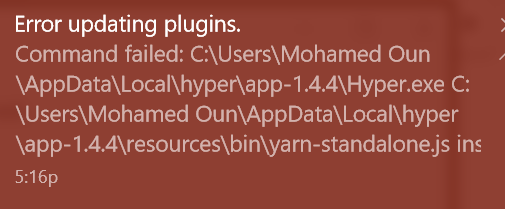
Hyper 1.4.4, W10.
 Mohamed3on
on 14 Sep 2017
Mohamed3on
on 14 Sep 2017
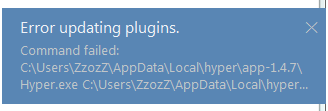
Hyper 1.4.7 Windows 7 Ultimate 64 ( CPU: AMD )
No errors in console:
(re)loading renderer plugins
index.html:35 total init time 765.0000000000001
No plugins loaded:
plugins: [],
 lZzozZl
on 23 Sep 2017
lZzozZl
on 23 Sep 2017
Is this mean that is fixed and on the next version i will not have this problem anymore or it means that i need to download or edit some files somewhere to fix my problem?
lZzozZl
on 23 Sep 2017
@lZzozZl Its already fixed in 1.4.7. Try doing a clean install. Also remove the folders C:\Users\
manojmkhanna
on 24 Sep 2017
Related issues
 juicygoose
·
3Comments
juicygoose
·
3Comments
 leo
·
3Comments
leo
·
3Comments
 sarneeh
·
3Comments
sarneeh
·
3Comments
 aem
·
3Comments
aem
·
3Comments
 hxnt
·
3Comments
hxnt
·
3Comments
Most helpful comment
@lZzozZl Its already fixed in 1.4.7. Try doing a clean install. Also remove the folders C:\Users\.hyper_plugins and C:\Users\\AppData\Roaming\Hyper before reinstalling.