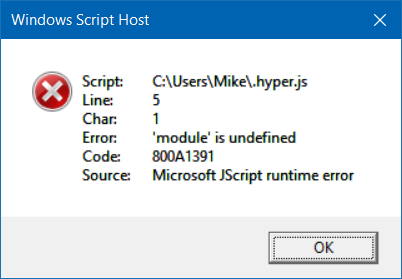
I opened the menu, clicked Edit, and then clicked Preferences. I received this error:
-
Hyper 1.3.3
Electron 1.4.16
win32 x64 10.0.15063
👀 Awaiting Response
 mviens
👍2
All 3 comments
Did you add a plugin? What when there is no plugin installed. Please follow the issue instructions.
 ppot
on 15 Aug 2017
ppot
on 15 Aug 2017
This happens in windows when .js files are associated with the Windows Script Host. You may have to open the preferences file directly notepad %USERPROFILE%\.hyper.js or something similar. Or you can change your .js file association to a text editor.
 bstoney
on 16 Aug 2017
bstoney
on 16 Aug 2017
👍2
I re-associated .js file with my favorite IDE (VSCode) and the problem is fixed (thanks!)
http://www.thewindowsclub.com/change-file-associations-windows
 01binary
on 16 Aug 2017
01binary
on 16 Aug 2017
👍1
Was this page helpful?
0 / 5 - 0 ratings
Related issues
 hxnt
·
3Comments
hxnt
·
3Comments
 sarneeh
·
3Comments
sarneeh
·
3Comments
 ConstantinChirila
·
3Comments
ConstantinChirila
·
3Comments
 stan-stripe
·
3Comments
stan-stripe
·
3Comments
 daenuprobst
·
3Comments
daenuprobst
·
3Comments
Most helpful comment
This happens in windows when
.jsfiles are associated with the Windows Script Host. You may have to open the preferences file directlynotepad %USERPROFILE%\.hyper.jsor something similar. Or you can change your.jsfile association to a text editor.