Hyper: Unneccesary new version notification
- [x] I am on the latest Hyper.app version
- [x] I have searched the issues of this repo and believe that this is not a duplicate
- OS version and name: Hardened Gentoo (Linux kernel 4.9.24)
- Hyper.app version: 1.3.3
- Link of a Gist with the contents of your .hyper.js: .hyper.js
- Relevant information from devtools _(CMD+ALT+I on Mac OS, CTRL+SHIFT+I elsewhere)_: N/A
- The issue is reproducible in vanilla Hyper.app: Yes
Issue
When using hyper compiled from the 1.3.3 release source, a red notification window opens in the bottom right which says "Version 1.3.3 is available. Performance improvements 🚀", despite the fact that I am running version 1.3.3. This is not reproducible when using the AppImage.
 soleera
All 10 comments
Did you download the source from the releases tab? see https://github.com/zeit/hyper/issues/1834
 albinekb
on 12 Jun 2017
albinekb
on 12 Jun 2017
Yes, the .tar.gz one to be precise.
soleera
on 12 Jun 2017
Ah, I just checked hyper-1.3.3/app/package.json and it has this:
"version": "1.3.2"
So it'll be the same issue as that one.
soleera
on 12 Jun 2017
Yeah, this issue https://github.com/zeit/hyper/issues/1818
 Stanzilla
on 12 Jun 2017
Stanzilla
on 12 Jun 2017
Do we know if it's just the version tag that wasn't bumped, or is the code also from 1.3.2?
soleera
on 12 Jun 2017
Don't know actually 😄 this is not an issue with the built ones, so probably the code in the .tar.gz is 1.3.2
I'd recommend just running from master since there's a lot of unreleased fixes (release soon) 👍
albinekb
on 12 Jun 2017
I just checked, and if you look at the 1.3.3 tag the most recent commit is this, which immediately precedes the version bump commit here. So the fix would be to add the 1.3.3 tag to that version bump commit and then create a new 1.3.3 archive which includes it (or just sed the version tag in the source code before compiling =P); there shouldn't be any other code differences apart from that.
soleera
on 12 Jun 2017
I noticed a similar issue: I'm on 2.0.0-canary and getting the "Please update to 1.4.8" message.
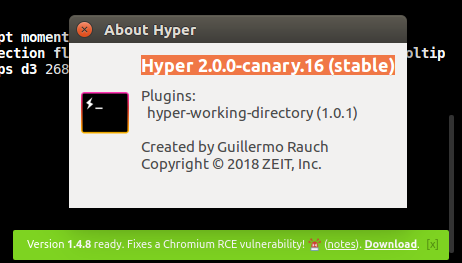
 mojoaxel
on 16 Apr 2018
mojoaxel
on 16 Apr 2018
@mojoaxel if you downloaded the canary release from the releases, you need to update ~/.hyper.js to use canary channel, here's the issue for that: https://github.com/zeit/hyper/issues/2704
albinekb
on 16 Apr 2018
(original issue) Fixed in v2 🎉
 chabou
on 16 Apr 2018
chabou
on 16 Apr 2018
Related issues
 ghost
·
3Comments
ghost
·
3Comments
 laur1s
·
3Comments
laur1s
·
3Comments
 juicygoose
·
3Comments
juicygoose
·
3Comments
 ConstantinChirila
·
3Comments
ConstantinChirila
·
3Comments
 hxnt
·
3Comments
hxnt
·
3Comments