Hyper: config.json does not update Window Position after 2nd display is unplugged
Dell XPS-9560 (3840x2160) connected via HDMI to a 27" Dell monitor running at 1920x1080. I had Hyper term window on the 27" Dell monitor. Finished for the day and shutdown all applications including Hyper. Shutdown down laptop. Disconnect HDMI.
Later in the evening at home, turned on laptop. Started VS Code, Chrome and Postman (all apps that were running on the external monitor earlier), they all came up fine with the window sizes a bit wonkey due to the resolution switch.
However the Hyper windows was not visible even though the program was running. I looked at config.json and the Window Position was set to [4000, 50]. Obviously outside of the laptop's visible area. Closed down hyper and manually changed to [0,0].
Not sure if this is a bug. Unable to replicate as I was working at that remote location just for today.
-
Hyper 1.3.3
Electron 1.4.16
win32 x64 10.0.15063
 a-heryani
All 12 comments
It's probably a bug. But a simple workaround would be to use one of Windows' window moving keyboard shortcuts like win+left.
 MartyGentillon
on 25 May 2017
MartyGentillon
on 25 May 2017
Duplicate of #1802 ? maybe 😄
 albinekb
on 26 May 2017
albinekb
on 26 May 2017
win+left doesn't help me. I've deleting all Hyper files and reinstalling, but still the Hyper window appears off screen. Where can the Window Position setting be found?
The values in C:\Users\
const winCfg = new Config({
  defaults: {
    windowPosition: [50, 50],
    windowSize: [540, 380]
  }
});
 mattwoolnough
on 31 May 2017
mattwoolnough
on 31 May 2017
the config.json file is in \AppData\Roaming\Hyper
a-heryani
on 31 May 2017
Editing %APPDATA%\Hyper\config.json and changing
windowPosition: [2560, 708]
to:
windowPosition: [50, 50]
got me working again.
thanks
mattwoolnough
on 31 May 2017
Same issue here, I always have to edit %appdata%\Hyper\config.json each time I remove monitors from my laptop, or I remote into my machine.
Win + arrow also does not move the Hyper window when it's outside of the available desktop space. I feel this is the bigger bug.
 Xapphire13
on 19 Sep 2017
Xapphire13
on 19 Sep 2017
I should really take time to fix this 😂.
 ppot
on 20 Sep 2017
ppot
on 20 Sep 2017
Can reproduce. If Hyper is open while 2nd monitor is disconnected, position will update. However, if Hyper is not open while 2nd monitor is disconnected, there is absolutely no way other than edition the config.json to bring the window back. Win+Arrow keys do not work, and neither does the 'Shift+ right-click on task bar icon -> move' trick that usually works.
 lauhayden
on 24 Sep 2017
lauhayden
on 24 Sep 2017
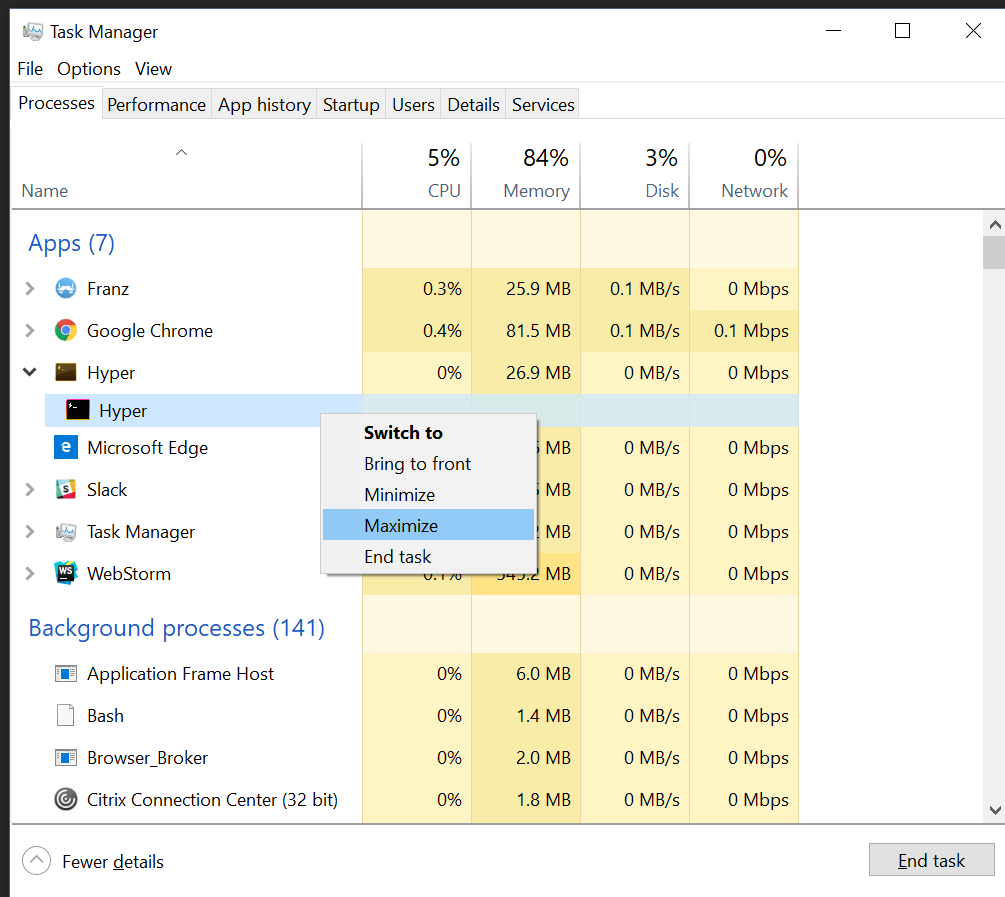
This is horrendous, but i found using the Task Manager to maximise seems to get it back on screen:
 darkdreamingdan
on 28 Sep 2017
darkdreamingdan
on 28 Sep 2017
Above fix doesn't seem to work in Hyper 2.x canary releases, because there are multiple processes running. I've found another workaround though.
- Access the Properties menu of any shortcut to Hyper
- You can create a shortcut on desktop, or in a folder, and right click and choose Properties
- If Hyper is pinned to your start bar, close it down, then use shift+right click and choose Properties
- If Hyper is in Start Menu, right click, under "More" choose "Open File Location". Then right click on the shortcut, and choose Properties
- Under the Shortcut tab, set Run to
Maximised. Hit OK.
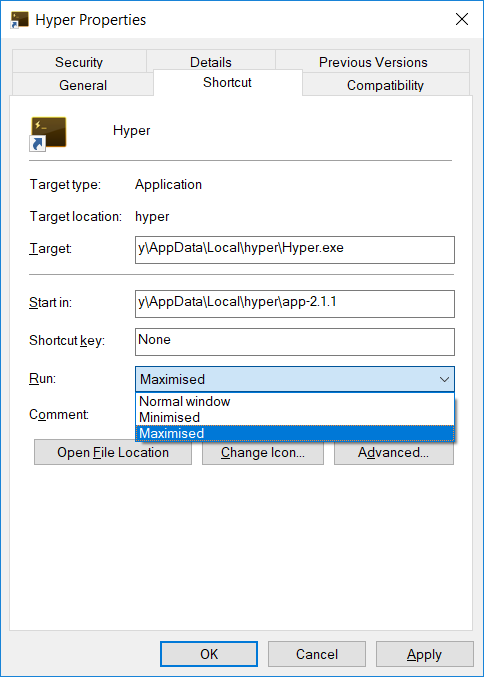
- Launch with your modified shortcut, and it'll open maximised on your screen.
darkdreamingdan
on 14 Nov 2017
When restoring, window position should be validated and corrected if needed.
 chabou
on 14 Nov 2017
chabou
on 14 Nov 2017
My go-to for windows that are stuck off-screen is Alt+Space then M (move), then arrow keys to move the window back on screen. Also, if you move the window with the arrows, then move your mouse (I don't know why you need to use the arrows first...) it will automatically move to your mouse location.
 Terrabits
on 27 Jun 2018
Terrabits
on 27 Jun 2018
Related issues
 anthonyettinger
·
3Comments
anthonyettinger
·
3Comments
 ghost
·
3Comments
ghost
·
3Comments
 cooperpellaton
·
3Comments
cooperpellaton
·
3Comments
 leo
·
3Comments
leo
·
3Comments
 sarneeh
·
3Comments
sarneeh
·
3Comments
Most helpful comment
This is horrendous, but i found using the Task Manager to maximise seems to get it back on screen: